
Renderosity Forums / Poser Technical
Welcome to the Poser Technical Forum
Forum Moderators: Lobo3433, Staff Forum Coordinators: Anim8dtoon
Poser Technical F.A.Q (Last Updated: 2026 May 14 2:11 pm)
Welcome to the Poser Technical Forum.
Where computer nerds can Pull out their slide rules and not get laughed at. Pocket protectors are not required. ;-)
This is the place you come to ask questions and share new ideas about using the internal file structure of Poser to push the program past it's normal limits.
New users are encouraged to read the FAQ sections here and on the Poser forum before asking questions.
Checkout the Renderosity MarketPlace - Your source for digital art content!

Subject: Animation in material files?

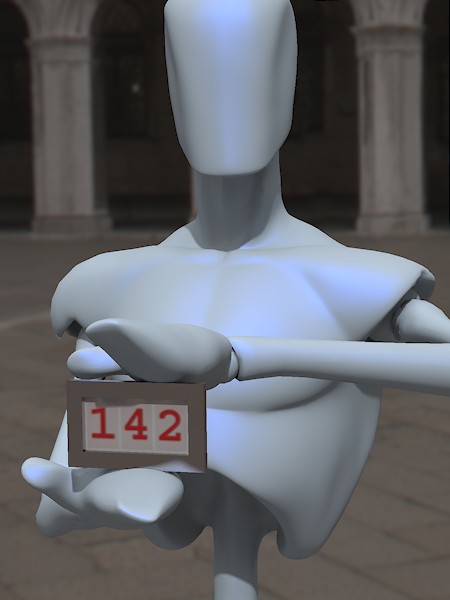
But you inspired me to solve a puzzle.
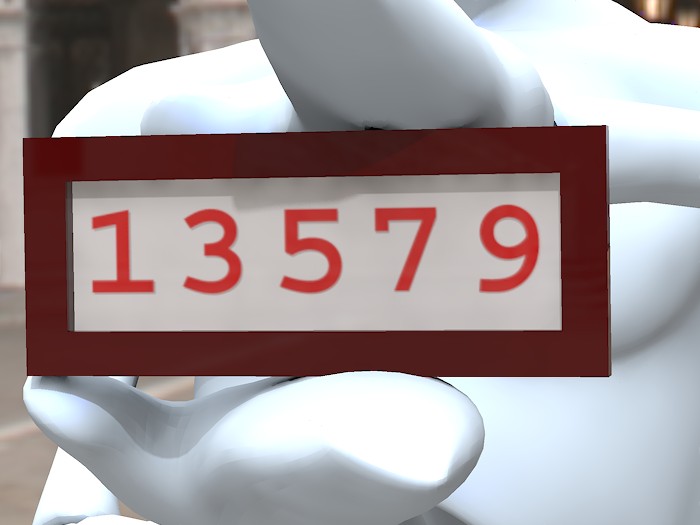
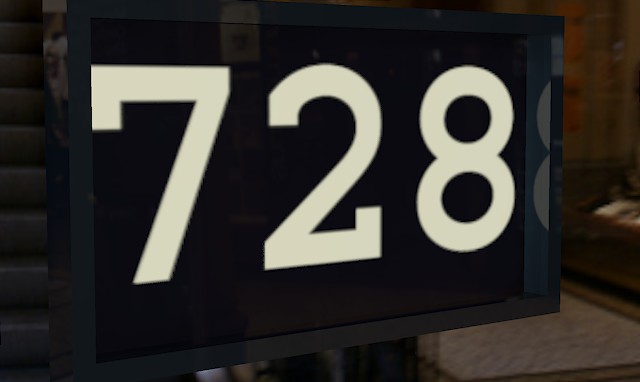
Is it possible to make a prop and material that displays mutiple digits in base 10 of arbitrary shape, using an arbitrary choice of input. The answer is yes.
In this case I connected it to animation frame number and this is frame 142.
The digits are precisely UV mapped rectangles, and they are all one material zone.
Renderosity forum reply notifications are wonky. If I read a follow-up in a thread, but I don't myself reply, then notifications no longer happen AT ALL on that thread. So if I seem to be ignoring a question, that's why. (Updated September 23, 2019)
Content Advisory! This message contains nudity
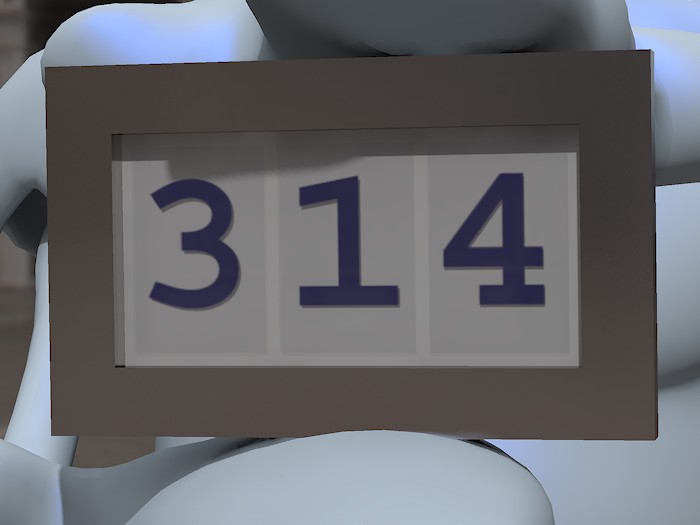
Notice the shadow of the digits on the white face.
Renderosity forum reply notifications are wonky. If I read a follow-up in a thread, but I don't myself reply, then notifications no longer happen AT ALL on that thread. So if I seem to be ignoring a question, that's why. (Updated September 23, 2019)

Quote - ... This is Poser 7, so maybe - hopefully - this behaviour is fixed in later versions. Any light you can shed (no pun intended) would be welcome...
When creating a key on a material input, Poser creates not only the parameter ("SegA_PoserSurface_6" in your case), but also a dial and a channel on the prop. It looks like:
shaderNodeParm SegA_PoserSurface_6
{
name SegA_PoserSurface_6
initValue 0
hidden 0
forceLimits 1
min 0
max 10
trackingScale 0.01
This shaderNodeParm however is attached to the actor, not the material, and it does not get saved into the mt5 or mc6 file. So when simply loading the mc6 or mt5 it will not work. I tried to copy the section with the shaderNodeParm into the mt5, but then i get a crash, too (using Poser2010). Perhaps it is a similar case like the missing ability to create new morph channels when loading a pose file. When saving the whole prop, the shaderNodeParm is saved with it and everything seems to work (the actual animation data, however is not saved with it when using a prop, so you either need to make it into a figure and save a pose file, or put the animation keys into the channel with a text editor).
Thanks millighost, I hadn't really examined the prop file before. I see the shaderNodeParm channels now. If I'd thought about it I would have realised the need for these, so that Poser can key into the animation process.
Since what I need is just for the material settings to leave the animation stuff untouched, I guess the good old deprecated MAT pose is the way to go for this. I was hoping to be able to distribute something less messy, but hey.


Changing the digits via poses files that sets the values of the shaderNodeParm channels controlling Ambient_Value, should work, but the change might not show up in preview.
I guess changing the digits via a dial, where the dial value equals the displayed digit, would be the best way from the stand point of an end user, but setting up ERC to implement that for Ambient_Value sounds like a gargantuan task.
I think the easiest way to change the number via one dial would be to use geom switching. Unfortunately that requires using ten different obj files. The idea is that each obj has a material zone in the shape of one specific digit. Attached is my attempt to implement that.
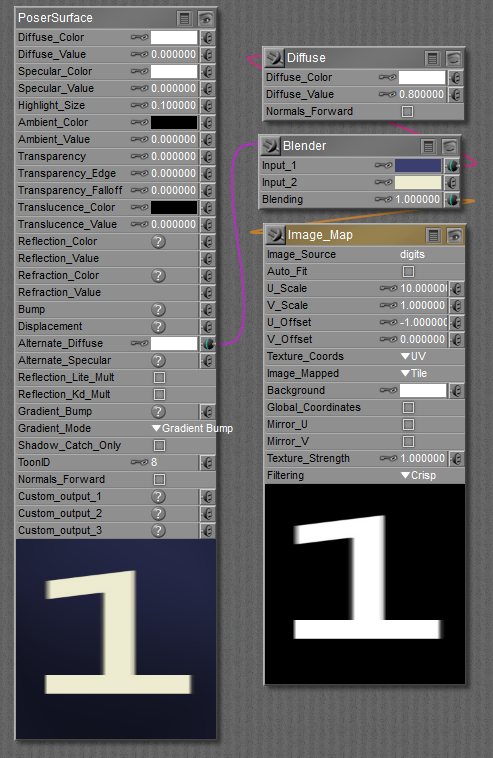
I made an image with all ten digits on it, and used scaling and offset in the material room.
My image has ten digits, 0 through 9, left to right.
I make the image 10 times the area of the rectangle via Image_Map node U_Scale=10.
I move the digit I want into the rectangle via Image_Map node U_Offset = -x where x is the digit I want. For example, to show the digit 4, U_Offset = -4.
I think that is the easiest way to change the number via one dial.
Now can you think of how I changed all the numbers (all five digits) with ONE dial?
Renderosity forum reply notifications are wonky. If I read a follow-up in a thread, but I don't myself reply, then notifications no longer happen AT ALL on that thread. So if I seem to be ignoring a question, that's why. (Updated September 23, 2019)

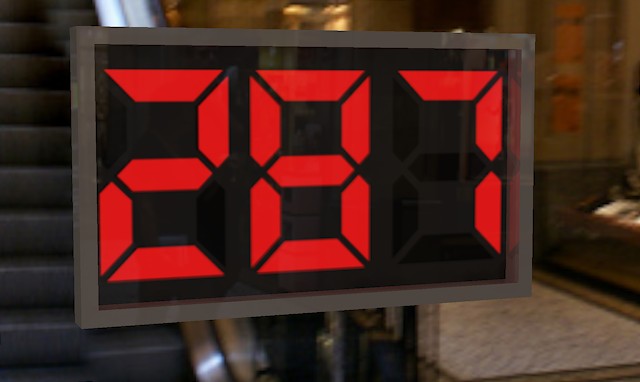
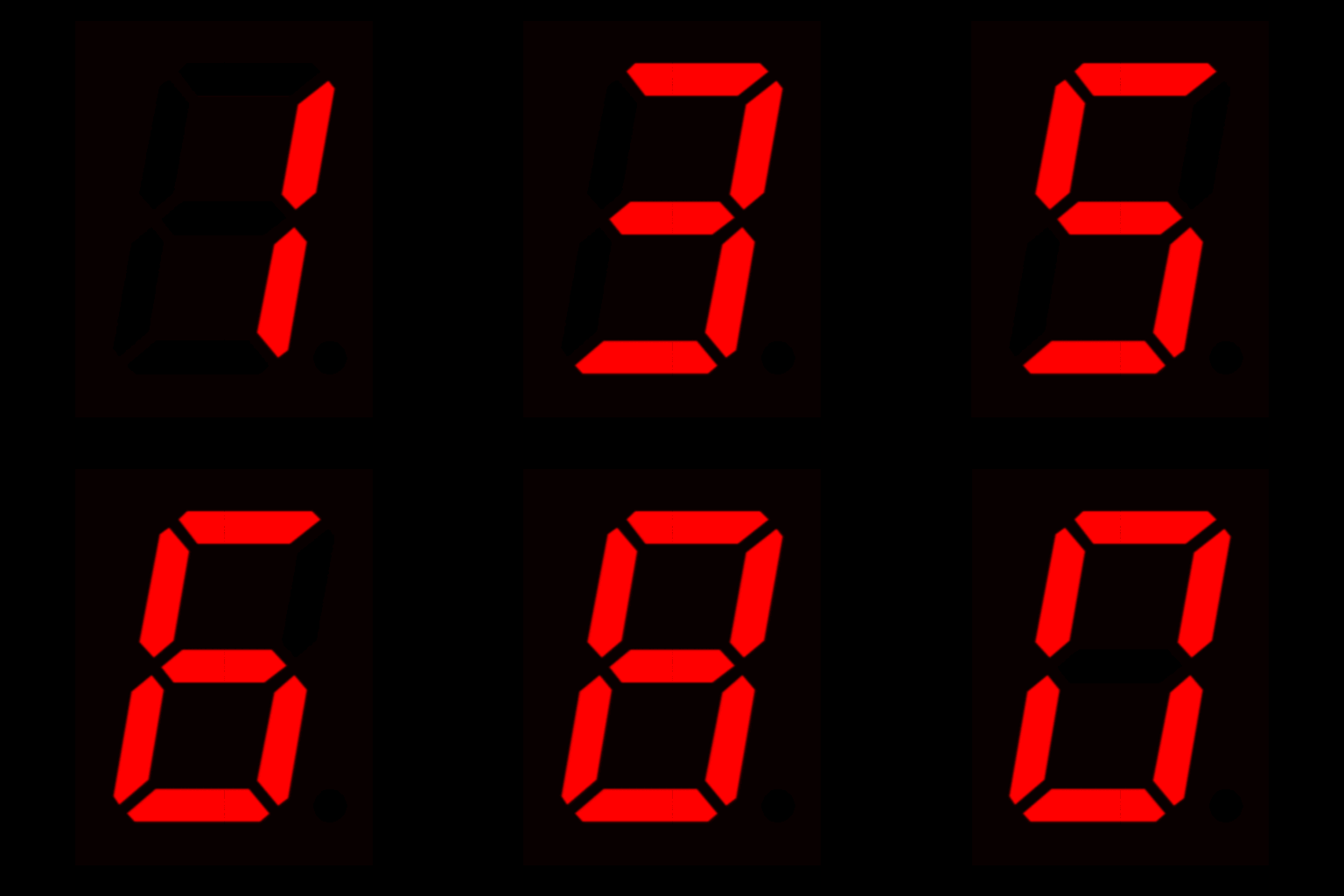
You could make any shapes you want - including the 7-segment style.
Renderosity forum reply notifications are wonky. If I read a follow-up in a thread, but I don't myself reply, then notifications no longer happen AT ALL on that thread. So if I seem to be ignoring a question, that's why. (Updated September 23, 2019)
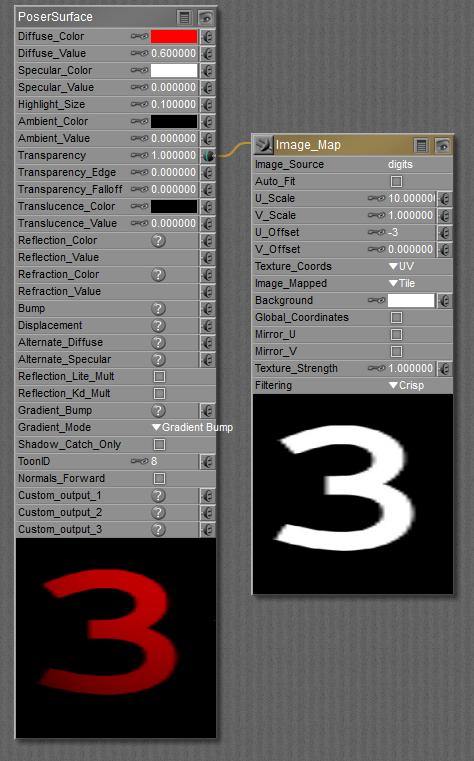
This is showing the digit in red, and otherwise the rectangle is transparent.
Renderosity forum reply notifications are wonky. If I read a follow-up in a thread, but I don't myself reply, then notifications no longer happen AT ALL on that thread. So if I seem to be ignoring a question, that's why. (Updated September 23, 2019)
Renderosity forum reply notifications are wonky. If I read a follow-up in a thread, but I don't myself reply, then notifications no longer happen AT ALL on that thread. So if I seem to be ignoring a question, that's why. (Updated September 23, 2019)
Renderosity forum reply notifications are wonky. If I read a follow-up in a thread, but I don't myself reply, then notifications no longer happen AT ALL on that thread. So if I seem to be ignoring a question, that's why. (Updated September 23, 2019)
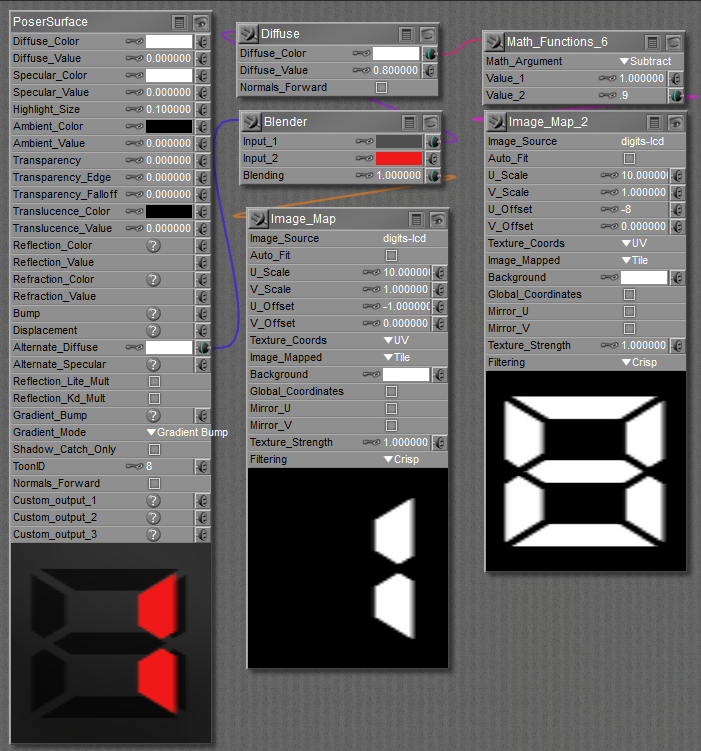
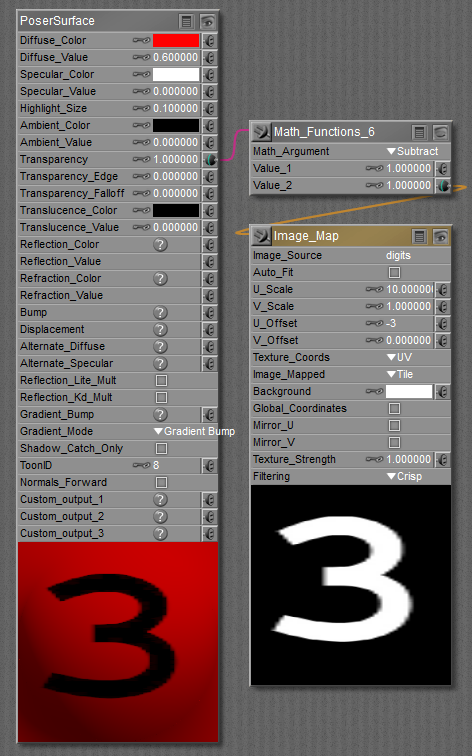
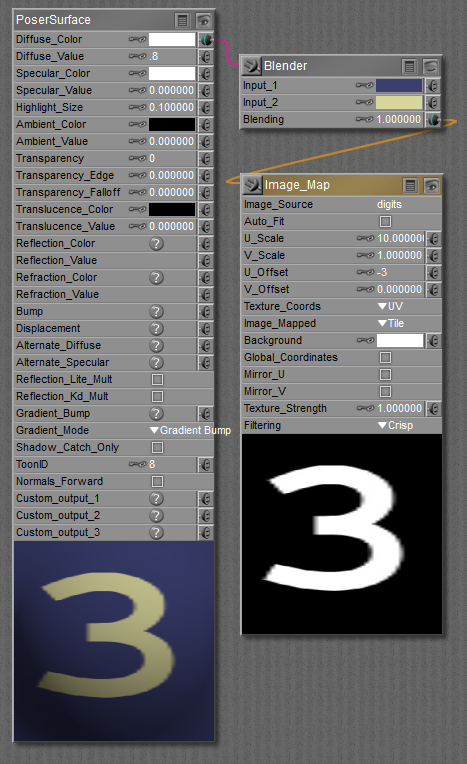
Put in a second Image_Map. Use the 8 to make the unlit segments look black against a dark gray background, and then the other Image_Map lights up some of those in red.
In my case, the number 1 is not lined up properly. Make sure all your digits line up.
Renderosity forum reply notifications are wonky. If I read a follow-up in a thread, but I don't myself reply, then notifications no longer happen AT ALL on that thread. So if I seem to be ignoring a question, that's why. (Updated September 23, 2019)
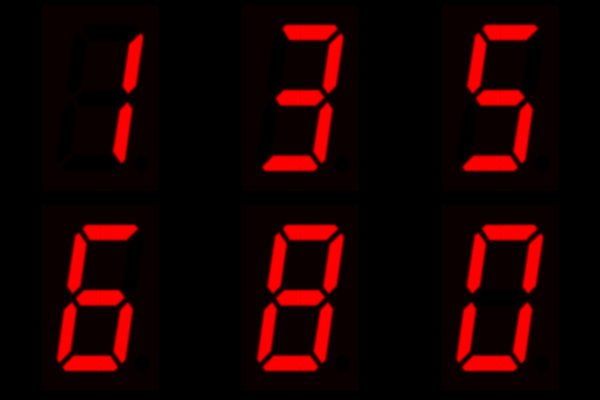
Great. Still no guesses how to do multiple digits from a single animated numerical value?
Renderosity forum reply notifications are wonky. If I read a follow-up in a thread, but I don't myself reply, then notifications no longer happen AT ALL on that thread. So if I seem to be ignoring a question, that's why. (Updated September 23, 2019)

Quote - Great. Still no guesses how to do multiple digits from a single animated numerical value?
That's what I've been thinking about all day long...
Considering, the dial goes from 0 to infinity...
I still don't know how to tell Poser the position of each digit...
Yesterday's the past, tomorrow's the future, but today is a gift. That's why it's called the present.
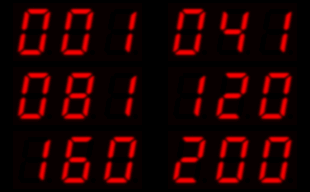
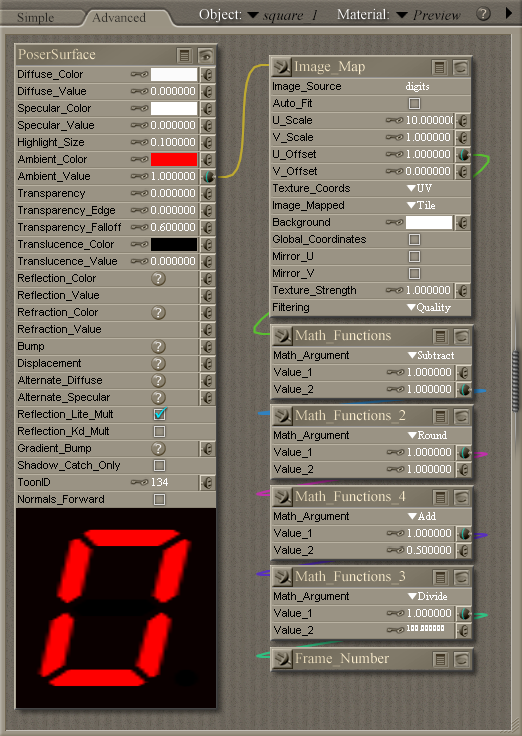
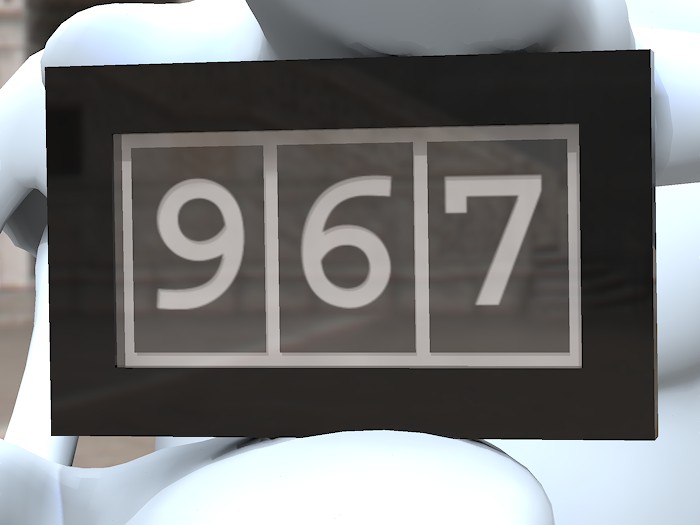
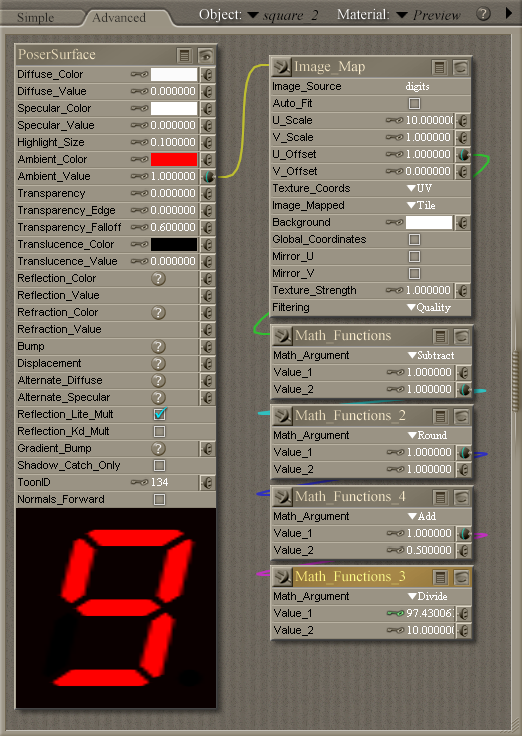
This material is for the hundreds digit - change Value_2 in Math_Functions_3 for other digits. It's overkill to use Value_2 = 1 for units, but won't hurt and keeps things consistent. I like consistency. :)
My zero digit seems to be slightly offset compared to the others. I'd better fix that.

I don't know if my node maths is faulty, or if there's something wrong with Poser's UV offset. Here's my digit strip if anyone wants to try it.
Quote - Has anyone else tried this? I've remade my digit strip more than once, and I'm sure it's accurately positioned - but no matter what I do there always seems to be that wobble as the digits switch. You can see it in the animation I posted last week.
I don't know if my node maths is faulty, or if there's something wrong with Poser's UV offset. Here's my digit strip if anyone wants to try it.
The texture, UV map, and Firefly's pixel sampling do not play well together here, so it is hard to say what actually is "wrong". I think the main tripwire is Firefly's pixel sampling of image textures (got me once, too). For example your UV coordinates are between 0 and 1. So when U is 0, the left border of your image is used, when U is 1, the right border of your image is used. Firefly sees the image map as an array of points, so for U=0 it uses the leftmost pixel, for U=1 it uses the rightmost pixel. But the difference between the first pixel and the last pixel of a 4000 pixel wide image is 3999 pixels, not 4000, so you are missing one pixel. Normally this is not a big problem, because the texture size is large enough to make this unnoticable, but in this case the error amplifies because of the UV scaling.
For a solution for this you could make your image one pixel larger, i.e. 4001 instead of 4000 by adding a one pixel border (not by scaling).
Alternatively you could try to adjust it with the offset and scale of the image map (i am not exactly sure how they work).
Or you could also adjust the UV map of the object (undesirable, because that would make the UV map dependent on the image texture, but not uncommon).
BTW, other render engines do not have this problem, because they view an image texture as an array of small rectangular pixels with a real area, instead of a grid of points, so in other renderers an image with 4000 pixels has a width of 4000, not 3999.
I wrote something different but wrote too quickly. So I replaced it with this.
I may be seeing what you describe MG.
Renderosity forum reply notifications are wonky. If I read a follow-up in a thread, but I don't myself reply, then notifications no longer happen AT ALL on that thread. So if I seem to be ignoring a question, that's why. (Updated September 23, 2019)
OK I was testing with 10 copies of a 32-pixel pattern. So my total image width is 320.
U_Scale = 10, and U_Offset of whole number produced a very slight shift, increasing until I got to 9. At 10, it dropped back to the shift associated with 0. So there is some modulo 1.0 going on inside.
Using MG's clue, I set about attempting to factor either U_Offset or U_Scale. I finally found an adjustment that works.
Set the U_Scale = 10 * (w-1)/w
Where 'w' is your width in pixels of all ten digits.
In my case it was 10 * 319 / 320 that worked.
Renderosity forum reply notifications are wonky. If I read a follow-up in a thread, but I don't myself reply, then notifications no longer happen AT ALL on that thread. So if I seem to be ignoring a question, that's why. (Updated September 23, 2019)
EB I tested your strip. I got rid of the shift by using U_Scale = 10 * 3999/4000!!
I also had to turn off texture filtering.
Renderosity forum reply notifications are wonky. If I read a follow-up in a thread, but I don't myself reply, then notifications no longer happen AT ALL on that thread. So if I seem to be ignoring a question, that's why. (Updated September 23, 2019)
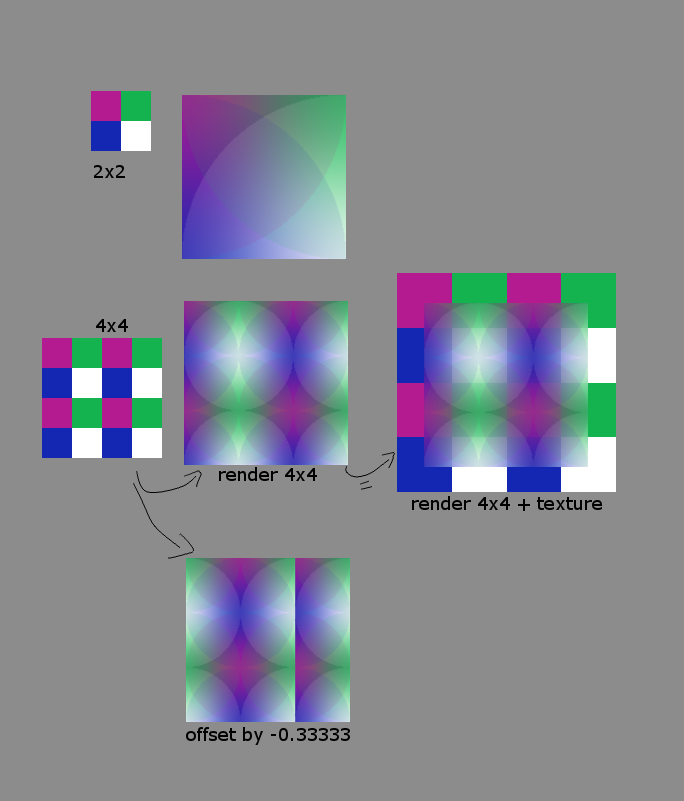
No problem, i already read it and made up an answer :-) It might be useful anyhow, so here you go:
Easiest it is to see with a simple 2x2 texture (in the illustration upper left, i magnified it, so it is better to see, but it is only 2 by 2 pixels). Renderering this on a square shows the square next to it. I used "quality" texture filtering, because it allows to see the center of where the filtering algorithm places the center of the pixels influence. It shows up as circles because it uses the closest pixel for the most influence. You can see that the influence circle has a radius of the image size.
In the row below i doubled the texture by repeating it twice in each direction. i would expect that the filter would now appear as a whole circle, because because the image size doubled. But now it shows a size of one and a half circle. On the right i overlayed the render with the texture to illustrate on where the renderer samples the texture within the image. It looks like firefly clips off the outside half-pixel sized border of the texture, using effectively only an area of 3 by 3 pixels instead of the whole of the 4 by 4 texture.
Lower image: indeed, if i wanted to shift the texture to the left, so that the white pixel is on the left border of my render, i have to offset the U value by -0.33333, not by 0.25, even though the texture is 2 x 2.
This last example also shows a problem with this behaviour: because this is a tiling texture, the U and V coordinates wrap around after 1 and start over at 0. But this only works if the color value at U=1 is the same as the color at U=0 (which it is not), it leaves a seam at U=0.6666. Normally this does matter that much, because the texture has a higher resolution than the render, but when it is scaled up like in this example it is very hard to make a seamless tiling texture.
EDIT: i also missed the last 3 or so posts, sorry for the delay....

Privacy Notice
This site uses cookies to deliver the best experience. Our own cookies make user accounts and other features possible. Third-party cookies are used to display relevant ads and to analyze how Renderosity is used. By using our site, you acknowledge that you have read and understood our Terms of Service, including our Cookie Policy and our Privacy Policy.
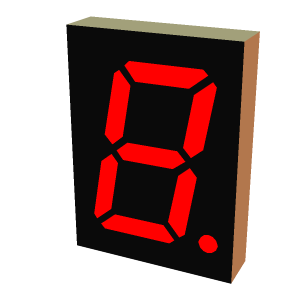
I've made this Poser prop of a seven segment (plus decimal point) display. Each segment is a separate material zone, the idea being that you can make them light up by setting the ambient colour and value to taste.If I make the ambient value animatable I can turn the segments on and off over time. So far, so good. I can save a prop in that form and it loads again fine. However if I make material collections to help me quickly form digits, the animatable key is turned off after I apply the material, although the MC6 file itself seems to have the right stuff in it.
It's even worse if I make an MT5 - I managed to crash Poser straight to the desktop with those. :eek:
Here's an excerpt from the file without animation turned on:
And here it is with animation on:
SegA is the material name for that segment. It seems that, although the code that applies an MT5 is happy to ignore the material name at the head of the file, it gets rather confused when it sees it elsewhere. Wherever I applied the MT5, the material seemed to end up on the first material in the list. Then after some more tinkering I had the aforementioned crash.
This is Poser 7, so maybe - hopefully - this behaviour is fixed in later versions. Any light you can shed (no pun intended) would be welcome...