
EnglishBob opened this issue on Jul 06, 2012 · 36 posts
millighost posted Thu, 19 July 2012 at 6:22 PM
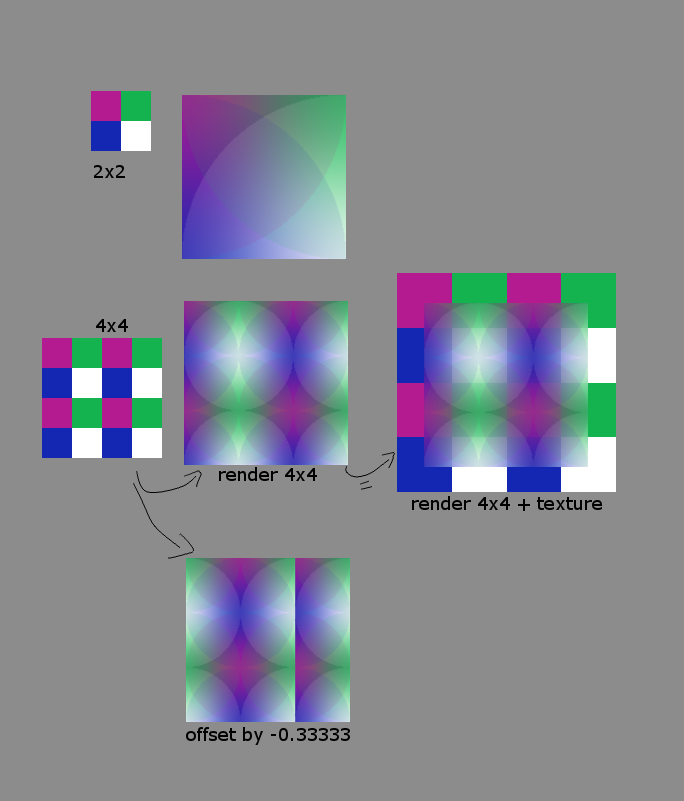
No problem, i already read it and made up an answer :-) It might be useful anyhow, so here you go:
Easiest it is to see with a simple 2x2 texture (in the illustration upper left, i magnified it, so it is better to see, but it is only 2 by 2 pixels). Renderering this on a square shows the square next to it. I used "quality" texture filtering, because it allows to see the center of where the filtering algorithm places the center of the pixels influence. It shows up as circles because it uses the closest pixel for the most influence. You can see that the influence circle has a radius of the image size.
In the row below i doubled the texture by repeating it twice in each direction. i would expect that the filter would now appear as a whole circle, because because the image size doubled. But now it shows a size of one and a half circle. On the right i overlayed the render with the texture to illustrate on where the renderer samples the texture within the image. It looks like firefly clips off the outside half-pixel sized border of the texture, using effectively only an area of 3 by 3 pixels instead of the whole of the 4 by 4 texture.
Lower image: indeed, if i wanted to shift the texture to the left, so that the white pixel is on the left border of my render, i have to offset the U value by -0.33333, not by 0.25, even though the texture is 2 x 2.
This last example also shows a problem with this behaviour: because this is a tiling texture, the U and V coordinates wrap around after 1 and start over at 0. But this only works if the color value at U=1 is the same as the color at U=0 (which it is not), it leaves a seam at U=0.6666. Normally this does matter that much, because the texture has a higher resolution than the render, but when it is scaled up like in this example it is very hard to make a seamless tiling texture.
EDIT: i also missed the last 3 or so posts, sorry for the delay....