
Renderosity Forums / Poser - OFFICIAL
Welcome to the Poser - OFFICIAL Forum
Forum Moderators: RedPhantom Forum Coordinators: Anim8dtoon
Poser - OFFICIAL F.A.Q (Last Updated: 2026 Oct 03 4:20 pm)

Subject: Collision with grass created in hair room ?


good idea, just running a sim to see how it works.....ty
OS: Windows7 64-bit Processor Intel(R) Core(TM)
i5-2430M CPU @ 2.40GHz, 2401 Mhz, 2 Core(s), 4 Logical
Processor(s) 6GB Ram
Poser: Poser Pro 2012 SR3.1 ...Poser 8.........Poser5 on a bad
day........
Daz Studio Pro 4.5 64bit
Carrara beta 8.5
Modelling: Silo/Hexagon/Groboto V3
Image Editing: PSP V9/Irfanview
Movie Editing. Cyberlink power director/Windows live movie
maker
"I live in an unfinished , poorly lit box, but we call it home"
My freestuff
link via my artist page

just had to retweak the sim , drop the force strength, very much a wip but just rendering animation as i type
OS: Windows7 64-bit Processor Intel(R) Core(TM)
i5-2430M CPU @ 2.40GHz, 2401 Mhz, 2 Core(s), 4 Logical
Processor(s) 6GB Ram
Poser: Poser Pro 2012 SR3.1 ...Poser 8.........Poser5 on a bad
day........
Daz Studio Pro 4.5 64bit
Carrara beta 8.5
Modelling: Silo/Hexagon/Groboto V3
Image Editing: PSP V9/Irfanview
Movie Editing. Cyberlink power director/Windows live movie
maker
"I live in an unfinished , poorly lit box, but we call it home"
My freestuff
link via my artist page

Posting a screengrab of what you want exactly would help.
It is doable to grow long grass in the hair room.
But you know?
Once the grass is grown and simmed, you can manipulate the grass with any other tool.
Grow the grass in the hair room.
Then you can manipulate it with windfroce, or with magnets, or with the morphing tool.
I would have to know what you exactly want before going deeper?
That is why screengrabs would help.
Fresh cut grass can be made with a displacement map and a noice node.
Long grass can be made in the hair room.
Afterwards it is testing to get the result you need.
A hair room and or a cloth room can calculate dynamics and collisions, but to make the long grass being pushed out of the way when a figure is walking through it takes some testing.
ha-ha-ha-
What you CAN do.
Build your grass scene INVERTED..... !!!!! Upside down.
Grow the grass on a plate prop, save simmed hair/grass into library.
Load the grass prop and invert it back into normal position.
Then manipulate grass with magnets or morph tool as your figure walks throug it?
This INVERTED trick is also used to keep panty's not falling off a figure during a cloth sim.
Poser 1, 2, 3, 4, 5, 7,
P8 and PPro2010, P9 and PP2012, P10 and PP2014 Game
Dev
"Do not drive
faster then your angel can fly"!
not brilliant, i need to get the grass thicker and the collisions showing more, the tip and root settings are 8 and 10 with 20 verts....any hair gurus can offer advice?
geesh 600kb avi exceeds maximum file size any ideas lol
OS: Windows7 64-bit Processor Intel(R) Core(TM)
i5-2430M CPU @ 2.40GHz, 2401 Mhz, 2 Core(s), 4 Logical
Processor(s) 6GB Ram
Poser: Poser Pro 2012 SR3.1 ...Poser 8.........Poser5 on a bad
day........
Daz Studio Pro 4.5 64bit
Carrara beta 8.5
Modelling: Silo/Hexagon/Groboto V3
Image Editing: PSP V9/Irfanview
Movie Editing. Cyberlink power director/Windows live movie
maker
"I live in an unfinished , poorly lit box, but we call it home"
My freestuff
link via my artist page
vilters dear chap, how do i go about growing the hair inverted?, if i use a simple primitive sqaure cloth plane, do i just invert it first before growing the hair?
OS: Windows7 64-bit Processor Intel(R) Core(TM)
i5-2430M CPU @ 2.40GHz, 2401 Mhz, 2 Core(s), 4 Logical
Processor(s) 6GB Ram
Poser: Poser Pro 2012 SR3.1 ...Poser 8.........Poser5 on a bad
day........
Daz Studio Pro 4.5 64bit
Carrara beta 8.5
Modelling: Silo/Hexagon/Groboto V3
Image Editing: PSP V9/Irfanview
Movie Editing. Cyberlink power director/Windows live movie
maker
"I live in an unfinished , poorly lit box, but we call it home"
My freestuff
link via my artist page
Making the whole scene inverted and running the collitions with the figure inverted might also help with the grass returning to their normal vertical position after the figure went through it.
Long Gras is vertical.
Figures walks through and grass gets "collisioned out of the way".
Long grass returns to vertical after the figure went by.
Still do not exactly know what you want.
Poser 1, 2, 3, 4, 5, 7,
P8 and PPro2010, P9 and PP2012, P10 and PP2014 Game
Dev
"Do not drive
faster then your angel can fly"!
just rerunning and render some stills
OS: Windows7 64-bit Processor Intel(R) Core(TM)
i5-2430M CPU @ 2.40GHz, 2401 Mhz, 2 Core(s), 4 Logical
Processor(s) 6GB Ram
Poser: Poser Pro 2012 SR3.1 ...Poser 8.........Poser5 on a bad
day........
Daz Studio Pro 4.5 64bit
Carrara beta 8.5
Modelling: Silo/Hexagon/Groboto V3
Image Editing: PSP V9/Irfanview
Movie Editing. Cyberlink power director/Windows live movie
maker
"I live in an unfinished , poorly lit box, but we call it home"
My freestuff
link via my artist page
Sorry, just missed your last post.
Yes, use the primitive square cloth plane would be fine.
There are more options but.
Turn it upside down.
Let the grass grow downwards. Using normal gravity.
Experiment with the length and lenght variations, and with tip and rooth thickness untill you are satisfied with your grass sim.
then save this as you would normal dynamic hair.
Save the plane and the grown grass in the library as you normally would.
Load your grass prop and turn it upside down. => Right side up again. It is just a prop now. The grass will stand upward.
You now have a prop with long grass.
Set plane color to sand color and the grass color variation from tip to rooth.
This grass, (that handles like any other prop) can now be manupulated with magnets and or morphing tool if you need it to be.
Depending on what you exactly want => Think outside of the box !
A screengrab of what you want would tell a 1000 words.
Happy Posering.
Poser 1, 2, 3, 4, 5, 7,
P8 and PPro2010, P9 and PP2012, P10 and PP2014 Game
Dev
"Do not drive
faster then your angel can fly"!
OS: Windows7 64-bit Processor Intel(R) Core(TM)
i5-2430M CPU @ 2.40GHz, 2401 Mhz, 2 Core(s), 4 Logical
Processor(s) 6GB Ram
Poser: Poser Pro 2012 SR3.1 ...Poser 8.........Poser5 on a bad
day........
Daz Studio Pro 4.5 64bit
Carrara beta 8.5
Modelling: Silo/Hexagon/Groboto V3
Image Editing: PSP V9/Irfanview
Movie Editing. Cyberlink power director/Windows live movie
maker
"I live in an unfinished , poorly lit box, but we call it home"
My freestuff
link via my artist page
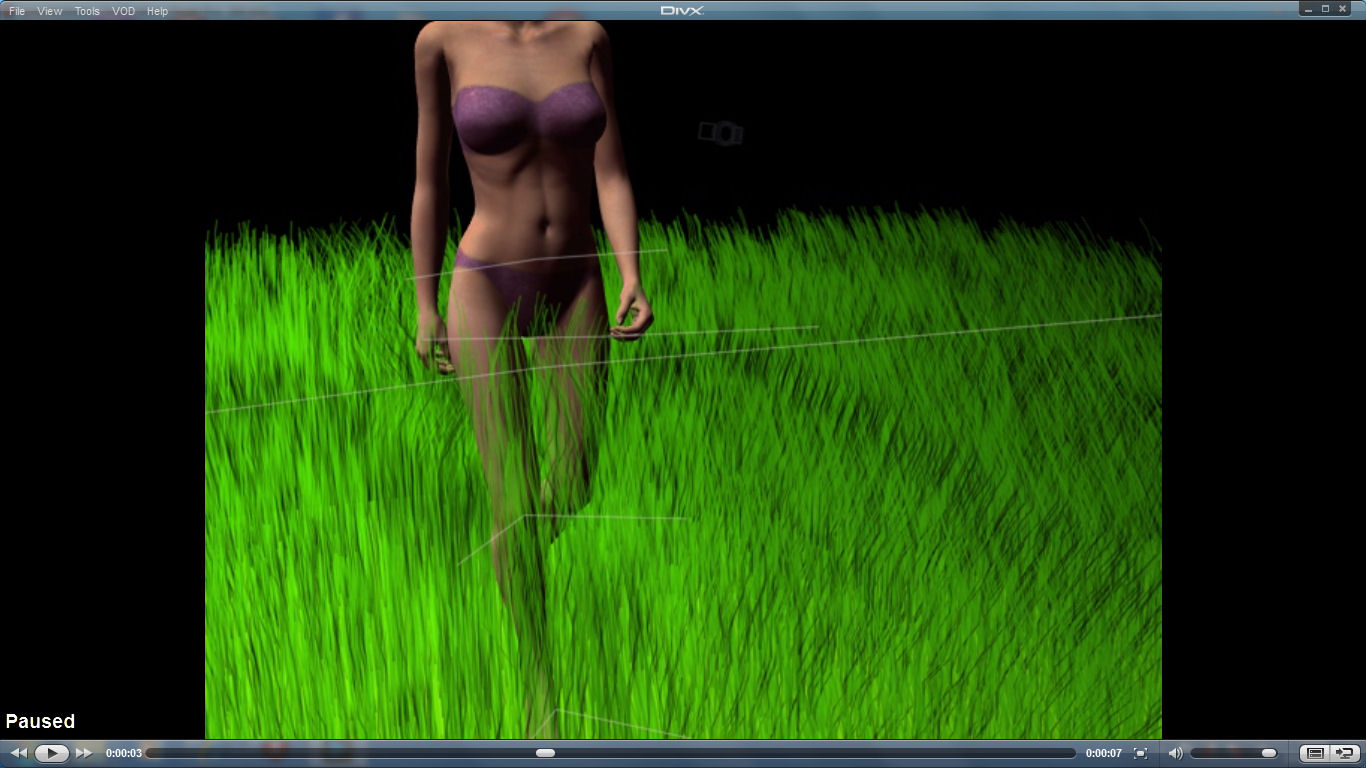
Yep, I see now.
Problem being real life..
When one walks through long grass, the grass bends (gets pushed away) at its root, and this pushes the grass around it away also.
You will need magnets or the morphing tool to get to this effect.
And increase the collision depth and offset in the sim also.
Your grass is also very green-green.
Poser 1, 2, 3, 4, 5, 7,
P8 and PPro2010, P9 and PP2012, P10 and PP2014 Game
Dev
"Do not drive
faster then your angel can fly"!
Just had another idea.
As the grass gets crushed and pushed out of the way by the walking figure.
Set a ball in your scene.
let the ball follow the figures movement and let the grass collide against the ball.
(it will move out of the way as the ball passes throught he grass.)
Or use 2 balls, one for each leg.
You can set the ball(s) invisible in the render, so the ball(s) will push the grass out of the way as the figure passes in the sim, but the ball(s) will not be rendered.
You can morph the ball(s) into an egg shape for better results.
Or use inverted cone primitives to get the same effect.
(Parent them to the shins.)
Let the grown grass collide against that balls, or inverted cones.
Poser 1, 2, 3, 4, 5, 7,
P8 and PPro2010, P9 and PP2012, P10 and PP2014 Game
Dev
"Do not drive
faster then your angel can fly"!
thanks vilters, the grass was that green just for render purposes to highlight it in here, one thing that does happen is i presume due to the gravity and collision settings, ie the figure pushes the entire prop in front of it.......i'm going back to start from scratch, it seems that the gravity setting when i create inversely needs tweaking, any idea what the inverted gravity setting should be? ty
OS: Windows7 64-bit Processor Intel(R) Core(TM)
i5-2430M CPU @ 2.40GHz, 2401 Mhz, 2 Core(s), 4 Logical
Processor(s) 6GB Ram
Poser: Poser Pro 2012 SR3.1 ...Poser 8.........Poser5 on a bad
day........
Daz Studio Pro 4.5 64bit
Carrara beta 8.5
Modelling: Silo/Hexagon/Groboto V3
Image Editing: PSP V9/Irfanview
Movie Editing. Cyberlink power director/Windows live movie
maker
"I live in an unfinished , poorly lit box, but we call it home"
My freestuff
link via my artist page
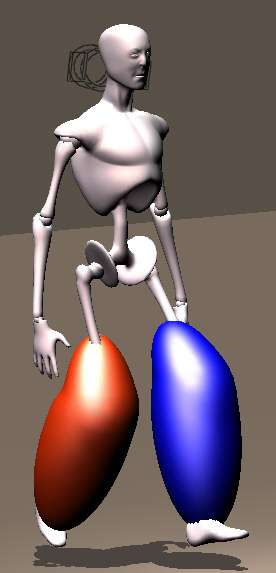
Load figure and set IK to OFF
Zero figure in joint parameters.
I loaded 2 balls from the primitives.
Scaled them in Y to make an egg shape.
Position each egged ball exactly over the left and right shins.
Select one at the time, and parent to the figures left and right shin, with inherit bends checked on.
Use this into your grass simulation and let the grass collide with both balls.
The grass will bend out of the way when the figure comes through.
I will try a sim tonight. (time-time-time- )
Poser 1, 2, 3, 4, 5, 7,
P8 and PPro2010, P9 and PP2012, P10 and PP2014 Game
Dev
"Do not drive
faster then your angel can fly"!
fun time, experimental poser, i loves it :)
OS: Windows7 64-bit Processor Intel(R) Core(TM)
i5-2430M CPU @ 2.40GHz, 2401 Mhz, 2 Core(s), 4 Logical
Processor(s) 6GB Ram
Poser: Poser Pro 2012 SR3.1 ...Poser 8.........Poser5 on a bad
day........
Daz Studio Pro 4.5 64bit
Carrara beta 8.5
Modelling: Silo/Hexagon/Groboto V3
Image Editing: PSP V9/Irfanview
Movie Editing. Cyberlink power director/Windows live movie
maker
"I live in an unfinished , poorly lit box, but we call it home"
My freestuff
link via my artist page
Poser is all about having fun and experimenting.
And sometimes, thingking outside of the box....
Collisions are for hair !!
But?? Grass is no hair ha-ha-ha-
So, one has to use a trick from time to time.
;-)
Poser 1, 2, 3, 4, 5, 7,
P8 and PPro2010, P9 and PP2012, P10 and PP2014 Game
Dev
"Do not drive
faster then your angel can fly"!
back to gravity settings vilters if i may, if i'm right and feel free to correct me if i'm wrong, a zero gravity setting in the hair room the right way up would create floating hair and a high positive value would create really heavy hair, so are you saying the gravity settings for inversely created hair are the opposite ie: a zero gravity inverse hair would just hang straight down but a positive gravity setting would try to float back upwards? and how would that then affect hair created in the inverse position if you change the gravity once you have flipped it?
OS: Windows7 64-bit Processor Intel(R) Core(TM)
i5-2430M CPU @ 2.40GHz, 2401 Mhz, 2 Core(s), 4 Logical
Processor(s) 6GB Ram
Poser: Poser Pro 2012 SR3.1 ...Poser 8.........Poser5 on a bad
day........
Daz Studio Pro 4.5 64bit
Carrara beta 8.5
Modelling: Silo/Hexagon/Groboto V3
Image Editing: PSP V9/Irfanview
Movie Editing. Cyberlink power director/Windows live movie
maker
"I live in an unfinished , poorly lit box, but we call it home"
My freestuff
link via my artist page
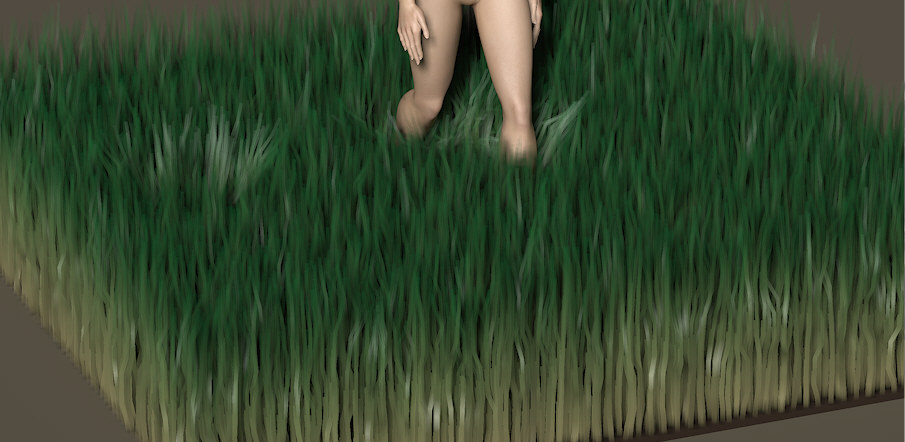
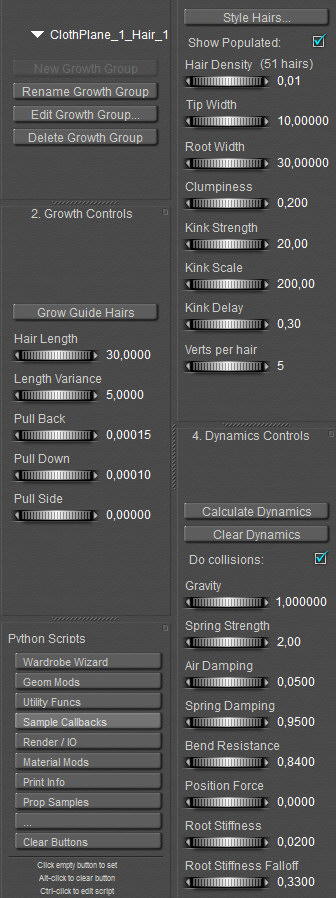
thanks vilters. i shall give it a try and see what happens if i increase the hair length, btw is this hair created invertedly or the right way up?
OS: Windows7 64-bit Processor Intel(R) Core(TM)
i5-2430M CPU @ 2.40GHz, 2401 Mhz, 2 Core(s), 4 Logical
Processor(s) 6GB Ram
Poser: Poser Pro 2012 SR3.1 ...Poser 8.........Poser5 on a bad
day........
Daz Studio Pro 4.5 64bit
Carrara beta 8.5
Modelling: Silo/Hexagon/Groboto V3
Image Editing: PSP V9/Irfanview
Movie Editing. Cyberlink power director/Windows live movie
maker
"I live in an unfinished , poorly lit box, but we call it home"
My freestuff
link via my artist page
Helloo Sir,
This is the right way up.
Loading 2 cones, inverting them, positioning over the shins, and parenting them to the shins with inherit bends checked on.
Run the sim.
Then just before the render set the cones to invisible.
This is ONE way of doing it;
The SECOND way was to let the grass grow inverted.
Save as a prop.
But then you have a PROP. A fixed PROP.
The grass will NOT move any more during a simulation. it acks as a solid PROP.
In this second method you would have to use magnets or morph tool to make the grass move as the figure comes through it.
Poser 1, 2, 3, 4, 5, 7,
P8 and PPro2010, P9 and PP2012, P10 and PP2014 Game
Dev
"Do not drive
faster then your angel can fly"!
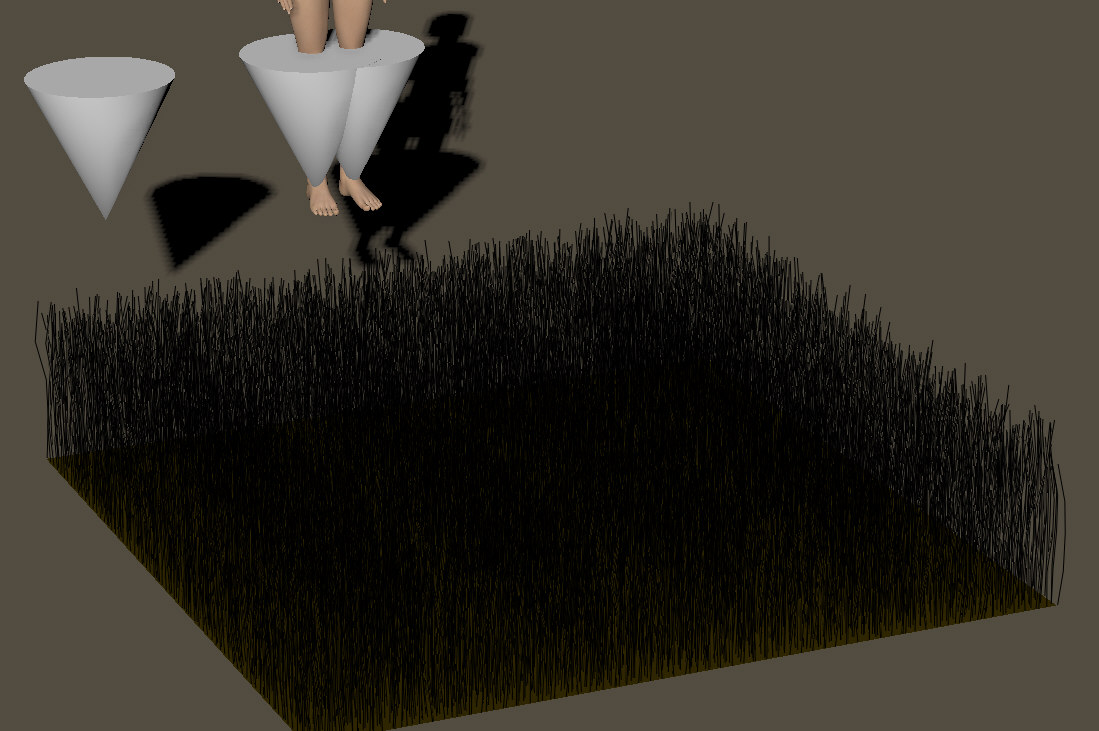
it will take some experimenting,
hight of the grass, size of your cones to get the effect you want.
Poser is al about fun-fun-fun.
good luck Sir.
have a nice evening.
Poser 1, 2, 3, 4, 5, 7,
P8 and PPro2010, P9 and PP2012, P10 and PP2014 Game
Dev
"Do not drive
faster then your angel can fly"!
and you vilters :)
OS: Windows7 64-bit Processor Intel(R) Core(TM)
i5-2430M CPU @ 2.40GHz, 2401 Mhz, 2 Core(s), 4 Logical
Processor(s) 6GB Ram
Poser: Poser Pro 2012 SR3.1 ...Poser 8.........Poser5 on a bad
day........
Daz Studio Pro 4.5 64bit
Carrara beta 8.5
Modelling: Silo/Hexagon/Groboto V3
Image Editing: PSP V9/Irfanview
Movie Editing. Cyberlink power director/Windows live movie
maker
"I live in an unfinished , poorly lit box, but we call it home"
My freestuff
link via my artist page
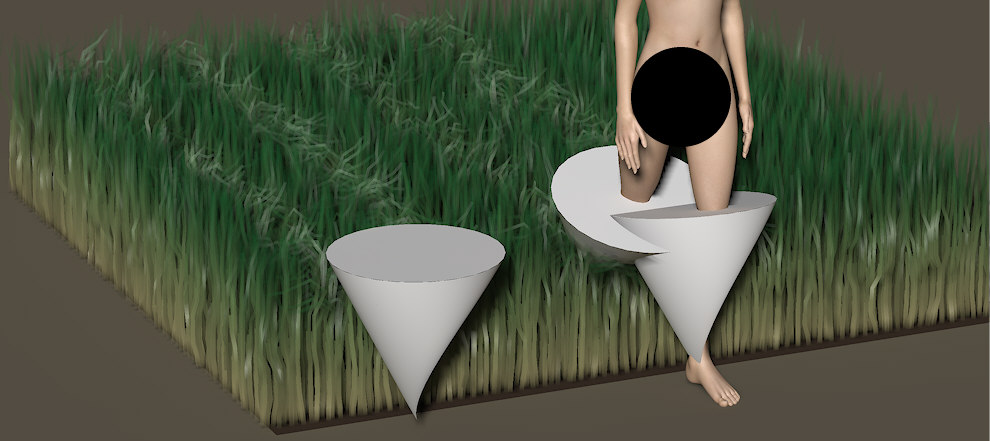
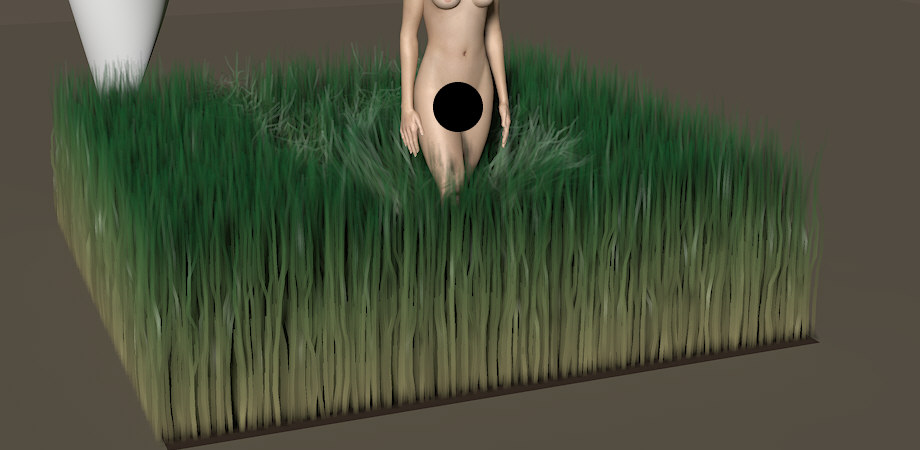
I think I am overdoing it a bit. :-)
Cones could be a bit smaller in X and Z.
I also set the bend resistance to 0.3
Click to enlarge.
FUN FUN FUN !
Poser 1, 2, 3, 4, 5, 7,
P8 and PPro2010, P9 and PP2012, P10 and PP2014 Game
Dev
"Do not drive
faster then your angel can fly"!

i'm not sure wht's happening but my sim is freezing at frames 54 or 55 (200 frame animation)each time i try and run the sim, and additionally the grass isn't reacting to the collisions, this only seems to happen if i load the hair prop i created and saved, not if i run it from a new hair creation...any clues as to why it freezes?
OS: Windows7 64-bit Processor Intel(R) Core(TM)
i5-2430M CPU @ 2.40GHz, 2401 Mhz, 2 Core(s), 4 Logical
Processor(s) 6GB Ram
Poser: Poser Pro 2012 SR3.1 ...Poser 8.........Poser5 on a bad
day........
Daz Studio Pro 4.5 64bit
Carrara beta 8.5
Modelling: Silo/Hexagon/Groboto V3
Image Editing: PSP V9/Irfanview
Movie Editing. Cyberlink power director/Windows live movie
maker
"I live in an unfinished , poorly lit box, but we call it home"
My freestuff
link via my artist page
my hair room seems to be having a tantrum today, it keeps freezing up, figure chasing the grass hair in front of it during the sim, i have no idea what is going on, grrrrrrrrrr................ps collisions are checked, all the hair settings are exactly the same as the ones vilters listed above.......sigh........maybe i'll try again later when i've restarted after having to force the program to close as it is now completely frozen, it's using 25% of the cpu, system is total 26% cpu in use and 51% physical memory, i reckon it's time to reinstall on my other laptop and use this one for shared runtimes......
OS: Windows7 64-bit Processor Intel(R) Core(TM)
i5-2430M CPU @ 2.40GHz, 2401 Mhz, 2 Core(s), 4 Logical
Processor(s) 6GB Ram
Poser: Poser Pro 2012 SR3.1 ...Poser 8.........Poser5 on a bad
day........
Daz Studio Pro 4.5 64bit
Carrara beta 8.5
Modelling: Silo/Hexagon/Groboto V3
Image Editing: PSP V9/Irfanview
Movie Editing. Cyberlink power director/Windows live movie
maker
"I live in an unfinished , poorly lit box, but we call it home"
My freestuff
link via my artist page
thanks shuy, i'll give it a try
OS: Windows7 64-bit Processor Intel(R) Core(TM)
i5-2430M CPU @ 2.40GHz, 2401 Mhz, 2 Core(s), 4 Logical
Processor(s) 6GB Ram
Poser: Poser Pro 2012 SR3.1 ...Poser 8.........Poser5 on a bad
day........
Daz Studio Pro 4.5 64bit
Carrara beta 8.5
Modelling: Silo/Hexagon/Groboto V3
Image Editing: PSP V9/Irfanview
Movie Editing. Cyberlink power director/Windows live movie
maker
"I live in an unfinished , poorly lit box, but we call it home"
My freestuff
link via my artist page

Oeps, sorry was out today.
First, my Poser units are inches.
Second.
I ONLY set collistions for the cones, NOT for the legs or other figure parts to keep the number of calculations within control.
The cones are bigger anyway, setting collision ON for the figure would add nothing as the grass should already be pushed out of the way by the cones.
I"ll try some more tonight if possible.
Poser 1, 2, 3, 4, 5, 7,
P8 and PPro2010, P9 and PP2012, P10 and PP2014 Game
Dev
"Do not drive
faster then your angel can fly"!
Quote - just currious... did you select V4's shins and enable collisions? not sure it makes a diff i dont have much experience in the hair room...
:O)
Collision shape should be similar to inverted cones. Shins are more less thin tubes, this shape does not bend grass correct. Moreover shins are high number of polygons and calculation can be very long. Cone props parented to shins are better and faster.
Yes, PLUS that in real life, the grass gets crushed at the FOOT level.
Something that is pretty hard to simulate in a sim.
During my further tests : My first Gras-walker figure worked OK.
Collitions for the hair only set to the 2 egg shaped balls.
And for a slightly more dramatic effect the inverted cones are working fine.
Collisions for the hair ONLY set to the cones.
Good luck and keep us posted.
Poser 1, 2, 3, 4, 5, 7,
P8 and PPro2010, P9 and PP2012, P10 and PP2014 Game
Dev
"Do not drive
faster then your angel can fly"!
i've expanded this to a second thread on hair room dynamic settings Vilters, to try and include some sort of explanation to the effects of the various dynamic settings, it's under the thread heading Hair Guru's advice needed........:)
OS: Windows7 64-bit Processor Intel(R) Core(TM)
i5-2430M CPU @ 2.40GHz, 2401 Mhz, 2 Core(s), 4 Logical
Processor(s) 6GB Ram
Poser: Poser Pro 2012 SR3.1 ...Poser 8.........Poser5 on a bad
day........
Daz Studio Pro 4.5 64bit
Carrara beta 8.5
Modelling: Silo/Hexagon/Groboto V3
Image Editing: PSP V9/Irfanview
Movie Editing. Cyberlink power director/Windows live movie
maker
"I live in an unfinished , poorly lit box, but we call it home"
My freestuff
link via my artist page
Quote - Yes, PLUS that in real life, the grass gets crushed at the FOOT level.
Something that is pretty hard to simulate in a sim.During my further tests : My first Gras-walker figure worked OK.
Collitions for the hair only set to the 2 egg shaped balls.And for a slightly more dramatic effect the inverted cones are working fine.
Collisions for the hair ONLY set to the cones.Good luck and keep us posted.
Because real grass is usually broken its mean that number of verticles should be 1.
OT - funny posts queue
but you cant set vertices lower than 4 ;)
OS: Windows7 64-bit Processor Intel(R) Core(TM)
i5-2430M CPU @ 2.40GHz, 2401 Mhz, 2 Core(s), 4 Logical
Processor(s) 6GB Ram
Poser: Poser Pro 2012 SR3.1 ...Poser 8.........Poser5 on a bad
day........
Daz Studio Pro 4.5 64bit
Carrara beta 8.5
Modelling: Silo/Hexagon/Groboto V3
Image Editing: PSP V9/Irfanview
Movie Editing. Cyberlink power director/Windows live movie
maker
"I live in an unfinished , poorly lit box, but we call it home"
My freestuff
link via my artist page

Privacy Notice
This site uses cookies to deliver the best experience. Our own cookies make user accounts and other features possible. Third-party cookies are used to display relevant ads and to analyze how Renderosity is used. By using our site, you acknowledge that you have read and understood our Terms of Service, including our Cookie Policy and our Privacy Policy.
is there a way of simulating a character walking through long grass using the hair room to create a dynamic grass......ie: rather than the grass passing through the body it collides with it...I know the simulation might be quite intense , i'm wondering whether this needs to be done by the collision settings in the hair room, with a large negative gravity to stop the hair grass collapsing to the floor, or does it need for the hair grass to be clothified in the cloth room ...any clues gratefully accepted.....
OS: Windows7 64-bit Processor Intel(R) Core(TM) i5-2430M CPU @ 2.40GHz, 2401 Mhz, 2 Core(s), 4 Logical Processor(s) 6GB Ram
Poser: Poser Pro 2012 SR3.1 ...Poser 8.........Poser5 on a bad day........
Daz Studio Pro 4.5 64bit
Carrara beta 8.5
Modelling: Silo/Hexagon/Groboto V3
Image Editing: PSP V9/Irfanview
Movie Editing. Cyberlink power director/Windows live movie maker
"I live in an unfinished , poorly lit box, but we call it home"
My freestuff
link via my artist page