
Renderosity Forums / Blender
Welcome to the Blender Forum
Forum Moderators: Lobo3433 Forum Coordinators: bwsupport
Blender F.A.Q (Last Updated: 2026 Jul 21 7:08 pm)
Welcome to the Blender Forum!
Your place to learn about Blender, ask questions,
exchange ideas, and interact with the other Blender users!
Gallery | Freestuff | Tutorials
Visit the Renderosity MarketPlace. Your source for digital art content!


Subject: No 'Groups As Objects/Groups' Option When Importing An OBJ ?


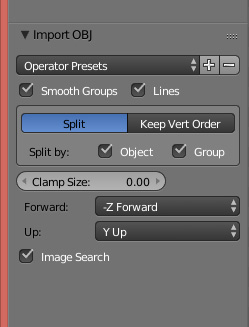
Select Import > OBJ. In the dialogue box, to the lower left of the screen are your OBJ import options. They are not as robust as the export options perhaps.
______________________________________
My Store
My Free Models
My Video Tutorials
My CG Animations
Instagram: @luxxeon3d
Facebook: https://www.facebook.com/luxxeon
Here's a screencap. Sorry, I needed to edit the original one.
______________________________________
My Store
My Free Models
My Video Tutorials
My CG Animations
Instagram: @luxxeon3d
Facebook: https://www.facebook.com/luxxeon
Thanks - what an idiot I am!  I was looking for a pop-up dialog after selecting the OBJ file, like I used to see in 2.49b (I think?). And I did look in the bottom left, but only after I'd imported the OBJ (after all when you do Add > Mesh the mesh options are still there) - but of course you can't select import options after importing, you have to do that beforehand!
D'oh!
Facepalm!
I was looking for a pop-up dialog after selecting the OBJ file, like I used to see in 2.49b (I think?). And I did look in the bottom left, but only after I'd imported the OBJ (after all when you do Add > Mesh the mesh options are still there) - but of course you can't select import options after importing, you have to do that beforehand!
D'oh!
Facepalm!
The 3Dcheapskate* occasionally posts sensible stuff. Usually by accident. And it usually uses Poser 11, with units set to inches. Except when it's using Poser 6 or PP2014, or when its units are set to PNU or something else.
*soon only to be available in two flavours - DAZ and Renderosity
Hmmm... if I UNcheck both "Split by object" and "Split by group" I'd expect the groups from the OBJ to appear in Blender as vertex groups, but it seems that all sense of those groups is lost. Or am I missing something again ?
Ah! Just spotted "Keep Vertex Order" and the "Poly Groups" checkbox !
The 3Dcheapskate* occasionally posts sensible stuff. Usually by accident. And it usually uses Poser 11, with units set to inches. Except when it's using Poser 6 or PP2014, or when its units are set to PNU or something else.
*soon only to be available in two flavours - DAZ and Renderosity

Thanks Bob - I've just had a quick skim through it, and there's a lot that I already knew... but also a lot I didn't (or thought I did, but was wrong ;o) And it looks like an entertaining read too, so some time over the next few days... :)
The 3Dcheapskate* occasionally posts sensible stuff. Usually by accident. And it usually uses Poser 11, with units set to inches. Except when it's using Poser 6 or PP2014, or when its units are set to PNU or something else.
*soon only to be available in two flavours - DAZ and Renderosity

Privacy Notice
This site uses cookies to deliver the best experience. Our own cookies make user accounts and other features possible. Third-party cookies are used to display relevant ads and to analyze how Renderosity is used. By using our site, you acknowledge that you have read and understood our Terms of Service, including our Cookie Policy and our Privacy Policy.
I still only use a very (very) limited subset of Blender's capabilties, mainly to produce simple models for Poser/DAZ Studio.
If I have several objects in Blender that make up my model, then when I export to an OBJ I have several options, including "Objects as OBJ objects" / "Objects as OBJ groups".
But if I import an OBJ I don't seem to have any options at all. Blender seems to automatically split OBJ groups into Blender objects.
Is there an obvious reason (that I'm missing) for there being no OBJ import options in Blender?
Or perhaps there are options and I'm just not looking in the right place?
The 3Dcheapskate* occasionally posts sensible stuff. Usually by accident. And it usually uses Poser 11, with units set to inches. Except when it's using Poser 6 or PP2014, or when its units are set to PNU or something else.
*soon only to be available in two flavours - DAZ and Renderosity