
3dcheapskate opened this issue on Jun 26, 2016 · 7 posts
3dcheapskate posted Sun, 26 June 2016 at 10:53 PM
I still only use a very (very) limited subset of Blender's capabilties, mainly to produce simple models for Poser/DAZ Studio.
If I have several objects in Blender that make up my model, then when I export to an OBJ I have several options, including "Objects as OBJ objects" / "Objects as OBJ groups".
But if I import an OBJ I don't seem to have any options at all. Blender seems to automatically split OBJ groups into Blender objects.
Is there an obvious reason (that I'm missing) for there being no OBJ import options in Blender?
Or perhaps there are options and I'm just not looking in the right place?
The 3Dcheapskate (also available in DAZ and HiveWire3D flavours) occasionally posts sensible stuff. Usually by accident.
And it usually uses Poser 11, with units set to inches. Except when it's using Poser 6 or PP2014, or when its units are set to PNU.

LuxXeon posted Mon, 27 June 2016 at 12:34 AM
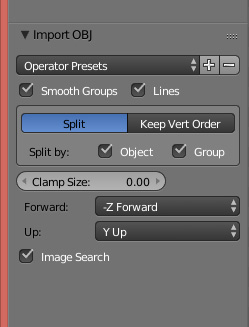
Select Import > OBJ. In the dialogue box, to the lower left of the screen are your OBJ import options. They are not as robust as the export options perhaps.
______________________________________
My Store
My Free Models
My Video Tutorials
My CG Animations
Instagram: @luxxeon3d
Facebook: https://www.facebook.com/luxxeon
LuxXeon posted Mon, 27 June 2016 at 12:36 AM
Here's a screencap. Sorry, I needed to edit the original one.
______________________________________
My Store
My Free Models
My Video Tutorials
My CG Animations
Instagram: @luxxeon3d
Facebook: https://www.facebook.com/luxxeon
3dcheapskate posted Mon, 27 June 2016 at 12:53 AM
Thanks - what an idiot I am!  I was looking for a pop-up dialog after selecting the OBJ file, like I used to see in 2.49b (I think?). And I did look in the bottom left, but only after I'd imported the OBJ (after all when you do Add > Mesh the mesh options are still there) - but of course you can't select import options after importing, you have to do that beforehand!
D'oh!
Facepalm!
I was looking for a pop-up dialog after selecting the OBJ file, like I used to see in 2.49b (I think?). And I did look in the bottom left, but only after I'd imported the OBJ (after all when you do Add > Mesh the mesh options are still there) - but of course you can't select import options after importing, you have to do that beforehand!
D'oh!
Facepalm!
The 3Dcheapskate (also available in DAZ and HiveWire3D flavours) occasionally posts sensible stuff. Usually by accident.
And it usually uses Poser 11, with units set to inches. Except when it's using Poser 6 or PP2014, or when its units are set to PNU.
3dcheapskate posted Mon, 27 June 2016 at 1:04 AM
Hmmm... if I UNcheck both "Split by object" and "Split by group" I'd expect the groups from the OBJ to appear in Blender as vertex groups, but it seems that all sense of those groups is lost. Or am I missing something again ?
Ah! Just spotted "Keep Vertex Order" and the "Poly Groups" checkbox !
The 3Dcheapskate (also available in DAZ and HiveWire3D flavours) occasionally posts sensible stuff. Usually by accident.
And it usually uses Poser 11, with units set to inches. Except when it's using Poser 6 or PP2014, or when its units are set to PNU.

kittykat98 posted Mon, 27 June 2016 at 4:48 AM
Here's a link to my tutorial in the freestuff section. I hope you'll find it helpful.
https://www.renderosity.com/mod/freestuff/blender-to-poser-tutorial/76353
Bob
3dcheapskate posted Mon, 27 June 2016 at 5:10 AM
Thanks Bob - I've just had a quick skim through it, and there's a lot that I already knew... but also a lot I didn't (or thought I did, but was wrong ;o) And it looks like an entertaining read too, so some time over the next few days... :)
The 3Dcheapskate (also available in DAZ and HiveWire3D flavours) occasionally posts sensible stuff. Usually by accident.
And it usually uses Poser 11, with units set to inches. Except when it's using Poser 6 or PP2014, or when its units are set to PNU.