
-
Marketplace
- Free Stuff
-
Galleries
-
Community
Forums General
- News
- Deals
- Poser
- Contact
Renderosity Forums / Poser Technical
Welcome to the Poser Technical Forum
Forum Moderators: Lobo3433, Staff Forum Coordinators: Anim8dtoon
Poser Technical F.A.Q (Last Updated: 2026 May 14 2:11 pm)
Welcome to the Poser Technical Forum.
Where computer nerds can Pull out their slide rules and not get laughed at. Pocket protectors are not required. ;-)
This is the place you come to ask questions and share new ideas about using the internal file structure of Poser to push the program past it's normal limits.
New users are encouraged to read the FAQ sections here and on the Poser forum before asking questions.
Checkout the Renderosity MarketPlace - Your source for digital art content!

Subject: Rendering single animation frames.

Report Post

It's an 'assumed' option on that panel, rather than an explicit option with its own sub-section in the panel. Here's how to do it in Poser 13...
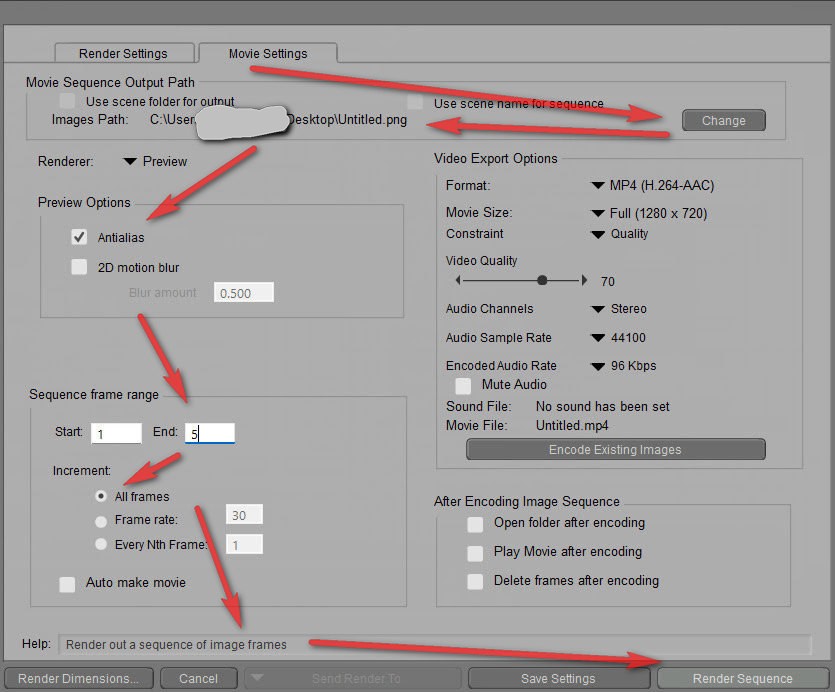
Note that you can usually get past GIF-blockers by compiling the frames to .APNG (freeware such as Gif2aPNG etc) and renaming to .PNG file. Web browsers should still play it as an animation.
Learn the Secrets of Poser 11 and Line-art Filters.

Also note that 'Auto make Movie' and 'Delete frames after encoding' are UN-Checked. You have a lot of options that are check boxes. If you wanted to you could render the frames keeping them AND also make a movie. Also if you render the frames and go into some of them and edit them to add or delete some part of the that frame then you could just press the 'Encode Existing Images' and it will make a movie based on the frames already rendered. The old way if you wanted to have two different formats of the movie meant rendering the scene twice. Now you can make a movie of each format without re-rendering.
Poser 5, 6, 7, 8, Poser Pro 9 (2012), 10 (2014), 11, 12, 13, 14
-
- Renderosity Page
- Renderosity Communities
- Blender 3D
- iClone
- Poser Users
- Poser Software
- Become an Affiliate
- Memorials
-
About
- About Us
- Contact Us
- Team
- Policies
- Terms of Service
- Copyright Policy
- Refund Policy
- Licenses
- Standard License
- Extended License

Privacy Notice
This site uses cookies to deliver the best experience. Our own cookies make user accounts and other features possible. Third-party cookies are used to display relevant ads and to analyze how Renderosity is used. By using our site, you acknowledge that you have read and understood our Terms of Service, including our Cookie Policy and our Privacy Policy.
Hello, in the past version of Poser 11 I could render all of my animation frames as single image files with a batch process in the animation tab. Now that I have Poser 13, I see that I only have the option to render movie files. I like to create animated gifs, and this new feature is not good for me. Is there still an option to render my animations as single image files automatically, or am I SOL?