
puddly opened this issue on Mar 20, 2026 · 3 posts
puddly posted Fri, 20 March 2026 at 9:38 PM
Hello, in the past version of Poser 11 I could render all of my animation frames as single image files with a batch process in the animation tab. Now that I have Poser 13, I see that I only have the option to render movie files. I like to create animated gifs, and this new feature is not good for me. Is there still an option to render my animations as single image files automatically, or am I SOL?

HartyBart posted Sat, 21 March 2026 at 5:43 AM
It's an 'assumed' option on that panel, rather than an explicit option with its own sub-section in the panel. Here's how to do it in Poser 13...
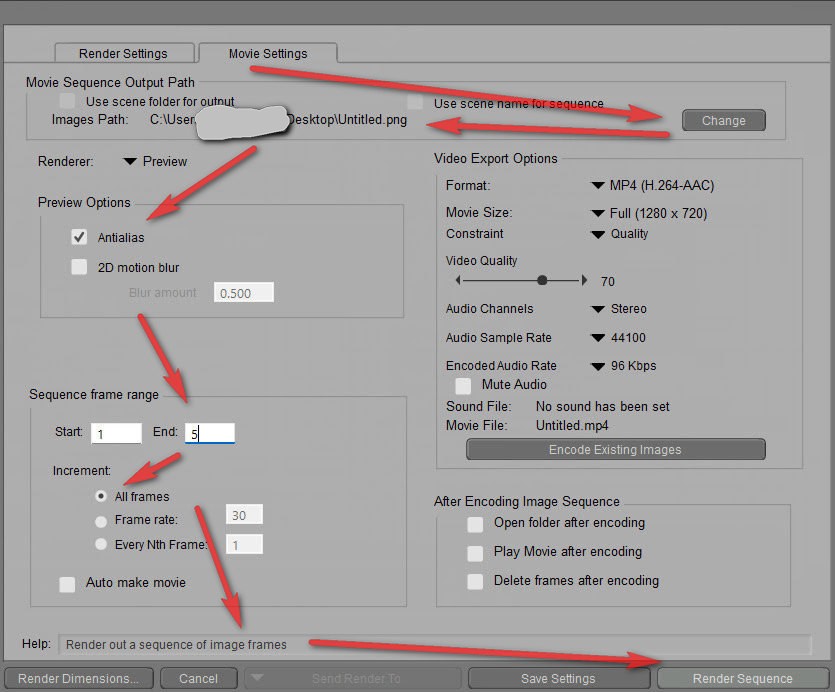
Note that you can usually get past GIF-blockers by compiling the frames to .APNG (freeware such as Gif2aPNG etc) and renaming to .PNG file. Web browsers should still play it as an animation.
Learn the Secrets of Poser 11 and Line-art Filters.

Richard60 posted Tue, 24 March 2026 at 7:59 PM
Also note that 'Auto make Movie' and 'Delete frames after encoding' are UN-Checked. You have a lot of options that are check boxes. If you wanted to you could render the frames keeping them AND also make a movie. Also if you render the frames and go into some of them and edit them to add or delete some part of the that frame then you could just press the 'Encode Existing Images' and it will make a movie based on the frames already rendered. The old way if you wanted to have two different formats of the movie meant rendering the scene twice. Now you can make a movie of each format without re-rendering.
Poser 5, 6, 7, 8, Poser Pro 9 (2012), 10 (2014), 11, 12, 13, 14