
Renderosity Forums / Poser Technical
Welcome to the Poser Technical Forum
Forum Moderators: Lobo3433, Staff Forum Coordinators: Anim8dtoon
Poser Technical F.A.Q (Last Updated: 2026 May 14 2:11 pm)
Welcome to the Poser Technical Forum.
Where computer nerds can Pull out their slide rules and not get laughed at. Pocket protectors are not required. ;-)
This is the place you come to ask questions and share new ideas about using the internal file structure of Poser to push the program past it's normal limits.
New users are encouraged to read the FAQ sections here and on the Poser forum before asking questions.
Checkout the Renderosity MarketPlace - Your source for digital art content!

Subject: Trying to build a superfly shader, need help.


Is your question why the material doesn't look like you meant, or why the material got set up this way by your Python code? If the latter, you probably need to post that Python code, otherwise no one can tell you what it is doing wrong.
If your question is why the material doesn't do what you expected, your root node is the CyclesSurface in the top center, since that's the one with the checkmark for SuperFly. The only thing plugged into it is the Diffuse Map in the upper right. So, everything else is being ignored. Probably what you actually want to do is plug your PrincipledBsdf_2 node into the CyclesSurface root (in the Surface node).

ChromeStar posted at 10:30 PM Sun, 8 March 2026 - #4504471
I disagree. The active PrincipleBsdf node has three nodes connected to it: a Diffuse node, a roughness map, and an ambiguous bump arrangement that is not properly set up. Other unattached node arrangements are the subsurface scatter and the translucent one. Those mistakes are glaring and need to be either corrected or deleted. I would clean up the shader by deleting the unnecessary and unattached nodes and re-upload a new screencap.Is your question why the material doesn't look like you meant, or why the material got set up this way by your Python code? If the latter, you probably need to post that Python code, otherwise no one can tell you what it is doing wrong.
If your question is why the material doesn't do what you expected, your root node is the CyclesSurface in the top center, since that's the one with the checkmark for SuperFly. The only thing plugged into it is the Diffuse Map in the upper right. So, everything else is being ignored. Probably what you actually want to do is plug your PrincipledBsdf_2 node into the CyclesSurface root (in the Surface node).
What exactly are you trying to accomplish?
Edit: I take back my disagreement with ChromeStar; upon reexamining the image, I do see the disconnect between the PrincipleBsdf node and the Cycles root node. That is the major part of the problem. My bad.

Privacy Notice
This site uses cookies to deliver the best experience. Our own cookies make user accounts and other features possible. Third-party cookies are used to display relevant ads and to analyze how Renderosity is used. By using our site, you acknowledge that you have read and understood our Terms of Service, including our Cookie Policy and our Privacy Policy.
I'm trying to build a superfly shader, but something is wrong and I have no idea what I did wrong.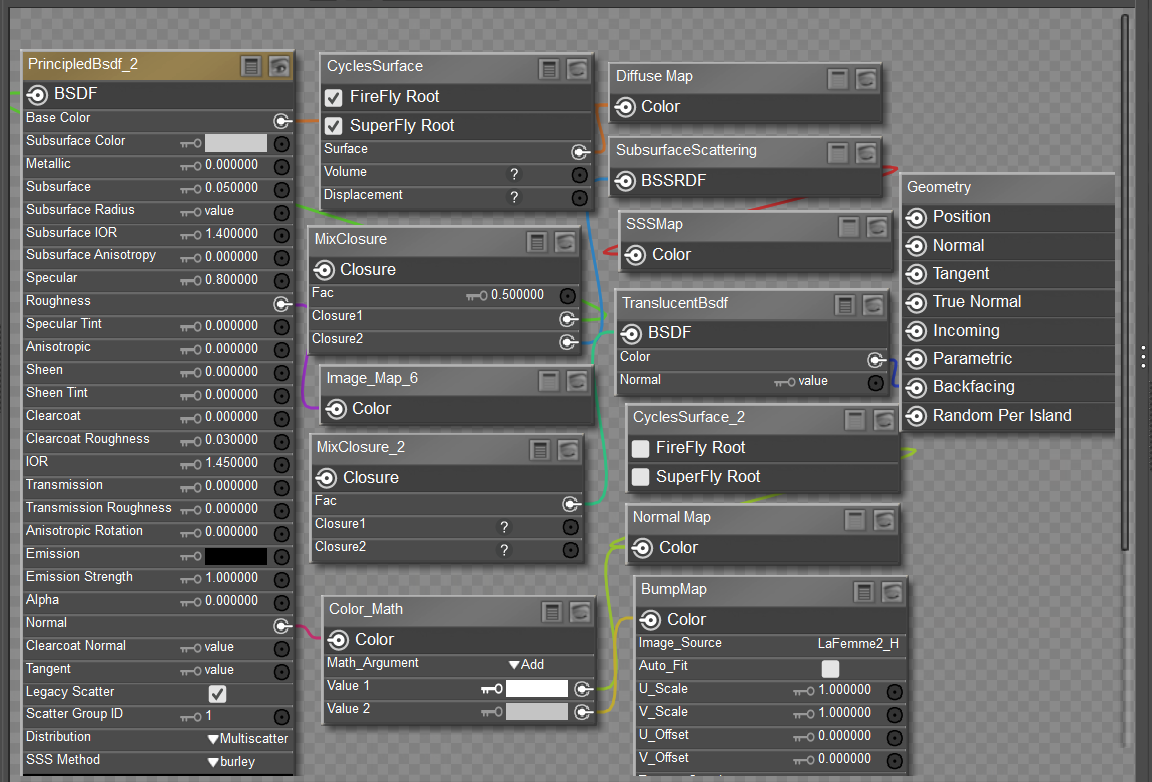 were my error occured?
Could someone look at this screenshot ans see if you know
I'd appreciate it if you could tell me if I connected th nodes correctly.
Thanks.
Let me introduce you to my multiple personalities. :)
BluEcho...Faery_Light...Faery_Souls.