
Faery_Light opened this issue on Mar 08, 2026 · 7 posts
Faery_Light posted Sun, 08 March 2026 at 9:41 PM
I'm trying to build a superfly shader, but something is wrong and I have no idea what I did wrong.
Could someone look at this screenshot ans see if you know 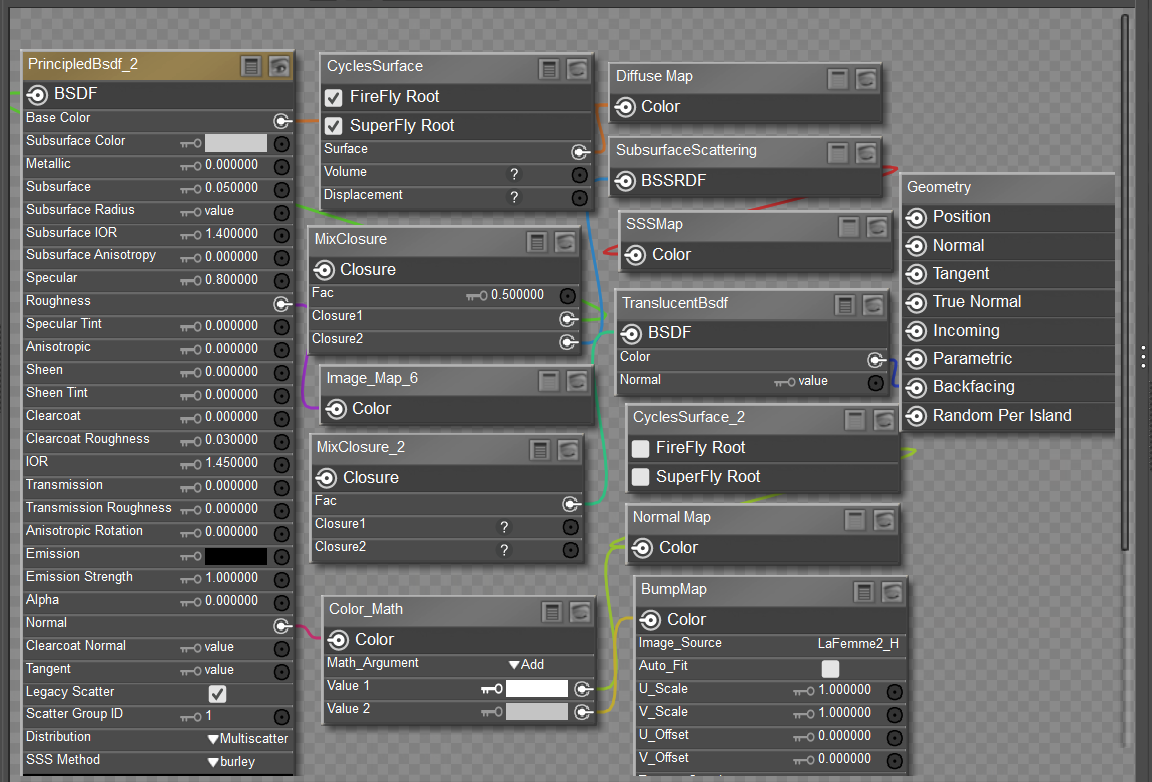 were my error occured?
I'd appreciate it if you could tell me if I connected th nodes correctly.
Thanks.
Let me introduce you to my multiple personalities. :)
BluEcho...Faery_Light...Faery_Souls.

ChromeStar posted Sun, 08 March 2026 at 10:30 PM
Is your question why the material doesn't look like you meant, or why the material got set up this way by your Python code? If the latter, you probably need to post that Python code, otherwise no one can tell you what it is doing wrong.
If your question is why the material doesn't do what you expected, your root node is the CyclesSurface in the top center, since that's the one with the checkmark for SuperFly. The only thing plugged into it is the Diffuse Map in the upper right. So, everything else is being ignored. Probably what you actually want to do is plug your PrincipledBsdf_2 node into the CyclesSurface root (in the Surface node).
Faery_Light posted Sun, 08 March 2026 at 11:17 PM
Thank you, I will correct it in the morning.
Let me introduce you to my multiple personalities. :)
BluEcho...Faery_Light...Faery_Souls.

hborre posted Mon, 09 March 2026 at 10:21 AM
ChromeStar posted at 10:30 PM Sun, 8 March 2026 - #4504471
I disagree. The active PrincipleBsdf node has three nodes connected to it: a Diffuse node, a roughness map, and an ambiguous bump arrangement that is not properly set up. Other unattached node arrangements are the subsurface scatter and the translucent one. Those mistakes are glaring and need to be either corrected or deleted. I would clean up the shader by deleting the unnecessary and unattached nodes and re-upload a new screencap.Is your question why the material doesn't look like you meant, or why the material got set up this way by your Python code? If the latter, you probably need to post that Python code, otherwise no one can tell you what it is doing wrong.
If your question is why the material doesn't do what you expected, your root node is the CyclesSurface in the top center, since that's the one with the checkmark for SuperFly. The only thing plugged into it is the Diffuse Map in the upper right. So, everything else is being ignored. Probably what you actually want to do is plug your PrincipledBsdf_2 node into the CyclesSurface root (in the Surface node).
What exactly are you trying to accomplish?
Edit: I take back my disagreement with ChromeStar; upon reexamining the image, I do see the disconnect between the PrincipleBsdf node and the Cycles root node. That is the major part of the problem. My bad.
Faery_Light posted Mon, 09 March 2026 at 7:06 PM
Unfortunatley it corrupted.
So I'll try a new one.
This was a skin shader setup for Poser.
Let me introduce you to my multiple personalities. :)
BluEcho...Faery_Light...Faery_Souls.
hborre posted Mon, 09 March 2026 at 7:24 PM
I recognize the shader nodes. Load a new screencap once you reconstruct the skin shader and point out any particular problems you are having to get it to work correctly.
Faery_Light posted Tue, 10 March 2026 at 4:57 PM
I am giving it up.
Right now I'm doing a better one and not feeling well so moving slow.
thanks for repiles.
Let me introduce you to my multiple personalities. :)
BluEcho...Faery_Light...Faery_Souls.