
Renderosity Forums / Poser 13
Welcome to the Poser 13 Forum
Forum Moderators: nerd, RedPhantom Forum Coordinators: Digitell
(Last Updated: 2026 May 09 11:13 pm)

Subject: Integration of AI with Poser (redux)


IMHO, the thread should be entitled 'Integration of AI with Poser' and not generically AI features in Poser. The problem with the last thread was it became a 'ram-it-down-your-throat' approach in defense of AI, either you conform or be left behind. That did not go well with a lot of users and understandably so. The shotgun approach of 'doom-and-gloom' is not a selling point and turns users off. I can understand the interest in integrative AI use and how it can facilitate workflow. However, I still see individuals posting AI-created works in the gallery that are tweaked in third-party applications. Still no originality there.
Hopefully, this thread will evolve into something productive, however, given how the last thread devolved so quickly, time will only tell.

You can already use these in Poser.
Just as an example, I will use AI Texture mentioned...
Go to Polycams site (the creator of AI texture), to their AI texture generator page under free tools, type in what you want. Poof, download the 4 textures it creates. Plug them in and set them up how you want them.....
So why do you need a plugin for it? It is already free and available............ There is zero need to buy a plugin......
These textures are free to use, with no rights taken the moment you run it......
Which is completely different than what was going on in the other thread.......................
Some things are easy to explain, other things are not........ <- Store -> <-Freebies->
IMHO, the thread should be entitled 'Integration of AI with Poser' and not generically AI features in Poser. The problem with the last thread was it became a 'ram-it-down-your-throat' approach in defense of AI, either you conform or be left behind. That did not go well with a lot of users and understandably so. The shotgun approach of 'doom-and-gloom' is not a selling point and turns users off. I can understand the interest in integrative AI use and how it can facilitate workflow. However, I still see individuals posting AI-created works in the gallery that are tweaked in third-party applications. Still no originality there.
Hopefully, this thread will evolve into something productive, however, given how the last thread devolved so quickly, time will only tell.
You're right. Much more accurate of a title. Is there any way to change a thread title? o.O
shvrdavid posted at 12:35 PM Tue, 2 January 2024 - #4479888
Well, sure, any image can be used where images are already used in Poser. :)You can already use these in Poser.
Just as an example, I will use AI Texture mentioned...
Go to Polycams site (the creator of AI texture), to their AI texture generator page under free tools, type in what you want. Poof, download the 4 textures it creates. Plug them in and set them up how you want them.....
So why do you need a plugin for it? It is already free and available............ There is zero need to buy a plugin......
These textures are free to use, with no rights taken the moment you run it......
Which is completely different than what was going on in the other thread.......................
dt2db bridge is a bit cooler in that it's integrated into the node editor.
And I've always wished Poser had a way to integrate external render engines. Back in the luxrender days. Paolo's plugin did a great job of exporting a poser scene into something lux could understand. It would be interesting if there was a way for poser to "give a native window" that an external renderer could direct it's output. Then people could write an export to external render, and call it in such a way that Poser can display the results. Workflow would be a bit more seamless. And Poser could support other renderers (and post render, like AI post render processing) in a "without leaving poser native-feeling" way. Does that make sense?
Then it would be possible to export to eevee and get *that* render back. Or luxrender. Or (and this is the point) a stable diffusion render.
I think hborre nailed the title a bit more with "integration". It's about not interrupting the poser workflow. Or, at least bridging things, where the other interface is a bit more complex. Stable Difussion has such an easy inerface, it's easy to integrate it directly in blender. It's some text boxes, sliders, and drop downs.
But bridging...
Consider, I can go back and forth between Poser morph tool and Blender Sculpting. I wrote a Blender add-on that "repairs" the out of order verts Poser exports. In real time. But it's not a perfect bridge. I still have to export import export import. A better bridge would might let me keep the meshes "in sync", automatically. Then I could have both apps open and work with the mesh in both apps at the same time. Necessary? No. Cool? maybe. For me, certainly :)
But that's a different topic (although the tech probably underlies easier future integrations.
Anyway, integration. Integrating various "AI" things into Poser to enhance the ability to "make images we want"

The title has been changed.
Available on Amazon for the Kindle E-Reader Monster of the North and The Shimmering Mage
Today I break my own personal record for the number of days for being alive.
Check out my store here or my free stuff here
I use Poser 13 and win 10
Keep in mind that if the textures are named right, you can drag them into Poser and they hook themselves up. Details on the file names recognized are in the room help, within the material room, under the Recognized Texture Names in the help box that poops up. So in affect, the material room has already been updated in Poser to make using and hooking up lots of textures even easier. I am not sure if many people even know that feature is there truthfully. If anyone sees where this can be improved more, please put a ticket in on it.
As far as a way to simply add external engines. I have asked for that since Poser 8.
I have asked for a bridge to Blender too. Now that Zbrush is rent to never own, it makes even more sense to bridge to free software that is opensource. Something that Poser was founded on, is using opensource. But that seems to be ignored when it comes to a bridge to Blender LTS. I guess more people need to request it. Now that Blender has LTS versions, there is no reason not to add a bridge to a program with long term support.
As far as Poser integrating AI like Stable Diffusion into Poser, that brings up the long term support issue. Stable Diffusion has been replaced every few months with a new version.
Just to support that would have required multiple updates from August of 23 to today. Version 3 will be released soon as well, but there are same legal catches with 3 that could cause some issues. One being you may have to submit your copyrighted art to have it removed from the model, just to even tell if it is in there and giving it to them at the same time............. I wish I was joking about that...........
Some things are easy to explain, other things are not........ <- Store -> <-Freebies->
Keep in mind that if the textures are named right, you can drag them into Poser and they hook themselves up. Details on the file names recognized are in the room help, within the material room, under the Recognized Texture Names in the help box that poops up. So in affect, the material room has already been updated in Poser to make using and hooking up lots of textures even easier. I am not sure if many people even know that feature is there truthfully. If anyone sees where this can be improved more, please put a ticket in on it.
Did not know that. Cool.
I wonder how many helpful features like that are tucked away o.O
As far as a way to simply add external engines. I have asked for that since Poser 8.
Wow! ahead of the curve, there :)
I have asked for a bridge to Blender too. Now that Zbrush is rent to never own, it makes even more sense to bridge to free software that is opensource. Something that Poser was founded on, is using opensource. But that seems to be ignored when it comes to a bridge to Blender LTS. I guess more people need to request it. Now that Blender has LTS versions, there is no reason not to add a bridge to a program with long term support.
Considering that Poser uses a version of cycles rendering engine.
As far as Poser integrating AI like Stable Diffusion into Poser, that brings up the long term support issue. Stable Diffusion has been replaced every few months with a new version.
Just to support that would have required multiple updates from August of 23 to today. Version 3 will be released soon as well, but there are same legal catches with 3 that could cause some issues. One being you may have to submit your copyrighted art to have it removed from the model, just to even tell if it is in there and giving it to them at the same time............. I wish I was joking about that...........
Different topic, that. Worm can, for sure O.O
Awesome, thanks! :)The title has been changed.

Stable Diffusion is Python, Poser is Python. So, let the Poser and SD talk to each other. By simply allowing any third-party script to be plugged into Poser's PostFX. That's the obvious choice, and then after that the Poser developers don't have to wrangle with AI. I'm sure they have enough to do, and don't want to be 'chasing the tail' of AI.
For instance... I plug a script into PostFX to let me send my basic Poser render to Stable Diffusion Controlnets (Canny, Depth and Openpose), with one click, for the "SD render". Someone more Python-y than me could probably rig up a normal script to do that anyway, once the SD UI's can also be officially scripted ('take renders from Poser, slot them in here, here and here, set SD sliders to my 'Poser preset', then generate an image'). Of course that can be done manually, but it's a of fiddly pixel-size input, clicks and dragging. It would be nice to have it done automatically via PostFX.
Another option might be to add the equivalent of PostFX to Poser's Comic Book Preview panel. In the form of a simple radio button... "And make it look Pro!", by sending the real-time render over to be re-generated in a special comics-art SD model. Again, one can do that already manually, but it would be nice to have a one-click option.
Your idea of adding textured primitives to the scene, via a simple SD text prompt, is a good one. Though bear in mind that SD itself will be able to do that. There's already one special SD model in which you can basically say "keep the scene the same, but just add a glowing blue 3D orb above the head of the figure". And it just changes that one thing.
As I've mentioned before, Renderosity could consider buying out Ken's Openpose plugin and making it free with Poser 14. It would get the AI crowd thinking about using Poser, especially if it was also bundled free with the $50 Poser 13 (I assume another perma-deal on the earlier version of Poser, as before). The buyout might be in the form of giving Ken $2 on every sale of the $50 Poser 13, so there might be no up-front buyout cost.
Learn the Secrets of Poser 11 and Line-art Filters.
HartyBart posted at 5:41 AM Wed, 3 January 2024 - #4479927
The Python API does seem like the obvious choice. There are still plenty of critical things that can't be done with it. It's not quite as extensive as Blender's API.Stable Diffusion is Python, Poser is Python. So, let the Poser and SD talk to each other. By simply allowing any third-party script to be plugged into Poser's PostFX. That's the obvious choice, and then after that the Poser developers don't have to wrangle with AI. I'm sure they have enough to do, and don't want to be 'chasing the tail' of AI.
For instance... I plug a script into PostFX to let me send my basic Poser render to Stable Diffusion Controlnets (Canny, Depth and Openpose), with one click, for the "SD render". Someone more Python-y than me could probably rig up a normal script to do that anyway, once the SD UI's can also be officially scripted ('take renders from Poser, slot them in here, here and here, set SD sliders to my 'Poser preset', then generate an image'). Of course that can be done manually, but it's a of fiddly pixel-size input, clicks and dragging. It would be nice to have it done automatically via PostFX.
Another option might be to add the equivalent of PostFX to Poser's Comic Book Preview panel. In the form of a simple radio button... "And make it look Pro!", by sending the real-time render over to be re-generated in a special comics-art SD model. Again, one can do that already manually, but it would be nice to have a one-click option.
Your idea of adding textured primitives to the scene, via a simple SD text prompt, is a good one. Though bear in mind that SD itself will be able to do that. There's already one special SD model in which you can basically say "keep the scene the same, but just add a glowing blue 3D orb above the head of the figure". And it just changes that one thing.
As I've mentioned before, Renderosity could consider buying out Ken's Openpose plugin and making it free with Poser 14. It would get the AI crowd thinking about using Poser, especially if it was also bundled free with the $50 Poser 13 (I assume another perma-deal on the earlier version of Poser, as before). The buyout might be in the form of giving Ken $2 on every sale of the $50 Poser 13, so there might be no up-front buyout cost.
Along those lines, it might be nice to improve the performance and reach of the Python API. Then things like this would be simple.
I have Ken's plugin. I'm waiting for my new Mac so I can run odyssey which gives me a nice node based AI workflow tool. Into which I can plug Ken's output. Poser makes it quick to pose, which is the essential of keyframing. I've talked to Odyssey and external nodes are on their roadmap. That is, node that can be attached to via an API to accept input and deliver output.
Ala, my poor 18 core iMac Pro is not optimal for AI. An m3Pro gives me the ML silicon I need for AI stuff :)
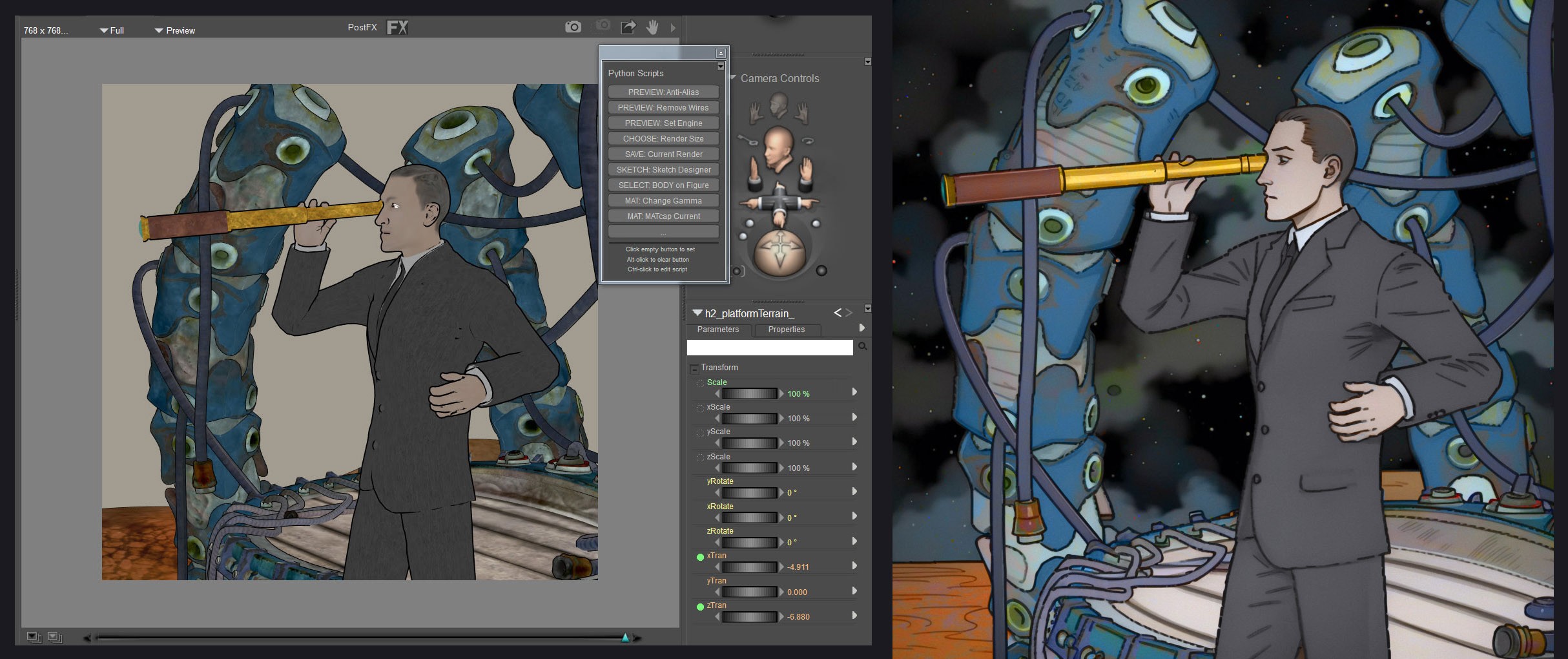
After several days of experiments, I've successfully proved that it's possible to 'render' from Poser using Stable Diffusion 1.5. By 'render' I mean that SD 1.5 should work like a usual render engine, by retaining exact outline registration with the Poser scene. This, and the fact that the final output (seen above) is 1024-pixels, enables easy masking of figure / background / props. As you can see above, a basic 'Canny' Controlnet has kept SD's image generation locked to the original real-time Preview render from Poser, while allowing just enough wiggle-room to 'render' in a new style (in this case, old-school comic-book). The pockets and suit lapel are 'invented' by SD, true - but that's because they're not specified in the input image. And the final image is lighter, true, but that's because I lifted the brightness a touch in Photoshop. The starfield was added in Photoshop (Glitterato plugin), before the Poser Preview render was sent to Stable Diffusion.
Anyway, it is possible to 'render' using SD and retain exact fit with the Poser renders. I now plan to have a Python script output and name the needed Poser render set.
Learn the Secrets of Poser 11 and Line-art Filters.

Privacy Notice
This site uses cookies to deliver the best experience. Our own cookies make user accounts and other features possible. Third-party cookies are used to display relevant ads and to analyze how Renderosity is used. By using our site, you acknowledge that you have read and understood our Terms of Service, including our Cookie Policy and our Privacy Policy.
Well, the last thread I read quickly descended into insults (perceived and/or real). Can we try again?
No debate about the "A" or "I". It's a lost cause: the media has fixated on it. Kind of like how "Hacker" was lost many decades ago. :p
This isn't about the "make art" button. Or even philosophically "what really *is* art?" There are other places for such things.
And it isn't about legal stuff of ownership. The USCO has already ruled on it, although they've pretty much said it's an emerging area and they're just applying the strict letter of the law for now. There are other places for such things.
This is about the tool we all play with (that would be Poser) for making images we want. Essentially, is that not Poser? A tool we use in "making images we want"?
And this is about various "AI" things that can possibly enhance Poser for that purpose.
Now, what *I* want is a bit more than typing "hot chic who looks like a supermodel, with big boobs, wearing almost nothing, standing in front of a dark castle, shooting lightning from her fingers" and enjoying the resulting pin up a cool algorithm has generated.
I'm not saying that's bad. If that's your goal, congrats: there's an app for that. You don't need Poser or DS for that, any longer. Go forth and type!
This is about those who do something else, some other way.
Over in the Blender world, a few people have done some interesting AI plug-ins. 3 of them seem useful in the Poser world (ie: for people who compose 3d scenes and render). Note: blender plugins are in the blendermarket. Which is not rendo, so I'm not linking. Search :)
1. AI textures. A handy plugin that makes materials (complete with bump, displacement maps, and node setups). So things like "dark red old brick, seamless" makes a material you can use. Hugely useful, no? It produces normal node setup, that you can then tweak as you wish. If you ran that through a "mind of BB algorithm" for node generation, it could be cool.
[called dt2db bridge]
2. AI 3D objects. A handy plugin (very early stage) based on chatGPT and its ability to generate simple code. Something like "a 20cm diameter brightly glowing orb, light-blue light, high resolution" and it's added to your scene. Pretty cool. That also would be useful too, no?
[called blender copilot]
Neither of these two things does anything people don't already do a lot slower (or just as quick, depending on your library :)
3. Render using scene as a reference. Ken has started in that direction. This blender plugin takes it further. You can (say) use a bunch of cubes to position buildings in a city scape. Add some simple low poly figures to position people. Pick your camera angles. You can add details, and diffusion picks those up as more references. It's like a super-powered render.
[called AI render]
Poser is MADE for driving things like this!
Imagine using Poser to drive AI rendering and animation with precision. It's actually so close. And it has the *way* more approachable interface. This really seems like a good match.
I'm sure I'm not the only one thinking such things.