
Renderosity Forums / Carrara
Welcome to the Carrara Forum
Forum Coordinators: Kalypso, Anim8dtoon
Carrara F.A.Q (Last Updated: 2026 Sep 09 4:39 am)
Visit the Carrara Gallery here.

Subject: How do you create morphs for a posed figure in Carrara 8?


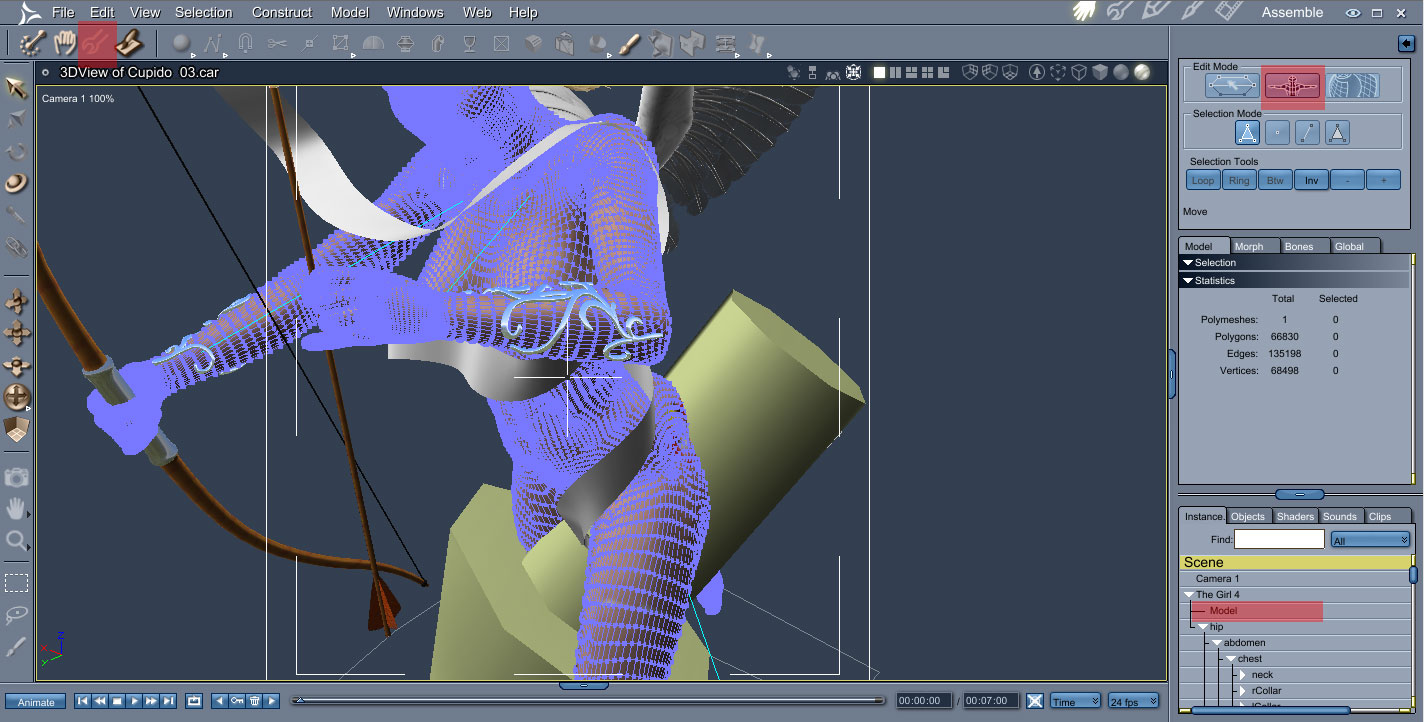
The modeling room is where you are working on the mesh in its default form. When you make a change here, you are actually altering the mesh, as opposed to posing the mesh. The change will show in the assembly room, on top of any poses, which are really just moving that mesh around.
It would be nice to keep a pose in the modeling room, I agree. But that is not how the program is built.

Follow me at euQfiz Digital
Thanks for the clear screen shot. Everything is working now.
Download my free stuff here: http://www.renderosity.com/homepage.php?page=2&userid=323368

Privacy Notice
This site uses cookies to deliver the best experience. Our own cookies make user accounts and other features possible. Third-party cookies are used to display relevant ads and to analyze how Renderosity is used. By using our site, you acknowledge that you have read and understood our Terms of Service, including our Cookie Policy and our Privacy Policy.
When I select the figure in the scene and hit the wrench icon located above the view and to the left, the editable vertex object assumes a zero pose. This is not working as described. I watched a tutorial at YouTube and followed the instructions but this isn't working for me. Is there some important step I've missed?
Download my free stuff here: http://www.renderosity.com/homepage.php?page=2&userid=323368