
Renderosity Forums / Maya
Welcome to the Maya Forum
Forum Moderators: Lobo3433
Maya F.A.Q (Last Updated: 2024 Aug 27 11:07 am)
|
|
|
| Maya Gallery |
Checkout the Renderosity MarketPlace - Your source for digital art content!

Subject: Using light glow sun flare?


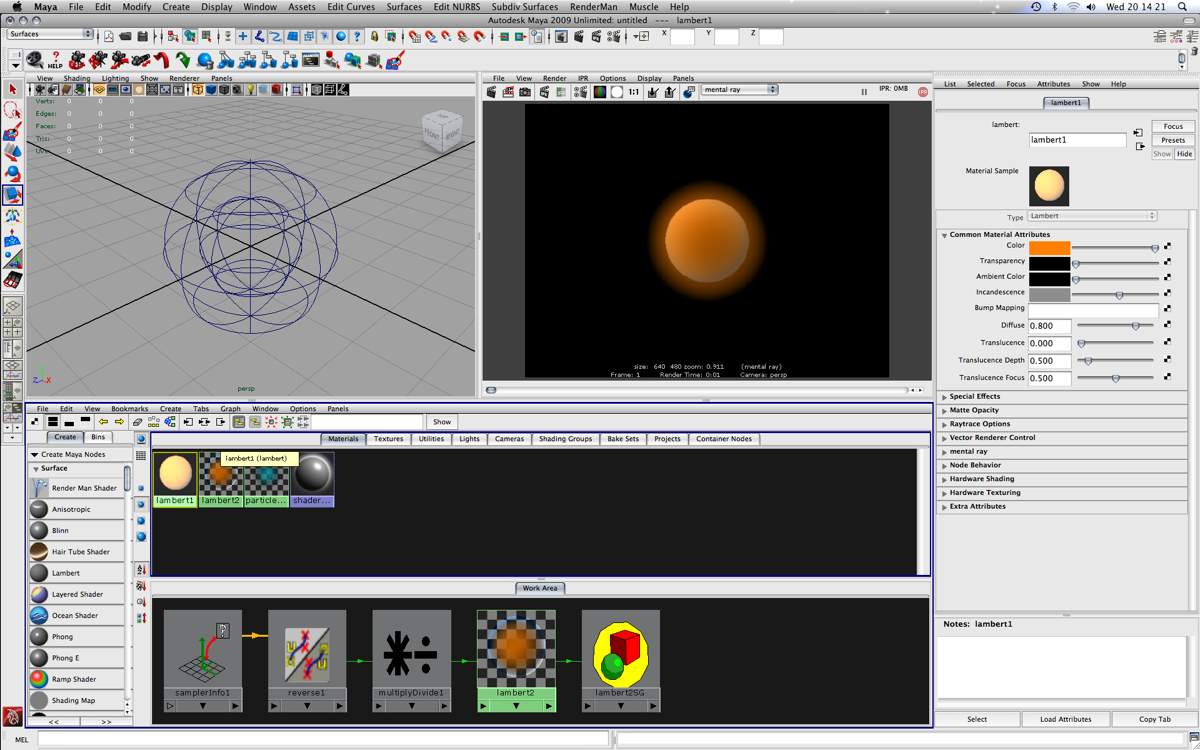
It's not that these effects don't work in mental ray - they do. If you, say, increase your intensities x10 and use mental ray the effects will appear. The main thing you will notice is that the effects are not as smooth as they appear with the software renderer.
As far as glows (specifically) are concerned, you could fake them with a samplerInfo / facing ratio node driving transparency. As you can see, I have two spheres. The inner sphere has incandescence applied (see Attribute Editor), the outer sphere has the "fake glow" network at the bottom of the Hypershade applied.
Sorry, can't give you lens flare...yet.
I may try working with two different layers for the sun flare. I can layer them in Vegas I guess.
Though Vegas has a sun flare effect it doesn't seem so well. Just doesn't feel right, may I get your opinion (and anyone else on it) ? This one uses the Vegas flare, personally I find the lense flare in Maya much more suitable.


"Absence of evidence is not evidence of absence."

Privacy Notice
This site uses cookies to deliver the best experience. Our own cookies make user accounts and other features possible. Third-party cookies are used to display relevant ads and to analyze how Renderosity is used. By using our site, you acknowledge that you have read and understood our Terms of Service, including our Cookie Policy and our Privacy Policy.
Hello everyone!
So I have been trying to render a star in Maya. The proper means by which I can achieve this from what I have been able to figure out is using the light glow and sun flare settings in the attribute editor.
I have two main problems which are preventing me from rendering a distant sun coming from from the horizon of a planet.
One: The light glow will not render in Mental Ray. Is there a way to bypass this? If so what else can I use to create a sun flare in Maya?
Two: When rendering in Maya Software the light glow will show (with the sun flare) but it goes through the planet.
No matter where I position it whether it is behind one object or behind 5 it will still show through all of these objects. How can I prevent this light glow from showing through objects in Maya?
I do not want to use any video editing software unless I absolutely have to. I use Vegas to edit all my video data and Vegas has a sun flare effect but it is unrealistic, and I can't control it entirely which makes it difficult to get a desired outcome.
Anyways that's my current problem. I hope someone can help. I really don't want to use Maya Software to render anything, and as I have stated before I really only have Maya as an option to work in.
"Absence of evidence is not evidence of absence."