
Renderosity Forums / Z Brush
Welcome to the Z Brush Forum
Forum Moderators: fly028
Z Brush F.A.Q (Last Updated: 2024 Aug 27 11:07 am)
 |
|
|
ZBrush Areas @ Renderosity : Gallery - Tutorials - Freestuff
Pixologic: ZB 3.1 Overview - ZB 3.1 Demo -ZBrush 3.12 MAC - Gallery - ZBrush News - Interviews
ZClassroom - Docs - ZBrushInfo (Wiki) - Downloads - ZBrush 3.1 Overview
| Renderosity Marketplace | Gnomon ZB/DVD Training |

Subject: How do I prepare an OBJ from DAZ Studio for ZBrush 3?


You would tick Ignore invisible if there are other things in the scene that you don't want to paint, and if you've set them to hidden (Visible:No). Otherwise, for painting, those shouldn't matter.
You need the uv coordinates, the other stuff should be optional.
You don't need groups at all
You might want Surfaces, if you are going to paint only selected material zones. You will certaibly want them if this is a figure that uses different maps on different parts, like the DAZ humans.

Quote - OK, I do have a question about exporting from DAZ Studio, not Poser, to prepare a obj to for painting in ZBrush (not morphs, painting!!).
Are you using a morphed obj? If not, why not use the original obj in the geometries folder?
If you are using the daz figures, I have a tutorial at my site byfivecat.com on. If the tutorial is not clear, than please feel free to ask me specific questions.
As far as the export dialog:
Quote - So when I bring up the export dialog.
In the Basic tab there are 3 options:
Ignore Invisible Nodes
Use Bone Welds
Removed Unused VerticesWhich are checked?
Leave Ignore Invisible Nodes checked. Others unchecked.
Quote -
In the Advanced tab there are 3 sections with sub options:
Swap Y and Z Orientation
Write UV Coordinates
Write Normals
Write Object StatementsWrite Groups (section 2)
Use Existing Groups
Use Node Name(s)
Use Surface Name(s)
Use Figure Name(s)Write Surfaces (section 3)
Write Material Library (sub options below)
No Maps
Collect Maps
Convert Maps (for Bryce)Which of these areas should be checked and which sub options should be checked?
Write UV, write normals.
For painting, use surface names.
You do not need to write surfaces, so leave all unchecked.
OK, going to try this. I wanted to ask, is there a better export preset or just keep at Custom and keep that 1% as is??
---Wolff On The Prowl---
Quote - OK, going to try this. I wanted to ask, is there a better export preset or just keep at Custom and keep that 1% as is??
I would recommend using custom.
Ram, I understand wanting to learn from others, but don't be afraid to try stuff youself. I learned a lot by just trying things and seeing what happened. We don't always know what is best for you... only you can find what is your best workflow.
OK, thanks much! 
I think your tutorials are nice but they are a bit text for me. I'm more of a visual learner and I realize no one like to sit there and organize a zillion and one image references. I sure don't but for some of us too much text and our minds go to mush. So I have to ask as I go along to keep it all straight!! LOL
Hope that's OK...
---Wolff On The Prowl---
Wanted to ask one more question.
This one pertains to the ZBrush main work area. Is there a way to customize the UI to make the most of the work space? I've got a 30" monitor. When the UI is full maximized I end up with this FAT border around the the area and it's such a waste of space. If I use the top Zoom tool it will zoom this area better to fit but then the model looks a bit pixeled around the edges!
---Wolff On The Prowl---
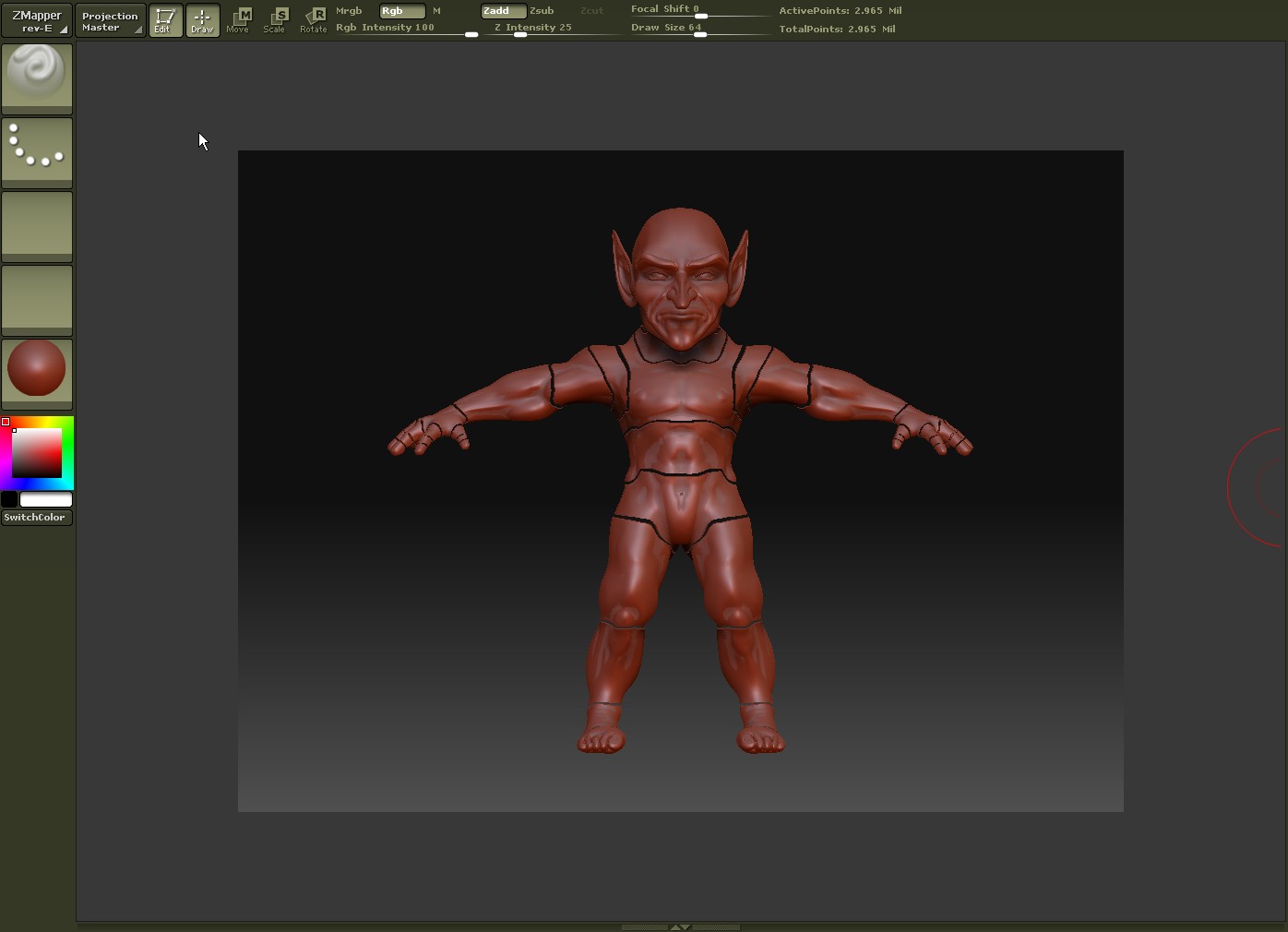
Also, in order to start a new document I get an error. Basically asks me to try again when I've deselected the tool. Only way I can get past that so far is to restart ZBrush! :huh:
Image shows that huge border I mentioned and the mesh as I've exported it as it looks when subdivided up 3 times!
---Wolff On The Prowl---
It's been said that by subdividing you can add in better detail while painting.
In any case I think I remember from the Meats DVD that he said to make sure and mentioned that you should first hit the Crease button and then subdivide. That keeps the mesh from blowing apart like that..
---Wolff On The Prowl---

RAMWolff, I hope you do not mind my asking a question here. It is directed at fivecat. I am also new to ZBrush and UV Mapper. I have Classic. I was reading over your tut on how to prepare a figure for painting. Being very new to the UV mapper program, I'm not sure exactly how to go about selecting to create new groups. So that part of the tut is unclear to me. Could you explain how I should select the parts to create new groups.
Again RAMWolff, I apologize if I seem to be highjacking your thread, I can create another thread for this question if you prefer.
thanks, cimaira
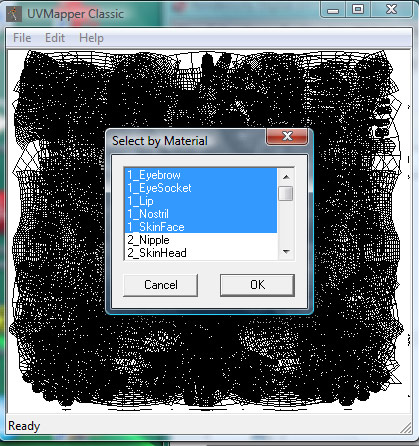
Go to Edit-->Select-->by Material and select all the materials that are on one texture map. For Victoria 4 they made this easy, as each set of materials is preceded by a number. You can see in the attached image that I have selected all the materials on the head texture map (all materials have the 1- prefix).
With the materials selected, go to Edit-->Assign-->to Group. Type in a name for a new group such as FaceMap and Click okay. Do this for all the material groups.
When you are finished, Save Model with a new name -- Don't overwrite your original object file!
You can now bring this object into zBrush, and the groups will be the Material groups you created.
Hijack away, good info is good info for all!!
---Wolff On The Prowl---

Privacy Notice
This site uses cookies to deliver the best experience. Our own cookies make user accounts and other features possible. Third-party cookies are used to display relevant ads and to analyze how Renderosity is used. By using our site, you acknowledge that you have read and understood our Terms of Service, including our Cookie Policy and our Privacy Policy.
OK, I do have a question about exporting from DAZ Studio, not Poser, to prepare a obj to for painting in ZBrush (not morphs, painting!!).
So when I bring up the export dialog.
In the Basic tab there are 3 options:
Ignore Invisible Nodes
Use Bone Welds
Removed Unused Vertices
Which are checked?
In the Advanced tab there are 3 sections with sub options:
Swap Y and Z Orientation
Write UV Coordinates
Write Normals
Write Object Statements
Write Groups (section 2)
Use Existing Groups
Use Node Name(s)
Use Surface Name(s)
Use Figure Name(s)
Write Surfaces (section 3)
Write Material Library (sub options below)
No Maps
Collect Maps
Convert Maps (for Bryce)
Which of these areas should be checked and which sub options should be checked?
Again, this is to export for bringing a figure into ZBrush (single template) for painting, nothing more....
Thanks much!! :biggrin:
---Wolff On The Prowl---
My Store is HERE
My Freebies are HERE