
Renderosity Forums / Poser - OFFICIAL
Welcome to the Poser - OFFICIAL Forum
Forum Moderators: RedPhantom Forum Coordinators: Anim8dtoon
Poser - OFFICIAL F.A.Q (Last Updated: 2026 May 07 11:24 am)

Subject: Another Question on Preview Mode


Doesn't seem to happen on my computer, at least with basic specularity (highlights).
What does your material setting look like?
My python page
My ShareCG freebies

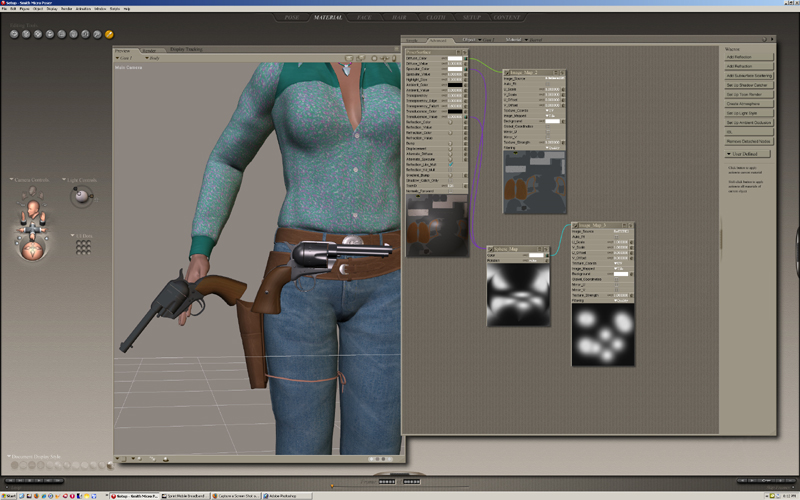
Oh, you're using a Sphere map. When I try to duplicate this with a prop, I still get the
same appearance when parented or not.
Is the same map running to Translucence? I can't quite see it from your picture.
My python page
My ShareCG freebies

Something else to think about, the default preview display style is "USEPARENT". If the parent's preview display style is something other than "USEPARENT" then it will be applied to the model that you make a child of that actor.

But the "useparent" wont' have any effect un the unparented gun. It is then it's own parent so to speak.
So I think what PJZ is saying is that the parented gun takes the display mode of the hand.
Still odd that it happens to you and not to others. Can't check it myself as I'm rendering an animation, but it certainly IS odd.
FREEBIES! | My Gallery | My Store | My FB | Tumblr |
You just can't put the words "Poserites" and "happy" in the same sentence - didn't you know that? LaurieA
Using Poser since 2002. Currently at Version 11.1 - Win 10.
After thinking about it some more, the only display mode I can see in use in the pics Kirwyn showed is "TEXTURESHADED" anyway, so I don't think it's that any more. Must be just some quirk of Poser's OpenGL preview.

Privacy Notice
This site uses cookies to deliver the best experience. Our own cookies make user accounts and other features possible. Third-party cookies are used to display relevant ads and to analyze how Renderosity is used. By using our site, you acknowledge that you have read and understood our Terms of Service, including our Cookie Policy and our Privacy Policy.
I have set up specularity settings so that They are seen in OpenGL preview. In other words, the metal parts of a gun I have modeled appears shiny even before rendering. But a strange thing happens whenever it is parented to the hand. The shiny metal parts suddenly go flat or have a matte finish. In both instances, the final render is the same, but I was hoping to have this shine in OpenGL. I have changed this and that in the PP2 file, but still end up with the same result. In short, a prop parented to the universe appears shiny in OpenGL, but when parented to a body part, the same prop now appears flat without any specularity. Is there a fix for this or is this just the way it is?