
Renderosity Forums / Vue
Welcome to the Vue Forum
Forum Moderators: wheatpenny Forum Coordinators: bwsupport
Vue F.A.Q (Last Updated: 2026 Feb 27 3:10 pm)

Subject: An interesting alpha problem


Attached Link: http://www.renderosity.com/mod/forumpro/showthread.php?thread_id=2765947
This seems like a similar problem (or at least the same root cause) as the one Tubbritt had in the thread above.
Hm, strange...no, niothing there helps I will just have to keep it off the ground i suppose. I do think it is odd though. Almost like AO is causing it as it does with certain lighting in Cinema 4D (;
The most beautiful experience we can have is the mysterious. It is the fundamental emotion that stands at the cradle of true art and true science...
Yeah sorry, your right. I was reading all the translucence and such as well got confused :D
For this problem however it will have to be "faked" in photoshop as an afterthought to achieve the effect i want. I have never seen this behavior in Vue and have been using 6Infinite since its birth. I am assuming e-on knows already.
The most beautiful experience we can have is the mysterious. It is the fundamental emotion that stands at the cradle of true art and true science...

I had this problem too, and Tech support told me there was nothing to do about it atm, it's a limitation of the Vue renderer. Any object that uses a transmap when in contact with another surface will create this artefact. The only thing you can do is lift up the alpha plane like +0.01 cm, this should do the trick and may not be noticeable, depending on the camera angle. Might screw up the sahdows though.
Right, exactly bruno, it isnt a physical object (could model one if i had to i guess) so i would like it to be able to cast shadows, and i was going to have steam coming from the "holes" in the top so i wanted it to be relative close up. I think i will just have to model it the more i think about it as i type this actually. Then i can just cubemap the alpha onto the disk and see where that gets me.
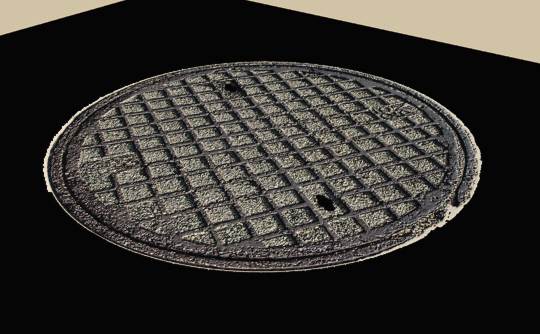
What makes me wonder though is if you look at the bottom pic you can see around the edge of the cover it looks like it wants to work then just decides not to. You can see the ground through the alpha around the edge.
The most beautiful experience we can have is the mysterious. It is the fundamental emotion that stands at the cradle of true art and true science...

Privacy Notice
This site uses cookies to deliver the best experience. Our own cookies make user accounts and other features possible. Third-party cookies are used to display relevant ads and to analyze how Renderosity is used. By using our site, you acknowledge that you have read and understood our Terms of Service, including our Cookie Policy and our Privacy Policy.
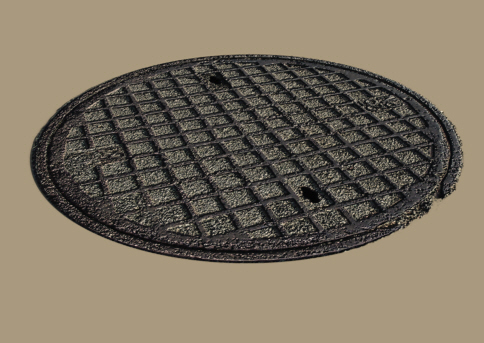
I have this problem as you can see, but only when i drop the plane to the ground. Nothing helps with adjusting the shadows. The alpha is built into the tga file.The most beautiful experience we can have is the mysterious. It is the fundamental emotion that stands at the cradle of true art and true science...