
Renderosity Forums / Carrara
Welcome to the Carrara Forum
Forum Coordinators: Kalypso, Anim8dtoon
Carrara F.A.Q (Last Updated: 2026 Sep 09 4:39 am)
Visit the Carrara Gallery here.

Subject: Using surface replicator on a grouped object...


I have never had the first problem, but as for the loading Poser content problem, the only time I have had this problem is when the imported content has a camera1 and light one attached. Usually just deleting the annoying duplicate camera 1 and light 1 solves the problem. If you don't have the duplicates, then I can't think of anything else, sorry.

I have had this problem with several poser buildings. I dragged them in from the browser, then tried to replicate. The replicants go off in weird directions. I was able to get the buildings positioned right by typing in a value for the hotpoint (trial and error, watching the buildings get closer and closer).
I suspect that part of the problem is that the buildings carry more hotpoint information than just for the whole model. The ceiling has a hotpoint and the south wall and the west wall, etc...
I got the result I wanted, by going over each named part and setting the hotpoint to a place that worked. Notice I did not say I set the hotpoint to zero! It was all trial and error.
?Maybe it will work better if you fuse the fly body, (or remove the bones)?
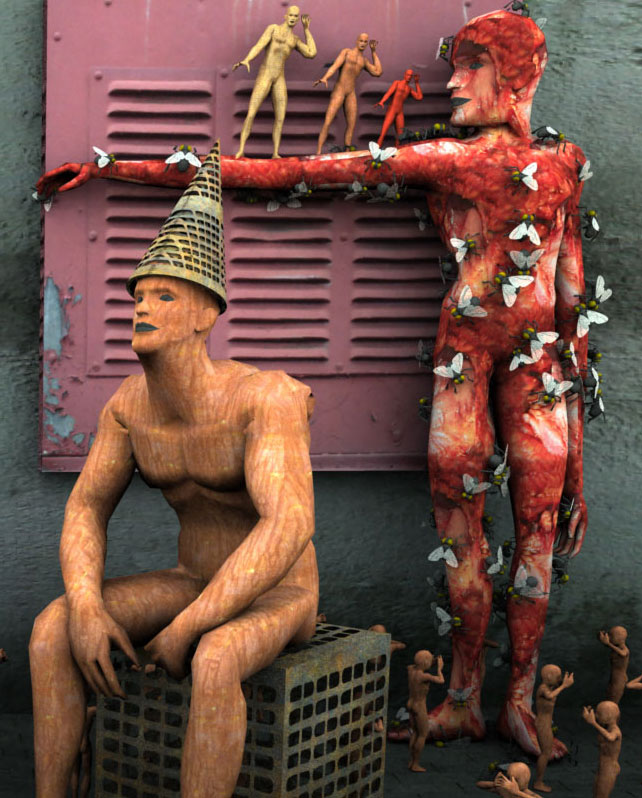
Sue, I did try to get it to set right through much trial and error (an obvious failed attempt =B), but I want to know either how to fix or avoid the issue altogether.
I still dont know why the fly wouldnt go to the scene dead center either. Even after a regroup, it didnt work. Curious.............
There are 3 kinds of people in the
world. Those that can count, and those that can't..

Privacy Notice
This site uses cookies to deliver the best experience. Our own cookies make user accounts and other features possible. Third-party cookies are used to display relevant ads and to analyze how Renderosity is used. By using our site, you acknowledge that you have read and understood our Terms of Service, including our Cookie Policy and our Privacy Policy.
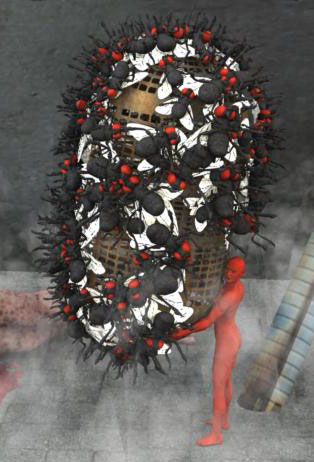
Hey peoples, whats shakin =)I use the surface rep alot in C6Pro, but I notice that if something is "wrong" w/ the replicated object, itll totally screw up your output.
Ive found that there are several objects in C6pro (and this also happens ALOT w/ Poser Content loaded in from the runtime folder) that once in the scene, do NOT respect positioning and hot point centers...
On the last piece I did, I tried to replicate the C6Pro fly, something Ive done and used before, but this time, I just was not able to place it at the scenes dead center... Center object hotpoint would work, but trying to send to scene center would have it float above the center, setting it at 0,0,1 instead of 0,0,0.
To fix it (or so I thought) I ungrouped the fly, regrouped, set the object hotpoint at center and centered the fly. It worked the 1st time, but when trying again I notice it went back to the 0,0,1 position (I didnt see it move, but when going back and forth from the assembly to the render room, it happened). Weird huh?!?
When setting objects to replicate on a surface, I know to have the hotpoint on the ground, this will ensure that the object stays "floored". After setting the fly and the hotpoint to this position, I notice the flies would NOT be on the surface of the object I had set... Also, the flies replicated on their backs and rotated way off from the setting I placed on them, and I have no idea how to compensate for this glitch or fix it altogether...
I also have this problem w/ Poser content pulled into C6Pro not coming in at dead center and w/ hotpoints not at the object center. However, w/ Poser content, trying to adjust the hotpoint gives freakish results, for example, turn on Caps Lock to move the object center down, and the object itself begins to go up, while the hotpoint stays in its position... Try to replicate these objects and the objects render no where near the surface, and its no way to really assume the position of the objects hotpoint to compensate or fix the problem...
You can see in the image that the flies are not respecting the surface. I only have them rotating in the z axis (so theyre facing different directions, they should still be flat on the surface) but they seem to be all over the place, and alot of their feet are sticking out into the air... Totally not the desired effects, especially from the settings in my surafce replicator...
Anyone else see or notice this w/ some of the stuff in C6Pro and pulled in from the Poser runtime?!?
There are 3 kinds of people in the world. Those that can count, and those that can't..