
MatCreator opened this issue on Oct 13, 2008 · 5 posts
MatCreator posted Mon, 13 October 2008 at 7:08 AM
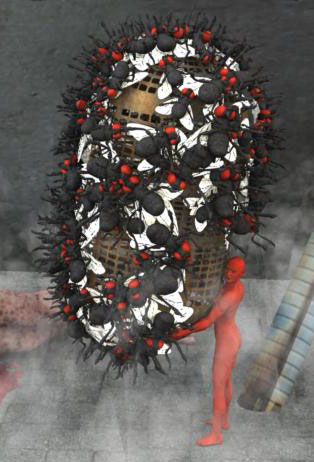
I use the surface rep alot in C6Pro, but I notice that if something is "wrong" w/ the replicated object, itll totally screw up your output.
Ive found that there are several objects in C6pro (and this also happens ALOT w/ Poser Content loaded in from the runtime folder) that once in the scene, do NOT respect positioning and hot point centers...
On the last piece I did, I tried to replicate the C6Pro fly, something Ive done and used before, but this time, I just was not able to place it at the scenes dead center... Center object hotpoint would work, but trying to send to scene center would have it float above the center, setting it at 0,0,1 instead of 0,0,0.
To fix it (or so I thought) I ungrouped the fly, regrouped, set the object hotpoint at center and centered the fly. It worked the 1st time, but when trying again I notice it went back to the 0,0,1 position (I didnt see it move, but when going back and forth from the assembly to the render room, it happened). Weird huh?!?
When setting objects to replicate on a surface, I know to have the hotpoint on the ground, this will ensure that the object stays "floored". After setting the fly and the hotpoint to this position, I notice the flies would NOT be on the surface of the object I had set... Also, the flies replicated on their backs and rotated way off from the setting I placed on them, and I have no idea how to compensate for this glitch or fix it altogether...
I also have this problem w/ Poser content pulled into C6Pro not coming in at dead center and w/ hotpoints not at the object center. However, w/ Poser content, trying to adjust the hotpoint gives freakish results, for example, turn on Caps Lock to move the object center down, and the object itself begins to go up, while the hotpoint stays in its position... Try to replicate these objects and the objects render no where near the surface, and its no way to really assume the position of the objects hotpoint to compensate or fix the problem...
You can see in the image that the flies are not respecting the surface. I only have them rotating in the z axis (so theyre facing different directions, they should still be flat on the surface) but they seem to be all over the place, and alot of their feet are sticking out into the air... Totally not the desired effects, especially from the settings in my surafce replicator...
Anyone else see or notice this w/ some of the stuff in C6Pro and pulled in from the Poser runtime?!?
There are 3 kinds of people in the
world. Those that can count, and those that can't..