Filter: Safe | Sun, Jul 19, 12:20 PM CDT

Renderosity Forums / Carrara


Welcome to the Carrara Forum

Forum Coordinators: Kalypso, Anim8dtoon

Carrara F.A.Q (Last Updated: 2026 Jul 11 2:50 am)


Visit the Carrara Gallery here.

Carrara Free Stuff here.

 
Visit the Renderosity MarketPlace - Your source for digital art content!


Subject: Ugly Betty Syndrome!


MrGorf ( ) posted Sat, 27 October 2007 at 8:47 AM · edited Wed, 08 July 2026 at 9:35 AM

file_391898.jpg

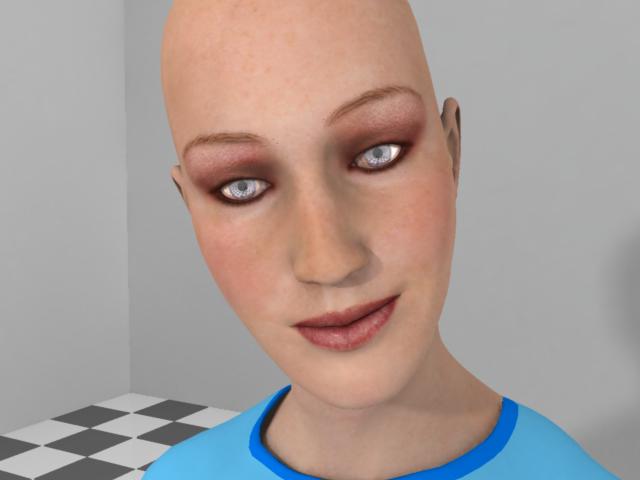
Hello, all. I haven't used Carrara too much in the past but I'm ernestly trying to bring Poser things into it now. (Hey, somebody just rolled their eyes!) Anyway, I spent a couple hours last night trying to figure this one out. I've got Stephanie Petite all ready to go in Carrara. Everything looked fine until I turned on Global Illumination (Indirect Light). Actually, most things look better this way, except... Now Steph has these massive eyebrows! :scared: I spent a couple hours stewing over this, making lots of renders, some at very high settings. Turn Global Illumination off, and they go away. Turn it back on, there they are. I tried making the Eyebrow material completely "Transparent" and/or completely "Alpha." (This is one of the International Beauties maps so the actual brows are on the base texture.) After sleeping on the problem, I realized that the color of them was fooling me. This isn't the Eyebrow material failing to go transparent, it's the SHADOW of the invisible eyebrows! (Is it??) This turns out to be a more compelling issue than I originally thought. This also means no definition in the eyelashes, etc. I have the hair turned off at the moment but I'm sure this and any other partially transparent object would be casting a shadow of the full object. I get the feeling that Global Illumination and Radiosity-type effects are for "purely diffuse surfaces" (as Wikipedia tells me) and are not really appropriate for scenes with any transparent objects. Is this true? So, like, what do I do about this? Do I need to go in and delete the polygons of the Eyebrow material? Is there an easier way? Thanks for any help. *P.S.: Point of reference, on the (American) Ugly Betty television show, the makeup artists "paint" her eyebrows to be much bigger than they really are.*


Incognitas ( ) posted Sat, 27 October 2007 at 9:42 AM

Not wishing to be asking an obvious question but aren't you supposed to tick the let light through transparancy in TWO places if you are using global lighting in the render room?In the top box and under global lighting?


Miss Nancy ( ) posted Sat, 27 October 2007 at 3:24 PM

those things come with transmaps. follow incog's tip. GI works with those, if ya use the correct settings. post yer render settings. i can see the cornea and eyelash materials also have bad settings.


MrGorf ( ) posted Sat, 27 October 2007 at 6:32 PM · edited Sat, 27 October 2007 at 6:35 PM

file_391934.jpg

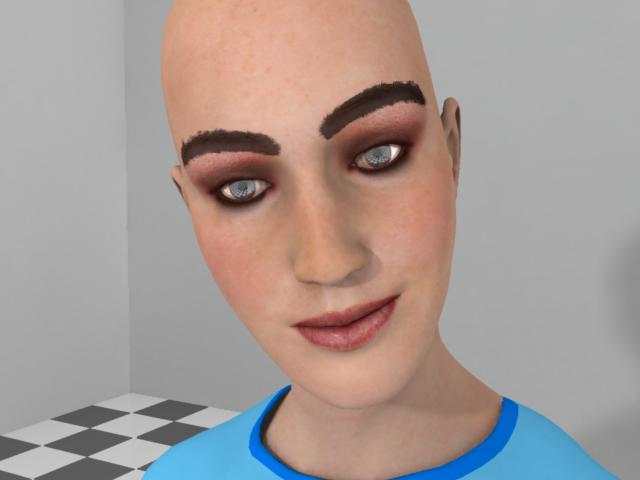
Aah! So that's it! I guess it would pay to read the manual a little more closely, huh? That second "Light Through Transparency" checkbox was staring me right in the face and I didn't even notice it. That did the trick, as you can see. Miss Nancy, you spotted something I didn't - the corneas were casting shadows as well, but it's hard to notice unless you see the "after" picture with it. Honestly, I was wondering why on earth anyone would want "Light Through Transparency" for raytracing but not for global illumination. That was before I turned on the hair and tried a render. The light map was projecting to take not hours, but DAYS to finish!! I think I've got a little tweaking of the settings yet to do... Actually I was testing subsurface scattering on the hair which seems entirely appropriate and realistic, but, uhh... Maybe we'll skip that part! Anyway, thanks for the help. It would have been a really long time before I noticed that silly checkbox! As an aside... One drawback of the International Beauties package is the eyebrows drawn on the map and the Eyebrow transmapped material are not quite aligned. (At least on this one.) This picture is just with the Eyebrow material completely turned off.


MrGorf ( ) posted Sat, 27 October 2007 at 8:54 PM

file_391943.jpg

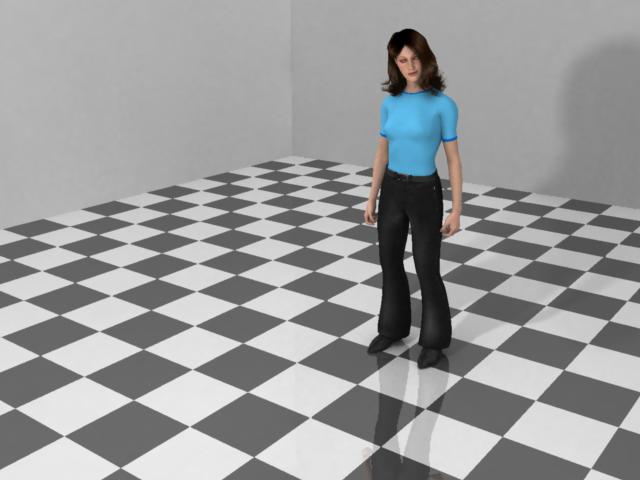
Here's a long shot with the hair and Light Through Transparency turned on. This took about 48 minutes to render. I think the net result, especially for a closeup, is that it's not worth it unless I use some MUCH geometrically simpler hair. However, this is a good demonstration that the effects are working. Thanks again for the advice. By the way, there is only one Bulb light in this scene.


Privacy Notice

This site uses cookies to deliver the best experience. Our own cookies make user accounts and other features possible. Third-party cookies are used to display relevant ads and to analyze how Renderosity is used. By using our site, you acknowledge that you have read and understood our Terms of Service, including our Cookie Policy and our Privacy Policy.