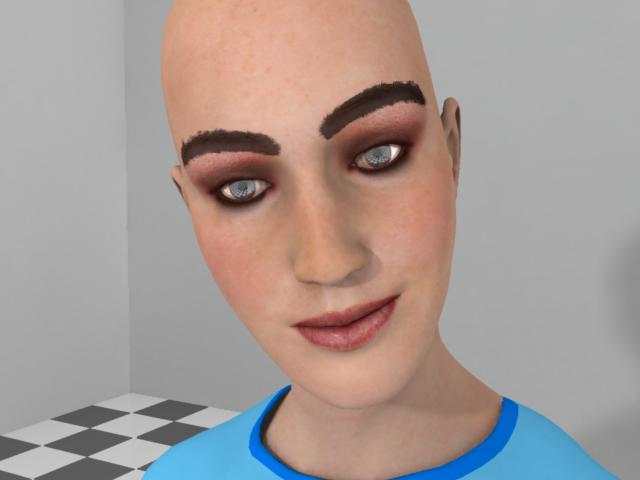
Hello, all. I haven't used Carrara too much in the past but I'm ernestly trying to bring Poser things into it now. (Hey, somebody just rolled their eyes!) Anyway, I spent a couple hours last night trying to figure this one out. I've got Stephanie Petite all ready to go in Carrara. Everything looked fine until I turned on Global Illumination (Indirect Light). Actually, most things look better this way, except... Now Steph has these massive eyebrows! :scared: I spent a couple hours stewing over this, making lots of renders, some at very high settings. Turn Global Illumination off, and they go away. Turn it back on, there they are. I tried making the Eyebrow material completely "Transparent" and/or completely "Alpha." (This is one of the International Beauties maps so the actual brows are on the base texture.) After sleeping on the problem, I realized that the color of them was fooling me. This isn't the Eyebrow material failing to go transparent, it's the SHADOW of the invisible eyebrows! (Is it??) This turns out to be a more compelling issue than I originally thought. This also means no definition in the eyelashes, etc. I have the hair turned off at the moment but I'm sure this and any other partially transparent object would be casting a shadow of the full object. I get the feeling that Global Illumination and Radiosity-type effects are for "purely diffuse surfaces" (as Wikipedia tells me) and are not really appropriate for scenes with any transparent objects. Is this true? So, like, what do I do about this? Do I need to go in and delete the polygons of the Eyebrow material? Is there an easier way? Thanks for any help. *P.S.: Point of reference, on the (American) Ugly Betty television show, the makeup artists "paint" her eyebrows to be much bigger than they really are.*
