
Renderosity Forums / Poser - OFFICIAL
Welcome to the Poser - OFFICIAL Forum
Forum Moderators: RedPhantom Forum Coordinators: Anim8dtoon
Poser - OFFICIAL F.A.Q (Last Updated: 2026 Jun 04 5:51 pm)

Subject: What the heck??? (Poser7 saving in png)


That's bizarre. I usually save in .tif and I have had no problems. I've also tried the .jpg and had success. Do you have the latest patch? I know there was a problem with the jpg saving pre-patch (though I never used it at that time, so I couldn't tell you what the problem was, I jsut read some somplaints.)
I'll try and do a test with psd and see what happens.

can't help with the P7 bit , but you should be able to view a .png file in windows picture and fax viewer by right clicking on it then selecting "windows picture and fax viewer" , i use that sometimes if i have a big image that i'm playing with 'cause no matter how big it is it will open smoothed, you can view it with a white background , or start a slideshow and pause it with a black background (edit colour of your choice)

My P7 does the same thing, even though I always save in TIF format. Current browsers have no problem with PNG format that I know of, and it's actually a nice blend of JPG and GIF features (think 16M colors AND transparency). I just haven't come to trust the format yet.
As for Poser remembering that I like TIF better, well why would anyone expect that? It can't remember where it got the last texture or PZ3. It can't even figure out whether I want to select the great big head my cursor is centered on or the pinkie finger nearby. It expects you to delete stranded hair one..... strand.... at......... a..................... time..................................
But who cares? The niceties of normal programming are for girlie men and infidels.
M


So am I.
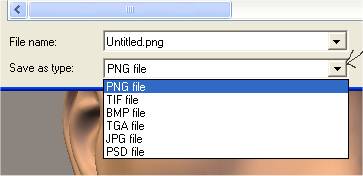
Poser 7 has a Drop Down Box that lets you choose what format you want to save the image as.
Png is simply the Default Choice.
Also, when given the choice of percentage, as with a jpg, 100% is the best quality.
P7 Defaults to 75%
DR
"That government is
best which governs the least, because its people discipline
themselves."
Thomas Jefferson
while we are on the subject, has anyone worked out a way that i could save a vue render in layers for photoshop?
i was a bit dissapointed that when i had planned a scene in layers in vue, taking care to include all that i wanted to manipulate was in each layer, that when i saved it as a .psd file it was a flattened image file, i kinda hoped that was one reason for the layering option in vue.
the only thing i can think of ( but haven't tried it) would be to do the same as i did but, make each layer i need visable, and hide the others, render and export each layer like that as a .png, and then bring it all together again in photoshop, then save as a layered .psd.
but it would be less time consuming if vue exported .psd as a layered file me thinks.
BTW, nearly all the postworked images i've made, that are rendered in poser i export as both a .bmp( with black background) and a .png file, that way you can do lots of overlay effects.
Of course. I save usually in psd format because I work with PhotoShop for alpha channels, retouching and signing my pics. With my P6 NEVER had the same trouble: I save in psd format and I get a *.psd file. But my crazy P7 is kidding or something... I save in psd format (SELECTING IT) and I get a *.png file unable to open. I change manually its extension from png to psd and now the file works OK and opens as psd in PhotoShop or every viewer
Looks like P7 is saving in psd format but writting a png extension... :blink:
CASETTE
=======
"Poser isn't a SOFTWARE... it's a RELIGION!"

Quote - For example, I saved a pic selecting PhotoShop PSD format and the result is Render1.png :blink: , a file which is impossible to open with any viewer... until I change manually the extension from png to psd and then it works OK
Haven't had that problem either, P7 pretty much saves to the extension I select. (Though I've never really tried to save to PSD directly out of Poser) Have you tried the other extensions other than PSD to see if they revert back to PNG as well?
Quote - Also, when given the choice of percentage, as with a jpg, 100% is the best quality.
P7 Defaults to 75%
I have also found that P7's jpeg compression to be a bit funky. ANY setting below 100% (even like 98%) gives me really nasty artifacts. This didn't seem to be the case in previous versions of Poser as anything in the vicinity of 95% or so were pretty clean before.
Hey! His nose is dry! ... Someone should lick it, just in case. - Diego


I've noticed the same annoyance. I'm in the habit of using BMP,
and when you try to save in BMP, you have to write out the entire
filename. The extension isn't automatically filled in.
Would be MUCH better to put a default choice in the INI
file so you can have your own preference come up first.
My python page
My ShareCG freebies


I will say this one difference, which I have reported... but Poser 6 remembered what you previously selected from session to session. Poser 7 does not. Once you realize that, the issue normally disappears. (It did for me at least, since I always save as TIFF!) Poser 7 normally will remember within a session, even when starting new Projects.
ratscloset
aka John


Privacy Notice
This site uses cookies to deliver the best experience. Our own cookies make user accounts and other features possible. Third-party cookies are used to display relevant ads and to analyze how Renderosity is used. By using our site, you acknowledge that you have read and understood our Terms of Service, including our Cookie Policy and our Privacy Policy.
Hi Folks
Slowly I'm starting to try P7 (it crashes still lots of times) and there's a detail which is knocking me. When I finish any render and I try to save the pic, all times Poser add to it a *.png extension!
For example, I saved a pic selecting PhotoShop PSD format and the result is Render1.png :blink: , a file which is impossible to open with any viewer... until I change manually the extension from png to psd and then it works OK
WTH is this, anyone has the same bug, and how can I fix it???
CASETTE
=======
"Poser isn't a SOFTWARE... it's a RELIGION!"