
Renderosity Forums / Carrara
Welcome to the Carrara Forum
Forum Coordinators: Kalypso, Anim8dtoon
Carrara F.A.Q (Last Updated: 2026 Sep 09 4:39 am)
Visit the Carrara Gallery here.

Subject: WIP - asking for suggestions


Cute. Yeah, something is off w/ that pup. Looks like you have too much light also. I would make sure you have no interpolation. Are you using an alpha mask?(not sure what kind of texture that is). If so make sure it is there. Also If you are using GI make sure BOTH options for light thru trans are checked. If you are using a trans/alpha map maybe the colors are inverted(white/black). His mouth is also too red, but you might not be there yet. The seal also looks very yellowish instead of the darker brownish/grayish color.Also get some refraction on the eyes.
No need to think outside the box....
Just make it
invisible.

Short fur is going to show strong anisotropic effects. Like velvet; looked at dead-on, you look down into the shadows at the base of the hairs and it is darker. Looked at from an angle, you see the shiny sides of hairs (and your view of the shadows is blocked) and it is lighter. Use fake fresnel, anisotropic lighting, tricks like that. I'd also, with such a light surface (ice/snow), turn ambience all the way down/off, and apply GI; especially "Indirect" light. If you actually have exposed new ice you might even look at adding caustics.
Attached Link: http://toucan.web.infoseek.co.jp/3DCG/3ds/FishModelsE.html
Wow! Thanks for all the help. I'll start makin' some changes. My experience with indirect light has been - check, render, wait. So I don't use it much. I'm running a eMac 1.25gig with 1gig ram. It does okay for now. On a different note, I just found the most amazing examples of fish models I have ever seen on the web. The site is out of Japan. The artist is selling his/her work with the 3Dsquid shop. I downloaded and played around with a few models. Amazing quality and maps. For some time now I've been building similar models, but not to the same quality - at first I had mixed emotions. I slept on it, and now I can appreciate the work - and my work as wel. We are all at different stages, right? anyway, here is the site. He/she allows the models to be used, but not sold - or used in something to be sold, unless the models are purchased. Fair enough.Never Give Up!
Nice link ominousplay. Yeah, you can't get yourself down in comparing yourself to someone else. You will most likely always be hardest on your own work(if you strive to be good anyway).I think our creator intended us to be part of a process rather than constantly be concerned with the man created one of product.This is the natural order of things which is why we suffer so...we let ourselves be coaxed into be unnatural. Creating is supposed to be a joyful process :)
No need to think outside the box....
Just make it
invisible.
Never Give Up!
Honestly, I have been using the poser pre-rigged, testing a bit w/ mimic also. I stopped dealing with my own rigs, when I get around to some character modeling I am sure I will deal with it again. Some of the limitations w/ cararra's current animation/rigging haven't compelled me to deal with it.If I get problems in carrara I don't get freezing. I get errors or a few times thrown out(carrara trees do this). More often I get sluggish performance(they really need to look at D|S opengl preview).
No need to think outside the box....
Just make it
invisible.
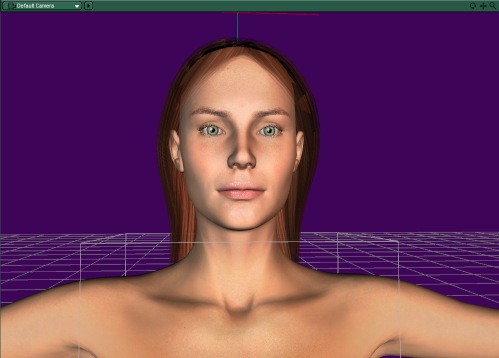
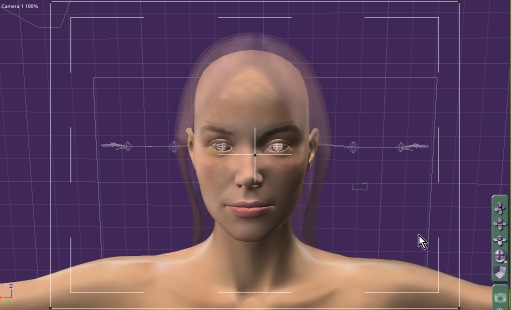
Are you using DazStudio to get the model the way you want it then back to Carrara for final comp.? My need is to use the models in an environment for the big picture. I could add each piece one by one in photoshop, as long as the lighting / camera angle between Poser/Daz and Carrara is same.
Never Give Up!
Yeah, basically. I don't really render in D|S. It has an interesting look and even does a nice cartoon. Since C5 I am actually doing more with native then importing hair/clothes and using imported pz2 for posing. I can setup a character and see what it looks like better/quicker in D|S and pose it easier. The powerpose w/ the pinning is very easy and intuitive. I haven't animated yet in D|S to export to carrara for tweaking as a pz2(so I am not sure you can export a pz2 animation sequence from D|S, but I know you can from mimic, pretty sure you can tho)If you export a figure as an obj from D|S it's pretty fast, but then you can't use prexisting rigging.Get the free plugins and exporter scripts from the free archive. The other plugins are also really dirt cheap, if you need them. There is currently a very minor issue w/ D|S obj export. They updated their format to be compatible w/ new obj syntax so for carrara it means one little change before import or no textures come in. You simply edit the obj file and remove the quotes around the mtl statement at the top in a text editor then save.Carrara then can read the textures. Still will have missing alphas, but I suspect carrara is at fault there since this seems to happen alot w/ other programs.DS is going to make some changes to this shortly tho.Anyway check it out.
No need to think outside the box....
Just make it
invisible.

Privacy Notice
This site uses cookies to deliver the best experience. Our own cookies make user accounts and other features possible. Third-party cookies are used to display relevant ads and to analyze how Renderosity is used. By using our site, you acknowledge that you have read and understood our Terms of Service, including our Cookie Policy and our Privacy Policy.
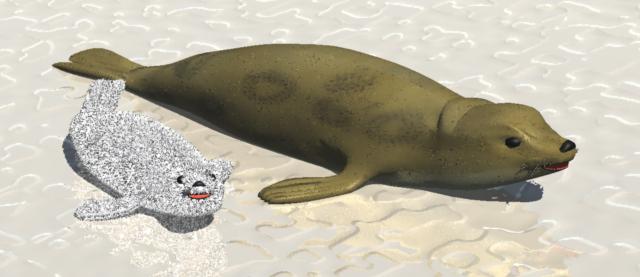
I'm trying to creat Arctic scenes. Picked up a polar bear off Daz site, but needed a seal. What do you'all think? Suggestions? The snow/ice needs work. And the AG fur on the pup is very dark. Its skin is white, fur white, neither takes shadows, but stil I get dark patches... if it was ALL white there would be no contrast, but this is still too much for me. Ideas? RNever Give Up!