
Renderosity Forums / Poser Python Scripting
Welcome to the Poser Python Scripting Forum
Forum Moderators: Lobo3433, Staff Forum Coordinators: Anim8dtoon
Poser Python Scripting F.A.Q (Last Updated: 2026 Jan 04 1:47 pm)
Check out the new Poser Python Wish List thread. If you have an idea for a script, jot it down and maybe someone can write it. If you're looking to write a script, check out this thread for useful suggestions.
Also, check out the official Python site for interpreters, sample code, applications, cool links and debuggers. This is THE central site for Python.
You can now attach text files to your posts to pass around scripts. Just attach the script as a txt file like you would a jpg or gif. Since the forum will use a random name for the file in the link, you should give instructions on what the file name should be and where to install it. Its a good idea to usually put that info right in the script file as well.
Checkout the Renderosity MarketPlace - Your source for digital art content!

Subject: Integrating Poser With Other Programs


In principle, you could communicate between different programs (e.g., a python plug-in for Poser and another plug-in for the other program) in various ways:
* One calls the other from the command-line.
* One creates a file that the other is checking for (in a shared location).
* One sends a network message that the other receives.

All libs needed to communicate with the outside world via network is already included in (Poser) Python. Just look at the Python documentation.
Poser provides "poseraddon.py", a class one can use to get informed on several events, "frameChanged" included.
I made a script 3 years ago to "remote control" Poser figures from the outside world via MQTT.
On the other side: sure that you need an external "image processor"? Poser Python includes "Pillow" already. A complete image processor.
https://pillow.readthedocs.io/en/latest/handbook/index.html
And wxPython has some related functions too. Here is how to combine wxPython (the Poser part) and Pillow:
https://wiki.wxpython.org/WorkingWithImages
adp001 posted at 1:52 PM Thu, 4 December 2025 - #4501971
On the other side: sure that you need an external "image processor"? Poser Python includes "Pillow" already. A complete image processor.
I don't know the capabilities of Pillow. I know that the TOS transporter effect I'm doing requires multiple layers, tinkering with the alpha channel/masks, and starting at a specific spot to fade in the effect, and then fading the effect out to the same spot.
I have the process worked out manually, but I'm having difficulties getting my simplest test scripts to register, and I haven't started on the Poser side yet.
But I'm grateful for the leads you've given me. I'm but a neophyte when it comes to Python, worse when it comes to Poser and Gimp. (Idid write a script to rename the shadow cams about ten years ago, and then Python changed on me.)
It's a shame I don't know what TOS is and what the transporter effect looks like.
But I know that Pillow can handle “layers.” Or rather, it is capable of combining multiple images (layers) into one.
Masks can be used when merging layers.
If your effect does not require complicated image manipulations that are built into Gimp (special Gimp filters, for example), then it should be possible to recreate your effect with Python and Pillow. I can only say for sure once I know more precisely what needs to be done in Gimp to process a single image generated by Poser. I assume that the processing in Gimp is always the same, but that a different mask has to be used for each image?
Another question: Why is synchronization between Poser and image processing necessary? Can't you use Poser to create an animation sequence as individual images and then feed the set of individual images to a script? The script then processes the images accordingly, and you can reassemble the individual images back into a video clip.
???

Yes, it's perfectly possible with Windows and Photoshop. You automate the Poser renders from a saved scene, drop the renders to a Windows folder, have the script call Photoshop and a Photoshop script, Photoshop auto-loads the dropped renders into a layer stack, then runs a Photoshop Action to sort the stack and apply filters etc, then saves as a .PSD file. The script then restores the Poser scene to what it was before the script ran, moves the dropped renders to a datestamped folder for backup, closes Photoshop and quits. Rinse and repeat.
Learn the Secrets of Poser 11 and Line-art Filters.
It's a shame I don't know what TOS is and what the transporter effect looks like.
But I know that Pillow can handle “layers.” Or rather, it is capable of combining multiple images (layers) into one.
Masks can be used when merging layers.
If your effect does not require complicated image manipulations that are built into Gimp (special Gimp filters, for example), then it should be possible to recreate your effect with Python and Pillow. I can only say for sure once I know more precisely what needs to be done in Gimp to process a single image generated by Poser. I assume that the processing in Gimp is always the same, but that a different mask has to be used for each image?
Sorry, shouldn't have abbreviated like that. [wry smile]
It doesn't use different masks, but the whole process is broken down into three segments, each with its own sequence of mask usage. The first creates a mask to shape the effect as it appears over the characters (currently motionless, no camera panning, either). The effect does not fade in; rather, it gets larger until it fills the shape of the mask as the brush gradually fills the mask. The second needs the same mask to keep the humanoid shape of the transporter effect while the characters are faded out from underneath it. The last stage uses the same mask to soften and shrink the effect to invisibility. Again, the effect does not fade out, the appearance and disappearance is handled by a brush to modify the mask. Each stage lasts for 100 frames, giving a total of 300 frames for a 10 second animation.
That's for a beam out. It might be possible to reuse the three modules in a different sequence with some added logic to reverse the process for a beam in.
Poser is needed to generate an image of an empty transporter room, a transporter with "passengers" on the pads, and an image of just the "passengers" with an alpha channel for the mask. I haven't investigated if the "sparklies" can be generated by the image processor; I used someone's snow generator in Poser to create those.
HartyBart said: "Yes, it's perfectly possible with Windows and Photoshop. You automate the Poser renders from a saved scene, drop the renders to a Windows folder, have the script call Photoshop and a Photoshop script, Photoshop auto-loads the dropped renders into a layer stack, then runs a Photoshop Action to sort the stack and apply filters etc, then saves as a .PSD file. The script then restores the Poser scene to what it was before the script ran, moves the dropped renders to a datestamped folder for backup, closes Photoshop and quits. Rinse and repeat."
I'm doing something similar manually, minus the .PSD part.
It looks like this:
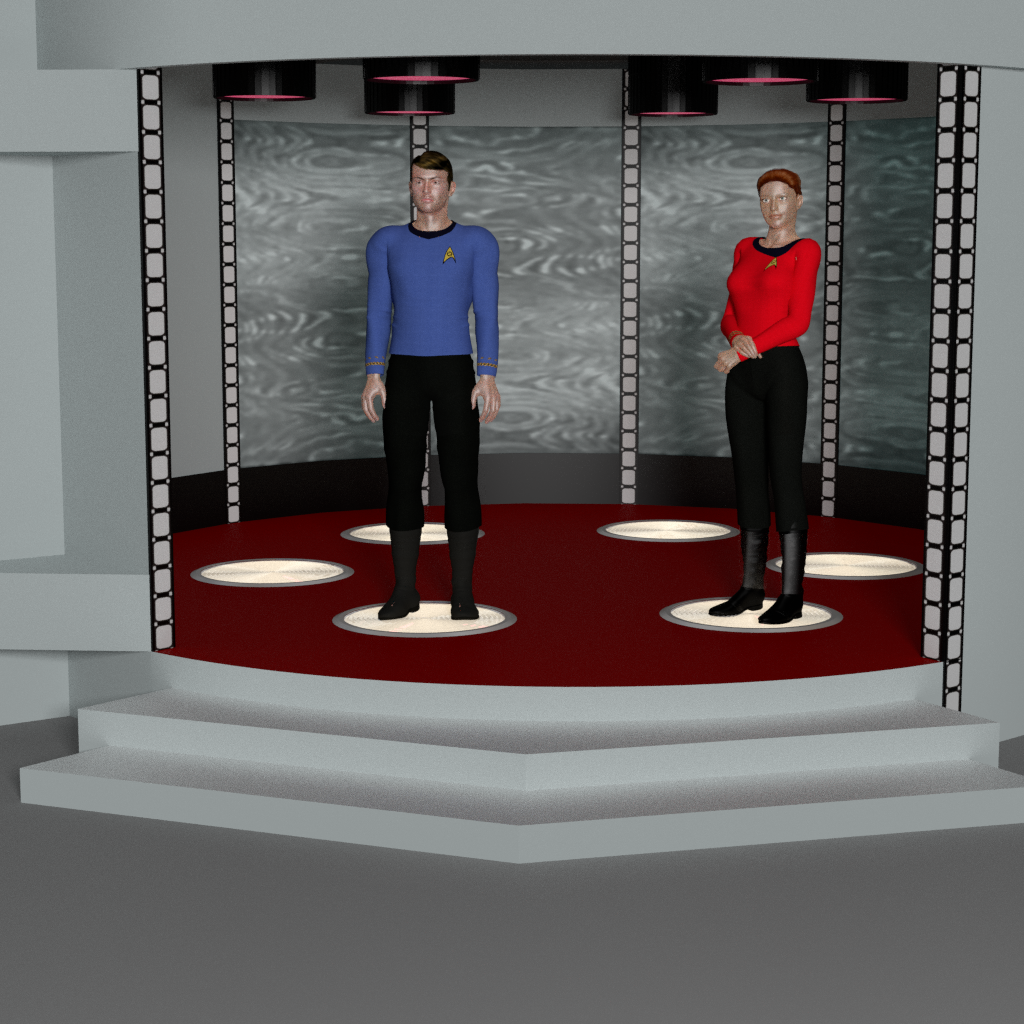
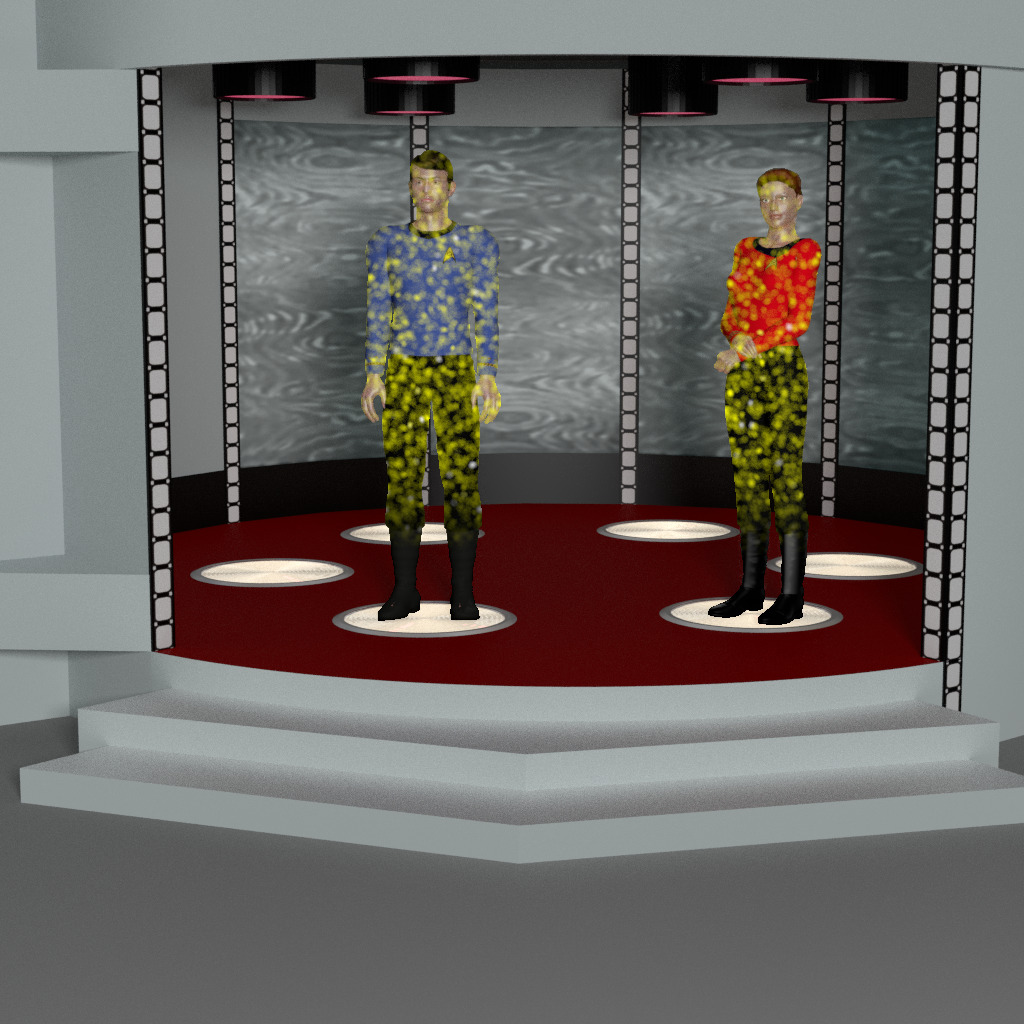
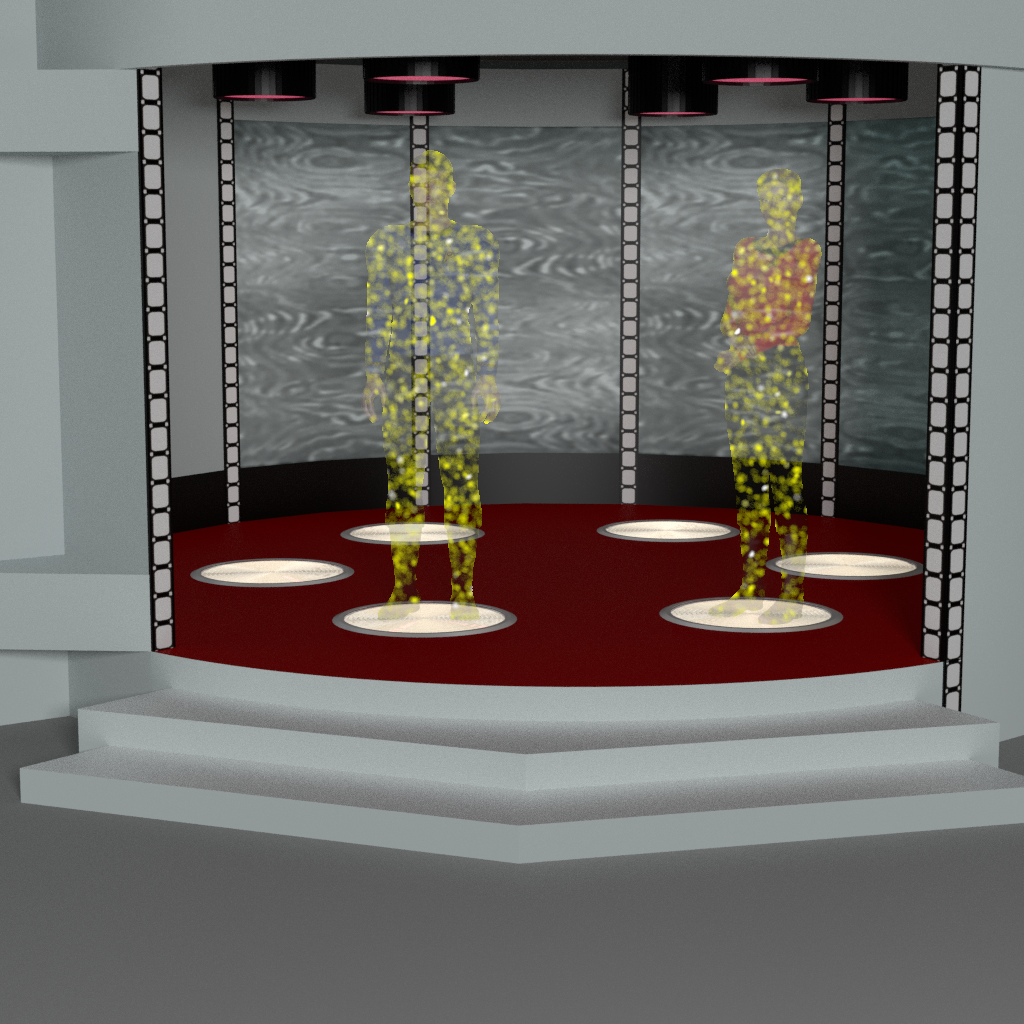
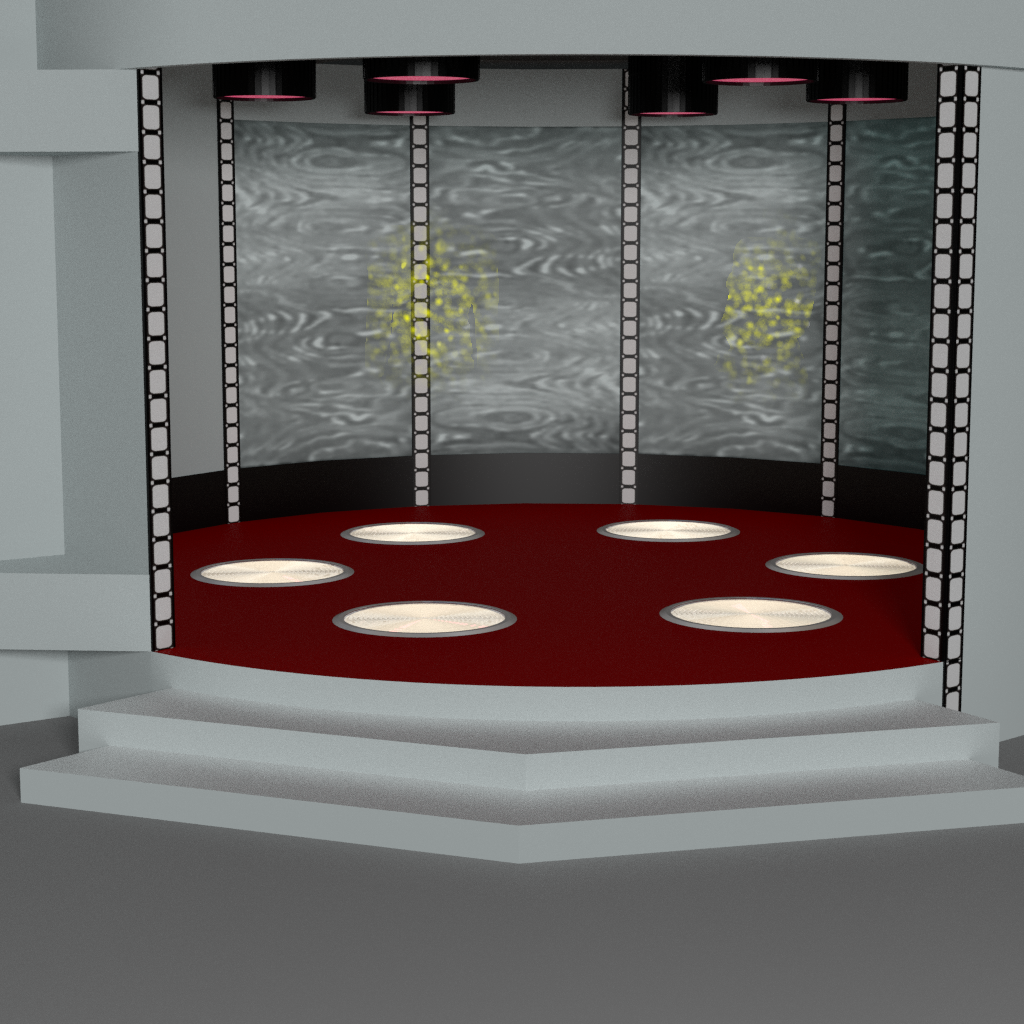
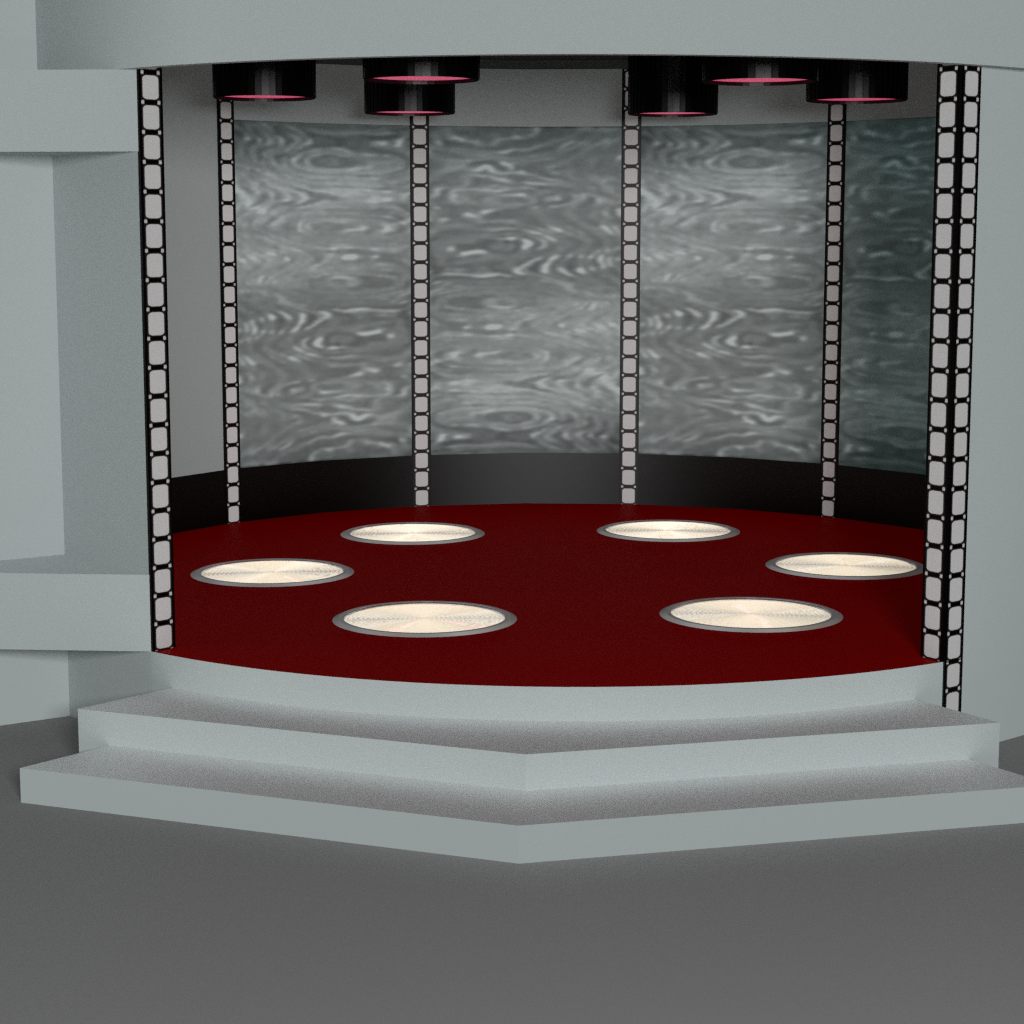
Thanks for the images. The complex bit seems to be the fade-out mask (i.e. head and feed vanishing before the centre of the body does). Is this being done already, in Poser? And it sounds like the sparklies are also being done already in Poser?
So, I'm uncertain if you have the whole thing working/animating as you require in Poser, or if you only now need a external image processor to: i) add a better fade-out mask for the figures; and/or ii) produce better transporter sparklies?
Learn the Secrets of Poser 11 and Line-art Filters.
@HartyBart, The transporter effect was apparently not consistently applied, from what I've read. What I've seen most often is the effect starting mid body and spreading outward.
This is a composite effort: Poser did the plates for the couple, the chamber, and the sparklies animation. Putting together the layers and mask sequences was done in Gimp.
It is possible that I need to study the effect itself more closely to make it more accurate. My current method of filling the mask is to place a round brush in the center of the mask with lightly feathered edges, increasing the size of the brush with each frame.
Yes, I'm not sure Photoshop would help there, other than perhaps its layer-stacking script. It sounds like you'd effectively be doing in Photoshop what you can already do in GIMP - and I assume they now have the comparable levels of scripted automation, after GIMP lagging behind for so many years in that regard. Does GIMP also now have the equivalent of Photoshop's recordable/replayable Actions? But automating GIMP for what you want is perhaps best discussed on their forums. I don't use it and last time I looked at GIMP, maybe six years ago, it didn't even have a layer-stacking script.
You should be able to get a mask direct from Poser, rather than making it in an image editor. Sent to a saved .PSD as a layer along with the backplate and figures. So far as I understand it, SuperFly can now save auxiliary render layers to a layered .PSD file, just like Firefly always could. Although I admit I'm not sure if that can be done repeatedly from individual animation frames - I'm not that familiar with Poser animation and my focus is rather on production for comics.
Learn the Secrets of Poser 11 and Line-art Filters.
Here's the gist of the script I described earlier...
Learn the Secrets of Poser 11 and Line-art Filters.
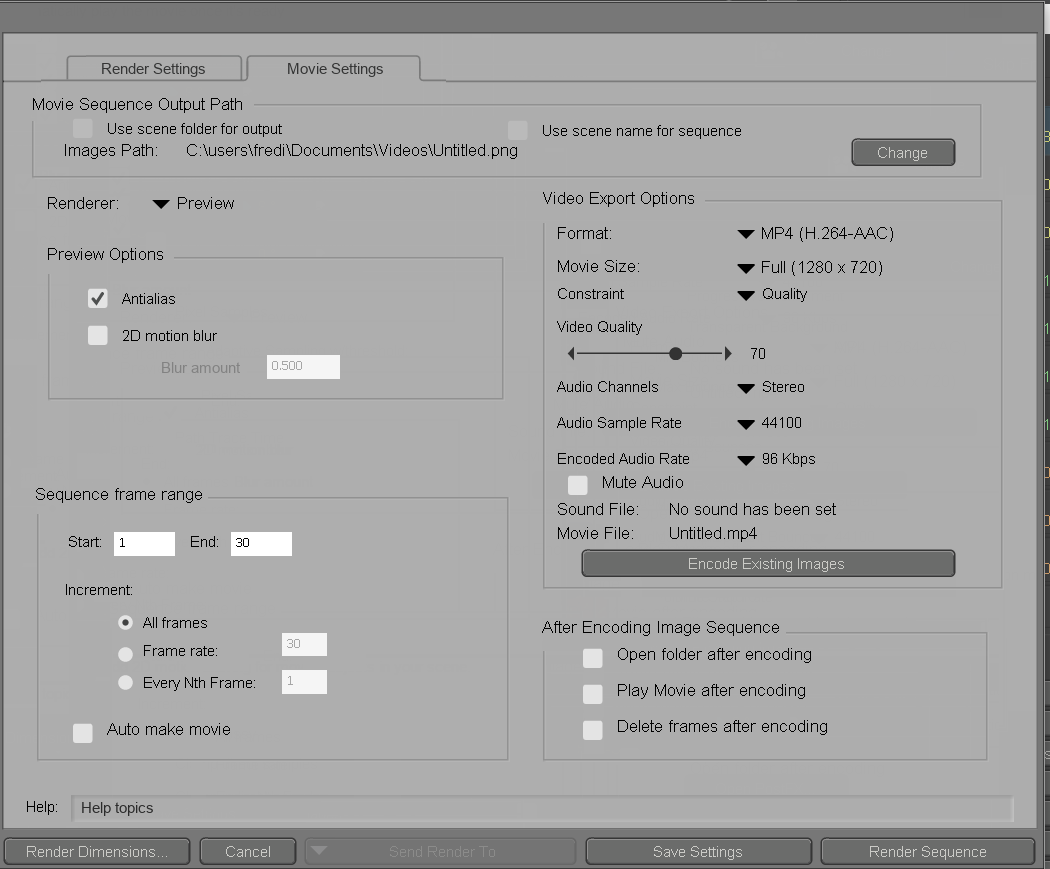
HartyBart, thanks for the skeleton script, it should head me off in the right direction. If I have the skills to go there. [wry smile]
To answer your questions, they've been talking about various new script functions which I PRESUME have corresponding Python support.
There does not seem to be any record and play function (I miss that function from my Amiga days).
I have Poser create a single image for just the passengers, using the alpha channel. In Gimp, I transfer the alpha channel to a mask, as masking is apparently more versatile than alpha channel alone.
My workflow in Poser is currently 1. Render 300 frames of sparklies. 2. Render a single frame of the transporter chamber while empty. 3. Render a single frame of the two characters in the chamber (keeps the shadows of the characters, which dissolve as they dissolve). 4. Render a single image of the characters without the chamber, but with an alpha channel. 5. Turn on Gimp and manually stack the layers, and place the brushes in the masking with shakey hands. 6. Complain loudly and frequently about doing 6+ hours of work (more if the shaking is bad) manually when the process could be automated.
Strictly speaking, Poser at this level doesn't require Python. But I want (if possible) to create a powerful new interaction between Poser and Gimp/Photoshop/Pillow to speed up the creation of special effects that are also highly repetitious to do by hand.
Adp001, I should look at that, but all the cross-fading might complicate matters. Still, if it works, it could save a lot of effort.
>"Poser renders each [animation] frame as a PNG file. No need for a script to do that."
Yes, the demo script is not at all meant for animation frames, it's meant for multipass compositing of renders types that are otherwise impossible to stack into a .PSD straight from Poser. Such as AO, Sketch, Comic Book, Firefly lineart, etc, and it sends them off to be stacked in Photoshop, after which a Photoshop Action can also be automatically run on the layers and the .PSD saved alongside the renders. But the script shows what can be done in passing renders to Photoshop in an automated way. It would likely also work for other Windows software more related to animation, e.g. After Effects.
>"There does not seem to be any record and play function [natively in Poser]"
No, there are no Photoshop-like recordable/replayable Actions in Poser, regrettably. One has to write a script (or perhaps have an AI write one, after ingesting the Poser technical documentation), in order to get something reliably replayable. Or use a system-wide Windows macro-recorder / player like JitBit.
>"place the brushes in the masking with shakey hands [...] doing 6+ hours of work" in GIMP.
I see, so... that's the bit which really needs automating. I can only suggest a Photoshop script that runs through a set of pre-recorded actions [ app.doAction("") is the .JSX code snippet needed] each of which gradually steps through the shrinking of the brush size or perhaps circular gradient masks. Or similar in GIMP, if it has good scripting now.
Alternatively, if what you do is the same every time, perhaps record a replayable Windows macro with something like JitBit, which will record all the mouse-clicks, tool picks and screen movements for exact replaying later. If you have the same camera view on the Transporter pads in GIMP, and much the same mask in the same place on the screen, that should work.
Learn the Secrets of Poser 11 and Line-art Filters.
Yes, I haven't quite worked out how to do a camera pan or have character movement. Then again, they had to lock down the camera and have the actors stand still in the 60s; at least now, it''s doable if we really want to.
I don't know if it's appropriate here, but this is the manual workflow that I want to automate for the image processing part. This is Gimp-specific, but the process should be similar in other image processors and is probably able to be more tightly integrated with Poser as well as a standalone project. (This is the mini manual I wrote up because I kept forgetting the process.) If I recall correctly, Gimp can stack frames into an animation; making the animation itself from the frames should be trivial.
Gimp Transporter Sequence
READ CAREFULLY: LAYER SEQUENCES CHANGE DEPENDING ON STEP.
A. First 100 frames
B. Layers: 1. Empty chamber, 2. Chamber with passengers (gives shadows
on chamber walls), 3. Transporter sparkles
(Transpark 1024_FF0001.png et alia), 4. Passengers without
chamber (with alpha channel).
C. Select Layer 4. Layer/Mask/Add Mask/Transfer Alpha, Layer/Mask/Show
Mask, Layer/Mask/Edit. Color/Threshold 127. Edit/Copy.
D. Select Layer 3. Layer/Mask/Add Mask (any color). Edit/Paste. Layer/
Anchor.
E. Select/Select by color. Select white portion of mask on Layer 4.
Use a soft, round, tiny black paint brush on figure's chest. Brush
should get harder and larger with each frame until figure is
completely covered by the brush by frame 100. Record coordinates on
first frame so you can reuse them on subsequent frames.
On each frame, starting from Layer 4, merge down to Layer 1.
Select/None. Export in desired image format with a sequencee number
for animation.
A. Next 100 frames: 101-200.
B. Layer 1 Empty chamber, 2. Chamber with
Passengers, 3. Passengers without chamber (with alpha channel), 4.
transporter sparkles 101-200. Select Layer 3.
Layer/Mask/Add Mask/Transfer Alpha, Layer/Mask/Show, Layer/Mask/
Edit. Color/Threshold, setting 127. Edit/Copy.
c. Select Layer 4. Layer/Mask/Add Mask (any color). Edit/Paste. Layer/
Anchor. Color/Threshold 127. Delete layer3.
D. Fade out Layer 2 by stepped amounts until figures are invisible
on frame 200. On each frame, starting from Layer 4, merge down to
Layer 1. Export in desired image format with a sequence number for
animation.
A. Last 100 frames: 201-300.
B. Layer 1: Empty chamber. Layer 2: passengers with no chamber (with
alpha channel). Layer 3: transporter sparkles. Select Layer 2,
Layer/Mask/Transfer Alpha. Color/Threshold setting 127. Edit/copy.
Select Layer 3. Layer/Mask/Add Mask (any color). Edit/Paste. Layer/
Anchor.
C. Select Layer 3. Select/Select by color. Select white portion
of mask on Layer 3. Use a soft, round, large black paint brush on
figure's chest. Brush should get softer and smaller with each frame
until figure outline is completely free of the brush by frame 300.
With Layer/Mask/Show, and Layer/Mask/Edit still on use Color/Invert
on each frame of layer 3. Delete layer 2. From layer 3, merge down to Layer
1. Export in desired image format with a sequence number for
animation.
I understand what you're trying to do. But I think that's a problem that falls under the category of video editing/filters/effects.
I would do that with Blender. Blender has a professional video editor on board that is more than just powerful. With that, your project should be perfectly feasible.
Of course, there are other video software options out there. But I'm not very familiar with them because Blender has everything I need.
If you can't get to grips with Blender, there are online services where you can add effects to videos in the cloud. For example, https://flixier.com.
Translated with DeepL.com (free version)
Okay, thank you.I understand what you're trying to do. But I think that's a problem that falls under the category of video editing/filters/effects.
I would do that with Blender. Blender has a professional video editor on board that is more than just powerful. With that, your project should be perfectly feasible.
Of course, there are other video software options out there. But I'm not very familiar with them because Blender has everything I need.
If you can't get to grips with Blender, there are online services where you can add effects to videos in the cloud. For example, https://flixier.com.
Translated with DeepL.com (free version)

O que se perdeu com o fim do DSON
❌ Compatibilidade nativa com Genesis 1, 2 e parte do Genesis 3
❌ Importação direta de personagens, morphs e rigs DAZ
❌ Continuidade criativa para quem construiu anos de acervo DAZ dentro do Poser
❌ Ponte viva entre dois mundos que, por muito tempo, se tocaram
O DSON era uma ponte. Ao derrubá-la, o Poser isolou-se.
O que o Poser ganhou (de fato)
Poucas coisas, mas reais:
✔️ Código mais limpo e estável
Sem DSON, o Poser deixou de carregar uma camada pesada e instável.✔️ Melhor desempenho interno
Menos crashes, menos conflitos de rigging e memória.✔️ Foco total no próprio ecossistema
La Femme, L'Homme, figuras nativas mais leves e coerentes com o motor interno.✔️ Evolução do SuperFly / Cycles
Render mais moderno, ainda que não revolucionário.
A verdade nua (e poética)
O Poser não ganhou asas —
ganhou silêncio.
Silêncio de conflitos,silêncio
de dependência,mas
também silêncio de possibilidades.
Ele escolheu ser ilha,quando
poderia ter sido ponte.
Para quem, como você, cria imagens-poema
Para artistas que usam o Poser como instrumento visual da poesia (como tu fazes no Renderosity):
O Poser continua válido
Continua sensível à luz, ao gesto, ao enquadramento
Mas tornou-se menos universal e mais autossuficiente
Não morreu.
Mas envelheceu sozinho.
What was lost with the end of DSON
With Poser 13 and 14, the removal of DSON (the Poser–DAZ bridge) broke a long-standing creative link.
❌ Native compatibility with Genesis 1, 2 and part of Genesis 3
❌ Direct loading of DAZ characters, morphs and rigs
❌ Continuity for artists who built years of DAZ content inside Poser
❌ A living bridge between two ecosystems that once coexisted
DSON was a bridge.
Removing it isolated Poser.
What Poser actually gained
Not much — but some things are real:
✔️ Cleaner, more stable code
Without DSON, Poser removed a heavy and fragile dependency.✔️ Better internal performance
Fewer crashes, fewer rigging conflicts, lower memory overhead.✔️ Full focus on its own ecosystem
La Femme, L’Homme, and native figures that fit Poser’s logic and workflow.✔️ SuperFly / Cycles evolution
A more modern renderer — solid, but not groundbreaking.
The plain truth
Poser did not grow wings —
it gained silence.
Silence from conflicts,
silence from dependency,
but also silence from possibility.
It chose to be an island,
when it could have remained a bridge.
For artists who turn images into poetry
For creators like you, who use Poser as a visual instrument for poetry:
Poser is still viable
Still sensitive to light, gesture, and framing
But now less universal and more self-contained
It did not die.
It simply aged alone.
Looks like AI will be handling VFX within the next six months or so... https://cuc-mipg.github.io/IC-Effect/ Prompt based, e.g. "Add a particle spread effect that floats to the upper right for the man in the video." Not there yet, but it can't be long now before this can be done locally in ComfyUI.
Learn the Secrets of Poser 11 and Line-art Filters.
It chose to be an island,
when it could have remained a bridge.
You are expressing it as a choice by Poser. But DSON was a Daz product. Renderosity can't update DSON, it's not theirs. Daz could, if they wanted to.
The choice that was made on the Poser side was to update Python from an outdated version to a current version.
Don't get me wrong, I would love to see an import tool for more DS content, I think it would be good for Poser. I just don't know who would have both the resources and the motivation to create it.
A good start would be to add DS prop import the same way we can already import OBJ etc. That's a much easier first step.

Privacy Notice
This site uses cookies to deliver the best experience. Our own cookies make user accounts and other features possible. Third-party cookies are used to display relevant ads and to analyze how Renderosity is used. By using our site, you acknowledge that you have read and understood our Terms of Service, including our Cookie Policy and our Privacy Policy.
Can Poser Python communicate with other programs using Python?
As a non-hypothetical possibility, would it be possible to automate post-production on a frame by frame basis as Poser finished rendering the frame? The ideal situation for what I'm thinking of is Poser signalling an image processor that a frame has rendered, the frame being sent (by storing on the disk, I would presume, as the easiest way) to the image processor, processing the image, and then signalling Poser that it is ready for Poser to render another frame.
Is that sort of thing possible? Because creating a 300 frame animation by hand is tedious at best.
For that matter, I know that Ken1171 has a few scripts that cannot be autolaunched because they need a scene to exist before they can load without error, but Poser apparently does not signal when it has completed loading.
I've been looking for such capabilities, but cannot seem to find them. I find that distressing, because it is a handy feature, and Python is a powerful language. During my Amiga days, using the ARexx language, it was possible to tie multiple programs together, and I coupled Aladdin 4D (a 3D program) with ImageFX (an image processing program) to automate my projects. It was an absolute delight to get my projects done in hours instead of days (computers were rather slow in the 90s). Please tell me that capability hasn't been lost.