
Renderosity Forums / Poser 11
Welcome to the Poser 11 Forum
Forum Moderators: nerd Forum Coordinators: Anim8dtoon
Poser 11 F.A.Q (Last Updated: 2026 Aug 04 4:53 pm)

Welcome to the Poser Forums! Need help with these versions, advice on upgrading? Etc...you've arrived at the right place!
Looking for Poser Tutorials? Find those HERE

Subject: Cloth Room: Calculates okay, but when I play - nothing

I hadn't saved the scene yet, so I thought I'd give that a try - save as a PZ3, restart Poser, reload from PZ3...
I didn't get that far.
When I checked to see what I'd saved it as there were no dynamics files - I vaguely recall that on the rare occasions that I've used the cloth room in the past it would create DYN (or some such) files.
D'ya think that might be a clue ?
The 3Dcheapskate* occasionally posts sensible stuff. Usually by accident. And it usually uses Poser 11, with units set to inches. Except when it's using Poser 6 or PP2014, or when its units are set to PNU or something else.
*soon only to be available in two flavours - DAZ and Renderosity
How bizarre !?!?!
After I'd saved the scene as Untitled.pz3 the simulation started playing correctly.
But after restarting Poser by opening Untitled.pz3 it wouldn't play the simulation.
However, after I recalculated the simulation it started working okay.
It appears that the 'logic' of the Renderosity forum software has infected Poser... ;o)
The 3Dcheapskate* occasionally posts sensible stuff. Usually by accident. And it usually uses Poser 11, with units set to inches. Except when it's using Poser 6 or PP2014, or when its units are set to PNU or something else.
*soon only to be available in two flavours - DAZ and Renderosity

In poser 11 and 12 the simulation file is a .abc file rather than a .dyn. Don't know why the change. If I had to guess, the problem might be with using the name untitled as the scene name. It might be assuming that the simulation for untitled is a temporary one since most scenes don't use that name once saved. Try renaming the scene and see if that helps.
You shouldn't need to have the pole as a figure. Poser has no problem draping on props. And usually, it's best not to have the cloth object inside the collision object. Most times it slows the simulation to a crawl and may make the cloth explode. For this scene, where the top of the ribbons stay at the top of the pole, I would have made the top row of vertices just outside your pole and used a choreographed group on them. If your setup is working for you, I wouldn't change it now. It's just something to keep in mind if you want to do other simulations.
The draped ribbons do look very nice.
Available on Amazon for the Kindle E-Reader Monster of the North and The Shimmering Mage
Today I break my own personal record for the number of days for being alive.
Check out my store here or my free stuff here
I use Poser 14 and Windows 11
Thanks RedPhantom. I just reran Poser 11, imported the two OBJs (pole and streamers, exactly the same ones as before), left the pole as a prop, clothified the streamers using a single dynamic group, but this time put the top pair of vertices of each streamer into the choreographed group as you suggested - Remembering to remove those vertices from the dynamic group, something I may have overlooked before. Those top vertices are inside the mesh of the pole as before, but that didn't seem to cause any problem - the simulation calculated at a reasonable speed. Screenshot of the top pairs of vertices in the prop pole setup, overlaying one with other objects hidden on one with them visible.
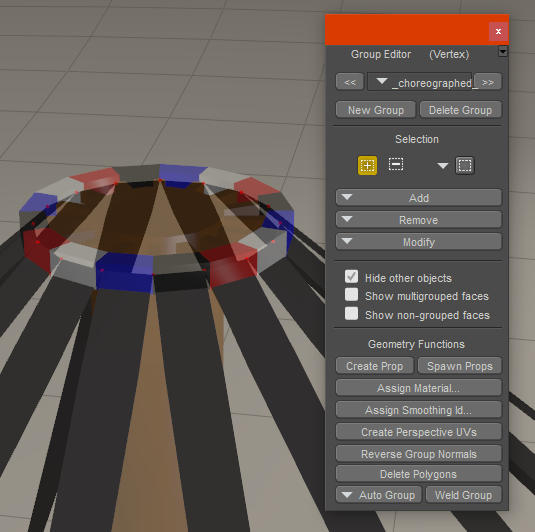
However, it refused to play, exactly as before. So I saved it as a sensibly named PZ3. Still refused to play. No sign of any abc file, just the PZ3
Restarted Poser, loaded the PZ3. Still refused to play.
Reran the simulation, and noticed that as I did this the abc file appeared. Now the simulation replays as it should.
So it appears that I have to save the scene before calculating the simulation.
Another oddity: putting the top two vertices into the constrained group, which is what I did when the pole was a figure, didn't work when the pole was a prop - the streamer tops just extricated themselves from the pole and fell to the ground
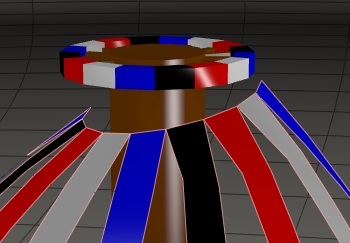
I was planning to have the bottom two vertices of each streamer in the choreographed group, and planning to do something clever with simple morphs to get that clockwise/anticlockwise under/over weaving of a typical maypole dance. The top was going to be held in place via a constrained group. But I think I have an idea that might work with them both in the choreographed group...
The 3Dcheapskate* occasionally posts sensible stuff. Usually by accident. And it usually uses Poser 11, with units set to inches. Except when it's using Poser 6 or PP2014, or when its units are set to PNU or something else.
*soon only to be available in two flavours - DAZ and Renderosity


Yes, I hadn't used the Cloth Room until I started beta testing for someone who sent me a little tutorial on how to do it, and she typed in bold text to save the scene BEFORE running the sim. I've gotten so used to it over the past few years, I don't even think twice about it anymore.
_______________
OK . . . Where's my chocolate?

Oh, I didn't realize that was the reason, but now that you mention it, it makes perfect sense. ~nods~
_______________
OK . . . Where's my chocolate?
Thanks again everybody. I have two PZ3s now, Maypole02.pz3 (with the pole converted to a figure) and Maypole02asProp.pz3. I've deleted all the dynamics files (.abc and .tmp)
I open Maypole02asProp.pz3 and a new Maypole02asProp_Sim_1_Maypole02-Streamerscache.tmp file is created. I slide the slider along the timeline and nothing happens (no surprise). I go to the cloth room and hit 'Calculate simulation' - Maypole02asProp_Sim_1_Maypole02-Streamers.abc is created and gets bigger as the calculation progresses. Now if I slide the slider along the timeline in the prop room the animation runs correctly. But if I simply close Poser now both the .TMP and .ABC file are deleted and I have to go through the same rigmarole again.
But this time after running the simulation I save the file again, but as Maypole02asProp-Done.pz3. Poser creates a Maypole02asProp-Done_Sim_1_Maypole02-Streamers.abc file (or perhaps renames the Maypole02asProp_Sim_1_Maypole02-Streamerscache.abc file, because that vanishes. The Maypole02asProp_Sim_1_Maypole02-Streamerscache.tmp file is still there). I close Poser and Maypole02asProp_Sim_1_Maypole02-Streamerscache.tmp disappears, but the Maypole02asProp_Sim_1_Maypole02-Streamerscache.abc remains. I restart Poser, load Maypole02asProp-Done.pz3. Now the animation runs correctly straight away.
Just to be sure I repeat the process with the other PZ3, Maypole02.pz3. That confirms the sequence above.
So it would appear that you have to save the PZ3 twice:
- save the PZ3 once before running the simulation to tell Poser what to call the ABC and TMP files
- save the PZ3 again after running the simulation to tell Poser not to delete the ABC file when you close Poser
I didn't investigate the cloth_simulation section in the PZ3, but I'm guessing that saving the PZ3 after running the sim something important gets added there.
N.B. Calculating the simulation for the maypole-as-figure version seems to be far quicker...
The 3Dcheapskate* occasionally posts sensible stuff. Usually by accident. And it usually uses Poser 11, with units set to inches. Except when it's using Poser 6 or PP2014, or when its units are set to PNU or something else.
*soon only to be available in two flavours - DAZ and Renderosity
Re the footnote in the previous post. I redid both sims and timed them (very approximately, using the time-honoured "one thousand two thousand etc..." method) a couple of times each
- Pole as Figure - 120 frames took about 15 seconds, most frames taking between 0.05 and 0.15 seconds
- Pole as Prop - 120 frames took about 60 seconds, most frames taking between 0.6 and 0.8 seconds
So there's definitely something going on there
The 3Dcheapskate* occasionally posts sensible stuff. Usually by accident. And it usually uses Poser 11, with units set to inches. Except when it's using Poser 6 or PP2014, or when its units are set to PNU or something else.
*soon only to be available in two flavours - DAZ and Renderosity

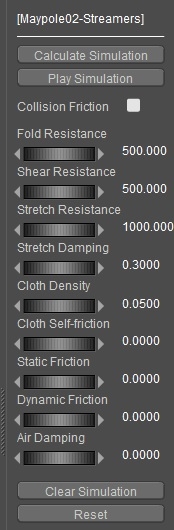
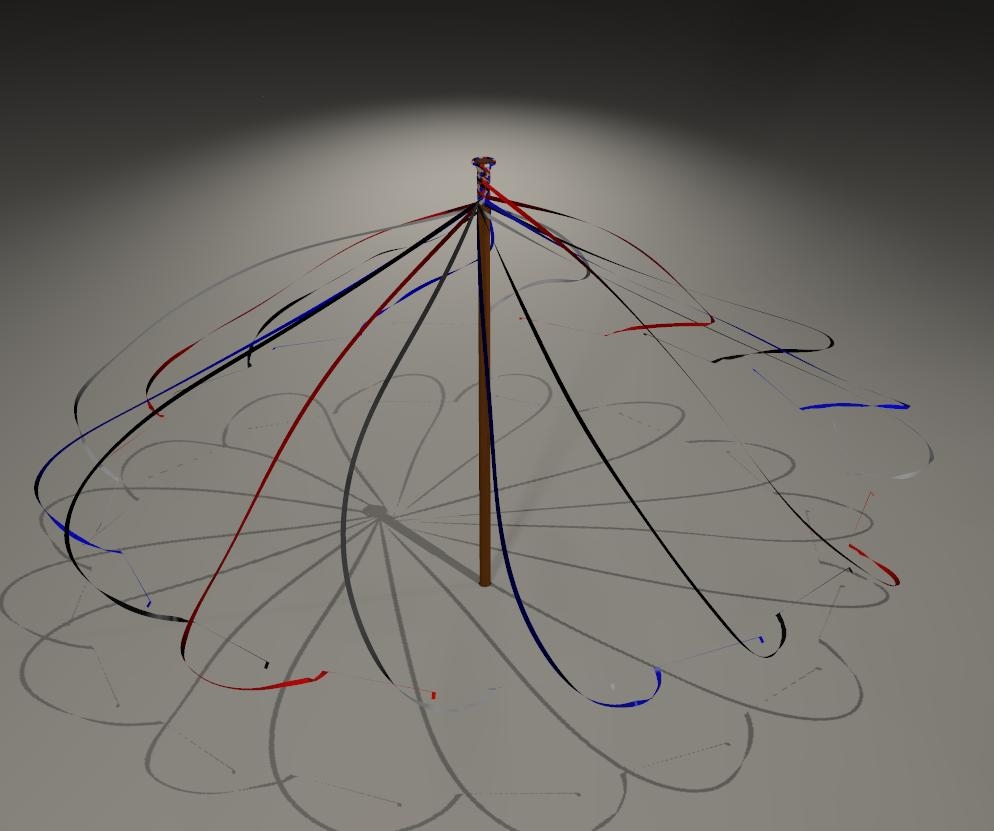
Using the pole-as-figure version (which uses constrained, not choreographed, vertices to fix the top of the streamers in position) I added a choreographed group consisting of the bottom few vertices of each streamer. I set a single keyframe on the last frame, 120, and set the streamer prop's Ytran=4 feet, and Y-rotation = 720 degrees. I fiddled around with the simulation parameters increasing the fold/shear/stretch resistances and removed friction and air resistance. Simulation took about 30s, most frames taking 0.2-0.3s. Here's the sttings (everything else was default, apart from the groupings):
Here's a render at the end of the sim:
And a detail of the top of the pole:
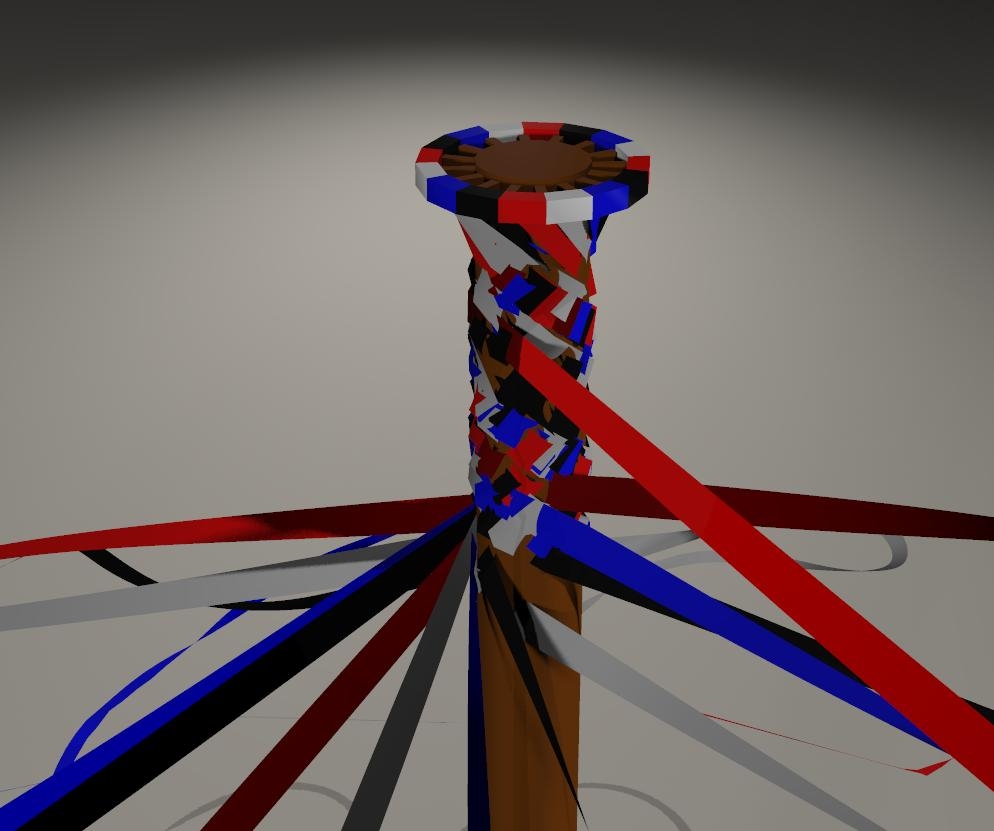
Since the problem that started this thread has, I think, now been resolved, and since I clearly have a lot to do to get my dynamic maypole working, it's probably time to start a new thread to work out the details of creating a maypole using dynamic cloth.
The 3Dcheapskate* occasionally posts sensible stuff. Usually by accident. And it usually uses Poser 11, with units set to inches. Except when it's using Poser 6 or PP2014, or when its units are set to PNU or something else.
*soon only to be available in two flavours - DAZ and Renderosity
New thread created here - Creating a maypole using Poser 11's cloth room
The 3Dcheapskate* occasionally posts sensible stuff. Usually by accident. And it usually uses Poser 11, with units set to inches. Except when it's using Poser 6 or PP2014, or when its units are set to PNU or something else.
*soon only to be available in two flavours - DAZ and Renderosity
adp001 posted at 11:44AM Thu, 20 May 2021 - #4419407
Wouldn't Bullet be a better solution for something like this?
Whoops ! I didn't see your post.
Yes, bullet would probably be better. So where do I find that ? I've only seen it in the hair room, which always struck me as rather odd.
The 3Dcheapskate* occasionally posts sensible stuff. Usually by accident. And it usually uses Poser 11, with units set to inches. Except when it's using Poser 6 or PP2014, or when its units are set to PNU or something else.
*soon only to be available in two flavours - DAZ and Renderosity
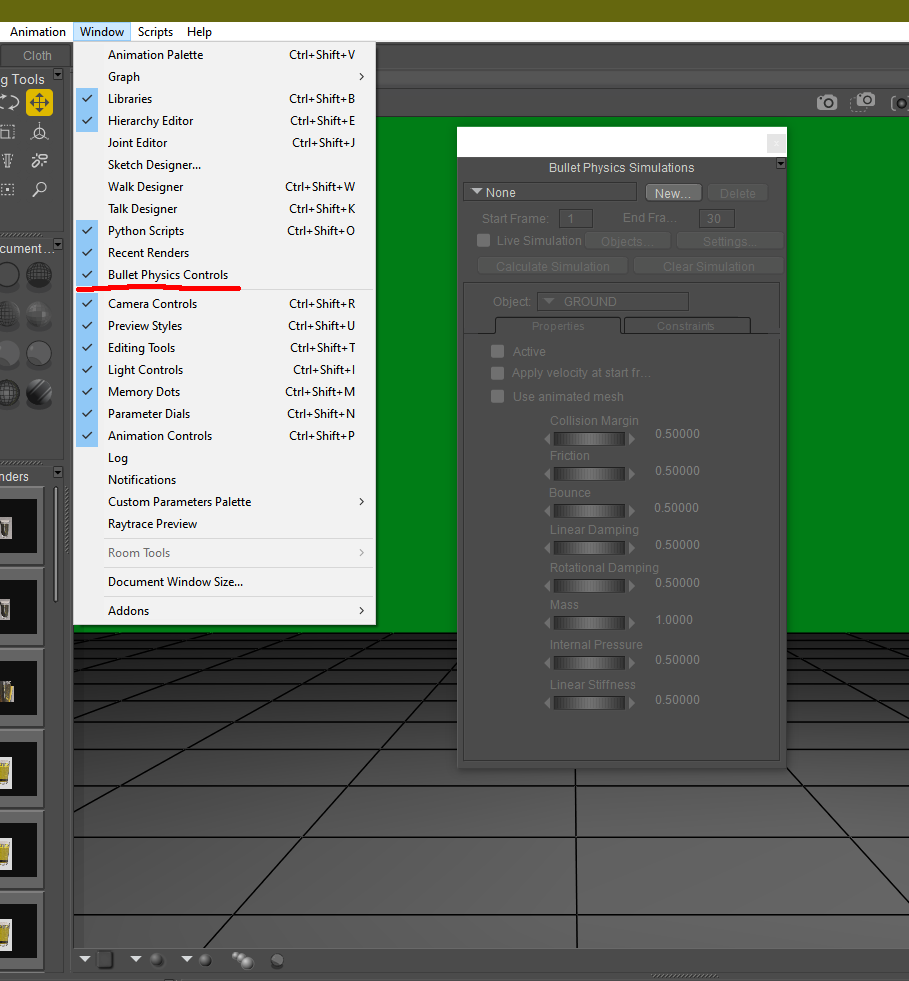
Here's where you find the controls. I've only used them a few times so I have to look at the manual every time I do. It should get you started at least
Available on Amazon for the Kindle E-Reader Monster of the North and The Shimmering Mage
Today I break my own personal record for the number of days for being alive.
Check out my store here or my free stuff here
I use Poser 14 and Windows 11

Sorry to interrupt, maybe of interest... I been playing about with toon hair models because I've been creating some things for Futepen's Sera figure and I happened to come across this... not sure it's really relevant but it involves bullet physics so perhaps it would at least go a little way toward the topic if you were to explore that route.
https://youtu.be/cJeeQRWOUHw
W10 Pro, HP Envy X360 Laptop, Intel Core i7-10510U, NVIDIA GeForce MX250, Intel UHD, 16 GB DDR4-2400 SDRAM, 1 TB PCIe NVMe M.2 SSD
Mudbox 2022, Adobe PS CC, Poser Pro 11.3, Blender 2.9, Wings3D 2.2.5
My Freestuff and Gallery at ShareCG
RedPhantom posted at 9:05PM Fri, 21 May 2021 - #4419578
Here's where you find the controls....
Ah, hidden in plain sight as usual ! Very tricksy ! :o)
The 3Dcheapskate* occasionally posts sensible stuff. Usually by accident. And it usually uses Poser 11, with units set to inches. Except when it's using Poser 6 or PP2014, or when its units are set to PNU or something else.
*soon only to be available in two flavours - DAZ and Renderosity
EldritchCellar posted at 9:07PM Fri, 21 May 2021 - #4419588
Sorry to interrupt, maybe of interest... I been playing about with toon hair models because I've been creating some things for Futepen's Sera figure and I happened to come across this... not sure it's really relevant but it involves bullet physics so perhaps it would at least go a little way toward the topic if you were to explore that route.
https://youtu.be/cJeeQRWOUHw
Thanks for the link, definitely of interest ! Time to start exploring bullet physics in Poser
The 3Dcheapskate* occasionally posts sensible stuff. Usually by accident. And it usually uses Poser 11, with units set to inches. Except when it's using Poser 6 or PP2014, or when its units are set to PNU or something else.
*soon only to be available in two flavours - DAZ and Renderosity

Privacy Notice
This site uses cookies to deliver the best experience. Our own cookies make user accounts and other features possible. Third-party cookies are used to display relevant ads and to analyze how Renderosity is used. By using our site, you acknowledge that you have read and understood our Terms of Service, including our Cookie Policy and our Privacy Policy.
I hardly ever go near the cloth room, and when I do I always seem to run into problems.
This year I decided to do a maypole. The pole is one imported OBJ, the streamers are another imported OBJ shown here as imported, at frame 1:
I set up a fairly basic sim in the cloth room for the streamers - collide against the ground and the pole, set the vertices at the top of each streamer to a constrained group (they're inside the mesh at the top of the maypole -I vaguely recall that I had to do that last time, and I also had to make the pole into a figure), and use defaults for everything-ish
The simulation seems to calculate okay...
... but when I play the sim (or move the timeline slider in the Pose room everything (except the frame counter which cycles round and round) just sits still going "Hmmph! No! I'm not moving"
So what bleedin' obvious thing have I missed 'ere then ?
The 3Dcheapskate* occasionally posts sensible stuff. Usually by accident. And it usually uses Poser 11, with units set to inches. Except when it's using Poser 6 or PP2014, or when its units are set to PNU or something else.
*soon only to be available in two flavours - DAZ and Renderosity