
Renderosity Forums / Blender
Welcome to the Blender Forum
Forum Moderators: Lobo3433 Forum Coordinators: bwsupport
Blender F.A.Q (Last Updated: 2026 Jul 21 7:08 pm)
Welcome to the Blender Forum!
Your place to learn about Blender, ask questions,
exchange ideas, and interact with the other Blender users!
Gallery | Freestuff | Tutorials
Visit the Renderosity MarketPlace. Your source for digital art content!


Subject: Blender 2.8 and Above Tips Tricks and Tutorials

- 1
- 2

I've been investigating the paint tools and it appears they're a lot more full-featured than I thought. More good news all the time. Coupled with the procedural capabilities that I've seen, one should be able to get absolutely amazing results right in Blender. :) Just as an example, this bit with stencils and masks could be a lot of fun. It probably helps to pick a sample that goes along with your intended results.
JnM has a few free addons of his own and he has been building his content rather rapidly the last couple fo months his hard surface modeling add is not up to Hard Ops but it is basic and not to bad to get a hang of well worth it to follow him on YouTube if you haven't yet
Lobo3433
Blender Maya & 3D Forum Moderator
Torquinox posted at 6:42PM Thu, 28 January 2021 - #4411223
Thanks for the headsup Lobo! Looks interesting. Does it create a lot of n-gons?
I am not a 100% sure I been working with Fluent which has been a little easier to grasp than Hard Ops but JnM's is very basic not as advance as Hard Ops or Fluent I think Hard Ops has to many features and more suited for someone who already has a good grasp booleans and the hard surface modeling work flow Fluent has just enough that it is not like learning a whole new UI. I think no matter which tool N-gons are going to be an issue and retopology in one form or another is going have to be incorporated into any work flow to get rid of n-gons
Lobo3433
Blender Maya & 3D Forum Moderator

Just Posting to keep Thread as Sticky
Lobo3433
Blender Maya & 3D Forum Moderator
Lobo3433
Blender Maya & 3D Forum Moderator
yes well this one is actually a short series from what I can tell each tip is a different part of the robot
Lobo3433
Blender Maya & 3D Forum Moderator
Came across this tutorial and it is simple but if you are like me I actually had trouble the first few times using the Spin tool when 2.8 first came out and here is a simple tutorial very basic on using the Spin tool even thou the tutorial says for Blender 3.0 this works in version from 2.8 and up
Blender 3.0 Modeling Basics Spin Tool Tutorial
Lobo3433
Blender Maya & 3D Forum Moderator

Thanks for the link Lobo. I never quite got Spin working in earlier versions of Blender. I had done it with an early version of Rhino years ago, and made a whole bunch of bowls, glasses, etc., so was really disappointed when I couldn't get it done as easily with Blender. It's been a while, so I'll have to play with it again, and this tutorial will certainly help when I get into 2.8.
_______________
OK . . . Where's my chocolate?
I go the spin in earlier versions when using Nurbs and then converting to polygons I found this tutorial useful it made sense if that makes sense lol
Lobo3433
Blender Maya & 3D Forum Moderator
Lobo3433 posted at 4:51PM Sun, 16 May 2021 - #4419298
I go the spin in earlier versions when using Nurbs and then converting to polygons
Ohhhhh, I've never used Nurbs in Blender, so didn't know that would work better. I'll have to give it a try in 2.79 and see how it goes. Thanks for the tip. 
_______________
OK . . . Where's my chocolate?
This is a bit of an old one but it is how I figured one use using spin tool and nurbs and never really explored more on using the spin tool this tutorial is dated but I think you can still do the same in current versions of Blender
Blender 3D NURBS : How to "lathing"/"lofting"-model in Blender / HD
Lobo3433
Blender Maya & 3D Forum Moderator
Thanks Lobo. I did a search at YouTube earlier, and found a couple more tutorials for 2.79 that don't use Nurbs, so I'll check them all out, and see which method I like best.
_______________
OK . . . Where's my chocolate?
Cool let me know how they go
Lobo3433
Blender Maya & 3D Forum Moderator
_______________
OK . . . Where's my chocolate?
This poor thread has been a bit neglected. Time to wake it from its dreamy state with this really awesome if older tutorial on modeling aircraft. Not a video, 12 web pages demonstrating loads of tips and tricks enroute to modeling a Halo helicopter. I like the way the model begins as a collection of simple primitives and becomes something awesome. http://www.cgarena.com/freestuff/tutorials/misc/aircraft/modeling.html
Continuing on in the vein of building models with better topology, here is the Topology Guides tips and tricks tutorial This begins showing a method for modeling a human hand and goes on to discuss various techniques for producing models with solid topology. It also seems to be Blender-centric.
Also, I forgot the forum software does not automatically provide links to web addresses so here is an actual link for the cgarena aircraft modeling tutorial mentioned in my last post.
Let's say you're not satisfied with the way your models are coming together. There is a tutorial for that in static web and video. This one is from cgcookie and discusses 6 key principles for 3D modeling.
Here is the referenced Neil Blevins blog post.
And the YT video
This is another topology discussion by Polish 3D artist Michal Kalisz. It's a lot about efficiently blending cylindrical forms into curved surfaces. You can almost sum it up in one image but I recommend actually reading the article Tools and Tips for Hard Surface Modeling in Blender 2.8 . It was posted 3/19/20 . I wanted to post about it sooner but I lost track of it for a while and had some trouble finding it again.
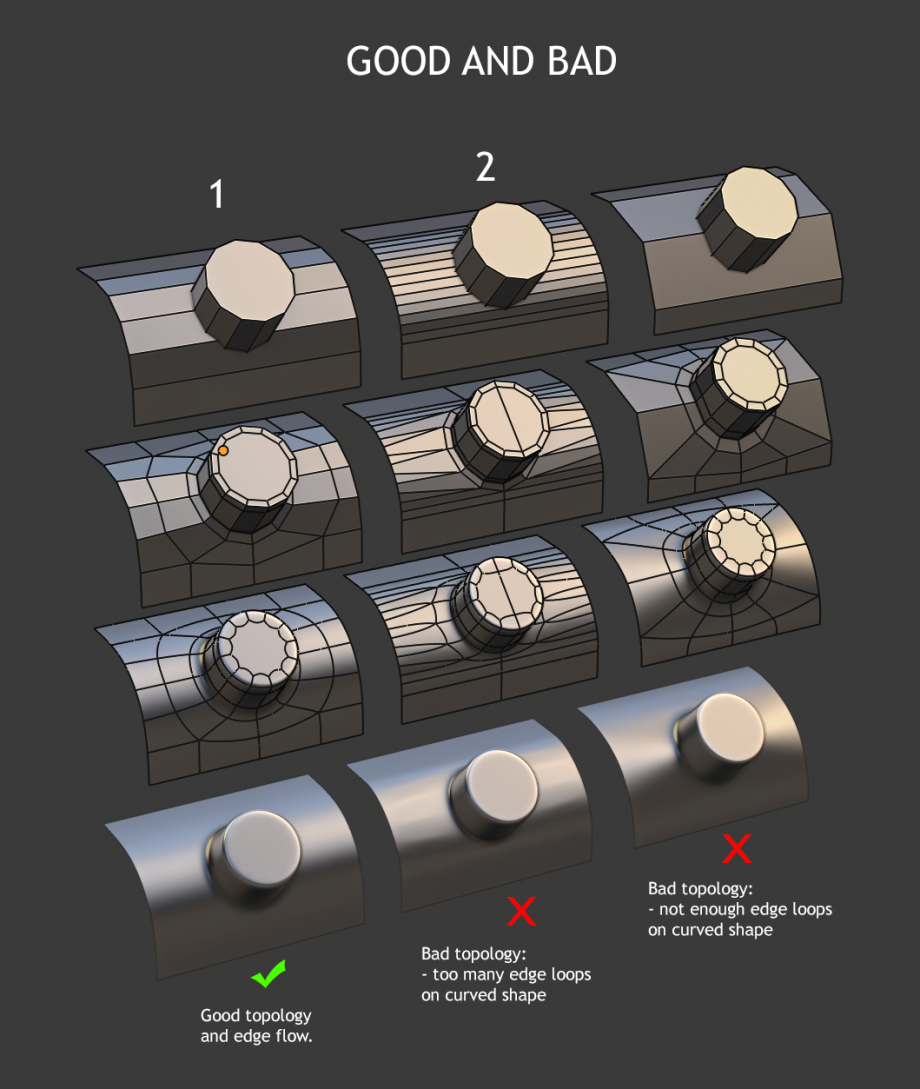
There are embedded videos. It's worth a read and the engine models look great by themselves.
Trying to refresh this thread
Lobo3433
Blender Maya & 3D Forum Moderator
Lobo3433
Blender Maya & 3D Forum Moderator

I must be missing the concept here. Does anyone have any tips on this?
To me it appears that content management exists of "blending" the assets from one file with those in another thus building one huge .blend file that I pull assets from as necessary; provided it doesn't become so large my machine dies.
I assume my workflow is faulty. Example: I built a back alley scene to reflect the one behind my building. It contains 6 different garbage bins for the various types of waste and waste pickup. It also contains 4 different types of recycling bin and 3 types of trash can. A lot of these items; such as the recycling bins, come in more than one colour and the large garbage bins have different decals to denote the various trucking companies that collect them.
Now, my problem. I finished the scene and rendered it. Now, I simply want to save an asset collection of Waste Disposal Items that I may use in other projects at a later time. The workflow as I understand it is to save a .blend file with all my assets in a row, replicated with the different textures I have prepared for them. Give the .blend a good name like Waste Disposal Items, save it and call it a day. Now if I want a specific waste bin I load them all; unless I broke the whole thing down into more concise .blends with all implementations of any given bin in each .blend file.
I'm an old guy. My mind wanders. I can't remember every itteration of every garbage can and what the heck I may have named them. Is there no way to see assets, in a group, without loading them first; and viewing them second? A complete waste of time suitable for one of the bins recently modeled.
Now
if one of those bins should come in either aluminum or plastic, with or
without scratches; my mind gets ready to explode. I have discovered
Material Library VX. It appears to reinforce my bad workflow by only
allowing me to save a material without any visual representation. I have
lots of metal and plastic materials I've "saved for a later date."
Right. Some cat named Fake User made sure that wasn't happening. I have
him tamed now but that doesn't tell me just what "metal" is in a
material till I load it.
I'm a visual kind of guy. Despite the thickness of the current lenses I would still prefer to see the materials I save and load in a visiual representation, if possible; without either loading a dozen different metal textures one at a time and removing them with Material Library VX till I find the one I want to apply to a bloody waste bin. Yep. Blood splattered alley way. Remember the decals above?
So; you get the drift of what I'm on here. Is
there any way to visually peruse assets. Models, materials, and the like
without loading a pile of .blend files looking for particular items or
node arrangements?
Lobo3433
Blender Maya & 3D Forum Moderator
- 1
- 2

Privacy Notice
This site uses cookies to deliver the best experience. Our own cookies make user accounts and other features possible. Third-party cookies are used to display relevant ads and to analyze how Renderosity is used. By using our site, you acknowledge that you have read and understood our Terms of Service, including our Cookie Policy and our Privacy Policy.
Your welcome Torquinox any time
Lobo3433
Blender Maya & 3D Forum Moderator
Renderosity Store
My Free Stuff
Facebook
Twitter