
Renderosity Forums / Poser - OFFICIAL
Welcome to the Poser - OFFICIAL Forum
Forum Moderators: RedPhantom Forum Coordinators: Anim8dtoon
Poser - OFFICIAL F.A.Q (Last Updated: 2026 Aug 08 6:09 pm)

Subject: Focal Length Value For An Exact 90 Degree FOV ?


my tut on Poser camera starts at http://www.book.artbeeweb.nl/?p=3069
on the 2nd page of it http://www.book.artbeeweb.nl/?p=3071 you'll find the full table of FoV's
you'll reach 90* at 11 mm focal length (measured as described in the webpages, so you can redo them if required)
My rule of thumb, which becomes more accurate at larger distances, is: when you step aside 1 mtr, and walk forward N meters, then you'll be at the edge of the image for a focal length of 12.5 * N mm. For FoV 90* this would result in 1 meter forward => 12.5 mm, but as said, the rule is not that accurate at shorter distances.
- - - - -
Usually I'm wrong. But to be effective and efficient, I don't need to be correct or accurate.
visit www.aRtBeeWeb.nl (works) or Missing Manuals (tutorials & reviews) - both need an update though

My measurement with 11mm shows much more than 90 degrees. Are you sure that's what you got?
I have observed that Poser has a focal length multiplier of 1.414 vs. the stated FoV for lenses on 35mm cameras. According to various calculators, a 35mm SLR produces a 90 degree FoV with a lens focal length of 18mm. Divide by 1.414 and you get 12.73 (approximately). When I put 12.73 mm into Poser, and measure my test object (which is the Poser BallCone - pointy bottom) the pointy part is exactly at the edge of my image.
Renderosity forum reply notifications are wonky. If I read a follow-up in a thread, but I don't myself reply, then notifications no longer happen AT ALL on that thread. So if I seem to be ignoring a question, that's why. (Updated September 23, 2019)
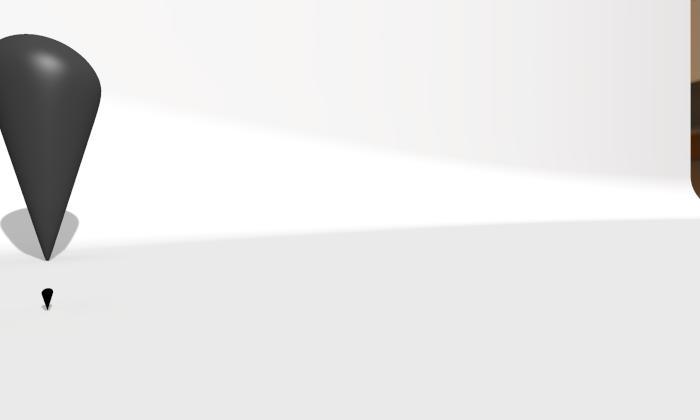
Here is a render.
I put the dolly camera at 0, 0, 0 (very important to put your camera in a known place to do the measurement).
It is rotated -45 degrees (Yaw = -45) - therefore objects on the Z axis (X = 0) should appear exactly at the edge of the image.
The focal is 12.73 mm.
The two props (one gray, one black) are at different scales and different Z-distance from the origin but both have xTran = 0.
 On the other hand - with focal length 11mm, I see much more than 90 degrees.
Renderosity forum reply notifications are wonky. If I read a follow-up in a thread, but I don't myself reply, then notifications no longer happen AT ALL on that thread. So if I seem to be ignoring a question, that's why. (Updated September 23, 2019)
Always good to redo tests, so it's 12.75mm for now. I'll do a complete rerun in due time. As said my lower values were inaccurate (as I was more interested in long lenses for portraits by then).
The Poser camera seems to behave as a 50mm camera, so the focal multiplier is 50/35 when comparing it to a real 35 mm one.
There also is a difference between dolly cams and revolving ones. This becomes apparent when exporting Poser cam settings to Octane. Perhaps I did my measurements with Main Camera (which is a revolving one).
Thanks, by all means.
- - - - -
Usually I'm wrong. But to be effective and efficient, I don't need to be correct or accurate.
visit www.aRtBeeWeb.nl (works) or Missing Manuals (tutorials & reviews) - both need an update though
(Edit - just cross-posted with your last couple of posts!)
Hmmm, that's odd. I'm definitely getting just over 12.7mm. (I'm using Poser 9 at the moment and the dolly camera - orbiting cameras have an inherent offset value which nobody seemed to be able to fully explain or give a precise value for - http://www.renderosity.com/mod/forumpro/?thread_id=2880985 )
I got my latest 12.7mm figure using this very simple empirical test setup, but that doesn't seem to be accurate enough*:
-
An imported cube OBJ centred at the origin, with inward facing normals, and each face a different colour. (Imported into Poser with all checkboxes cleared so it loads as intended)
-
Dolly camera positioned at the origin (DollyX/Y/Z set to zero, all Scale values set to 100%)
-
One point light also at the origin (just to make things visible!)
-
Render dimensions set to equal width/height.
Set the focal length to my test value.
Set roll/pitch/yaw to 0/0/0 and render. Repeat with 0/0/90, 0/0/180, and 0/90/0 as a quadruple-check.
(*The reason for this question is that I want to be able to stitch a set of six square renders into a vertical cross cubemap without any seam problems)
The 3Dcheapskate* occasionally posts sensible stuff. Usually by accident. And it usually uses Poser 11, with units set to inches. Except when it's using Poser 6 or PP2014, or when its units are set to PNU or something else.
*soon only to be available in two flavours - DAZ and Renderosity
Thanks bagginsbill - 12.73 sounds good, and 18/1.414 gives a nice logical explanation for the figure.
The 3Dcheapskate* occasionally posts sensible stuff. Usually by accident. And it usually uses Poser 11, with units set to inches. Except when it's using Poser 6 or PP2014, or when its units are set to PNU or something else.
*soon only to be available in two flavours - DAZ and Renderosity
Just completed six 1024x1024 cubemap test renders using the dollycam with a 2.7298mm focal length. Converted the result to a 4096x2048 latlong environment map, and I can't spot the seams, so it's looking good. I'll try 2048x2048 tomorrow since my goal is an 8192x4096 environment map
The 3Dcheapskate* occasionally posts sensible stuff. Usually by accident. And it usually uses Poser 11, with units set to inches. Except when it's using Poser 6 or PP2014, or when its units are set to PNU or something else.
*soon only to be available in two flavours - DAZ and Renderosity

It seems to be somewhere around 12.5-12.75mm (I'm using the dolly camera with its 'Scale' settings at 100%, in Poser 6/9/2014) - but does anybody know the exact value?
Internally Poser is built on imperial units. To get the 90degrees on a film of one inch, you will need a focal length of half an inch, or 12.7mm. Of course, all the other values suggested also sound good :-)
I've just completed another test. Here's a section of my resultant 8192x4098 lat-long map, created from separate 90° 2048x2048 cubemap renders. It shows the seam between the 0° yaw and -90° yaw renders. The version on the left was created from dollycam renders with a 12.7298mm focal length (bagginsbill's figure), and on the left with 12.7mm (millighost's figure).
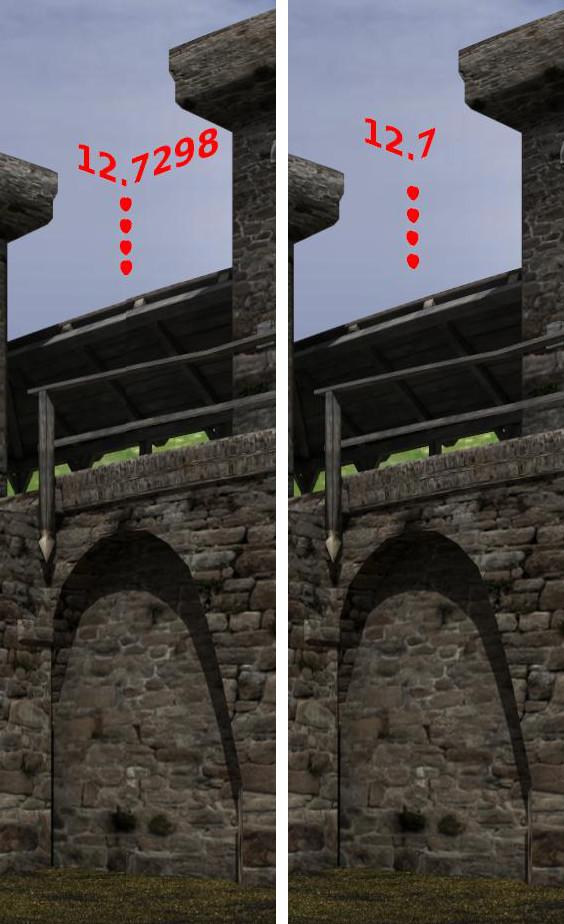 I was rather surprised - I can see the seam in the 12.7298mm result, but not in the 12.7mm one.
The result's not conclusive yet (I may have made a mistake somewhere - I was sure I'd tried 12.7 before and could spot the seams!) and I still need to do a few more tests.
aRtBee: I've got your pages bookmarked, as there's lots of interesting and new (to me) stuff there. I particularly liked your comment on the orbiting cameras - "This is very satisfying from a computational point of view, but very confusing for us, humble human users." Well said! :D
The 3Dcheapskate* occasionally posts sensible stuff. Usually by accident. And it usually uses Poser 11, with units set to inches. Except when it's using Poser 6 or PP2014, or when its units are set to PNU or something else.
*soon only to be available in two flavours - DAZ and Renderosity
I'm now satisfied that the correct value is exactly 12.7mm (as millighost stated). This gives me a precise 90° FOV (as judged by the test below) for the default dolly cam in Poser 9. I would assume that this figure is also true for other cameras, and other versions of poser but haven't checked.
I position the default dolly cam and a point light at the origin. I created a tall thin UV-mapped vertical plane with the following texture image (well, actually a 128 wide x 2048 high extended version of it) applied to it - the image was a PNG, and the filtering was 'Crisp'. I positioned this plane so that it would lie across the left edge of a 0/0/0 (roll/pitch/yaw) render, and the right edge of a 0/0/90 render.
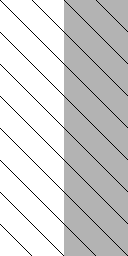 I then did two 2048x2048 renders with yaw=0 and yaw=90, and put them side by side. Here's a section of the result rendered using focal length 12.7298mm (the right half of every diagonal on the seam line is a few pixels lower than the left half, and this is consistent for the whole 2048 pixel height of the render):
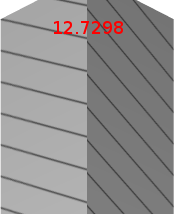 And here's the same section rendered using 12.7mm (the left and right halfs of every diagonal match perfectly, accurate to the exact pixel, and this is true for the whole 2048 pixel height of the render):
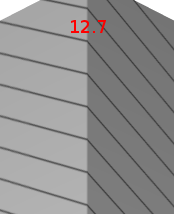 Unless somebody can spot a flaw in my logic I think that's fairly conclusive?
The 3Dcheapskate* occasionally posts sensible stuff. Usually by accident. And it usually uses Poser 11, with units set to inches. Except when it's using Poser 6 or PP2014, or when its units are set to PNU or something else.
*soon only to be available in two flavours - DAZ and Renderosity
Hi people. I'm not getting ebots - otherwise I would have come back sooner.
I never did such precise measurements - I only made a guess about the 1.414 based on "eyeballing" what a 90 degree view seemed to be and guessing that somebody mistakenly coded the diagonal of a square sensor or something like that.
Millighost's explanation (developers used a virtual 1-inch (25.4 mm) sensor instead of the SLR camera standard (36 mm)) makes the most sense to explain the facts - which are exactly as you demonstrated, 3dcheapskate.
I stand corrected.
I wonder what made them go through the logic of implying a photographic metric everybody knows (focal length in mm) and then using a completely unknown sensor size (1 inch) instead. Oh well - it is what it is.
I also confirmed the results myself, just to be sure. I concur that the stripe texture test with two images generated from 90-degree rotated views is the best way to demonstrated the consistent result from 12.7 mm.
Well done.
The Poser "crop factor" is 36mm/25.4mm which comes out to 1.41732283465, not the 1.414 that I had guessed.
Renderosity forum reply notifications are wonky. If I read a follow-up in a thread, but I don't myself reply, then notifications no longer happen AT ALL on that thread. So if I seem to be ignoring a question, that's why. (Updated September 23, 2019)
Here are my stripe test images with 12.7 mm focal length. I used a Poser one-sided square with a procedural stripe. I rendered it looking left of it and looking right of it (45 and -45 camera rotatation) and then combined them side-by-side in an image editor.
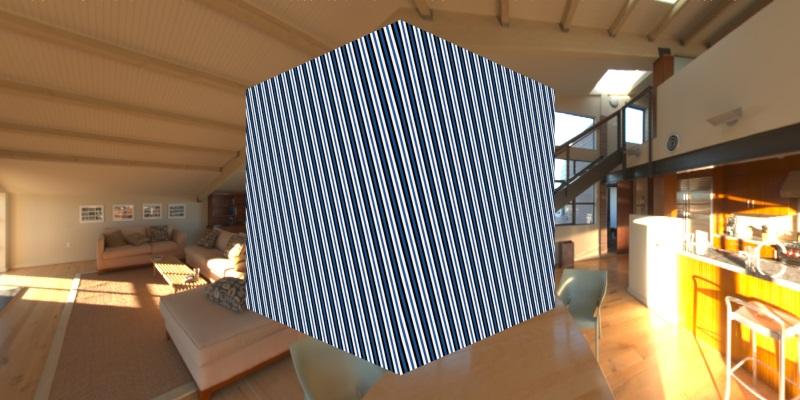 The two different camera orientations make the single square appear to be a box when butted together. The stripes line up perfectly. With any other focal length, they do not.
Renderosity forum reply notifications are wonky. If I read a follow-up in a thread, but I don't myself reply, then notifications no longer happen AT ALL on that thread. So if I seem to be ignoring a question, that's why. (Updated September 23, 2019)
Many thanks bagginsbill for double-checking and confirming the 12.7mm figure.
You did state up front in your first reply that your "focal length multiplier of 1.414" was based on observation, and my first tests with the 12.7298mm figure seemed to confirm that. But it was millighost's comment that it should actually be 12.7mm that made me look at the seam in more detail.
The 3Dcheapskate* occasionally posts sensible stuff. Usually by accident. And it usually uses Poser 11, with units set to inches. Except when it's using Poser 6 or PP2014, or when its units are set to PNU or something else.
*soon only to be available in two flavours - DAZ and Renderosity

Thank you all for the information on the wrong sensor size assumption in Poser. It explains a lot of things. I have been struggling with this for a long time trying to make a background picture of a room of known dimensions made with a lens with known focal distance on a sensor of known size fit my 'shadow catcher' box scene element and eventually just gave up because it would not fit.
Will try again with this knowledge.
great!
Now we do understand the Dolly cam a bit better, can somerun run similar tests for the Revolving cam?
- - - - -
Usually I'm wrong. But to be effective and efficient, I don't need to be correct or accurate.
visit www.aRtBeeWeb.nl (works) or Missing Manuals (tutorials & reviews) - both need an update though
great!
Now we do understand the Dolly cam a bit better, can somerun run similar tests for the Revolving cam?
That's a good idea! I gave up trying to work out an exact value for the inherent offset value for orbiting cams ( http://www.renderosity.com/mod/forumpro/?thread_id=2880985 - roughly 1.2 Poser Units along the +Z axis was as far as I got.) But using the same test as the dolly cam (i.e. a 90 degree FOV, the diagonal stripes, and butting adjacent renders together) and the assumption of 1 inch sensor size, then a bit of trial and error with the +Z offset might be worth a try...
I may give it a go sometime over the next week (and I'll be reading your stuff on the revolving cams too! :) )
The 3Dcheapskate* occasionally posts sensible stuff. Usually by accident. And it usually uses Poser 11, with units set to inches. Except when it's using Poser 6 or PP2014, or when its units are set to PNU or something else.
*soon only to be available in two flavours - DAZ and Renderosity

My apologies for coming into this discussion late - and I have not read most of the thread - so sorry if this has already been mentioned. The Octane plugin pretty accurately determines the camera position and fov for both the main Poser camera, and the dolly camera (the formula is different for each).
HORIZONTAL fov = 2.0 * math.atan ( ( FilmbackWidth / 2.0 ) / fl ) * 180.0 / math.pi
... where fl = the camera focal length. FilmBackWidth is 26 for Main/Aux cameras and 22 for Dollys.
If you want vertical or diagonal fov, more calcs are needed - and I have the formula's somewhere.
The camera position for Dolly's it's the DollyX/Y/Z position. For the main/aux camera it is 1.8 meters (not poser units) behind the DollyX/Y/Z position - where "behind" is the inverse vector from the view vector.
Paul
Creator of PoserPhysics
Creator
of OctaneRender
for Poser
Blog
Facebook
Thanks Paul, but that equation doesn't seem right to me. Simply consider the case of a 90° FOV - for this equation to yield a 90° FOV the focal length would have to be zero. And according to the equation 12.7mm should give an 81.79° FOV.
This contradicts the results of the empirical tests already reported here, i.e. that for the dolly cam an exact 12.7mm focal length gives an exact 90° FOV.
The 3Dcheapskate* occasionally posts sensible stuff. Usually by accident. And it usually uses Poser 11, with units set to inches. Except when it's using Poser 6 or PP2014, or when its units are set to PNU or something else.
*soon only to be available in two flavours - DAZ and Renderosity
Back to aRtBee's "...can somerun run similar tests for the Revolving cam?"
I've just completed a very simple initial test to get approximate figures.
-
I imported a large cube OBJ that I created into Poser 9 - centred at the origin, each face is a different colour, and all faces face inwards.
-
I set up a single point light at the origin so I'll actually see something when the camera's inside the cube.
-
I set the Main Camera DollyX/Y/Z and OrbitX/Y/Z to (0,0,0) , focal length to 12.7mm (as per dolly cam), and scale to 100%.
-
I set the view to use the main camera, and ensured that the view pane width and height were equal.
-
I then adjusted the main camera's DollyX until the cube face I was looking at just about filled the FOV. The DollyZ value I got was about -113" / -290cm / -1.1PNU
-
I then rotated the main camera to point at each of the remaining five cube faces i.e. OrbitX/Y/Z set to (0,90,0), (0,180,0), (0,270,0), (90,0,0) and (-90,0,0). Each face just about filled the fov perfectly. I didn't render
I also got the same results as above for the Aux and Posing Cameras. (I also tried this simple test with the Face/Hand cameras, but ran into other problems, so I can't say anything about those yet)
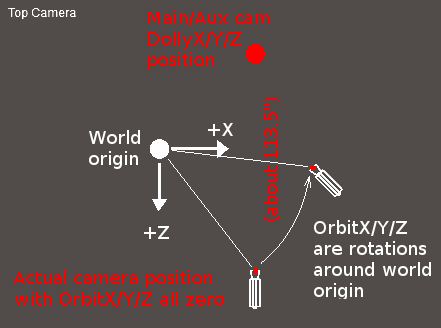
My initial conclusion is that the main/aux/posing cameras in Poser 9 seem to produce a 90° FOV with the same 12.7mm focal length as the dolly camera, and that the main camera's offset is about 113" along the Z axis (I won't say + or - since it depends how you define the offset!). More tests are still required to verify this and to get more precise figures.
The 3Dcheapskate* occasionally posts sensible stuff. Usually by accident. And it usually uses Poser 11, with units set to inches. Except when it's using Poser 6 or PP2014, or when its units are set to PNU or something else.
*soon only to be available in two flavours - DAZ and Renderosity
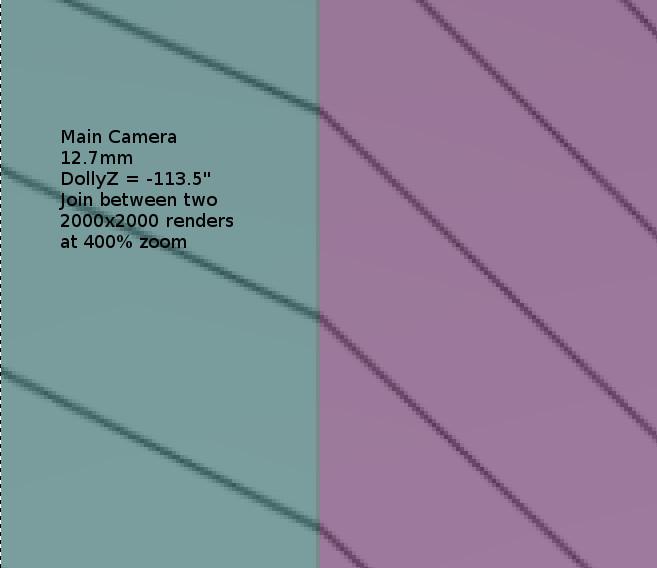
Okay, just completed another test for the Main Camera using the diagonal stripes (similar procedure to what I did for the dollycam).
This test appears to confirm the results from the previous post, i.e. 12.7mm seems to be the correct focal length for the main camera to get a 90° FOV, and the DollyZ value required to place the camera at the origin is now a bit more precise -113.5" (±0.05").
Here's the almost perfect match I got using DollyZ = -113.5":
 Here's the mismatch with DollyZ 0.1" less:
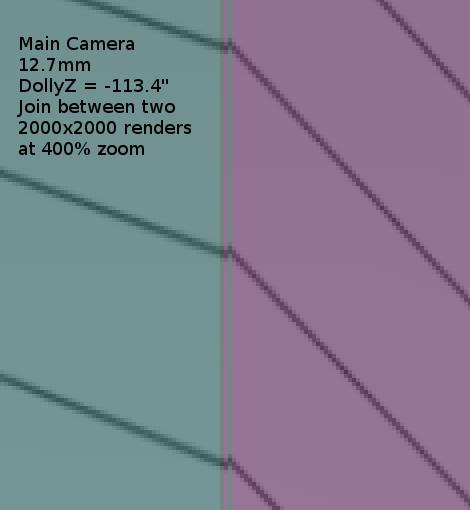 And here's the mismatch with DollyZ 0.1" higher:
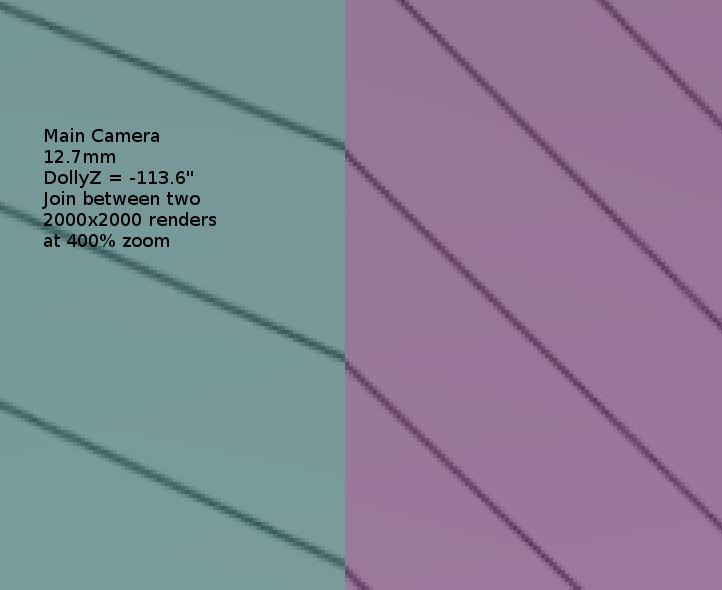 I also checked the joins between other adjacent pairs of 90° renders (if you consider the above test was the join between the north/east facing renders, I also checked the east/south, south/west, and north/up joins using the same diagonal stripes - almost perfect match in all cases with 12.7mm and -113.5")
Still not 100% proof positive, but getting closer. Once again I'd appreciate it if anybody can see any errors in my logic...
The 3Dcheapskate* occasionally posts sensible stuff. Usually by accident. And it usually uses Poser 11, with units set to inches. Except when it's using Poser 6 or PP2014, or when its units are set to PNU or something else.
*soon only to be available in two flavours - DAZ and Renderosity
This simple diagram is my understanding of how the Main/Aux cameras operate. With the Posing/Face/Hand cameras I believe that the Hip/Head/Hand position is used instead of the world origin. I may still be wrong.
The 3Dcheapskate* occasionally posts sensible stuff. Usually by accident. And it usually uses Poser 11, with units set to inches. Except when it's using Poser 6 or PP2014, or when its units are set to PNU or something else.
*soon only to be available in two flavours - DAZ and Renderosity
Once again I'm seriously not getting any emails from this f'ing weak incompetent forum update. I just stumbled on all this new info because I thought I better look over the recent threads and see if their are updates I'm not aware of.
Seriously I don't want to be in this forum anymore.
Renderosity forum reply notifications are wonky. If I read a follow-up in a thread, but I don't myself reply, then notifications no longer happen AT ALL on that thread. So if I seem to be ignoring a question, that's why. (Updated September 23, 2019)
113.5 is very close, if my new tactic is correct.
Here's my new tactic - ask poser where the camera is.
poser.Scene().CurrentCamera().WorldDisplacement()
With my main camera dolly 0, 0, 0, and all rotations 0, 0, 0, it reports (in Poser Native Units)
(0.0, 0.0, 1.100000023841858)
Using the official Poser inch ratio (103.2) we get a z coordinate of 113.52000 (there are more decimal places, but I don't think we care)
Renderosity forum reply notifications are wonky. If I read a follow-up in a thread, but I don't myself reply, then notifications no longer happen AT ALL on that thread. So if I seem to be ignoring a question, that's why. (Updated September 23, 2019)
113.5 is very close, if my new tactic is correct.
Here's my new tactic - ask poser where the camera is.
poser.Scene().CurrentCamera().WorldDisplacement()
With my main camera dolly 0, 0, 0, and all rotations 0, 0, 0, it reports (in Poser Native Units)
(0.0, 0.0, 1.100000023841858)
Using the official Poser inch ratio (103.2) we get a z coordinate of 113.52000 (there are more decimal places, but I don't think we care)
Thanks bagginsbill - that's a lot easier than my method ! :) Good to see that your figure's very close to mine
The 3Dcheapskate* occasionally posts sensible stuff. Usually by accident. And it usually uses Poser 11, with units set to inches. Except when it's using Poser 6 or PP2014, or when its units are set to PNU or something else.
*soon only to be available in two flavours - DAZ and Renderosity
With my 12.7mm Dolly Cam I've already gone ahead with the next step of my original project, i.e. creating the cubemap renders. I've started a separate thread for the first problem I've run into with that - "Parts of groundplane being clipped on 90° FOV render with camera horizontal."
Regarding the Main/Aux cameras any further comments regarding those are probably more appropriate on the "Getting the same view from dolly/orbiting cameras" thread.
The 3Dcheapskate* occasionally posts sensible stuff. Usually by accident. And it usually uses Poser 11, with units set to inches. Except when it's using Poser 6 or PP2014, or when its units are set to PNU or something else.
*soon only to be available in two flavours - DAZ and Renderosity

Privacy Notice
This site uses cookies to deliver the best experience. Our own cookies make user accounts and other features possible. Third-party cookies are used to display relevant ads and to analyze how Renderosity is used. By using our site, you acknowledge that you have read and understood our Terms of Service, including our Cookie Policy and our Privacy Policy.
It seems to be somewhere around 12.5-12.75mm (I'm using the dolly camera with its 'Scale' settings at 100%, in Poser 6/9/2014) - but does anybody know the exact value?
The 3Dcheapskate* occasionally posts sensible stuff. Usually by accident. And it usually uses Poser 11, with units set to inches. Except when it's using Poser 6 or PP2014, or when its units are set to PNU or something else.
*soon only to be available in two flavours - DAZ and Renderosity