
Renderosity Forums / Poser - OFFICIAL
Welcome to the Poser - OFFICIAL Forum
Forum Moderators: RedPhantom Forum Coordinators: Anim8dtoon
Poser - OFFICIAL F.A.Q (Last Updated: 2026 Oct 02 9:11 am)

Subject: Parts of groundplane being clipped on 90° FOV render with camera horizontal.


Sorry I don't have a solution - I'm just here to chime in and say I see this, too. When it happens I either move the camera or I delete the whole scene and play Skyrim.
Renderosity forum reply notifications are wonky. If I read a follow-up in a thread, but I don't myself reply, then notifications no longer happen AT ALL on that thread. So if I seem to be ignoring a question, that's why. (Updated September 23, 2019)
I'm not a gamer, so Skyrim isn't an option for me. I'll try a third option - go to bed and hope the problem goes away... ;o)
The 3Dcheapskate* occasionally posts sensible stuff. Usually by accident. And it usually uses Poser 11, with units set to inches. Except when it's using Poser 6 or PP2014, or when its units are set to PNU or something else.
*soon only to be available in two flavours - DAZ and Renderosity

Okay, new day new ideas.
markschum - I used a separate ground prop because I want the dolly camera at (0,0,0) and my ground slightly below that - the default Poser GROUND prop has no way to adjust its height. I made the default Poser GROUND prop invisible (Visible, Visible In Raytracing, and Cast Shadows are UNchecked; Visible In Camera is checked) so it shouldn't be having any effect... but I guess it could be some odd interaction. Definitely worth trying a couple of tests.
But before that...
I recall that large values for 'Scale' can sometimes cause odd things to happen, so I tried reducing my groundplane's scale from 1250% to 100%. The bottom parts of the N, E, S and W renders are no longer clipped, but the right half of the groundplane in the W render is still not showing. Here's the W, N, E, S renders butted together (renders were 500x500 - I got the same result with a 2048x2048 render, so I don't think render dimensions have anything to do with the problem
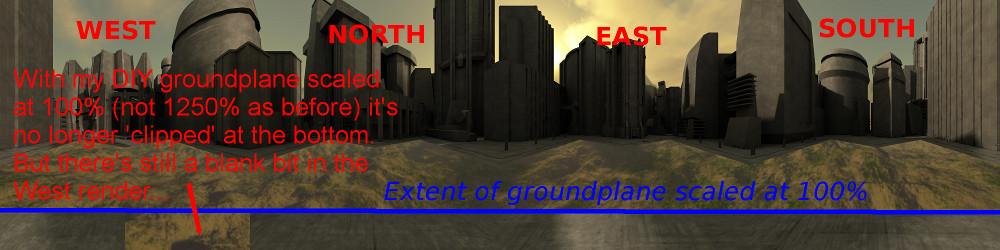 I'm wondering whether my groundplane having only 4 vertices (1 face) may have something to do with it, so it's probably worth trying with a mesh groundplane - the Poser GROUND prop for example.
(sidenote: the reason I'm using a 4 vertex ground plane is that it enables me to use displacement to make the ground bumpy. If I use a mesh I get artefacts along the mesh grid if I'm using AO - example image of that effect here http://www.renderosity.com/mod/gallery/index.php?image_id=2557344 )
The 3Dcheapskate* occasionally posts sensible stuff. Usually by accident. And it usually uses Poser 11, with units set to inches. Except when it's using Poser 6 or PP2014, or when its units are set to PNU or something else.
*soon only to be available in two flavours - DAZ and Renderosity
I just tried using the Poser GROUND prop instead of my DIY groundplane. I moved the dolly camera up a bit (36" above the origin) to put it the same height above the ground as my original.
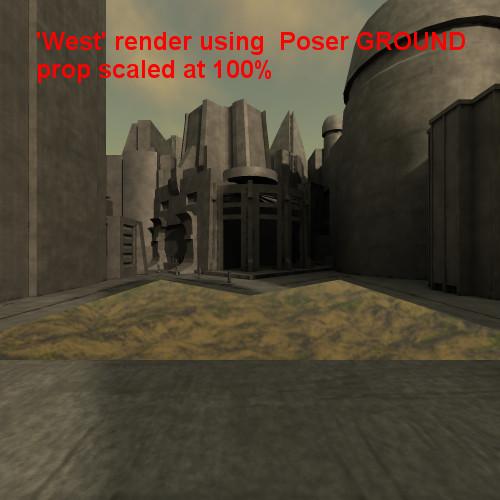
Here's the 'West' render with the GROUND scaled at 100% - everything seems as it should (the ground prop isn't big enough to reach to the buildings):
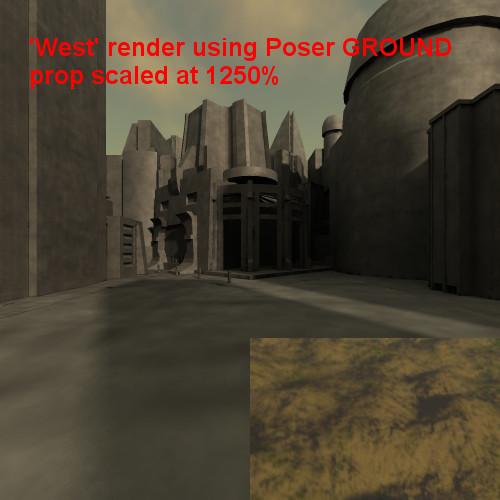
 But here's the 'West' render with the GROUND scaled at 1250% (the 'North render seems fine - haven't tried 'South' or 'East' yet):
 Hmmm... not sure if I can draw any conclusions yet.
The 3Dcheapskate* occasionally posts sensible stuff. Usually by accident. And it usually uses Poser 11, with units set to inches. Except when it's using Poser 6 or PP2014, or when its units are set to PNU or something else.
*soon only to be available in two flavours - DAZ and Renderosity
Continued from previous post (timeout for editing)... Even with the Poser GROUND prop scaled at 12500% the N, S, and E renders are okay, but the W render has the problem noted above.
The 3Dcheapskate* occasionally posts sensible stuff. Usually by accident. And it usually uses Poser 11, with units set to inches. Except when it's using Poser 6 or PP2014, or when its units are set to PNU or something else.
*soon only to be available in two flavours - DAZ and Renderosity

I've had this happen numerous times but I've yet to figure out a consistent way to beat it. the only solution which seems to work - some of the time - is to use a much higher res mesh for the ground. I couldn't give you a figure for that, unfortunately; you'll just have to faff about.
Coppula eam se non posit acceptera jocularum.
I've had this happen numerous times but I've yet to figure out a consistent way to beat it. the only solution which seems to work - some of the time - is to use a much higher res mesh for the ground. I couldn't give you a figure for that, unfortunately; you'll just have to faff about.
I'm still chipping away at this little conundrum. Your "using a higher resolution mesh" seems to tie in with the results I'm seeing - I'd really like to nail this one down by coming up with some figures! I think it's worth summarizing my thoughts so far.
I'm fairly sure there are two distinct (although probably related) problems, which likely occur under a broader range of conditions than I state here (I assume that you're using more 'normal' FOV values when you see this? I don't think many people use a 90° FOV?):
1)The bottom edge of a 1-face/4-vertex groundplane being 'clipped' in a 90° FOV horizontal (N, S, E, or W-facing) render. My thoughts so far (for which I'm still doing more tests) are that this seems to occur when the face exceeds a certain size - increasing the scale definitely causes it, but I'm not sure yet whether increasing the size of the square's actual geometry does.
- The right hand side of the West render not rendering. This one is bizarre - why is West different?
-
Also it can be only part of a face that's clipped (i.e. when using a 1-face/4-vertex groundplane).
-
When using a multi-face mesh it appears to be only the closeset face(s) in the right hand side of the West render that get clipped.
-
When using a multi-face mesh it seems to occur when the mesh/faces exceed a certain size - increasing the scale definitely causes it, but I'm not sure yet whether increasing the size of the square's actual geometry does.
-
(I get a very vague idea that there could be an error in the maths with one of the circular functions, under very specific circumstances - but that's just grabbing at straws! )
Like I already said there's more tests to try.
The 3Dcheapskate* occasionally posts sensible stuff. Usually by accident. And it usually uses Poser 11, with units set to inches. Except when it's using Poser 6 or PP2014, or when its units are set to PNU or something else.
*soon only to be available in two flavours - DAZ and Renderosity
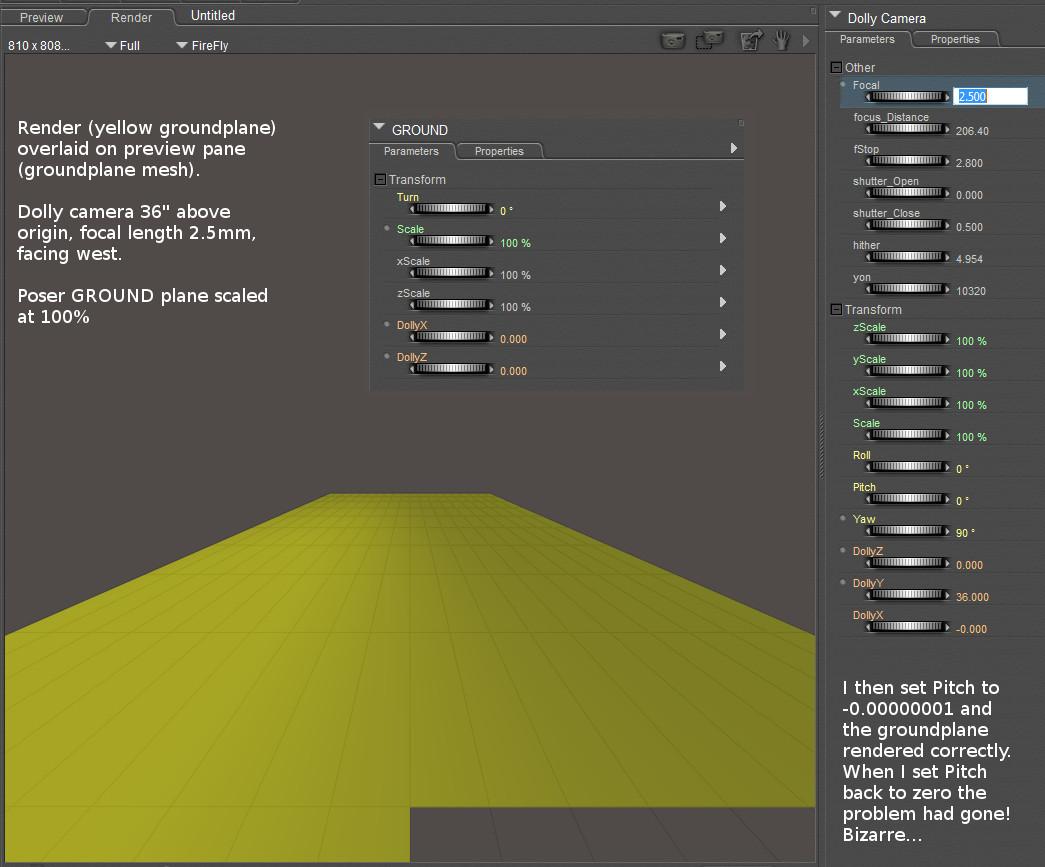
Okay, I've discovered a bit more. Even with the standard Poser GROUND prop unscaled (i.e. scale = 100%) the closest squares of the ground mesh in the right half of the west-facing render (dollycam yaw = 90) are still somehow being 'clipped'. (I had to open up the FOV even more to see this - I used a focal length of just 2.5mm. See the image below)
Then on a whim I set the dollycam pitch to -0.00000001 and rerendered - the groundplane rendered correctly.
But most curiously, when I set the dollycam pitch back to exactly zero and rerendered the groundplane still rendered correctly.
The 3Dcheapskate* occasionally posts sensible stuff. Usually by accident. And it usually uses Poser 11, with units set to inches. Except when it's using Poser 6 or PP2014, or when its units are set to PNU or something else.
*soon only to be available in two flavours - DAZ and Renderosity
The 'setting Pitch to a non-zero value and then setting it back' that I mentioned in the previous post - I haven't been able to repeat it. Setting Pitch to a couple of degrees down (e.g. -5°) does appear to get rid of the 'right half of the west-facing render groundplane'. But that's no help, since I need an exact 0° pitch.
However, following SamTherapy's suggestion I tried using the Poser 9 "Square Hi-Res" primitive prop for the ground instead. Even scaled at 10000% it seemed to render fine (I'd also raised the dollycam to be 72" above the origin)
So I now have my first 8192x4096 lat/long (±180° azimuth / ±90° elevation) Poser-generated environment map (I used HDRShop v1 to convert from vertical cross cubemap to lat/long map). Here's a reduced version of my first success, with complete groundplane - no holes!
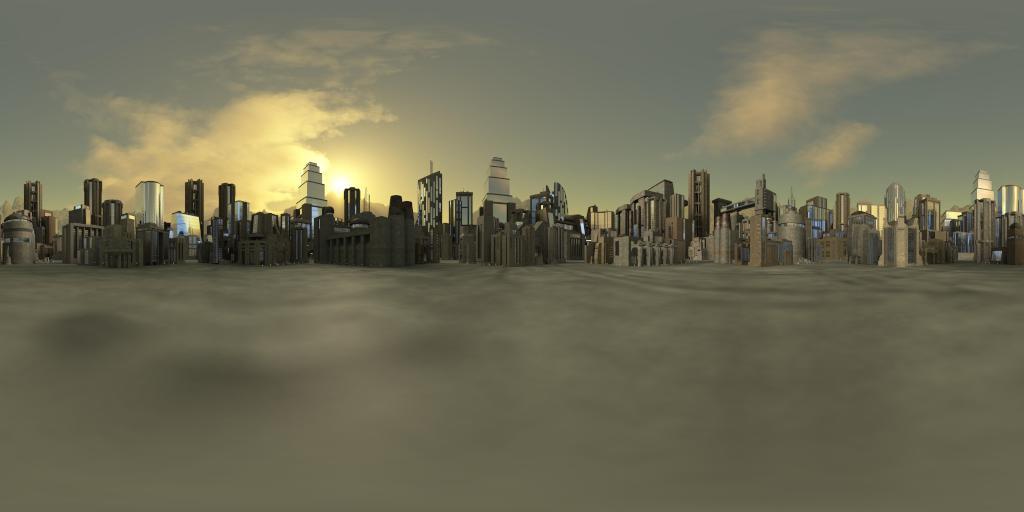 My attempts to understand why the 'right-half of the west-facing render' problem occurs are now floundering. But since SamTherapy's workaround seems to work for my particular situation I don't think I'll bother investigating further - unless somebody has a bright idea.
The 3Dcheapskate* occasionally posts sensible stuff. Usually by accident. And it usually uses Poser 11, with units set to inches. Except when it's using Poser 6 or PP2014, or when its units are set to PNU or something else.
*soon only to be available in two flavours - DAZ and Renderosity

Privacy Notice
This site uses cookies to deliver the best experience. Our own cookies make user accounts and other features possible. Third-party cookies are used to display relevant ads and to analyze how Renderosity is used. By using our site, you acknowledge that you have read and understood our Terms of Service, including our Cookie Policy and our Privacy Policy.
This is a follow-on from my "Focal Length Value For An Exact 90 Degree FOV ?" thread here in the Poser forum. The conclusion from that thread was that a dolly cam focal length of exactly 12.7mm produces an exact 90° FOV, accurate down to the individual pixels of a 2000x2000 render.
My next step is to create six separate 2000x2000 cubemap renders (north, east, south, west, up, and down is the way I like to refer to them) that butt together into a vertical cross cubemap. This is going very nicely, except for one thing...
The problem I have now is that parts of the plane I'm using for the ground do not get rendered, but seem to be clipped as per the annotated image below:
The groundplane is a single sided square, 4 vertices and 1 face, scaled at 1250%.
I don't think it's anything to do with 'Hither' and 'Yon', since these are only relevant to the preview (I think?)
I don't think it's anything to do with displacement, as I have the same problem with "Use Displacement Maps" UNchecked in Render Settings
Anyone have any ideas?
The 3Dcheapskate* occasionally posts sensible stuff. Usually by accident. And it usually uses Poser 11, with units set to inches. Except when it's using Poser 6 or PP2014, or when its units are set to PNU or something else.
*soon only to be available in two flavours - DAZ and Renderosity