
3dcheapskate opened this issue on Dec 18, 2014 · 11 posts
3dcheapskate posted Sun, 21 December 2014 at 1:16 AM
The 'setting Pitch to a non-zero value and then setting it back' that I mentioned in the previous post - I haven't been able to repeat it. Setting Pitch to a couple of degrees down (e.g. -5°) does appear to get rid of the 'right half of the west-facing render groundplane'. But that's no help, since I need an exact 0° pitch.
However, following SamTherapy's suggestion I tried using the Poser 9 "Square Hi-Res" primitive prop for the ground instead. Even scaled at 10000% it seemed to render fine (I'd also raised the dollycam to be 72" above the origin)
So I now have my first 8192x4096 lat/long (±180° azimuth / ±90° elevation) Poser-generated environment map (I used HDRShop v1 to convert from vertical cross cubemap to lat/long map). Here's a reduced version of my first success, with complete groundplane - no holes!
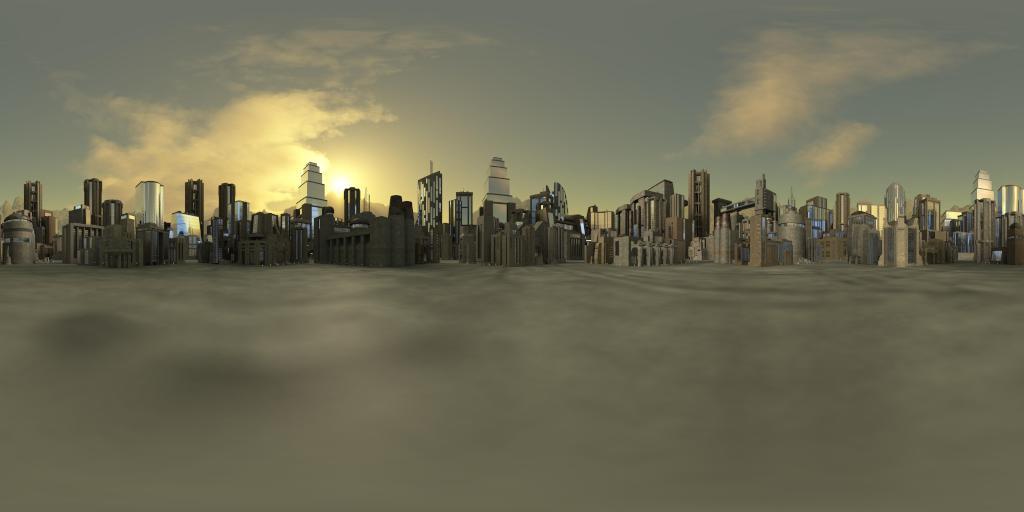 My attempts to understand why the 'right-half of the west-facing render' problem occurs are now floundering. But since SamTherapy's workaround seems to work for my particular situation I don't think I'll bother investigating further - unless somebody has a bright idea.
The 3Dcheapskate* occasionally posts sensible stuff. Usually by accident. And it usually uses Poser 11, with units set to inches. Except when it's using Poser 6 or PP2014, or when its units are set to PNU or something else.
*soon only to be available in two flavours - DAZ and Renderosity