
3dcheapskate opened this issue on Dec 18, 2014 · 11 posts
3dcheapskate posted Thu, 18 December 2014 at 10:02 PM
Okay, new day new ideas.
markschum - I used a separate ground prop because I want the dolly camera at (0,0,0) and my ground slightly below that - the default Poser GROUND prop has no way to adjust its height. I made the default Poser GROUND prop invisible (Visible, Visible In Raytracing, and Cast Shadows are UNchecked; Visible In Camera is checked) so it shouldn't be having any effect... but I guess it could be some odd interaction. Definitely worth trying a couple of tests.
But before that...
I recall that large values for 'Scale' can sometimes cause odd things to happen, so I tried reducing my groundplane's scale from 1250% to 100%. The bottom parts of the N, E, S and W renders are no longer clipped, but the right half of the groundplane in the W render is still not showing. Here's the W, N, E, S renders butted together (renders were 500x500 - I got the same result with a 2048x2048 render, so I don't think render dimensions have anything to do with the problem
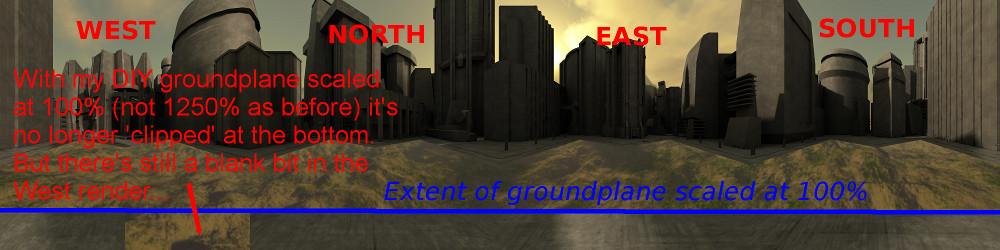 I'm wondering whether my groundplane having only 4 vertices (1 face) may have something to do with it, so it's probably worth trying with a mesh groundplane - the Poser GROUND prop for example.
(sidenote: the reason I'm using a 4 vertex ground plane is that it enables me to use displacement to make the ground bumpy. If I use a mesh I get artefacts along the mesh grid if I'm using AO - example image of that effect here http://www.renderosity.com/mod/gallery/index.php?image_id=2557344 )
The 3Dcheapskate* occasionally posts sensible stuff. Usually by accident. And it usually uses Poser 11, with units set to inches. Except when it's using Poser 6 or PP2014, or when its units are set to PNU or something else.
*soon only to be available in two flavours - DAZ and Renderosity