
Renderosity Forums / Poser - OFFICIAL
Welcome to the Poser - OFFICIAL Forum
Forum Moderators: RedPhantom Forum Coordinators: Anim8dtoon
Poser - OFFICIAL F.A.Q (Last Updated: 2026 Jun 21 10:38 pm)

Subject: How to build pubic hair

- 1
- 2

Check this thread out; it's the pits...:lol:
http://www.renderosity.com/mod/forumpro/showthread.php?thread_id=2803243
----------------------------------------------------------------------------------------
The Wisdom of bagginsbill:
"Oh - the manual says that? I have never read the manual - this must be why."“I could buy better software, but then I'd have to be an artist and what's the point of that?"
"The [R'osity Forum Search] 'Default' label should actually say 'Don't Find What I'm Looking For'".
bagginsbill's Free Stuff... https://web.archive.org/web/20201010171535/https://sites.google.com/site/bagginsbill/Home

In recent versions of Poser you no longer need a separate prop to host a hair growth group, which might make things like body or facial hair, where the hair growth group needs to adjust to morphs or joints, easier. You should be able to use the Grouping Tool to set up a hair group on your hip actor, for pubic hair. Then grow the hair and play with the Hair Room settings to see if you can get decent dynamic pubic hair out of the process. I tried this with Antonia, a few months back. It worked decently, but Antonia's hip geometry didn't permit me to group polygons such that I could get a decent-looking outline for the hair in the area. Dynamic hair may also have trouble doing tight curls such as one sees with body hair.
Another approach might be to build a conforming figure, using a series of specially UV-mapped ball props for the geometry. Then transmap the props and copy the weights to the conformer from the conformee. Depending on how you arrange the ball props and how well the UVs and textures are set up, this might work decently.
Using either of these approaches on top of a texture with the "flat" body hair painted on might help add a layered quality and more closely approach the desired effect.
Edit: I should have read the link, posted above. The dynamic stuff is already covered up there. 
===========================sigline======================================================
Cage can be an opinionated jerk who posts without thinking. He apologizes for this. He's honestly not trying to be a turkeyhead.
Cage had some freebies, compatible with Poser 11 and below. His Python scripts were saved at archive.org, along with the rest of the Morphography site, where they were hosted.
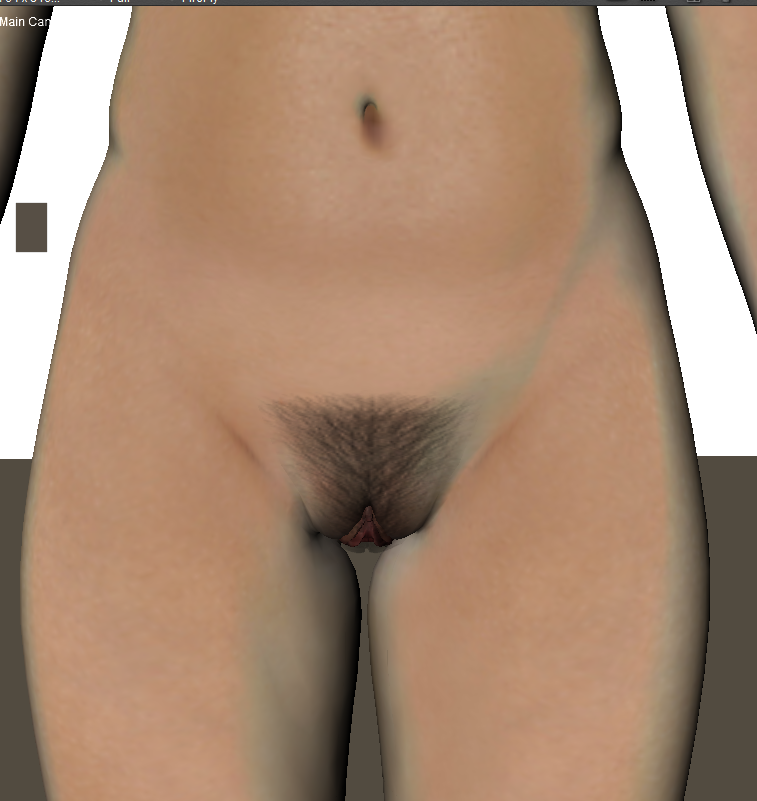

Alternatively, you could use rows of flat polygons with hair textures applied scattered about the pubic area. Sort of like transmapped hair for the head but instead, for the genitals. Again, it's not a quick solution, as you have to plan out the poly flow, uv a few of them, texture those and then spread them around judiciously based on the flow you designed.

===========================sigline======================================================
Cage can be an opinionated jerk who posts without thinking. He apologizes for this. He's honestly not trying to be a turkeyhead.
Cage had some freebies, compatible with Poser 11 and below. His Python scripts were saved at archive.org, along with the rest of the Morphography site, where they were hosted.

What figure are you working with?
Available on Amazon for the Kindle E-Reader Monster of the North and The Shimmering Mage
Today I break my own personal record for the number of days for being alive.
Check out my store here or my free stuff here
I use Poser 13 and win 10


Quote - Check this thread out; it's the pits...:lol:
http://www.renderosity.com/mod/forumpro/showthread.php?thread_id=2803243
You know, before I visited the thread I was hopefull it might be full of retro-babe bush!
But nah, you can be a bloody disappointment sometimes, Rod :biggrin:

Quote - Check this thread out; it's the pits...:lol:
http://www.renderosity.com/mod/forumpro/showthread.php?thread_id=2803243
Thanks for finding that one. I saw this thread and remembered that thread, but didn't have time to look for it.
Renderosity forum reply notifications are wonky. If I read a follow-up in a thread, but I don't myself reply, then notifications no longer happen AT ALL on that thread. So if I seem to be ignoring a question, that's why. (Updated September 23, 2019)

1 paint hair on the skin texture.
what most do.
2 shader
might as well paint on the skin texure
3 texture a lot of small hair meshes,like they make textured skull hair.
might as well use dynamics
4 dynamics
to look good will rase the polycount high.probably to high.
unless done in zBrush,mudbox or a high polycount app.
5 could paint hair in post
only works for personal use for people that can.
So now where back to paint hair on the skin texture.
That's why every one does it this way.
pretty much the only practical solutions.
============================================================
The
Artist that will fight for decades to conquer their media.
Even if you never know their name ,your know their Art.
Dark Sphere Mage Vengeance
Content Advisory! This message contains nudity
Pubic Hair
-
I do not want to work in post work in some of the shots I miss the three-dimensionality of the hair
-
I saw the post (http://www.renderosity.com/mod/forumpro/showthread.php?thread_id=2803243) but frankly friends, those are not real pubic hair
This is what I want to have:
Ideas ?

Poser Pro 2014 SR 1 on Windows 7 64
bit
I use IDL, Gamma Correction and EZSkin for all
final renders.
for just a few hairs
dynamics could work
original meshes topology might work for or against.
might need to make something like a skull cap or in your case a pelve cap.
============================================================
The
Artist that will fight for decades to conquer their media.
Even if you never know their name ,your know their Art.
Dark Sphere Mage Vengeance
Thanks RorrKonn
i'm trying to use "hair room" but i can not find the right way to address the hair properly.
Especially the basis of individual hair is too vertical to the skin,
I can not bend it properly ...
Poser Pro 2014 SR 1 on Windows 7 64
bit
I use IDL, Gamma Correction and EZSkin for all
final renders.
well if 1,2,4,5, wount do
where at 3
and
that's a lot of work
and
since it's around joints gods only know what might happen.
and
there's probably more stuff to consider that's not crossing my mind at the moment.
I'm thinking shaveds good
============================================================
The
Artist that will fight for decades to conquer their media.
Even if you never know their name ,your know their Art.
Dark Sphere Mage Vengeance
Content Advisory! This message contains nudity
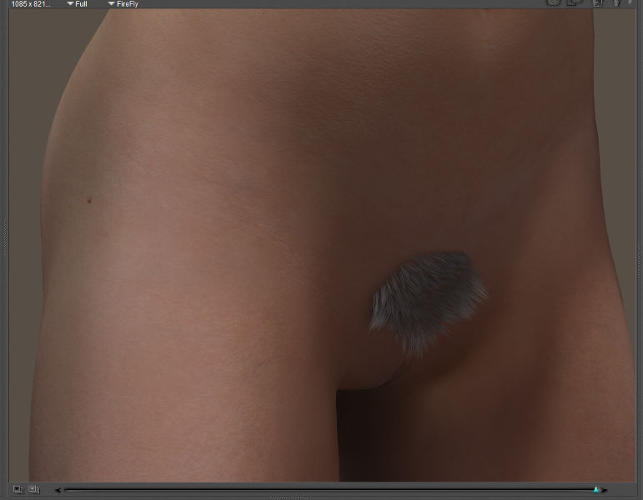
nothing about CGI is easy to learn.
Roxie needs a pelve cap but have no idea how that would do with joints.
and I know Rox's hair looks terrible.was just playing around
============================================================
The
Artist that will fight for decades to conquer their media.
Even if you never know their name ,your know their Art.
Dark Sphere Mage Vengeance
Thank you again RorrKonn
but the real trouble is turn the hair on the right way.
"hair style tool" which is the tool to turn the hair, has no sensitivity adjustment and i need to work on every single hair, it is impossible to reproduce the same symmetrically orientation between the hairs of the left and right.
Or if there is a way I have not found it yet.
Please RorrKonn, may you use a more simply language ?
english is not my native language, so i have some trouble sometime to understand what you mean.
many thanks
Ex. "f ya can turn up guid hairs and turn down copied hairs might help."
what do you mean ?
Poser Pro 2014 SR 1 on Windows 7 64
bit
I use IDL, Gamma Correction and EZSkin for all
final renders.
This is how learn CGI.
Read the chapter in the manual about the hair room.
Experiment with all the tools.
Click every button ,slide every slider.
until I know what they do.
I'm not that good with Pro 14 hair room.
Very soon your know more then me .
============================================================
The
Artist that will fight for decades to conquer their media.
Even if you never know their name ,your know their Art.
Dark Sphere Mage Vengeance
Quote - This is how learn CGI.
Read the chapter in the manual about the hair room.
Experiment with all the tools.
Click every button ,slide every slider.
until I know what they do.I'm not that good with Pro 14 hair room.
Very soon your know more then me .
You missed a step. Buy wig to replace your own hair until it grows back in.
Available on Amazon for the Kindle E-Reader Monster of the North and The Shimmering Mage
Today I break my own personal record for the number of days for being alive.
Check out my store here or my free stuff here
I use Poser 13 and win 10
Content Advisory! This message contains nudity
Available on Amazon for the Kindle E-Reader Monster of the North and The Shimmering Mage
Today I break my own personal record for the number of days for being alive.
Check out my store here or my free stuff here
I use Poser 13 and win 10
Content Advisory! This message contains nudity

Available on Amazon for the Kindle E-Reader Monster of the North and The Shimmering Mage
Today I break my own personal record for the number of days for being alive.
Check out my store here or my free stuff here
I use Poser 13 and win 10
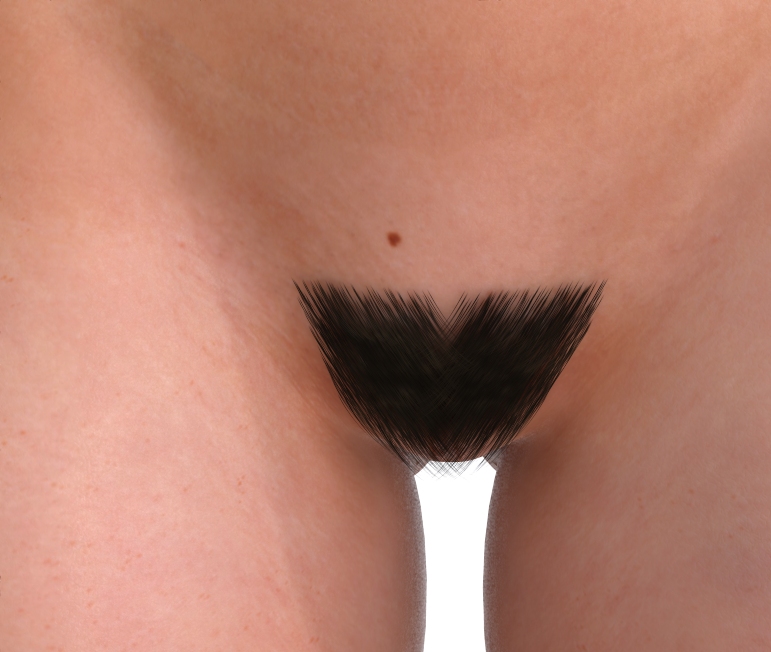
Quote - Here is the side view. Let me know what you think and how you'd like it changed.
I think that old hair script might be able to add some curl to the hairs. :unsure: The script is almost as much a PITA to use as the Hair Room's native Hair Style Tool, though, so mebbe that's not so useful....
===========================sigline======================================================
Cage can be an opinionated jerk who posts without thinking. He apologizes for this. He's honestly not trying to be a turkeyhead.
Cage had some freebies, compatible with Poser 11 and below. His Python scripts were saved at archive.org, along with the rest of the Morphography site, where they were hosted.
The hair script is what I used to style the hair in the first place. I used it to do the base style and then tweaked it in the hair room with the styling tools.
Available on Amazon for the Kindle E-Reader Monster of the North and The Shimmering Mage
Today I break my own personal record for the number of days for being alive.
Check out my store here or my free stuff here
I use Poser 13 and win 10

Oh, wow. :lol: I didn't realize. I was just thinking of the attached image, copied over from the Loop thread, showing my earliest attempts with the script. The curly hairs were easy that way, but hard to "steer", as it were.... :unsure: I never really learned how to apply that script for anything as well as you did, though.
===========================sigline======================================================
Cage can be an opinionated jerk who posts without thinking. He apologizes for this. He's honestly not trying to be a turkeyhead.
Cage had some freebies, compatible with Poser 11 and below. His Python scripts were saved at archive.org, along with the rest of the Morphography site, where they were hosted.
Quote - what script ,where .name,link ,some kind of clue ?
Oh, sorry. We're... being a bit obscure. :lol: I wrote a sort of experimental Poser Python script to style Poser dynamic hair guide hairs using spline paths defined by marker points. The script is absolutely undocumented, unfortunately, and I barely remember the basics of how to use it. :unsure:
The script is available here, as hair_to_path6c.py:
http://www.morphography.uk.vu/~cagepage/looper/loopy.html
The development thread for it is here, with discussion of the hair script beginning about halfway down page 17 of the thread:
http://www.renderosity.com/mod/forumpro/showthread.php?thread_id=2798819&page=17
===========================sigline======================================================
Cage can be an opinionated jerk who posts without thinking. He apologizes for this. He's honestly not trying to be a turkeyhead.
Cage had some freebies, compatible with Poser 11 and below. His Python scripts were saved at archive.org, along with the rest of the Morphography site, where they were hosted.
Content Advisory! This message contains nudity
xpdev:
http://www.renderosity.com/mod/gallery/index.php?image_id=2551600§ion_id=43&genre_id=66&np
might want to talk to bockolaf
& check out his gallery
Thanks Cage
============================================================
The
Artist that will fight for decades to conquer their media.
Even if you never know their name ,your know their Art.
Dark Sphere Mage Vengeance
The last page of the loop making thread has some unofficial instructions I wrote for the script.
http://www.renderosity.com/mod/forumpro/showthread.php?thread_id=2798819&page=21#message_4020156
Available on Amazon for the Kindle E-Reader Monster of the North and The Shimmering Mage
Today I break my own personal record for the number of days for being alive.
Check out my store here or my free stuff here
I use Poser 13 and win 10
Cage, that link is the wrong script. it's only version 6c. version 6d has the selection box that makes the script much easier to use.
Available on Amazon for the Kindle E-Reader Monster of the North and The Shimmering Mage
Today I break my own personal record for the number of days for being alive.
Check out my store here or my free stuff here
I use Poser 13 and win 10
I don't think 6d was ever publicly released. The project sort of fizzled while 6d was the dev-testing version. Do you find 6d stable and reliable? If so, I will put it up instead of 6c when I figure out this html editor. I need to update several things on my site pages, at this point.
===========================sigline======================================================
Cage can be an opinionated jerk who posts without thinking. He apologizes for this. He's honestly not trying to be a turkeyhead.
Cage had some freebies, compatible with Poser 11 and below. His Python scripts were saved at archive.org, along with the rest of the Morphography site, where they were hosted.
Yes, 6d is stable. I don't think I've ever had a problem with crashing, not that I can remember at least. It's certainly no less stable than poser itself...oh wait...um better than vista...um no um. Seriously, it seems fine.
Available on Amazon for the Kindle E-Reader Monster of the North and The Shimmering Mage
Today I break my own personal record for the number of days for being alive.
Check out my store here or my free stuff here
I use Poser 13 and win 10

I've been attempting something very similar myself, so perhaps this thread can help. That script looks pretty neat, as do some of the others, thanks so much for that! If you could share the latest version, that would be awesome! Maybe I can use the hair room after all instead of the way I have been doing things.
xpdev, do you happen to have AC3D, by any chance? If so, there's a nifty little tool for it which creates 'fur' from faces and there are some decent options too. I'm currently trying to figure out how to get imported strand hair props to morph and move with the figure mesh and also how to get it to render, as even with a clone of the default dynamic hair material, it's not rendering.
So far, the methods for creating 3D hair that I know of are as follows:
AC3D 'Fur' tool
Daz3D's Look At My Hair
A piece of software called Hair Farm
Poser's hair room, of course.
Look At My Hair won't work in Poser, that I know of and I'm not sure what can be done with Hair Farm, but if you do have AC3D, you could create the type of hair you're after fairly easily with that tool, though getting it to work with movements and morphs could be problematic.
Glen.
I'm running Win 10 Pro 32GB RAM Intel Core i7-4790K CPU @ 4.00GHz Nvidia GeForce GTX 1660 Ti
My DA Gallery: glen85.deviantart.com/gallery
Peace, love and polygons!
Here i'm
RedPhantom you wrote me
"Here is the side view. Let me know what you think and how you'd like it changed."
So, your work is amazing, but seems to me that is a "prop" using a skullcap
The trouble to use a skullcap in that body zone is that i need the hair follows body morphs, that is why i'm trying to use "hair room"
Otherwise I have to rebuild the hair every time I change the position of the legs and low belly.
i'm not able to find the way to use the "hair_to_path6c.py" without a skullcap in the "hair room"
Poser Pro 2014 SR 1 on Windows 7 64
bit
I use IDL, Gamma Correction and EZSkin for all
final renders.
That actually is a conforing figure rather than a prop. I found that growing hair directly on a model and then saving just the hair messes up the hair later. It loses all population. The hair needs to be saved with geometry.
To use the script you need to have a hair group created. I don't believe it matters what the group is created on.
Available on Amazon for the Kindle E-Reader Monster of the North and The Shimmering Mage
Today I break my own personal record for the number of days for being alive.
Check out my store here or my free stuff here
I use Poser 13 and win 10
You can get some unusual results with the script. I find that using directly to path and Radial options work the most preditably although I've gotten some interesting results with some of the others. For this hair, I used those and the use hair length entry with a length of .01. I don't know if that number is related to the poser units or not but if they are I use inches.
Some other things of note, the markers can be parented to each other or to another prop or even grouped. They can also be saved as a prop and loaded at a later time.
on a side note assuming it's not against the TOS, I am planning on uploading this as a freebie so if you can't get things how you like it, and you like mine you can use it.
Available on Amazon for the Kindle E-Reader Monster of the North and The Shimmering Mage
Today I break my own personal record for the number of days for being alive.
Check out my store here or my free stuff here
I use Poser 13 and win 10
http://www.renderosity.com/mod/forumpro/showthread.php?thread_id=2878471&page=1
Here is a link to another thread with a different technique for styling hair. But warning it's rather slow and tedious.
Available on Amazon for the Kindle E-Reader Monster of the North and The Shimmering Mage
Today I break my own personal record for the number of days for being alive.
Check out my store here or my free stuff here
I use Poser 13 and win 10
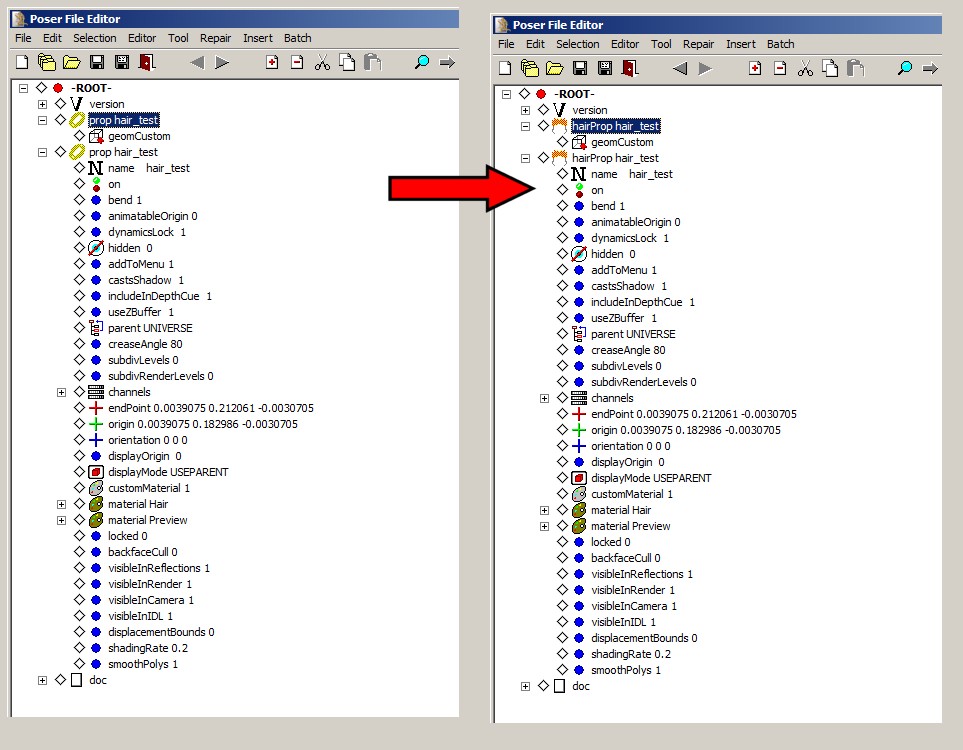
I overlooked this post, earlier. Several version ago, Poser used to render line geometries like any others, but that changed in... maybe Poser 7. The only way to get Poser to render a line geometry now is as a hair prop. To create one of these, you need to modify the .pp2 in a Poser file editor.
I was able to make a line geometry .obj render in Poser using the following process:
-
Import the obj.
-
Save the imported actor to the props (or hair) library. Poser will save this as .pp2 or .ppz.
-
Open the saved library prop in a Poser file editor or text editor.
-
Replace the two "prop" listings with "hairProp" listings and save the changes.
This created a line geometry prop which Poser would render as lines. This is equivalent to a dynamic hair prop rendering only the guide hairs.
===========================sigline======================================================
Cage can be an opinionated jerk who posts without thinking. He apologizes for this. He's honestly not trying to be a turkeyhead.
Cage had some freebies, compatible with Poser 11 and below. His Python scripts were saved at archive.org, along with the rest of the Morphography site, where they were hosted.

(Remove the .txt extension and save the attachment as .ppz, to use it in Poser.)
===========================sigline======================================================
Cage can be an opinionated jerk who posts without thinking. He apologizes for this. He's honestly not trying to be a turkeyhead.
Cage had some freebies, compatible with Poser 11 and below. His Python scripts were saved at archive.org, along with the rest of the Morphography site, where they were hosted.
You're a clever sausage, Cage! Thank you! I'll get onto that when I have time (preparing for a wedding this weekend, so it might be later on).
I'm running Win 10 Pro 32GB RAM Intel Core i7-4790K CPU @ 4.00GHz Nvidia GeForce GTX 1660 Ti
My DA Gallery: glen85.deviantart.com/gallery
Peace, love and polygons!
Many thanks for your work cage.
But i still consider the hair room the best way for pubic hair.
A prop is not able to follow belly body morphs
if i'm wrong i'm very happy to learn much much much more from you about pubic hair
props
Thanks again
Poser Pro 2014 SR 1 on Windows 7 64
bit
I use IDL, Gamma Correction and EZSkin for all
final renders.

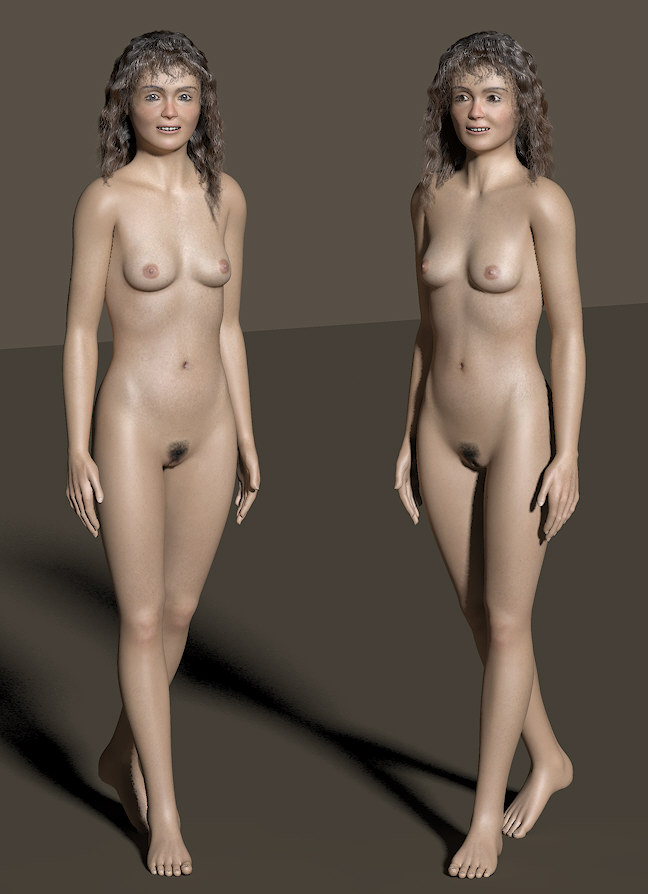
- 1
- 2

Privacy Notice
This site uses cookies to deliver the best experience. Our own cookies make user accounts and other features possible. Third-party cookies are used to display relevant ads and to analyze how Renderosity is used. By using our site, you acknowledge that you have read and understood our Terms of Service, including our Cookie Policy and our Privacy Policy.
Hi to all
i'm looking for a way to build pubic hair, i don't want to use skin with pubic hair, they are too "flat"
There is a way to use hair room to build pubic hair ?
or someone has other good ideas ?
thank to everybody
Poser Pro 2014 SR 1 on Windows 7 64 bit
I use IDL, Gamma Correction and EZSkin for all final renders.