
Renderosity Forums / Poser - OFFICIAL
Welcome to the Poser - OFFICIAL Forum
Forum Moderators: RedPhantom Forum Coordinators: Anim8dtoon
Poser - OFFICIAL F.A.Q (Last Updated: 2026 Jun 20 2:51 pm)

Subject: How to build pubic hair

- 1
- 2

Content Advisory! This message contains nudity
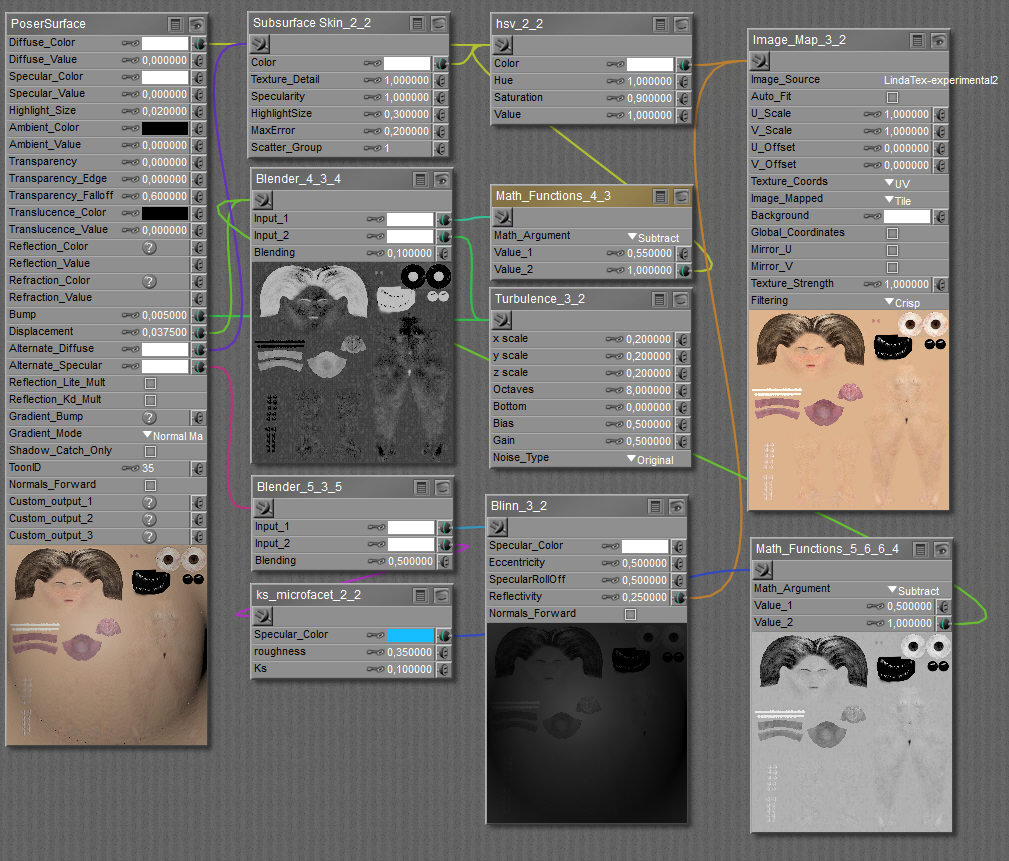
A slightly different setup that also works good.
This is my preferred one. See the connection between the ks_microfacet Specular_Color "BLUE" and the lower right hand corner Math_Function.
Should be in my first screengrab also.
This removes the "Blue Color" from the brows and the Public hair.
Poser 1, 2, 3, 4, 5, 7,
P8 and PPro2010, P9 and PP2012, P10 and PP2014 Game
Dev
"Do not drive
faster then your angel can fly"!
But? I have to add:
To use a setup like this, you need a good texture that allows it.
Most textures are way to soft and blurred, so I prepare the textures by making them pretty sharp, and then the brows and public hairs come to the surface.
Poser 1, 2, 3, 4, 5, 7,
P8 and PPro2010, P9 and PP2012, P10 and PP2014 Game
Dev
"Do not drive
faster then your angel can fly"!

It should work with existing hair groups. Make sure the skull cap (or whatever you hade the hair grown on) then run the script. The first list is the hair groups. Select the one you want to work with. Then you can either select nothing and work with the whole group, select individual strands in the second list, or create a selection and select some strands that way. I don't believe the select Y locks was ever working properly.
What the script doesn't work with is previous styling. It will override the growth controls and the styling tool. You can use the styling tools afterwards if you need to adjust sonething afterwards.
Available on Amazon for the Kindle E-Reader Monster of the North and The Shimmering Mage
Today I break my own personal record for the number of days for being alive.
Check out my store here or my free stuff here
I use Poser 13 and win 10


If the morphs are causing the problem, try styling the hair with them zeroed out. Then apply the morphs and use the styling tool, if needed, to fix any hairs that get messed up.
Available on Amazon for the Kindle E-Reader Monster of the North and The Shimmering Mage
Today I break my own personal record for the number of days for being alive.
Check out my store here or my free stuff here
I use Poser 13 and win 10
- 1
- 2

Privacy Notice
This site uses cookies to deliver the best experience. Our own cookies make user accounts and other features possible. Third-party cookies are used to display relevant ads and to analyze how Renderosity is used. By using our site, you acknowledge that you have read and understood our Terms of Service, including our Cookie Policy and our Privacy Policy.
Content Advisory! This message contains nudity
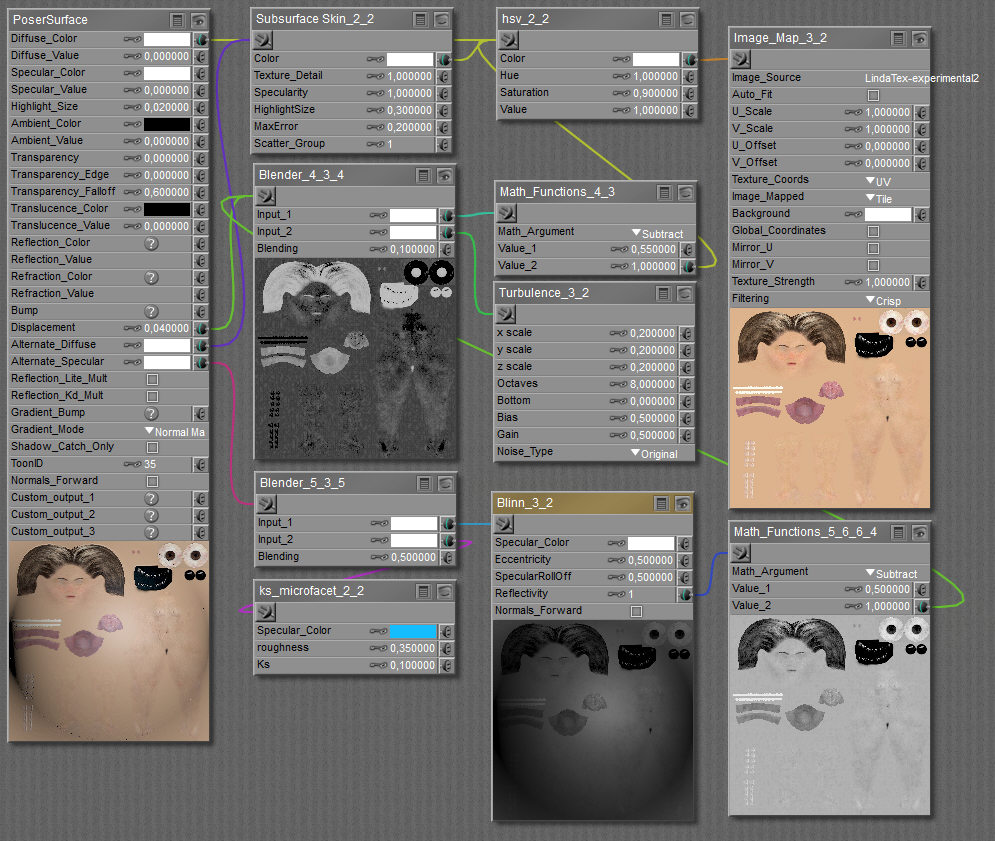
(Click to enlarge)the Public hair is manually painted on the original diffuse texture.
This diffuse texture goes through a Math_Function node to drive the displacement (Blended with a turbulence node) and also drives the Blinn node (again through a Math_Function to invert the map) .
I have several variations of this setup, but all work pretty well.
**The advantage of this setup is that:
**
Dark area's like brows and public gair get more displacement, and less shine.
Poser 1, 2, 3, 4, 5, 7, P8 and PPro2010, P9 and PP2012, P10 and PP2014 Game Dev
"Do not drive faster then your angel can fly"!