
xpdev opened this issue on Jul 22, 2014 · 61 posts
Cage posted Tue, 29 July 2014 at 6:27 AM
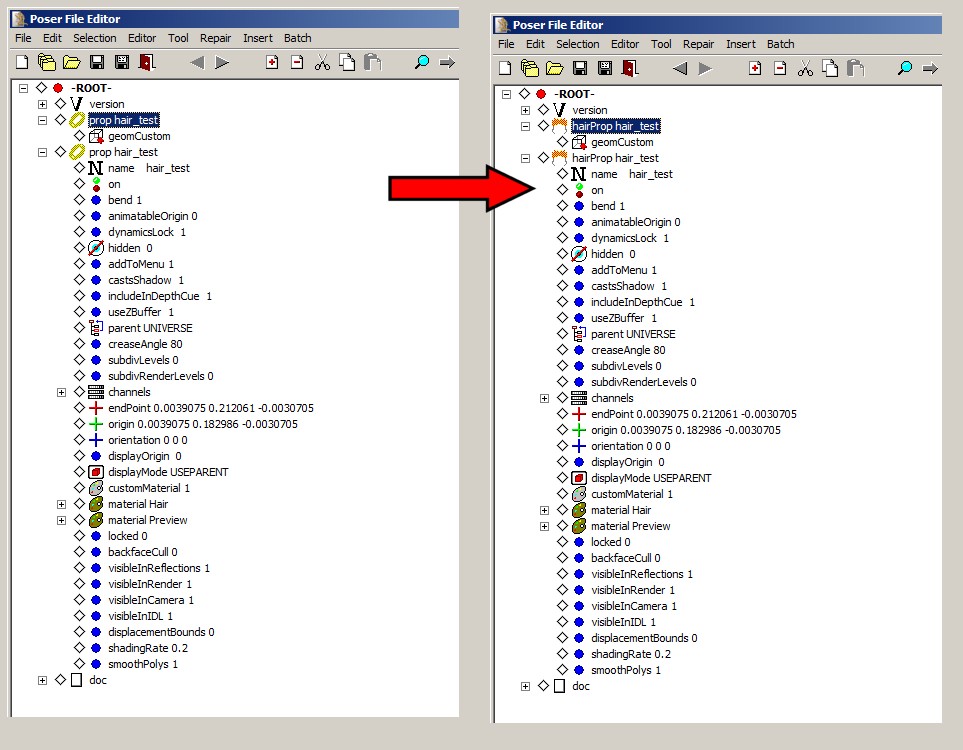
I overlooked this post, earlier. Several version ago, Poser used to render line geometries like any others, but that changed in... maybe Poser 7. The only way to get Poser to render a line geometry now is as a hair prop. To create one of these, you need to modify the .pp2 in a Poser file editor.
I was able to make a line geometry .obj render in Poser using the following process:
Import the obj.
Save the imported actor to the props (or hair) library. Poser will save this as .pp2 or .ppz.
Open the saved library prop in a Poser file editor or text editor.
Replace the two "prop" listings with "hairProp" listings and save the changes.
This created a line geometry prop which Poser would render as lines. This is equivalent to a dynamic hair prop rendering only the guide hairs.
===========================sigline======================================================
Cage can be an opinionated jerk who posts without thinking. He apologizes for this. He's honestly not trying to be a turkeyhead.
Cage had some freebies, compatible with Poser 11 and below. His Python scripts were saved at archive.org, along with the rest of the Morphography site, where they were hosted.