Fri, Mar 27, 1:57 AM CDT

Renderosity Forums / Poser - OFFICIAL


Welcome to the Poser - OFFICIAL Forum

Forum Moderators: RedPhantom Forum Coordinators: Anim8dtoon

Poser - OFFICIAL F.A.Q (Last Updated: 2026 Mar 26 11:44 pm)



Subject: Translucent slime shader?


ohman ( ) posted Thu, 14 March 2013 at 8:16 AM · edited Thu, 26 March 2026 at 11:51 PM

I try to create a green slimy translucent shader using scattering and cloud nodes but no luck... :o(

What i try to achieve is kind of a green slimy thing that is volumetric in a way that it is translucent (refractive) near the surface and then grow scattering as it grows thicker.

Has anyone seen a good shader out there?


/Ohman


Saxon3d ( ) posted Thu, 14 March 2013 at 8:22 AM

i think theres a slime type shader in the stock poser basic materials folder, might be worth a look how its put together


hborre ( ) posted Thu, 14 March 2013 at 8:28 AM

Those Poser shaders are pretty lame and very old.  There was a green slime shader posted here in the forum quite some time ago (years I believe) which may suit your needs.  Unfortunately I am not at my home computer to make a thorough search.  Perhaps someone else familiar with the same post can help.


ohman ( ) posted Thu, 14 March 2013 at 9:16 AM

What i need is a shader that combines reflection/refraction with subsurface scattering. Is it even possible to get volumetric effects with Firefly?


WandW ( ) posted Thu, 14 March 2013 at 10:58 AM · edited Thu, 14 March 2013 at 11:02 AM

I think the red shader might do you if you changed the colour, dialed up transparency and added the SSS you mentioned...

http://www.renderosity.com/mod/forumpro/showthread.php?message_id=3554737


PS the critter in the above thread is available here...

http://www.freewebs.com/mugseyfreestuff/Free.htm

----------------------------------------------------------------------------------------

The Wisdom of bagginsbill:

"Oh - the manual says that? I have never read the manual - this must be why."
“I could buy better software, but then I'd have to be an artist and what's the point of that?"
"The [R'osity Forum Search] 'Default' label should actually say 'Don't Find What I'm Looking For'".
bagginsbill's Free Stuff... https://web.archive.org/web/20201010171535/https://sites.google.com/site/bagginsbill/Home


hborre ( ) posted Sun, 17 March 2013 at 2:55 PM · edited Sun, 17 March 2013 at 2:55 PM

file_492730.jpg

This is as close as I could get with reflection/refraction and SSS.  Ball placed within an enviromental sphere and rendered with IDL.  There is also a slight transparency applied.  I am not too keen on the reflection but that is just the skydome providing too much light.  I wouldn't use the cloud node for the patterns, turbulence works better with a color ramp node.

BTW, you can take a render time hit with this. 


Miss Nancy ( ) posted Sun, 17 March 2013 at 8:02 PM

Attached Link: http://www.renderosity.com/mod/forumpro/showthread.php?thread_id=2852694&page=5

bagginsbill posted basic fresnel scatter shader here.  it looks translucent with strong backlite IMVHO.


hborre ( ) posted Sun, 17 March 2013 at 9:19 PM

Forgot about this one.  And I have it in my favorites bookmark.


ohman ( ) posted Mon, 18 March 2013 at 7:50 AM

WOW :o)

hborre this is just about exactly what i was after!  How did you do that?


hborre ( ) posted Mon, 18 March 2013 at 11:52 AM

Will post the shaders this evening.


hborre ( ) posted Mon, 18 March 2013 at 9:00 PM

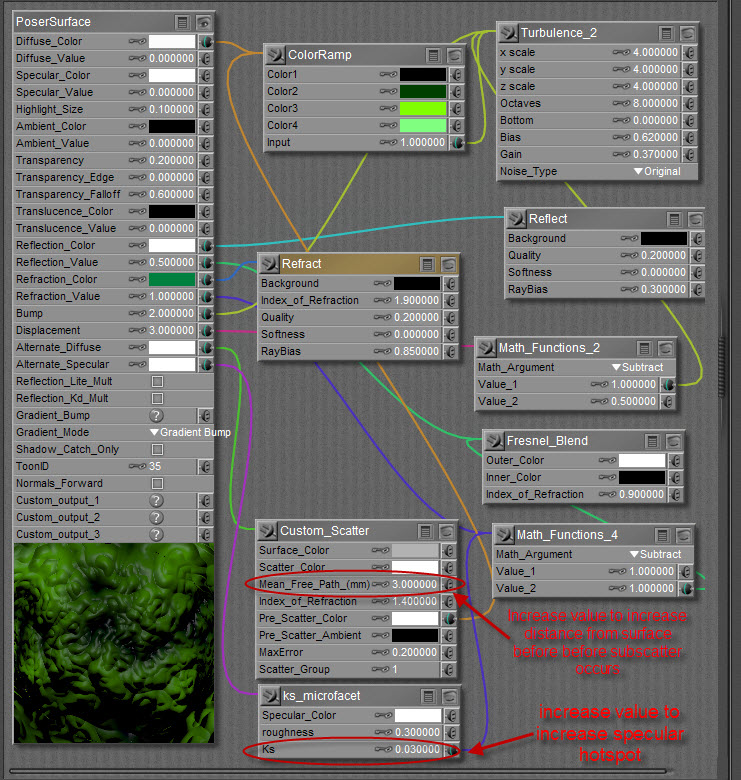
file_492766.jpg

As promised, here is the shader arrangement I created for the image above.  Please note the circled attributes, they will change how texture appears at render.  The *Mean_Free_Path_(mm)* attribute on the Custome_Scatter node is the distance, in mm, the raytrace will travel into the surface before it begins to scatter.  You will get a softer surface texture with a higher value (i.e., 14).  The *Ks* attribute on the Ks_microfacet will yield an increased specular highlight with higher values.  You can use this to control hotspots if you use HDRI images in your skydome which tend to be brighter. 

There is a slight transparency applied to this but it is not necessary.  Miss Nancy did point out a thread which I completely forgot about that could improve the shader.  However, I need the time to play with the settings.

The posted render was set up with a skydome (BB's envsphere), one infinite light (approximately 85% intensity).  The reflected light comes from a gradient applied to the dome.  The shader was built in part from a previous thread by Ajax; I stripped out what was unnecessary at the moment.


ohman ( ) posted Tue, 19 March 2013 at 8:25 AM

Thank you so much for this help! :oD

You really made my day!


Privacy Notice

This site uses cookies to deliver the best experience. Our own cookies make user accounts and other features possible. Third-party cookies are used to display relevant ads and to analyze how Renderosity is used. By using our site, you acknowledge that you have read and understood our Terms of Service, including our Cookie Policy and our Privacy Policy.