
Renderosity Forums / Poser - OFFICIAL
Welcome to the Poser - OFFICIAL Forum
Forum Moderators: RedPhantom Forum Coordinators: Anim8dtoon
Poser - OFFICIAL F.A.Q (Last Updated: 2026 Jun 06 6:06 pm)

Subject: Morph Cleanup Script

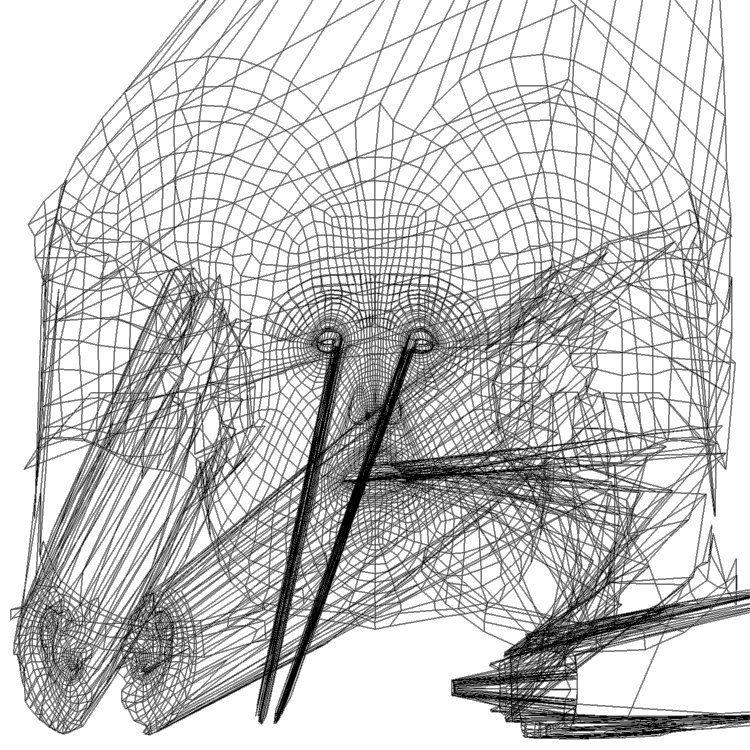
What might help is to:
- split all texvertices and convert the UV positions.
- Apply some 2D version or Restore Detail to the converted UVs, to pull things back into line somehow. I'm not sure how that would work, because we can't really count on a constant base set of UV's to which we can refer.
- Weld texvertices which share the same location.
I have code to weld texverts with shared locations, but nothing currently to work any kind of selective smoothing.
===========================sigline======================================================
Cage can be an opinionated jerk who posts without thinking. He apologizes for this. He's honestly not trying to be a turkeyhead.
Cage had some freebies, compatible with Poser 11 and below. His Python scripts were saved at archive.org, along with the rest of the Morphography site, where they were hosted.

===========================sigline======================================================
Cage can be an opinionated jerk who posts without thinking. He apologizes for this. He's honestly not trying to be a turkeyhead.
Cage had some freebies, compatible with Poser 11 and below. His Python scripts were saved at archive.org, along with the rest of the Morphography site, where they were hosted.

It does require P6+ for the poser.SimpleDialog which is used for actor selection.
===========================sigline======================================================
Cage can be an opinionated jerk who posts without thinking. He apologizes for this. He's honestly not trying to be a turkeyhead.
Cage had some freebies, compatible with Poser 11 and below. His Python scripts were saved at archive.org, along with the rest of the Morphography site, where they were hosted.
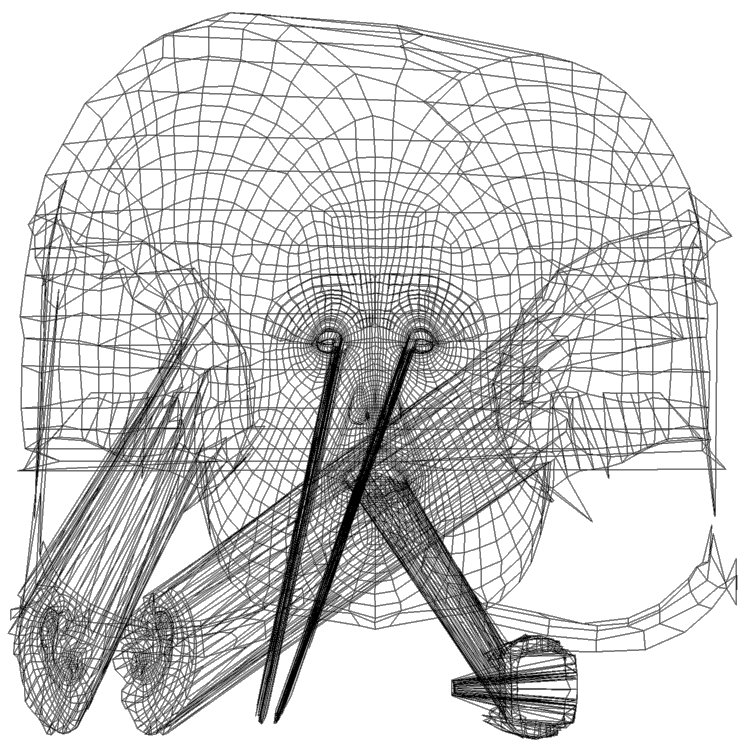
I've figured out how to isolate vertices which should have texvertices split for UV seams, which was the big problem I had in 2007. I'm having some trouble debugging an initial test of it, but if this part can work then the seam edges should be able to be cleaned up by script, one way or another.
I've gotten sucked into UV's. :lol: I knew this would happen.
===========================sigline======================================================
Cage can be an opinionated jerk who posts without thinking. He apologizes for this. He's honestly not trying to be a turkeyhead.
Cage had some freebies, compatible with Poser 11 and below. His Python scripts were saved at archive.org, along with the rest of the Morphography site, where they were hosted.

Quote - O NOEZ!!

Do not panic. :lol:
I may need a twelve-step program, if I get pulled back into this too deeply. :lol:
===========================sigline======================================================
Cage can be an opinionated jerk who posts without thinking. He apologizes for this. He's honestly not trying to be a turkeyhead.
Cage had some freebies, compatible with Poser 11 and below. His Python scripts were saved at archive.org, along with the rest of the Morphography site, where they were hosted.
===========================sigline======================================================
Cage can be an opinionated jerk who posts without thinking. He apologizes for this. He's honestly not trying to be a turkeyhead.
Cage had some freebies, compatible with Poser 11 and below. His Python scripts were saved at archive.org, along with the rest of the Morphography site, where they were hosted.
Argh. Missed my editing cutoff. 'Rosity and its time limits! :cursing:
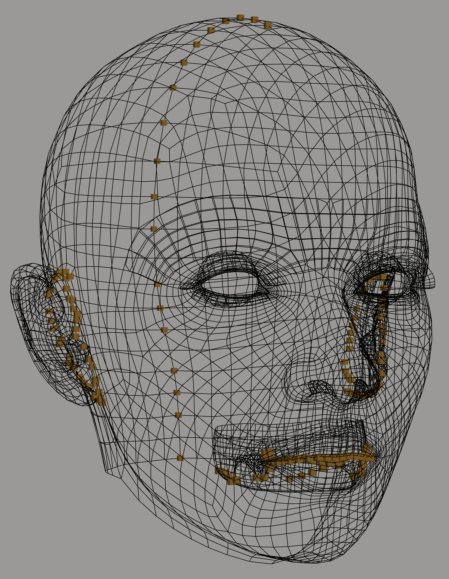
Note that the distortion in the lacrimal-mapping in the UV images I've posted above is due to a fault in the vmf correlation file. The lacrimal material was compared to the full head, rather than being screened out like the lashes. A cleaner correlation for lacrimals should result if I re-create the vmf file using materials screening.
===========================sigline======================================================
Cage can be an opinionated jerk who posts without thinking. He apologizes for this. He's honestly not trying to be a turkeyhead.
Cage had some freebies, compatible with Poser 11 and below. His Python scripts were saved at archive.org, along with the rest of the Morphography site, where they were hosted.

Sadly, I didn't get a lot of time to play with this today. What I meant by 'smoother settings' refers to the parameters within the Restore Detail script. I found out that no matter what the setting, the neck gets severely indented right where the head connects when I use the restore detail morph :(
I also found that tinkering with V3's ytran before running the script can really tighten up the resulting morph in Antonia, so long as I keep the new shape morph setting at 0.5 or less. While not a perfect transfer, this does open many new possibilities for giving Antonia a unique face :)
Is there any way to get the eyes to follow the new shape as well? I noticed that when I dial in the new shape, the eyes don't follow. This means that they have to be scaled/translated manually to work with the new shape.
-------------------------------------------------------------------------------------------------------------
AMD FX-9590 4.7ghz 8-core, 32gb of RAM, Win7 64bit, nVidia GeForce GTX 760
PoserPro2012, Photoshop CS4 and Magix Music Maker
--------------------------------------------------------------
...and when the day is dawning...I have to say goodbye...a last look back into...your broken eyes.
Quote - Sadly, I didn't get a lot of time to play with this today. What I meant by 'smoother settings' refers to the parameters within the Restore Detail script. I found out that no matter what the setting, the neck gets severely indented right where the head connects when I use the restore detail morph :(
I also found that tinkering with V3's ytran before running the script can really tighten up the resulting morph in Antonia, so long as I keep the new shape morph setting at 0.5 or less. While not a perfect transfer, this does open many new possibilities for giving Antonia a unique face :)Is there any way to get the eyes to follow the new shape as well? I noticed that when I dial in the new shape, the eyes don't follow. This means that they have to be scaled/translated manually to work with the new shape.
Yes, what you're describing with the neck is what I was going on about earlier. I need to integrate some form of actor weld edge screening for both shape transfer and restore detail. Once I'm done tinkering with UV transfer (hopefully I'll make myself quit today, whether it works or not), I plan to start porting some code from my Smoother script to those others.
When transferring the shape, did you use the special pose for V3 which was provided in the zip download? The "Vicky3_shape.p2z" should (assuming I didn't screw up the pose creation process) position V3 as I've had her in my own tests when I've gotten the best shape transfer results. If you've used the pose and still had different results than mine, I'd like to see what's happened. Can you post an image, preferably using the shaded wireframe like I've been posting in the thread? Given the same tools, we should both be able to get the same results, if we can make sure our processes correspond. That's assuming, of course, that you haven't simply found inadequate the results that I find impressive. :lol: Whatever the case, I value your testing efforts and any feedback you can provide. :woot:
===========================sigline======================================================
Cage can be an opinionated jerk who posts without thinking. He apologizes for this. He's honestly not trying to be a turkeyhead.
Cage had some freebies, compatible with Poser 11 and below. His Python scripts were saved at archive.org, along with the rest of the Morphography site, where they were hosted.

===========================sigline======================================================
Cage can be an opinionated jerk who posts without thinking. He apologizes for this. He's honestly not trying to be a turkeyhead.
Cage had some freebies, compatible with Poser 11 and below. His Python scripts were saved at archive.org, along with the rest of the Morphography site, where they were hosted.

i finally got the scripts to work (P7) & ported the expression morphs from Project Human Female into Antonia. Here's a quick animation without any cleanup & lacking ERC on the teeth movement ---Antonia Speaks.............
(larger version on YouTube)
http://www.youtube.com/watch?v=xxxYmB_X2FQ
still lost in the wilderness
Poser 13 Superfly pretty much only these days
woops, won't let me upload the .gif--guess it's too big
still lost in the wilderness
Poser 13 Superfly pretty much only these days
Quote - i finally got the scripts to work (P7) & ported the expression morphs from Project Human Female into Antonia. Here's a quick animation without any cleanup & lacking ERC on the teeth movement ---Antonia Speaks.............
That's great! :woot:
Would you be willing to share the correlation data file for Project Human Female and Antonia? I'm planning to put up a web page for the script and hope to build up a library of data files that users can download to use.
If not, that's fine, of course.
Great job on the comparison and transfer! :thumbupboth:
===========================sigline======================================================
Cage can be an opinionated jerk who posts without thinking. He apologizes for this. He's honestly not trying to be a turkeyhead.
Cage had some freebies, compatible with Poser 11 and below. His Python scripts were saved at archive.org, along with the rest of the Morphography site, where they were hosted.
i want to redo it with the mouths more open--the lips are kind of 'stuck together' in the corners & i think that'd help--but i'd be happy to share it. what's nice about PHF is she's opensource like Antonia so anything we make can be shared freely.
what files do you need other than the vmf?
still lost in the wilderness
Poser 13 Superfly pretty much only these days
Attached Link: http://www.renderosity.com/mod/rrfilelock/download.php?fileid=40340&key=8920
here's the vmf file if anyone wants to play with itstill lost in the wilderness
Poser 13 Superfly pretty much only these days
Quote - i want to redo it with the mouths more open--the lips are kind of 'stuck together' in the corners & i think that'd help--but i'd be happy to share it. what's nice about PHF is she's opensource like Antonia so anything we make can be shared freely.
what files do you need other than the vmf?
Just the .vmf, unless you've worked out the best positioning of the figures for a shape transfer. Ideally, I'd like to have a library of downloads which include the .vmf/.vmz files for transfer between both actors, as well as shape transfer setup poses.
That is:
- Actor A to Actor B .vmf
- Actor B to Actor A .vmf
- Shape positioning pose for A (if A was posed for shape transfer)
- Shape positioning pose for B (if B was posed for shape transfer)
- A readme (if desired)
That setup would then contain everything any user would need to recreate the best results.
Quote - here's the vmf file if anyone wants to play with it
Thank you! :woot: Now I'll have an excuse to try loading the PHF into a scene. :lol:
Can I post this on the script site, when I set it up? I'll credit you with creation of the file.
===========================sigline======================================================
Cage can be an opinionated jerk who posts without thinking. He apologizes for this. He's honestly not trying to be a turkeyhead.
Cage had some freebies, compatible with Poser 11 and below. His Python scripts were saved at archive.org, along with the rest of the Morphography site, where they were hosted.
you may do anything you wish with it. i made it early on so have to hunt down my comparison pose pz3 & see if it's usable.
i'm having trouble keeping the scripts in focus in the workspace. they keep hiding & it takes 3 slow clicks to bring them back up. is there a tweak for that?
by the way, it took all of 17 seconds to transfer the 78 morphs. wow.
still lost in the wilderness
Poser 13 Superfly pretty much only these days
Quote - you may do anything you wish with it. i made it early on so have to hunt down my comparison pose pz3 & see if it's usable.
i'm having trouble keeping the scripts in focus in the workspace. they keep hiding & it takes 3 slow clicks to bring them back up. is there a tweak for that?by the way, it took all of 17 seconds to transfer the 78 morphs. wow.
If you don't have a pose, that's okay. I have the PHF, so I can try to position figures for an optimal shape transfer. This wouldn't necessarily be the position in thich you had the figures for the comparison. A good shape transfer seems to result if the eyes on two heads are lined up as well as possible on y and z. I move only the source figure for this, and zero the figure, zero all source head morphs, then translate, rotate, or scale the Body as needed. Then I save the pose to the library, making sure to have the pose save Body data. Morph data isn't needed in the pose.
It's not as complicated as I may be making it sound. :lol:
The focus issue is new to me. What, exactly, is happening? What version of Poser are you using, on what OS? Hopefully I can figure out what could be happening.
Is 17 seconds slow, or fast? :lol: The higher the resolution of the actors involved, the slower the transfer will be (it's doing a lot of looping over all the verts in both actors), but the process has never been too slow for me. Spanki wrote the function, so it was optimized as much as possible.
And: thank you for permission to post the .vmf! :woot: How would you like to be credited?
===========================sigline======================================================
Cage can be an opinionated jerk who posts without thinking. He apologizes for this. He's honestly not trying to be a turkeyhead.
Cage had some freebies, compatible with Poser 11 and below. His Python scripts were saved at archive.org, along with the rest of the Morphography site, where they were hosted.

This adds options to screen from processing vertices which:
- share a weld with a parent or child
- are on a split edge which has no neighbor polygon
- have zero deltas (have not been morphed away from position in base geometry)
Thanks to cyberscape, for reminding me of the need for this functionality. :thumbupboth:
I've also cleaned up the GUI, hopefully make it less confusing (or at least more presentable) and added a status bar, so the user can tell what it's doing.
===========================sigline======================================================
Cage can be an opinionated jerk who posts without thinking. He apologizes for this. He's honestly not trying to be a turkeyhead.
Cage had some freebies, compatible with Poser 11 and below. His Python scripts were saved at archive.org, along with the rest of the Morphography site, where they were hosted.
i'm running XP, P7.01.97. i likely need some service packs but until recently had a super slow dialup connection & couldn't download much. when i run the scripts & click on anthing else (like say the parameters palette) the gui disappears to the taskbar. i have to "persuade" it to reappear by clicking slowly on it a few times. it's a minor annoyance & might just be my particular poser install. i've seen it happen with other scripts.
17 seconds seemed like lightning fast to me. & that's on a 6 year old, dying computer. just credit me as jancory, unless of course the vmf doesn't work in which case you may have all the credit ;>)
still lost in the wilderness
Poser 13 Superfly pretty much only these days
Quote - i'm running XP, P7.01.97. i likely need some service packs but until recently had a super slow dialup connection & couldn't download much. when i run the scripts & click on anthing else (like say the parameters palette) the gui disappears to the taskbar. i have to "persuade" it to reappear by clicking slowly on it a few times. it's a minor annoyance & might just be my particular poser install. i've seen it happen with other scripts.
Ah. I see what you mean. Some scripts are designed to allow the user to keep working with the Poser scene while the script interface remains open. This script actually isn't. The process with which I'm familiar for making the focus more flexible with PoserPython and Tkinter seems to have been the source of some crash bugs in earlier scripts of mine. So this script (and most of my other recent scripts) are designed to be run once the user's Poser scene is ready for the script, and they don't accomodate any back-and-forth with the scene. This is actually the default situation with most PoserPython scripts. The focus becomes flexible only if the script-writer adds that functionality.
Would such focus flexibility be an important feature for you? At what point in the process of running the script do you need to switch back to Poser? During slow comparisons?
You can speed up the comparison process significantly by using Spanki's _tdmt.pyd. It's free and it's compatible with your OS and Poser version. All you need to do is copy. the .pyd file to the :Runtime:Python:DLLs folder and start Poser.
http://skinprops.com/files/tdmt_pyd.zip
Quote - 17 seconds seemed like lightning fast to me. & that's on a 6 year old, dying computer. just credit me as jancory, unless of course the vmf doesn't work in which case you may have all the credit ;>)
:lol: I'm good at taking credit for failures. :lol: But I'm sure the .vmf is excellent. Credit to jancory! :woot:
===========================sigline======================================================
Cage can be an opinionated jerk who posts without thinking. He apologizes for this. He's honestly not trying to be a turkeyhead.
Cage had some freebies, compatible with Poser 11 and below. His Python scripts were saved at archive.org, along with the rest of the Morphography site, where they were hosted.
*Would such focus flexibility be an important feature for you? At what point in the process of running the script do you need to switch back to Poser? During slow comparisons?
*actually, now that you explained it i can live with how it is. i shouldn't have been running it multiple times anyhow; it was a learning process.......
i already use TDMT. haven't a clue what else it does, but it's installed.
still lost in the wilderness
Poser 13 Superfly pretty much only these days
By the way, I'd expect that with the grid screening in place, the speed of the comparison process would depend significantly on the threshold parameter. To my shame, I have to confess that I haven't tested this, but the number of vertices considered for distance calculation should be roughly proportional to the square of the threshold value. In other words, doubling the threshold should increase the time used for distance calculations by a factor of four. So one would try to use the smallest threshold that seems safe.
-- I'm not mad at you, just Westphalian.
Quote - i already use TDMT. haven't a clue what else it does, but it's installed.
The _tdmt.pyd provides a vector library for PoserPython, with some built in options which are specialized for Poser. It's faster than pure PoserPython. Running a comparison between V3 and Antonia, it takes 4:06 without the pyd and 2:27 with it, on my system. The .pyd opens a lot of possibilities for Python scripts which modify the geometry, in Poser. It sped things up enough for me that I was able to start experimenting more, allowing me to come up with some new or useful ideas, now and then.
I think I'm the only one in Poserdom who writes scripts which use the .pyd, however. It isn't compatible with all versions of Poser, and it won't run on Mac, so I guess I can see why. I've found it wonderfully useful, however.
Thumbs up for Spanki! :thumbupboth:
===========================sigline======================================================
Cage can be an opinionated jerk who posts without thinking. He apologizes for this. He's honestly not trying to be a turkeyhead.
Cage had some freebies, compatible with Poser 11 and below. His Python scripts were saved at archive.org, along with the rest of the Morphography site, where they were hosted.
Quote - By the way, I'd expect that with the grid screening in place, the speed of the comparison process would depend significantly on the threshold parameter. To my shame, I have to confess that I haven't tested this, but the number of vertices considered for distance calculation should be roughly proportional to the square of the threshold value. In other words, doubling the threshold should increase the time used for distance calculations by a factor of four. So one would try to use the smallest threshold that seems safe.
Good advice! :D
You made excellent use of the threshold variable in the screening process. You should see the "octree" method I was using before, when I needed such screening. :lol: Three or four functions, a few hundred lines of code, and the actual creation of boxes, sometimes even with geometry. :lol:
===========================sigline======================================================
Cage can be an opinionated jerk who posts without thinking. He apologizes for this. He's honestly not trying to be a turkeyhead.
Cage had some freebies, compatible with Poser 11 and below. His Python scripts were saved at archive.org, along with the rest of the Morphography site, where they were hosted.

This morph-trimming script will:
- screen weld edges from a morph
- screen split edges from a morph
- remove any zero deltas from a morph
- screen one or more materials from a morph
- screen a selected group from a morph
- screen x,y, or z dimension from all vertices of a morph
- screen deltas by a threshold value (the trick used on the JGL morphs)
- use one morph to screen another: any vertex with a non-zero delta in second morph will be screened from first morph.
- apply inverse morph subtraction (screen by zero deltas instead of non-zero)
I've found some of these tools very useful, in the past. I hope others may, as well.
===========================sigline======================================================
Cage can be an opinionated jerk who posts without thinking. He apologizes for this. He's honestly not trying to be a turkeyhead.
Cage had some freebies, compatible with Poser 11 and below. His Python scripts were saved at archive.org, along with the rest of the Morphography site, where they were hosted.

===========================sigline======================================================
Cage can be an opinionated jerk who posts without thinking. He apologizes for this. He's honestly not trying to be a turkeyhead.
Cage had some freebies, compatible with Poser 11 and below. His Python scripts were saved at archive.org, along with the rest of the Morphography site, where they were hosted.
I'll get together basic instructions for the script and put them up first thing tomorrow. I think the script is fairly straightforward. Hopefully.
===========================sigline======================================================
Cage can be an opinionated jerk who posts without thinking. He apologizes for this. He's honestly not trying to be a turkeyhead.
Cage had some freebies, compatible with Poser 11 and below. His Python scripts were saved at archive.org, along with the rest of the Morphography site, where they were hosted.

===========================sigline======================================================
Cage can be an opinionated jerk who posts without thinking. He apologizes for this. He's honestly not trying to be a turkeyhead.
Cage had some freebies, compatible with Poser 11 and below. His Python scripts were saved at archive.org, along with the rest of the Morphography site, where they were hosted.
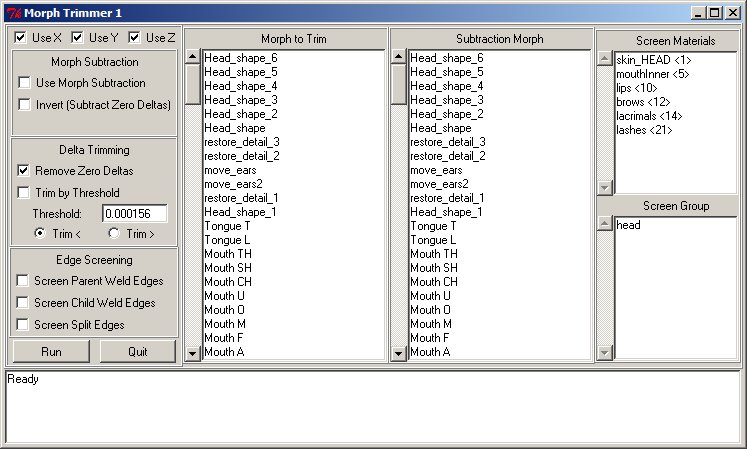
Basic instructions:
-
Select the morph to trim in the "Morph to Trim" listbox.
-
Use X, Use Y, Use Z: If any of these is unchecked, all deltas in the
morph will have their corresponding x,y, or z components removed. -
Use Morph Subtraction: If a morph is selected in the "Subtraction
Morph" listbox, this function will use the subtraction morph to screen
deltas on the trim morph. Check this to remove from the trim morph
deltas for any vertices which have non-zero deltas in the subtraction
morph. -
Invert (Subtract Zero Deltas): If "Use Morph Subtraction" is checked
along with this option, the trim morph will have deltas removed from
any vertices which have zero deltas in the subtraction morph. -
Remove Zero Deltas: Usually Poser morphs omit zero deltas, which
don't move a vertex at all. This option will remove from a morph any
zero deltas which were present. If they are present, removing them can
reduce .cr2 size. This option is selected by default, due to its
general utility and the fact that it doesn't alter a morph in any
visible way. -
Trim by Threshold: If checked, this will work with the two following
options to remove from a morph any deltas which are either greater than
or less than the supplied threshold value. This is the function which
was able to remove the unwanted motion from vertices in the JGL
expression morphs for Antonia. -
Threshold: The value by which threshold screening will be applied.
the default is the value which worked for the JGL morphs. -
Trim <, Trim >: Specify whether to trim deltas which are less than or
greater than the threshold. Less than is selected by default. -
Screen Parent Weld Edges: If checked, this will remove from a morph
deltas which affect any vertices which are welded to the parent of the
current actor. Only works on body part actors. -
Screen Child Weld Edges: If checked, this will remove from a morph
deltas which affect any vertices which are welded to children of the
current actor. Only works on body part actors. -
Screen Split Edges: If checked, this will remove deltas for any
vertices which are part of an edge which is not shared with another
polygon. This includes, for example, the edges of eyelashes, or the
hard edges of the Poser box prop. This will also include any welded
vertices, under normal conditions. (An actor can be welded along more
than shared edges if it overlaps a child or parent and they have
vertices in identical locations. The weld screening options will catch
such cases, but this won't. However, the welded vertices in such a
case would not respond to morphs anyway so the script is unlikely to be
used with them.) -
Morph to Trim: The selection of this listbox is the name of the morph
on the current actor which will be trimmed by the script. -
Subtraction Morph: The selection of this listbox is the name of the
morph which will be used for subtractive screening, if "Use Morph
Subtraction" is checked. Subtracting a morph from itself will probably
not do anything useful. -
Screen Materials: Vertices which belong to any of the materials
selected in this listbox will have deltas removed. Multiple selections
are possible. -
Screen Group: Vertices which are part of the group selected in this
listbox will have deltas removed. Selecting a body part's default
group will trim all deltas from the actor.
Aside from that, "Run" will run the script, "Quit" will exit the
script, and the status box at the bottom will notify the user of what
the script is doing.
Edit: copy-paste did funny things to my text, here. At least the page didn't end up 90 feet wide, though. :lol: Very strange. I wasn't using rich text format or anything....
===========================sigline======================================================
Cage can be an opinionated jerk who posts without thinking. He apologizes for this. He's honestly not trying to be a turkeyhead.
Cage had some freebies, compatible with Poser 11 and below. His Python scripts were saved at archive.org, along with the rest of the Morphography site, where they were hosted.
http://www.the.cage.page.phantom3d.net/TDMT_Match/TDMT_Match_Transfer2.zip
http://www.the.cage.page.phantom3d.net/TDMT_Match/TDMT_Match_Compare1.zip
Slight updates to both TDMT scripts. The transfer script has had the option added to omit parent weld vertices from a morph or shape transfer. The comparison script has had the option added to disuse the _tdmt.pyd if it is installed. The transfer script also includes the updated version of Restore Detail, as well as the Morph Trimmer script, since both could be useful for processing transferred morphs or shapes.
===========================sigline======================================================
Cage can be an opinionated jerk who posts without thinking. He apologizes for this. He's honestly not trying to be a turkeyhead.
Cage had some freebies, compatible with Poser 11 and below. His Python scripts were saved at archive.org, along with the rest of the Morphography site, where they were hosted.
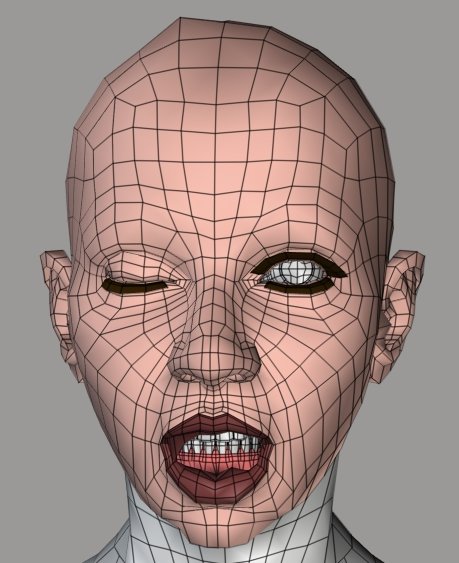
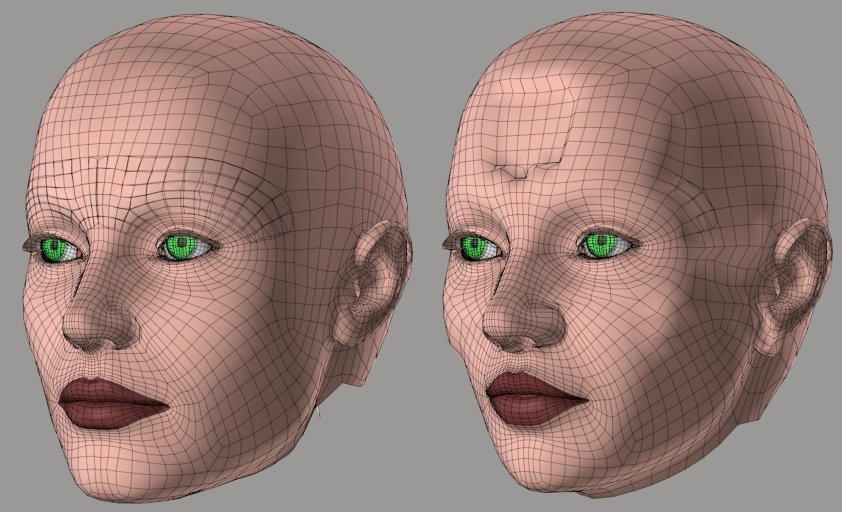
At any rate, I've compared dphoadly's Antonia-120lo remap for V3 to Vicky 3. The results basically work, although this first run of it seems a bit rough. The main complication is the fact that UV sets all share the same 2D space. UV's for one part of the geometry may completely overlap those for another. So the comparison process when running through UV's requires more screening by material. It also seems a bit more error-prone. Have to see what I can do about that.
The attached image is Antonia-lo with some V3 face morphs, transferred using this comparison process.
===========================sigline======================================================
Cage can be an opinionated jerk who posts without thinking. He apologizes for this. He's honestly not trying to be a turkeyhead.
Cage had some freebies, compatible with Poser 11 and below. His Python scripts were saved at archive.org, along with the rest of the Morphography site, where they were hosted.

~waves~
[Cage pointed me at this thread...]
Hi guys... I am in fact busy on other things these days, but I just wanted to de-lurk long enough to say hi, thanks for the comments/mentions and congrats on the new/continued work.
I've read through the thread and will try to follow along, but don't really have the time to participate too much at the moment, so/but here are a few general comments...
**re: Vert->Surface vs. Vert->NearVerts correlation methods...
**
Vert->Surface:
Our original Vert->Surface correlation method has the primary advantage of being fairly deterministic and correct (as far as getting the desired results), since it does not depend on knowing ahead of time how many vertices make up the underlying (correlating) polygon of the disimilar mesh. It identifies the 'surface' of the other mesh that corresponds to the vertex position of the mesh being adjusted and uses a weighting scheme that typically (or at least ideally) comes up with the right answer.
Where that method fails is that it depends on the two meshes having "generally similarly angled surfaces". In other words, it does not work well (fails miserably, in some cases) when trying to correlate vertices who's normals don't point at the surface of the other mesh (for example, vertices on the bottom or backside of a cuff/hem/belt on clothing... those rays shoot up in the air or out from the body, instead of towards the other mesh surface).
There are similar circumstances in some tightly meshed areas, like the nostrils, eyes and ears, where mesh folding may not line up well between the meshes being compared.
Vert->NearVerts:
The advantage of this method is that it addresses the disadvantage of the Vert->Surface method... since it doesn't really rely on casting rays along normals to find surfaces, it can much more easily find the corresponding "close-by" vertices of the other mesh.
The disadvantage of this method is in determining the 'right' number of vertices of one mesh that should influence (correlate to) each vertex of the other mesh (given the diversity in polygon sizes). In many cases, that number will/should be different for each correlation and you might well end up with some that shouldn't be included - or miss some that should (although due to the nature of most morphs, this is likely not a big problem).
From my brief scan of this thread, it sounds like you've already taken steps to correct for some of this and it appears to mostly be working well for you - nice job.
**re: Using a UV-Matched mesh to determine Vertex Correlation...
**
I don't recall off-hand who suggested this, but it is something that I considered in the past and at least "seems" like a natural/good idea. I haven't sat down and re-evaluated this idea in it's entirety, but IIRC, it's actually a much more complicated process than it sounds like. Aside from the UV-seams / Islands issue that Cage already mentioned, the more general problem has to do with how the weighting is done between disimilar mesh topologies...
I wouldn't want to rule it out as an option or speak much more on the subject without looking back into it, but either way, it would be a much less general solution (ie. it relies on someone coming up with the UV-matched meshes in the first-place).
**re: Generating a UV-Matched mesh...
**
The flip-side of the discussion is the viability of generating a UV-matched mesh, after having done the correlation and weighting process. As Cage has discussed (and supplied some sample scripts for), we did get this mostly working... but hadn't yet come up with a good means of accounting for and cleaning up the uv-seams (island edges/borders). Basically, anywhere there's a seam in the uv-mesh, the process needs to determine "which" of potentially many different uv-values is correct for the given vertex.
As Cage has mentioned, I have ported (or orginated / test-beded, in many cases) a lot of this code (including the UV code) over into plugins for Cinema 4D... at some point, I may try to tackle this issue again, but don't have any solution at the moment.
**re: Anyway...
**
Good luck and have fun! :)
Cheers,
Keith
Cinema4D Plugins (Home of Riptide, Riptide Pro, Undertow, Morph Mill, KyamaSlide and I/Ogre plugins) Poser products Freelance Modelling, Poser Rigging, UV-mapping work for hire.
Hey, Spanki! Happy to see you drop by. :woot: You've explained several things much better than I have been, or even could, as usual! :lol: You offer some very good points about the comparison method being used and how it stacks up against the raycasting method of older versions of the script. Thank you for the comments. :D
===========================sigline======================================================
Cage can be an opinionated jerk who posts without thinking. He apologizes for this. He's honestly not trying to be a turkeyhead.
Cage had some freebies, compatible with Poser 11 and below. His Python scripts were saved at archive.org, along with the rest of the Morphography site, where they were hosted.

===========================sigline======================================================
Cage can be an opinionated jerk who posts without thinking. He apologizes for this. He's honestly not trying to be a turkeyhead.
Cage had some freebies, compatible with Poser 11 and below. His Python scripts were saved at archive.org, along with the rest of the Morphography site, where they were hosted.

I dont really understand all of this Cage, except the general concept :huh: But I know it will be very useful, so here's to hard work and luck. :thumbupboth: Keep going.
Quote - I dont really understand all of this Cage, except the general concept
But I know it will be very useful, so here's to hard work and luck.
Keep going.
Thanks, phantom3d! A great deal of luck, hopefully. :lol:
I think the scripts have reached a point where I'm not making much new progress on anything. I suppose the next thing to do is set up a web page with some basic tutorials, and to try to use the new tools enough myself to develop some good workflows and, hopefully, a few higher-quality comparison data files. I took a look at the initial V1 comparison today, and it wasn't nearly as effective as I thought. :ohmy:
Enjoy your time in the boonies. :D
===========================sigline======================================================
Cage can be an opinionated jerk who posts without thinking. He apologizes for this. He's honestly not trying to be a turkeyhead.
Cage had some freebies, compatible with Poser 11 and below. His Python scripts were saved at archive.org, along with the rest of the Morphography site, where they were hosted.
Quote - I suppose the next thing to do is set up a web page with some basic tutorials, and to try to use the new tools enough myself to develop some good workflows and, hopefully, a few higher-quality comparison data files.
I'd say yes to that - this thread is now ten pages long, with scripts for more than one purpose, their updates, and user guides scattered through it. It's been very interesting to follow along, basking in the white heat of someone else's burst of creativity, don't get me wrong; but it would be nice to have a central spot which gave information on the scripts and had the latest version of each. Especially for those of us, like me, who are nodding sagely but don't actually have an immediate application for these tools, a page that gave us the ability to cut to the chase would be very welcome.
Anyway, keep up the good work. It's appreciated. 
Just another observation/comment, re: Vert->NearVert correlation...
Keep in mind that since this method doesn't pay any attention to surface orientation/Normal, a vertex on the inside of a nostril (for example) might well include (get correlated to) vertices on the outside of the nostril on the other mesh... the same thing could happen around the ear folds, etc. - basically any thin piece of skin-fold like that (eye-lids, lips, etc).
With the Nostrils, you can handle that situation easily enough with Material Screening (at least on meshes that have a separate Nostril material), but you might need some other method for things like the ears.
A fix for this might be to do an angle check (between the two normals) before including vertices in the correlation and skipping them if the angle is too divergent (like maybe anything over 90deg).
Cinema4D Plugins (Home of Riptide, Riptide Pro, Undertow, Morph Mill, KyamaSlide and I/Ogre plugins) Poser products Freelance Modelling, Poser Rigging, UV-mapping work for hire.
Quote - I'd say yes to that - this thread is now ten pages long, with scripts for more than one purpose, their updates, and user guides scattered through it. It's been very interesting to follow along, basking in the white heat of someone else's burst of creativity, don't get me wrong; but it would be nice to have a central spot which gave information on the scripts and had the latest version of each. Especially for those of us, like me, who are nodding sagely but don't actually have an immediate application for these tools, a page that gave us the ability to cut to the chase would be very welcome.
Anyway, keep up the good work. It's appreciated.

Thanks, EnglishBob! I'll make that my next priority. I've had a list of things I wanted to accomplish for the toolset for the morph transfer process, and I seem to have completed it. Aside from UV transfer and comparison through UV's, both of which are side issues which run a high risk of derailing my effort here altogether. :lol:
In terms of tutorials, I'm no Dr. Geep. :lol: I'm afraid I don't explain things clearly, much of the time. But I'll do my best. If anyone has any thoughts on how best to teach people to use this toolset, I'm eager to hear them.
I'll start on the site later today, hopefully.
===========================sigline======================================================
Cage can be an opinionated jerk who posts without thinking. He apologizes for this. He's honestly not trying to be a turkeyhead.
Cage had some freebies, compatible with Poser 11 and below. His Python scripts were saved at archive.org, along with the rest of the Morphography site, where they were hosted.
Quote - Just another observation/comment, re: Vert->NearVert correlation...
Keep in mind that since this method doesn't pay any attention to surface orientation/Normal, a vertex on the inside of a nostril (for example) might well include (get correlated to) vertices on the outside of the nostril on the other mesh... the same thing could happen around the ear folds, etc. - basically any thin piece of skin-fold like that (eye-lids, lips, etc).
With the Nostrils, you can handle that situation easily enough with Material Screening (at least on meshes that have a separate Nostril material), but you might need some other method for things like the ears.A fix for this might be to do an angle check (between the two normals) before including vertices in the correlation and skipping them if the angle is too divergent (like maybe anything over 90deg).
I'm thinking about this. Hmm. I've noted the basic problem with lips and innermouth. The problem can usually be fixed by improving the matching of the shape. But a dot check on the normals could help improve results with more approximate shape-matches at comparison time, perhaps. I think the main question is how this will impact speed. With the .pyd, the process would be tolerably fast. Without it, I'm not sure. I'll check Numeric's dot product calculation speed.
Good thinking! Thank you! :woot: I'm glad you've popped in to share your knowledge! :thumbupboth:
===========================sigline======================================================
Cage can be an opinionated jerk who posts without thinking. He apologizes for this. He's honestly not trying to be a turkeyhead.
Cage had some freebies, compatible with Poser 11 and below. His Python scripts were saved at archive.org, along with the rest of the Morphography site, where they were hosted.
I haven't tried your scripts, so I don't know if it's happening or not, but based on my understanding of what you're doing, even a perfect line-up of the meshes might still have this problem, depending on the topology and shaping of the mesh in some areas.
If you "correlate the (up to) 5 closest verts, within some tolerance distance", one or more of those closest verts could be on the other side of a mesh fold.
If the check adds much time, you could always make it an option.
EDIT: Of course... depending on how some morph is created, this may not be an issue anyway (ie. the morph creator may have also included those vertices within the morph) - so you may not always 'see' that there's a problem. The only time it might show up is on something like a morph that made the nostril opening smaller/larger diameter, without affecting the outside of the nostril.
Cinema4D Plugins (Home of Riptide, Riptide Pro, Undertow, Morph Mill, KyamaSlide and I/Ogre plugins) Poser products Freelance Modelling, Poser Rigging, UV-mapping work for hire.
Quote - I haven't tried your scripts, so I don't know if it's happening or not, but based on my understanding of what you're doing, even a perfect line-up of the meshes might still have this problem, depending on the topology and shaping of the mesh in some areas.
If you "correlate the (up to) 5 closest verts, within some tolerance distance", one or more of those closest verts could be on the other side of a mesh fold.
If the check adds much time, you could always make it an option.
EDIT: Of course... depending on how some morph is created, this may not be an issue anyway (ie. the morph creator may have also included those vertices within the morph) - so you may not always 'see' that there's a problem. The only time it might show up is on something like a morph that made the nostril opening smaller/larger diameter, without affecting the outside of the nostril.
I thought about it for a bit, and I think adding the option to test the normals is a good idea. I'm also considering a secondary option to test the normals of the base geometries instead of the worldspace geometries. Depending on the re-shaping in use to accomplish the best match of the actor surfaces, some vertices may have normals which vary greatly from those on the base geometries. (I'm thinking about my Antonia to Vicky 1 test case, which upon recent examination proved to have the lips and inner mouth of both actors badly morphed, creating incorrect correlations in the lips.)
I think speed issues may not be as bad as they were in the old, pre-.pyd version of TDMT. As ADP tried to point out once or twice in the Long TDMT Thread, the old code wasn't using Numeric to full advantage. Rather than splitting coordinates into their x,y,z components for processing, Numeric can handle them much like the pyd. That proved to be faster with vector subtraction. I'm hoping it will be with the dot product, as well.
So far I've not noted this normal-direction issue to be a problem with most morph transfers. It's showing up more pronouncedly in shape transfers, I think. But tools to improve the correlations will help in both cases.
Once again, thank you for the excellent and useful input! :woot: Just don't let me suck you into this. :lol: I tend to grab the smart person and try to wheedle information out of them. Bad habit of mine. 
===========================sigline======================================================
Cage can be an opinionated jerk who posts without thinking. He apologizes for this. He's honestly not trying to be a turkeyhead.
Cage had some freebies, compatible with Poser 11 and below. His Python scripts were saved at archive.org, along with the rest of the Morphography site, where they were hosted.
Ah! I've implemented the dot product check for the normals, and it does help. It also seems like it may be speeding things up, which suggests that my sorting code, later in the comparison function, may slow down as the sort list grows in length.
So far the checking of base geometry normals doesn't seem to make any obvious difference in my tests. I'm weighing the potential value of the option.
Spanki, if you're still reading out there, I am wondering about one particular .pyd function. I know that mesh.GetWorldNormals() can return a divide-by-zero crash error if it encounters a stray vertex with no associated polygons. I'm using the older PolyVertexNormals() approach, so I can get base geometry as well as worldspace normals, if need be. Do you happen to remember whether PolyVertexNormals() has divide-by-zero protection? I'm not sure I have a testing mesh with any stray verts, to try to find out in a whaddayacall hueristic manner. :unsure:
EnglishBob and others: My apologies. I didn't get started on a web page today. Doctor Who and the Dot Products distracted me. :lol: It looks like I can start on web design tomorrow.
With my above speculation about the possible speed gains of Numeric.dot(), I forgot that Spanki had already speed tested the function against various other approaches, quite some time ago. The Numeric version is actually slower than performing the calculation directly within a function. Sorry, Spanki. I forgot about that.
===========================sigline======================================================
Cage can be an opinionated jerk who posts without thinking. He apologizes for this. He's honestly not trying to be a turkeyhead.
Cage had some freebies, compatible with Poser 11 and below. His Python scripts were saved at archive.org, along with the rest of the Morphography site, where they were hosted.
Okay. Never mind. I found a way to test it. No stray vertex problems. :)
===========================sigline======================================================
Cage can be an opinionated jerk who posts without thinking. He apologizes for this. He's honestly not trying to be a turkeyhead.
Cage had some freebies, compatible with Poser 11 and below. His Python scripts were saved at archive.org, along with the rest of the Morphography site, where they were hosted.

Hi,
This is great stuff. I'm sure I will be using some of those scripts. Certainly there is a whole array of methods and processes being tried out, and that in itself is fascinating to watch, even though some of the maths in beyond me.
I was very interested in reading about your experiments with using UV's to compare meshes. It looks like that method doesn't help to solve the overall problem of comparing two meshes, but I am very grateful to you for spending your time trying it out and displaying the result.
Cheers
Ian
Quote - This is great stuff. I'm sure I will be using some of those scripts. Certainly there is a whole array of methods and processes being tried out, and that in itself is fascinating to watch, even though some of the maths in beyond me.
I was very interested in reading about your experiments with using UV's to compare meshes. It looks like that method doesn't help to solve the overall problem of comparing two meshes, but I am very grateful to you for spending your time trying it out and displaying the result.
Hi, Ian! Thank you for the comments. :D The math really isn't that difficult most of the time, because I don't understand the really difficult math well enough to use it effectively. :lol: Vector math is actually fairly simple, once you grasp the difference between a directional vector and a coordinate vector. It particularly helps to be able to visualize what the math is doing, as you go along. Which is where PoserPython is useful. You can write a script and, assuming it doesn't crash on you (:lol:), you can see what it does right away.
Now, matrix algebra and quaternion math and anything which delves intensively into angles, there I get lost very quickly. :lol: And I can still only read summation notation every now and then. (Why don't they explain what all the variables represent? There must be a universal standard set of symbols in use, and I don't have the key to read the code....)
Sadly, something about the process of indexing back and forth between vertices and texvertices also seems to confuse me quickly. I've reached the point where I'm (hopefully) fairly adept at it when handling one mesh, but when trying to do this indexing while working with two meshes simultaneously, I still get lost. :lol:
But both of the UV processes tested above show some promise and I'm sure I'll come back to them. I think Spanki's correct and comparing two geometries through their matched UV's presents more complications than I initially grasped, and possibly more than I currently grasp. One of my problems is that I only have one example on which to test the idea, which is the Antonia-Lo to V3 set, and the Antonia-V3 remap isn't available to the general public yet. (I was sure dphoadley had many free remaps out there, but I can't find them....)
So I may come back to the idea later. It's an interesting experiment. :laugh: Again, my apologies for having misunderstood what you were suggesting, initially. I jump to conclusions, you see.... :blushing:
===========================sigline======================================================
Cage can be an opinionated jerk who posts without thinking. He apologizes for this. He's honestly not trying to be a turkeyhead.
Cage had some freebies, compatible with Poser 11 and below. His Python scripts were saved at archive.org, along with the rest of the Morphography site, where they were hosted.

Privacy Notice
This site uses cookies to deliver the best experience. Our own cookies make user accounts and other features possible. Third-party cookies are used to display relevant ads and to analyze how Renderosity is used. By using our site, you acknowledge that you have read and understood our Terms of Service, including our Cookie Policy and our Privacy Policy.
I'm glad you got it to work! :woot:
Can you explain what you mean by "smoother settings"? You can run the Restore Detail script (top of this thread), to make some improvement to the results of the shape transfer. That will fix the ears nicely, if I understand your meaning. The nose has some issues in the comparison file which I've been working on refining, but it isn't ready to be posted yet. (Note: raise the Threshold value for Restore Detail to 0.75 or even 0.1 or 0.2, to have more cleanup of the morph with less loss of shape.)
The neck is an interesting problem. Part of the trouble there is that we probably want to avoid dragging the weld edge of the actor geometry away from a child or parent. The Smoother script I posted on page 1 or 2 of this thread has tools to trim a morph, removing deltas which affect these split edges. (Warning: Smoother script requires Spanki's _tdmt.pyd.) I've been planning to try to integrate some of that functionality into TDMT and Restore Detail, but haven't had a chance, while trying to get the new TDMT script and process into shape.
Thank you for the Cage != turkeyhead comment. :lol: I'm having a pretty good run, recently. I'm just waiting for the turkeyheadedness to creep out again. :lol:
===========================sigline======================================================
Cage can be an opinionated jerk who posts without thinking. He apologizes for this. He's honestly not trying to be a turkeyhead.
Cage had some freebies, compatible with Poser 11 and below. His Python scripts were saved at archive.org, along with the rest of the Morphography site, where they were hosted.