
Renderosity Forums / Carrara
Welcome to the Carrara Forum
Forum Coordinators: Kalypso, Anim8dtoon
Carrara F.A.Q (Last Updated: 2026 Jul 11 2:50 am)
Visit the Carrara Gallery here.

Subject: Can Carrara export an item as an .obj?


If you had Carrara Pro you would not need Poser in the first place. You could just save that item directly into the Carrara Browser to use on other Poser/Daz ,downloaded items into Carrara, as necessary!
Then, the question arrises, why would you need to then save to an .obj file? (one of the MANY file types which CarraraPro saves to.)
Brian
Have fun
bwtr
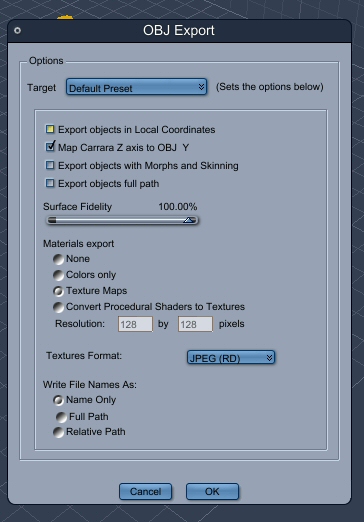
I downloaded the trial, and figured out how to export, but I don't know what to check in the export window. Here is a screenshot of the window.
"It is good to see ourselves as
others see us. Try as we may, we are never
able to know ourselves fully as we
are, especially the evil side of us.
This we can do only if we are not
angry with our critics but will take in good
heart whatever they might have to
say." - Ghandi
Carrara is a proper, all round 3D programme, many features what are above Poser,Bryce, DAZ Studio (none of those 3 being in the "true" 3D category)--Carrara even somewhat better in some areas above that of the top apps like LW, XSI etc.
Live a little.
Brian
ps--Poser, Bryce, AND Carrara all started from the same original app. Only Carrara fulfills the original concept approach I think.
bwtr

I used to use Poser for my models until C6 Pro came out. Ever since I have been able to work with Carrara to use models in much the same way as Poser. I have never touched poser again. It renders better. Object manipulation and movement is easier. It also has a much better library system for finding and bringing in that content. And there are a lot of things which can be done to content in Carrara which Poser cannot do or can't do nearly as easily.
Quote - Carrara is a proper, all round 3D programme, many features what are above Poser,Bryce, DAZ Studio (none of those 3 being in the "true" 3D category)--Carrara even somewhat better in some areas above that of the top apps like LW, XSI etc.
Live a little.
Brian
ps--Poser, Bryce, AND Carrara all started from the same original app. Only Carrara fulfills the original concept approach I think.

Hi Acadia, the answer is yep it can export .objs to Poser and your default settings shown should work just fine--one thing about Carrara (if you want to use the materials room to change the textures on the .obj)--each part of the obj should have its own color--this is an example: suppose you make a balcony. You will need a fence, floor, a wall, and perhaps a wall with a doorway in it. Color the fence red, the floor blue, first wall orange and wall with doorway green. When you save the scene (after grouping fence, floor, wall one and wall two together) and export it as an .obj. When you pull it up in Poser and enter the Materials room you can make the fence rusty metal, etc, your floor a tile, and your individual walls, stone, bricks etc.
That may also answer your question on why you would want to create stuff in Carrara (like walls, furniture-tables chairs etc for export into Poser. These are very easy to make-and the furniture, goblets etc look very realistic.
Carrara looks overwhelming, but it really isn't and we can get you up and running within a week. Jan
Quote - Hi Acadia, the answer is yep it can export .objs to Poser and your default settings shown should work just fine--one thing about Carrara (if you want to use the materials room to change the textures on the .obj)--each part of the obj should have its own color--this is an example: suppose you make a balcony. You will need a fence, floor, a wall, and perhaps a wall with a doorway in it. Color the fence red, the floor blue, first wall orange and wall with doorway green. When you save the scene (after grouping fence, floor, wall one and wall two together) and export it as an .obj. When you pull it up in Poser and enter the Materials room you can make the fence rusty metal, etc, your floor a tile, and your individual walls, stone, bricks etc.
That may also answer your question on why you would want to create stuff in Carrara (like walls, furniture-tables chairs etc for export into Poser. These are very easy to make-and the furniture, goblets etc look very realistic.
Carrara looks overwhelming, but it really isn't and we can get you up and running within a week. Jan
Thanks for the help :) I'll try the default and see what happens. So far as switching to Carrara, I'm not interested in learning another program. It took me years to finally understand Poser. I'm really stupid when it comes to learning computer programs via trial and error. I'm a visual learner and if I had someone here that used it and I could sit and watch them, that would be different. I'm not up to subjecting myself to the the kind of frustration I felt when trying to learn Poser.
"It is good to see ourselves as
others see us. Try as we may, we are never
able to know ourselves fully as we
are, especially the evil side of us.
This we can do only if we are not
angry with our critics but will take in good
heart whatever they might have to
say." - Ghandi

Quote - it's probly a good idea to stick with poser for posing human figures, unless realistic
and speedy rendering is desired. for the latter, almost all 3D apps are better IMVHO.
unfortunately, FFRender is an evolutionary dead end, like Mac OS 9 and Win 98.
That's ok with me. I do this as a hobby and Poser works just fine for my needs.
"It is good to see ourselves as
others see us. Try as we may, we are never
able to know ourselves fully as we
are, especially the evil side of us.
This we can do only if we are not
angry with our critics but will take in good
heart whatever they might have to
say." - Ghandi

Privacy Notice
This site uses cookies to deliver the best experience. Our own cookies make user accounts and other features possible. Third-party cookies are used to display relevant ads and to analyze how Renderosity is used. By using our site, you acknowledge that you have read and understood our Terms of Service, including our Cookie Policy and our Privacy Policy.
I got this free from Daz awhile ago, and I want to use it inside Poser. If I download the trial of Carrara 6, will I be able to convert this product to an .obj file?
http://www.daz3d.com/i/3d-models/-/fire-and-ice?item=6048&_m=d
My next question is, if so, how do I do it? hehe
"It is good to see ourselves as others see us. Try as we may, we are never
able to know ourselves fully as we are, especially the evil side of us.
This we can do only if we are not angry with our critics but will take in good
heart whatever they might have to say." - Ghandi