
Renderosity Forums / Carrara
Welcome to the Carrara Forum
Forum Coordinators: Kalypso, Anim8dtoon
Carrara F.A.Q (Last Updated: 2026 Jul 11 2:50 am)
Visit the Carrara Gallery here.

Subject: Problems following a Carrara Tutorial


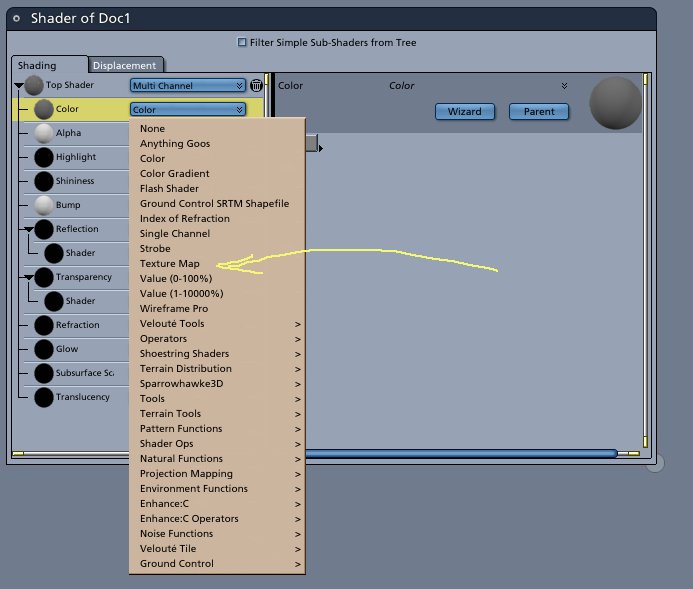
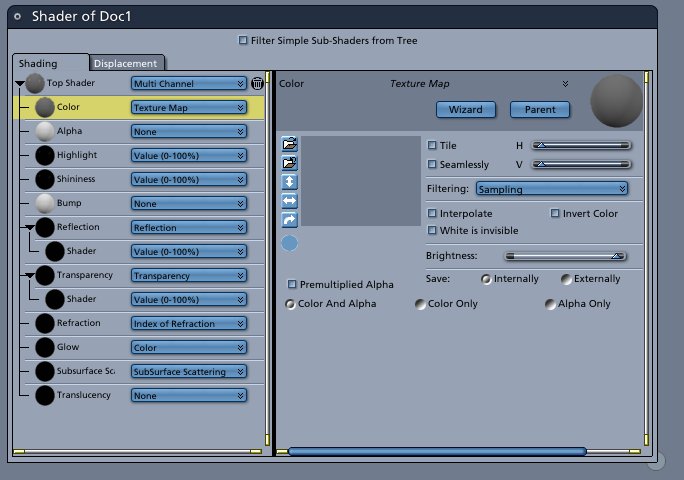
Okay, thanx guys. I'm telling you, middle age vision really sucks. I thought PHP based web pages were bad with their small text sizes, the text size in Carrara is as small as the entire Poser Universe.
Heres a joke, "How many Poser Universes can you fit on the head of a pin?"
I've had enough for tonight, anyone want the rest of this half gallon of cheap vodka?
Yank My Doodle, It's a
Dandy!


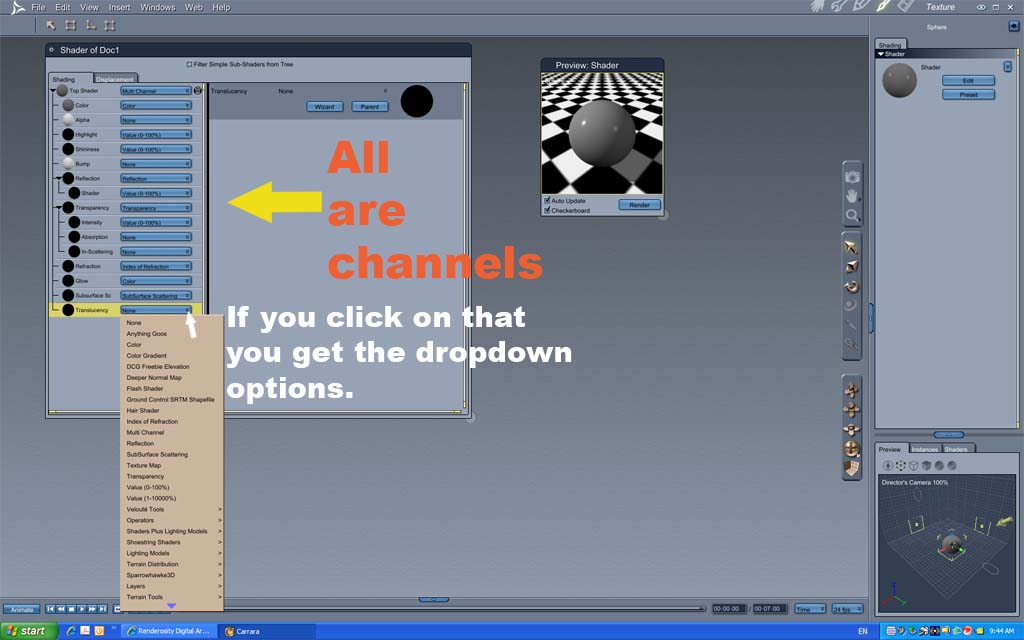
Each of the categories (color, shininess, reflection etc... are called channels. You click the arrow next to color and choose texture map, then on the screen that comes up you will see a folder icon next to the blank box. Clicking this bring up the browser so you can select the file you wish to use
Quote - Okay, according to instructions I have this model loaded up and am in the texture room. BTW I am using C6.
It says that in the Texture Room, I should see a Shader Tree and a preview of the model (a cube). Okay good so far.
Then the instructions say ***"On the left side of the shader tree click on the color channel menu and select texture map. Note the texture map options on the right side of the shader tree. Click once on the first folder icon and browse to the file cubeTexture.tif"
***
I assume they mean the thing that says Color because I don't see anything that says Channel Menu. If so, what do they mean by folder icon when there is no folder icon that I can see in this, what I assume to be, a Dialog Box.This tutorial was written for C5 so maybe some things have changed??? Any help would be appreciated.

http://forum.daz3d.com/Hosted_Tutorials/CarraraQuickTour/QuickTour/qt7.html#
http://www.markbremmer.com/pages/TutMain.html
Cryptojoe, I think you should quietlygo through all the free tutes, starting with these.
The first one actually comes with Carrara.
bwtr
Been through them all. Problem is since they came out with PHP, I need four pairs of glasses to see everything. I've been hating on-line life ever since 2005.
Some sites will accommodate Internet Explorer, others simply don't care, including Renderosity. It is the reason I no longer moderate here.
The worst of all the sites is Adobe, with its white background and silver text. It seems the kids justifying their jobs today didn't learn the history of the browser wars. Remember "this site best viewed with Netscape 2.0 or higher" and by God allot of times if you didn't have the right browser, you didn't have access to a site.
Some day, as they grow up, and the market reaches saturation, some smart-ass will recall what went wrong and they will fix their wagons. Kind of like cell phones. How they make them so small you can't use your fingers to push the buttons. Now they make one called the Jitterbug for people my mothers age.
In the meantime, I just don't buy anything from sites that limit my viewing or make it difficult to read. Its not my problem, the customer is always right, that is if the owner wants to maximize their profits.
So, I'll go back to books which I can read without setting my eyes on fire.
Yank My Doodle, It's a
Dandy!

Privacy Notice
This site uses cookies to deliver the best experience. Our own cookies make user accounts and other features possible. Third-party cookies are used to display relevant ads and to analyze how Renderosity is used. By using our site, you acknowledge that you have read and understood our Terms of Service, including our Cookie Policy and our Privacy Policy.
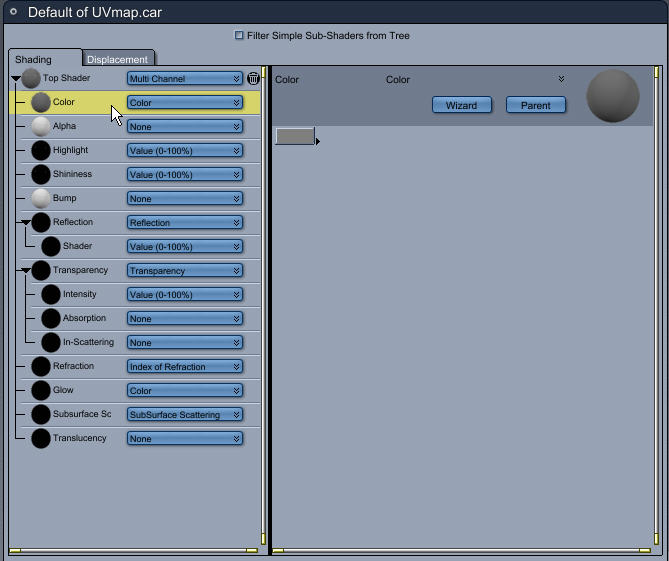
Okay, according to instructions I have this model loaded up and am in the texture room. BTW I am using C6.It says that in the Texture Room, I should see a Shader Tree and a preview of the model (a cube). Okay good so far.
Then the instructions say ***"On the left side of the shader tree click on the color channel menu and select texture map. Note the texture map options on the right side of the shader tree. Click once on the first folder icon and browse to the file cubeTexture.tif"
***
I assume they mean the thing that says Color because I don't see anything that says Channel Menu. If so, what do they mean by folder icon when there is no folder icon that I can see in this, what I assume to be, a Dialog Box.
This tutorial was written for C5 so maybe some things have changed??? Any help would be appreciated.
Yank My Doodle, It's a Dandy!