
Renderosity Forums / Carrara
Welcome to the Carrara Forum
Forum Coordinators: Kalypso, Anim8dtoon
Carrara F.A.Q (Last Updated: 2026 Jul 30 8:26 pm)
Visit the Carrara Gallery here.

Subject: Non-Photo Rendering...


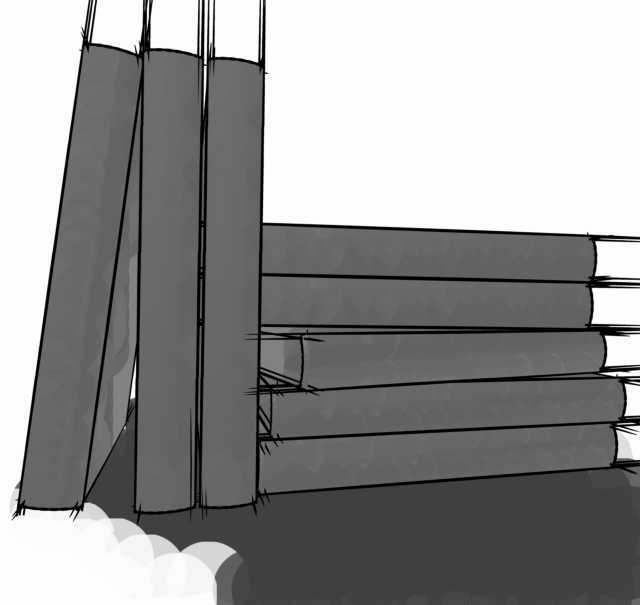
im just frustrated at this point...
ill attach what im talking about...im the corners the lines just shoot off the objects...
like i said i know this has got to be something simple and im just not figuring it out...
As one who has done a lot of art drawing, I like those extended lines. Makes the marks of the lines so natural. Carrara5 has Toon version 3 and there is also the ToonPro plugin from Digitalcarversguild.
Some of what you are concerned about may be the old Toon version. But have a look at the demo images of ToonPro at DCG--it may be worth buying for you.
bwtr

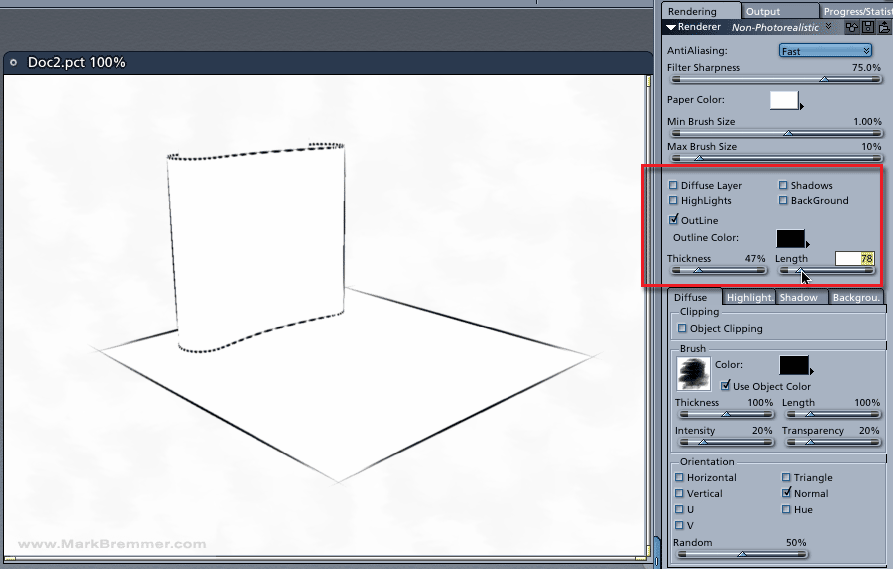
That worked. Thanks...funny that they still jutt out a bit...
I took your advice and am trying to get Toon to work...and in the Toon preview window it does, and i like how it looks, but when i actually try to render it out itll get to the end of the initial render then ill get a memory allocation error...lol...
Thanks for all the help..

Privacy Notice
This site uses cookies to deliver the best experience. Our own cookies make user accounts and other features possible. Third-party cookies are used to display relevant ads and to analyze how Renderosity is used. By using our site, you acknowledge that you have read and understood our Terms of Service, including our Cookie Policy and our Privacy Policy.
Its been a while since ive been able to use Carrara and im still on version 3pro...and for the life of me cant remember the particulars of the nonphoto render...
i looked in the help and tried to do a search, but...
all i want to really do is the outlines...I checked the box and tinkered with the brushes, but I get these spikes shooting off the ends of my objects...
im sure this is something simple, i just cant figure it out...
Thanks,