
todd71 opened this issue on Mar 27, 2007 · 7 posts
todd71 posted Tue, 27 March 2007 at 4:28 AM
Its been a while since ive been able to use Carrara and im still on version 3pro...and for the life of me cant remember the particulars of the nonphoto render...
i looked in the help and tried to do a search, but...
all i want to really do is the outlines...I checked the box and tinkered with the brushes, but I get these spikes shooting off the ends of my objects...
im sure this is something simple, i just cant figure it out...
Thanks,

bwtr posted Tue, 27 March 2007 at 5:03 AM
Carrra3 seems so long ago! I think Toon is what you may want to look at in the Help.
bwtr
todd71 posted Tue, 27 March 2007 at 5:08 AM
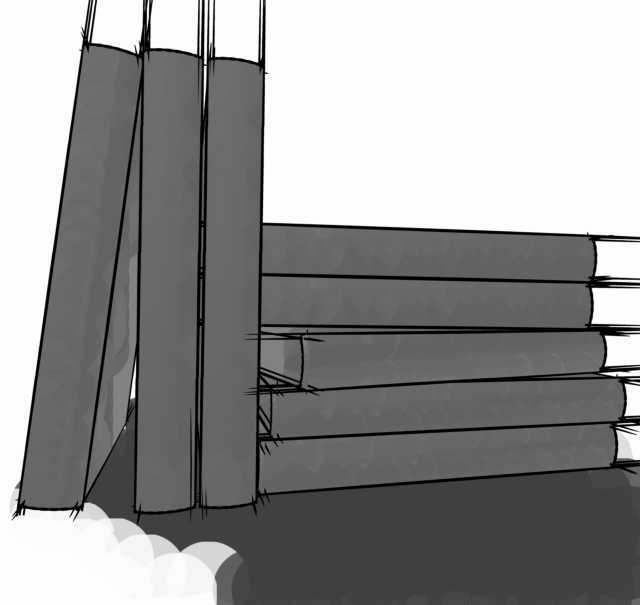
im just frustrated at this point...
ill attach what im talking about...im the corners the lines just shoot off the objects...
like i said i know this has got to be something simple and im just not figuring it out...
bwtr posted Tue, 27 March 2007 at 6:06 AM
As one who has done a lot of art drawing, I like those extended lines. Makes the marks of the lines so natural. Carrara5 has Toon version 3 and there is also the ToonPro plugin from Digitalcarversguild.
Some of what you are concerned about may be the old Toon version. But have a look at the demo images of ToonPro at DCG--it may be worth buying for you.
http://www.digitalcarversguild.com/plugin.php?ProductId=15
bwtr
todd71 posted Tue, 27 March 2007 at 6:10 AM
Looks like a good plug-in. Doesnt work with v3pro tho, or thats what it looks like.
I can always fix the image in Photoshop, but was hoping to figure this out for future usage...
Thanks for your thoughts...

MarkBremmer posted Tue, 27 March 2007 at 6:28 AM
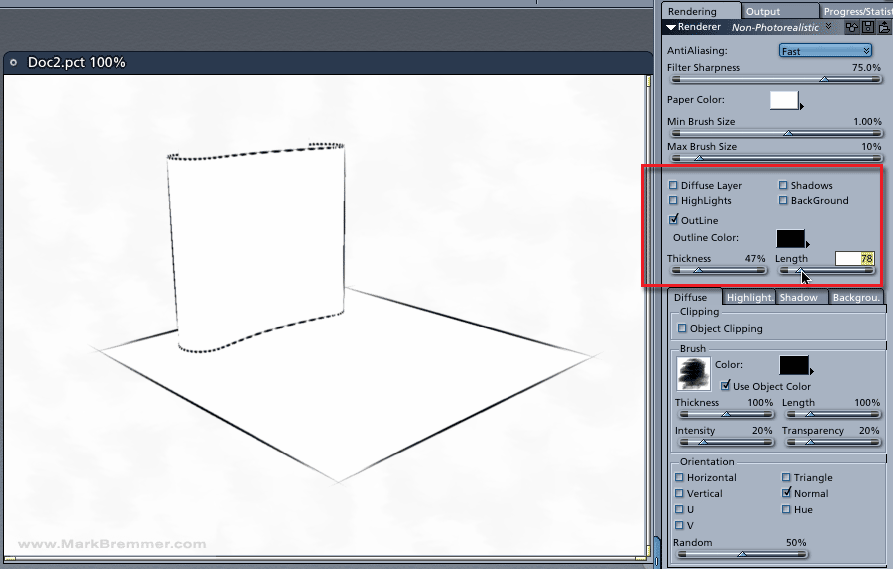
todd71 posted Tue, 27 March 2007 at 8:24 AM
That worked. Thanks...funny that they still jutt out a bit...
I took your advice and am trying to get Toon to work...and in the Toon preview window it does, and i like how it looks, but when i actually try to render it out itll get to the end of the initial render then ill get a memory allocation error...lol...
Thanks for all the help..