
Renderosity Forums / Carrara
Welcome to the Carrara Forum
Forum Coordinators: Kalypso, Anim8dtoon
Carrara F.A.Q (Last Updated: 2026 Jul 28 12:52 pm)
Visit the Carrara Gallery here.

Subject: Dumb question time about colouring hair.

Which importer? When using Transposer 2, dynamic hair comes in as part of the figure group. You can select each hair item and go to the modeling room; there you will have options to set root and tip color. Unfortunately, there is as far as I know no way to apply complex shaders to dynamic hair. Another little note: you must click the "keep link to Poser file" button if you wish dynamic hair to be imported.
It wasn’t dynamic hair I was imported it just hair, hair, changing it through the material room seems to be the only option, oh well. So mush for the much vaunted transoser it seems lacking really. Besides another problem has reared it’s ugly head to do with pose file imports. I was wondering when you import a pose have you come across that you lose the morphs on the character with transposer, and I was wondering if you had found a way around this as it’s kinda frustrating. You either have the morphs for the character or you have the pose, carrara seems to read the import of a pose file as exactly the same thing no matter what it’s meant to effect.
I only got C5 pro last Friday so I am at that stage of asking a lot of obvious questions so please be gently with me ;)

Um...there are only two other kinds of hair in Poser (I'll ignore the experiments on transmapped dynamic cloth hair, as those haven't panned out well yet). Prop hair is a mesh. Figure hair is a mesh, which may or may not be conforming. In both cases, if you use the Native importer it will come in as an object with attached material -- the latter material can be edited like any other material in Carrara's Material Room. If you export from Poser in Wavefront .obj format, Poser will also create a .mtl file that references the texture maps. If you import this .obj file into Carrara, Carrara will automatically look for (and set up as a material), those texture maps. No matter how you go about it, the textures of a mesh hair will be more editable in Carrara than they were in Poser originally. The only "limitation" I can see is inherent to the hair itself; most mesh hair is packaged with color and transparency maps, and thus to make major alterations in color or texture requires opening up an image editor and repainting the maps. Oh, lastly, I do not know if Poser "MAT" poses can be applied within Carrara. It will import figure poses, but the MAT pose was a bit of a hack. Still, since all most MAT poses do is change which texture image is referenced, I don't see a huge difficulty myself in simply navigating to the desired texture file by hand, from within Carrara's Material Room.

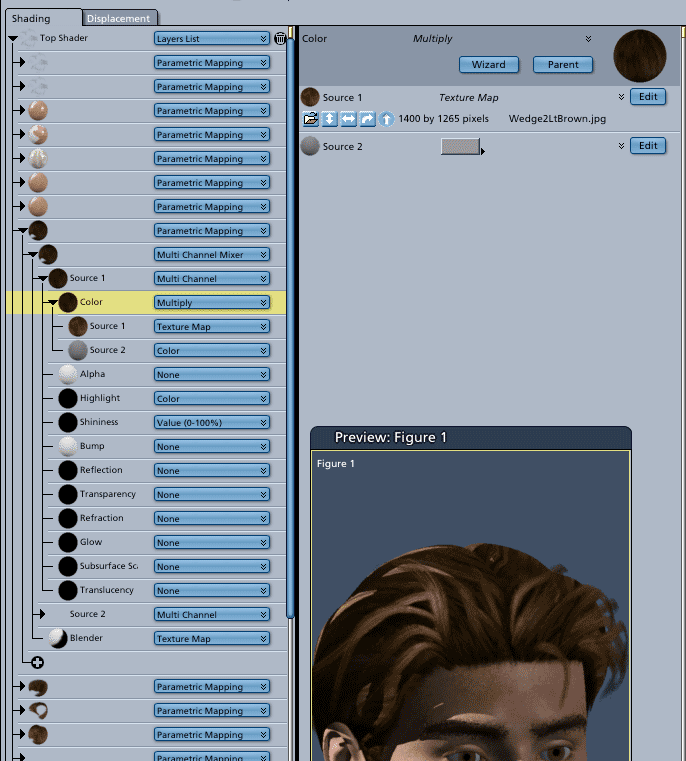
It does help, thanks all, the only thing I can add to all this is what I learnt from the daz forum is that if you do alter a poser file you need to remove unused object and shader files in from the edit tab. The reason I bring this up is that I was finding if you do alter anything I couldn’t save the file. An interposer glitch thing. Now to figure out what the rest of Carrara does J
OK, so what are the editing differences between using native vs transposer (besides dynamic cloth and hair)? When I import using native, I get a full tree listing of all ojects in the assembly room. I select the hair object and drop a shader on it from the browser. However, if I use transposer, it shows only the grouped objects. Selecting the hair and dropping a shader on it, shades both hair and the Mike figure(parent object). But apparently, if you go to the texture room, you can then shade/alter whatever parts you want. Correct? So why bother with native then and why does the help file state that you must do all editing in Poser if transposer is used? Are they actually refering to the dynamic hair and cloth only there? I'd previously always used the native mode since I always use Poser4 characters. So now I'm wonder which one I should be using. Don't ya just love all these newbie questions? ;-)
Irene-
Hi iolora, Native Import lets you animate the characters within Carrara with either the imported bones or you can create your own. TransPoser lets you animate within Poser and then import into Carrara. So, bottom line is that the Native format will let you do everything inside Carrara EXCEPT dynamic hair and cloth. For dynamic hair or Cloth, Poser is required. Clear as mud? Mark
Thing about poser is it’s a nightmare to animate in; I actually found Daz preferable even with the lack of proper animation tools. I’m hoping Carrara will be like Daz but better, seeing were a glitch in the animation was happening in Daz was very difficult and fixing it even harder. Setting characters up in poser and then importing them using the native import seems the way to go rather than trying to assemble a character using the transposer import of character files.
Where did the name Carrarra come from?? That said, where did the Daz name come from. Renderosity is obvious but I can’t figure out the other two. I’m really going to town here on the dumb questions front.;)
Originally I thought that Transposer did the same as native plus it allowed you to bring in the dynamic stuff and animation. Then I started reading the dang user PDF file. Here's what it says about Native importing.
"When using the Poser Native Importer, you can, in Carrara, edit the imported objects
(adjust morph targets, move the objects, move the joints, import a pose or a cloth, edit a
shader, etc.). For instance, if you import a Poser character into Carrara, it will create the
model of the character and also attach a skeleton to it and import all morph targets. You
can edit all this directly in Carrara. With the TransPoser import, Carrara will import the
Poser character but you will not be able to edit anything."
The way it is written, it sounds like with Transposer you can't do any of the things listed there as being doable with native import (including editing of shaders). And it sounds particularly worthless for animating. Before it was sounding like Transposer was the way to go, but now it sounds like native is unless you need dynamic hair and/or cloth? Yeah, clear as mud is right. LoL! Fortunately I don't animate or use the dynamic stuff (so far). Occassionally I want to change a texture. So it sounds like, for me, either one will do. I think... ;-)
nomouse is correct about the name Carrara. I remember Metacreations saying it was named after the Italian marble. Apparently it is prized by sculptors. When Zygote seperated out their Poser modeling business from their commercial modeling business, DAZ3d is the name they chose. DAZ standards for Digital Art Zone. Probably why their new forum website is called "The Art Zone".
Irene
Irene-
Here's a way to think about it that may help; Carrara does not yet have a cloth engine (nor, Anything Grows aside, does it really have the equivalent to Poser's dynamic hair). So via Native importer, you can bring in a figure and access Carrara's abilities to Model (aka adjust the mesh in ways impossible in Poser), use Carrara's improved bones (vertex weighting, which Poser lacks), use Carrara's physics, and of course have full access to Carrara's lighting and render effects as well as its texture options. However, if you want access to a cloth engine you need to go through Poser. So if you intend an animation with rippling cloth (and perhaps Poser dynamic hair) you would use the Transposer option instead. Technically, you have then chosen to do the figure animation inside Poser; you are still free to animated lighting, the rest of the scene, the camera, etc. within Carrara. And yet there is more. You can't change the figure's animation, but you can break the link with the Poser file and edit the materials. I also believe you can change the mesh to editable (not sure if that breaks the animation, tho). I guess that's still clear as mud, but that's the way I think of it: "Want animation -- go Carrara. Want cloth -- go Poser."
Transposer does a remarkably smooth job in moving a posed figure into Carrara. And I for one am used to Poser, used to navigating its libraries and spinning its pose dials. Since I came up through Bryce, and through manually importing Poser content, this method works just fine for me. I suppose I really should try putting together the Poser content and posing it in Carrara native some day, though. I'm an inveterate tweaker by nature, and you can't tweak a posed figure if, by the time you are tweaking the lighting, it is invertebrate.

Privacy Notice
This site uses cookies to deliver the best experience. Our own cookies make user accounts and other features possible. Third-party cookies are used to display relevant ads and to analyze how Renderosity is used. By using our site, you acknowledge that you have read and understood our Terms of Service, including our Cookie Policy and our Privacy Policy.
This is basically the question, I can import figures into carrara and import textures and such the only thing I cant’ get to change colour is hair, it doesn’t have an import pose button that I can see and the transposer documentation leaves a lot to be desired. Any help much appreciated to stop me pulling out my hair.