
Renderosity Forums / Carrara
Welcome to the Carrara Forum
Forum Coordinators: Kalypso, Anim8dtoon
Carrara F.A.Q (Last Updated: 2026 Jul 11 2:50 am)
Visit the Carrara Gallery here.

Subject: Wind Through the Trees


Try this: Tree wind example (MP4 format - 600K)
The render setting were on the low side for speed purposes.
If you can't view the file in this format, let me know and I will try a different one.
C5.1 trees rock!
I rendered the first tree last week so I don't remember the render time but I don't recall it being super long.
I renedered the second tree this morning with a 2 PC render node. It took 1 hour at a size of 320 x 240 for a 4 second animation @ 15 frames a second. I did have indirect lighting on and ambient occlusion. Despite the time, the effect is rather sweet.
Hope this info helps.
I tried to do a 640x480 QuickTime (MPEG-4) render of about 200 replicated trees. Unfortunately the render crashed 2 times. There didn't seem to be a memory problem(?), (my PC has 3 GByte of RAM). I was rendering from the batch option.
What did render (about 2 of 4 seconds) looked excellent, but I think Eovia has a bit more work to do on this feature?

Attached Link: http://server2.eovia.com/demos/carrara5/carrara51.html
This one is great, especially at the end. Altho I would like to see more leaf translucency.No need to think outside the box....
Just make it
invisible.
OP,
For what to charge...that varies. Certainly, you want to look at comparison stuff when it comes to materials because you want to charge differently for different materials. Now the value you place on the art will always be relative. You certainly want to charge to recoupe cost and make some money. You may have to experiment. I think the framed prices would vary depending on materials. How did your color copies turn out? Did you use cmyk palette in carrara or convert it in another program later? I am curious about commercial printing from carrara, since I would like to do this at some point. How long a print last and ages I would think would be important when talking about framed art tho.
No need to think outside the box....
Just make it
invisible.
I am unsure about the life of the prints. I know that when dealing with a company like Kinkos, you don't have much choice. They will only put a certain paper in their machines. The quality I've seen is not bad. It varies from one machine to the next. I had to run to different stores to get a better print quality - one particular machine needed to be cleaned and aligned - and for $3.00 copies, they wouldn't personalize the new inks for me. I did do post work on all my prints in Photoshop, and I think it was RGB color... but amazingly the prints came out very close to wysiwyg. I asked about color management - but Kinkos said everything (computers) were locked down - no profiles.
I have seen older matt board color - even in the center, after cutting - the inside was off-white. For the most part, my prints looks near perfect - just slightly dark, and if I look hard, a few faint lines from the print heads - but I expect perfection.
The problem I am having is choosing images to print, matt, and frame. I got on a role, and now have way too much work. Stayed up last night again till midnight installing glass and dust covers.
The wood working part of this is fun. Staining the frames to match the art is a challenge.
I suggest picking something - I printed my art at 200 pdi - and going down to a Kinkos (printer) and printing one off. But I warn you, it is addicting seeing your art in print.
Never Give Up!
I have done printing before just not w/ carrara, but I am sure it would be great. Wouldn't 300dpi be better? If your making the frames by hand that's a whole other game as well. The bad thing about that could be that many people may not appreciate the benefit of custom hand made frame or mat. It will be more expensive and time consuming.
No need to think outside the box....
Just make it
invisible.
Yes, I put a load of work into the frames - good thing I enjoy it : ). I consider the frames to be part of the artwork. I'll post an image of a finished piece. Another type of 3D art. I did start by purchasing finished molding, but the saw cuts chip fine molding and I didn't like the finished product. When I make my own I can patch the joints before staining.
I'll see in June how it goes. I've conducted a few searches for pricing - framed prints go anywhere from $100 - $500, depending on the size and demand for the artist's work. I'm a "new" artist - and in my opinion, still finding my style. But, like they say in skateboarding, "fake it till you make it".
Any word on Hex 2 release?
Never Give Up!
Quote - Unfortunately the render crashed 2 times. There didn't seem to be a memory problem(?), (my PC has 3 GByte of RAM). I was rendering from the batch option.
I tried the same thing. It didn't crash but rendered only 50 of my 150 frames then acted like it had finished the job.
I was monitoring the memory usage. Before booting up C5, I was using about 400MB of my 1GB of memory. C5 uses 12MB. After loading the file which had 30 trees, C5 memory usage went up to 123MB. While running a batch render, C5 steadily increased in memory usage to over 400MB! My total system memory was reporting over 2GB of usage.
I guess I can render it out in 4 second chucks then combine them in my video editing program.
I'll post more when I can.
"I am unsure about the life of the prints..."
I've got an Epson 9800 giclee printer, and have been printing on fine art canvas (prints to 44" wide). The output of this printer is stunning. I coat the prints with a gloss UV protectorant after about 24 hours to dry (not a problem with porous media like canvas). My minimum print resolution is 200 DPI, and I usually go for 240 DPI. BTW, a great upsampling freeware is "Irfanview." You can get it at irfanview.com. This great little program will upsample images using high quality B-Spline or Lancos algorithims (as well as others). This is an excellent way to double (or any ratio) your renders for final print.
The K3 pigmented ink for this printer will show no sign of fading inside a home with normal lighting for over 100 years -- without being behind UV glass or plastic. If you are going to have a print service do your printing, which is certainly a viable option over forking out $5 K for the Epson (can get an Epson 7800 for $3 K though -- good for 24" wide prints), make sure the ink is pigment and not dye based (though HP now has a long-life dye ink).
The Epson 9800 is possibly the best -- at any price, fine art printer, for canvas and other thick media -- like posterboard.


I usually send my stuff out to be printed... and yes you want 300dpi for a goodquality print. I can't say for sure on large scale with c5, just because I'm still working on images for poster prints (I like to send out batches of ten) but I was printing some stuff through a photo place that uses fujifilm paper, (it was walmart photo) and I printed a 5x7 of two c5 images I had done back in Dec. and they turned out wonderfully.
Christina -- "Love me but don't tell me so" Lilly
Bart
My Art
Actually for printing color dense images 200 DPI will usually suffice -- as a minimun for fine art prints. My prints are as much as 36"x28" in size, and file sizes (never print jpeg for fine art prints!), as much as 300 MByte. The 300 DPI is considered a minumum standard for the desk-top publishing world, as the contrast between (usually) black text and white background requires a higher resolution. I do get about 300 DPI on smaller print images though.
You can always up-sample images to increase "color resolution" to 300 dpi -- or more, but when printing large size prints the files could easily grow to over 1 GByte!
I purchased the Epson because it is THE fine art printer, and I use specific media printer profiles. I sold my 2 Honda quads & trailer to fund most of the the printer. The Epson (actually made by the Seiko factory) is a fantastic piece of hardware.
For those who want to do their own wide format giclee printing, on a bit of a budget, check out the HP DesignJet 130. It prints to 24" wide, and uses highly fade resistant dye inks. You can get for a bit less than $1200 (HP has a higher end version with auto cutter, roll feeder & network -- about $1800).

I just installed the latest quicktime for windows xp and the movie played fine.
www.youtube.com/user/ShawnDriscollCG

" Yes, I put a load of work into the frames - good thing I enjoy it : ). I consider the frames to be part of the artwork. I'll post an image of a finished piece. Another type of 3D art. I did start by purchasing finished molding, but the saw cuts chip fine molding and I didn't like the finished product. When I make my own I can patch the joints before staining.
I'll see in June how it goes. I've conducted a few searches for pricing - framed prints go anywhere from $100 - $500, depending on the size and demand for the artist's work. I'm a "new" artist - and in my opinion, still finding my style. But, like they say in skateboarding, "fake it till you make it".
Any word on Hex 2 release? "
Actually, I have heard Dale Carnegie advocates also live by this moto. 
"Thanks all for your enthusiastic support!<br></br>Hexagon 2 will be released between April 18 and April 28 (2006! )<br></br>We do everything to have the shipping date as closer from the first<br></br>one as possible!!<br></br>- Laurent
No need to think outside the box....
Just make it
invisible.
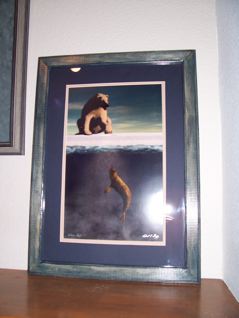
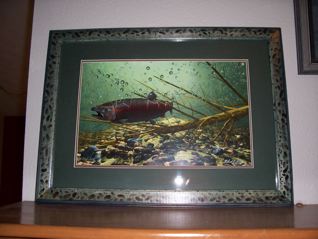
They look great OP, glass glare can be bad not just for photos of your work. Are you hand painting the frames? Do you hand cut the mats w/ a mat cutter, use a diff cutting method or use precuts? If you ship these you wll really have to be careful about glass breakage.
I know these are snap shots but,
for photos I would go ahead and setup a studio lighting sit since you know you will be photographing these. The flash does really take away from the whole piece, also the distortion.Also if you are shipping I would add some really nice personal touches in the packaging/wrapping. The whole alaska theme is obviously, a big playing point.
No need to think outside the box....
Just make it
invisible.
Thank you ren_mem. I do all the matt cutting, stain and route the wood, put the whole thing together - the only thing I don't do is cut the glass. Here I go to Lowes for cheap glass. Now I'm thinking about looking at non-glare glass.
Good idea with taking professional photos. The glare is anoying. And thanks for the packaging idea. I've made stickers with the image, size, title, etc. to stick on the packing tube for selling just prints. Robert
Never Give Up!

Non-glare is traditionally coated which does effect colors however, there are many other types of glass. Anti-reflective can be good, but it's all relative to the situation, I don't think that would be a large issue except for photographing. There you want to setup a pseudo studio setting. Nothing fancy, but you don't want light bouncing off the glass and you want light consistancy and accuracy. You also want a setup that can be used for nice distortion free angles, of course your lens and settings there are also important. I think a special note or something along those lines makes the whole thing personal and unique.
No need to think outside the box....
Just make it
invisible.
Here is another example of multiple replicated trees with wind: Click here (MP4 format - 640K)
I still think that C5 (especially with trees) has memory issues. In my previous post, I mentioned that the render did not fully complete and the memory useage went sky high. Even after the render was complete and saved, my entire system memory useage was still high even though the Task Manager in Windows said C5 was using only 12MB. When I close C5 completely, the memory useage drops back to normal (in this case from 950MB to 220MB)
Anyway, this rendered the first 124 frames of 150 before failing. So I just ran it again and rendered frames 125 to 150 then combined the 2 files in my video editing program.
For those who couldn't view the MP4 videos, I have reposted them in Windows Media Video format.
Tree video 1 (931KB)
Tree video 2 (750KB)
Whoohoo! Thank you very much for reposting these in WMV! The files played no problem. I love the subtlety you are getting in your wind animation. It looks very natural! So far, judging by the examples of wind animation, (including yours) that I've seen from both Carrara5 and VueInfinite, I'd have to say that Carrara's looks more "lifelike".
@ren_mem- My QT player indicated an 8971 error code. No crash involved, but the "brokenQT" graphic showed when I tried to playback the file. Normally I have no probs with QT files and I've had some success with using QT codecs for video work; of course that was on a higher spec machine that has Premiere Pro on it.
@bwtr- No arguments there. My desktop animation machine runs WinXP Pro and I've never experienced the dreaded "Blue-Screen of Death" with it, unlike with Windows98. I almost never connect that one to the net, which helps keep it running smoothly.
danamo, that's a file extension error, I believe. Maybe file associations on your browser/pc have messed this up. It isn't server side. XP Pro is a great OS. Running 24/7 w/ reboots normally every few months you can't complain. However, that wouldn't necessarily have much to do with an app having an issue. Downloading is usually easier to deal with instead of streaming. Some issues I have seen w/ media player are MS biased choices on the server side that aren't non-MS product friendly.
That is often the choice of the web site operator tho. They just assume MS everything. The best thing to do is download those kind of links and save them as a file then play them. Of course, you can't do that with a streaming link.
No need to think outside the box....
Just make it
invisible.

Privacy Notice
This site uses cookies to deliver the best experience. Our own cookies make user accounts and other features possible. Third-party cookies are used to display relevant ads and to analyze how Renderosity is used. By using our site, you acknowledge that you have read and understood our Terms of Service, including our Cookie Policy and our Privacy Policy.
Has anyone animated the new C5.1 trees? If so, could you post an animated gif for all to see? I have yet to try - but look forward. Found the RustBoy way (to animate moving leaves) creative, but always had issues with unwanted boarders around the leaves, even with an alpha map. But it did take less resources to animate.
Another question... I am starting to show my art (1st show in June), matted and framed ( I enjoy the process! Making my own frames - route, sand, build, stain, etc. ) The final piece costs me under $25 framed 14x20 - includes glass, double matt, dust cover, and hardware. Kinkos prints on 11x17 for $4.00.)
What would be a fair price to sell a framed piece like this? It is a print, and digital art does not appear to garnish the same price as painted art. I was thinking $40.00 for a print, in a mailing tube. $150 - $200 matted and framed. Too high? The stuff here by local artists varies, and for framed art - usallly can't touch it for under $250 - $300.
Anyway. It would be nice to recoup some of the (thousands) of dollars I've spent on 3D apps, computers, and models : ). Seems every month I am telling my wife - "Honey, the new version of ____ just came out, and it's ***nice. I gotta have it. Listen what it can do now..." Sound familiar to anyone? R
Never Give Up!