
Renderosity Forums / Carrara
Welcome to the Carrara Forum
Forum Coordinators: Kalypso, Anim8dtoon
Carrara F.A.Q (Last Updated: 2026 Jul 11 2:50 am)
Visit the Carrara Gallery here.

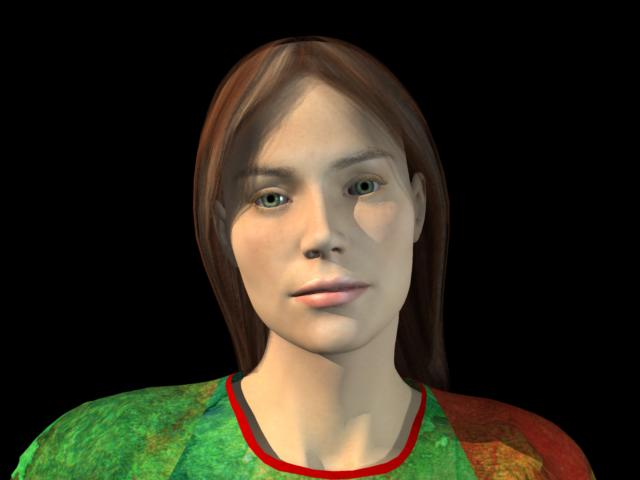
Subject: setting shinyness to 90% decreases the shiny plastic look of skin


Hmmmm - still seems oddish to me. Love esther
I aim to update it about once a month. Oh, and it's free!

the highlight is black - is that a high highlight? Love esther
I aim to update it about once a month. Oh, and it's free!
so if the highlight is already black then i would have thought 7% shiny shouldn't loo so shiny but it does, love esther
I aim to update it about once a month. Oh, and it's free!
It is the mix of highlight w/ shininess. Not saying it doesn't seem odd, but that from what I have seen it's not unusual. Actually, I generally use shininess on maybe eyeballs or lips.Black appears to be very close to none whether you use it in glow or highlight.
No need to think outside the box....
Just make it
invisible.
definitely low settings of the shinyness dial look more shiny than higher settings, surely this is a bug, love esther
I aim to update it about once a month. Oh, and it's free!
maybe it's different on a mac computer - it really is very shiny at low compared to high shiny settings - even when i tried black and then a light brown hi-lite. love esther
I aim to update it about once a month. Oh, and it's free!

I wish using point at w/ eyeballs worked better. In D|S it works great even in realtime OG preview, but in carrara doesn't seem to work well for that.I don't know if say adjusting the hot point for something might help there, but since I can't seem to get the eye to follow an obj well I haven't been able to get it to work the way I would like.
No need to think outside the box....
Just make it
invisible.

Decrease the highlight size a bit on the eye and add a little reflection to it and you're done. But you need something to reflect on it though, not just the black voidness.
www.youtube.com/user/ShawnDriscollCG
Oh, thanks shonner this isn't really for a render tho, just a quick example for skin shininess.Yeah, reflections aren't any good w/ out something to reflect. I was playing w/ reflection and refraction in the cornea tho awhile back.Are you talking about percentage for the highlight shader added to the color? I think the highlights are set to different shades for diff parts of the eye, like black and a darker gray.
No need to think outside the box....
Just make it
invisible.
The eye is always wet. So the entire outer part uses the same shine, highlight, and reflection.
www.youtube.com/user/ShawnDriscollCG
Up the shine to decrease the highlight. I'm talking about the wetness of the entire eye. Each part of the eye under the wetness will have its own reflection and highlight values, though. This makes the eyes look more real. But if they are not the focus of the render, don't bother with them so much.
www.youtube.com/user/ShawnDriscollCG
Esther, On the eyeball I found white highlight made a difference in how shine worked on eyeballs, but w/ white it was worse on skin...seemed harder to control. I know specular controls can be a bit more mysterious to understand than say diffuse.So what I said earlier probably doesn't hold true. Tho I didn't get a plastic look at 7% shine w/ black highlight.
No need to think outside the box....
Just make it
invisible.

Privacy Notice
This site uses cookies to deliver the best experience. Our own cookies make user accounts and other features possible. Third-party cookies are used to display relevant ads and to analyze how Renderosity is used. By using our site, you acknowledge that you have read and understood our Terms of Service, including our Cookie Policy and our Privacy Policy.
when I import a V3 figure from poser. Is this a bug? When it came in at default 7% it was plastic looking and shiny. So I took the advice given in another post and upped the shinyness (how did anyone ever work that out) and low and behold the shiny skin went away. Is this a bug do you think? Love esther
MY ONLINE COMIC IS NOW LIVE
I aim to update it about once a month. Oh, and it's free!