
Renderosity Forums / Carrara
Welcome to the Carrara Forum
Forum Coordinators: Kalypso, Anim8dtoon
Carrara F.A.Q (Last Updated: 2026 Jul 11 2:50 am)
Visit the Carrara Gallery here.

Subject: Alpha problems again


Hard to say w/o more info. It's possible it could be resolution artifacting w/ textures. You need to pin it down first. Did you turn off skylight to see if it was the issue? In the past I have been able to turn GI down to 20%. Maybe just play with turning it down. Also try increasing the lighting/shadow quality/accuracy and turn off interpolation. If you don't get anywhere I would report it. Can't hurt.
No need to think outside the box....
Just make it
invisible.


thanks will try these suggestions... already tried improved edges... which got me no where... I love this forum because of all of you who are so helpful. Will let you know what I find and what works if anything. Thanks again
Christina -- "Love me but don't tell me so" Lilly
Bart
My Art

I turned it off... now it's taking forever to render... may know by morning if that's the answer. I hope so... although it is increasing the render time... it's an easy enough solution. And... bluetone... if you want a leopard girl that bad, I'll paint you a texture map.... ;) It would be a neat effect if you wanted it...
Christina -- "Love me but don't tell me so" Lilly
Bart
My Art

100% interpolation is a lot faster than using no interpolation and gets rid of most of the ashes. 20% interpolation is useless for skylight rendering.
www.youtube.com/user/ShawnDriscollCG
I feel like such a retard... thank you all for your help... esp you Shonner. Gotta say I don't really know you, but I love you. Everybody here is so helpfull. BTW.... 100% interpolation is faster than turning it off, and it corrects the problem... now when I finish the putting the whole image together I'll have to post a link here. Thanks you all again.
Christina -- "Love me but don't tell me so" Lilly
Bart
My Art
I don't know why 100% Interpolation works. The Carrara manual (and others here) make it sound like it should do the reverse. 1% Interpolation actually gives the worst results when it should give nearly the same result as no Interpolation at all (according to Eovia and friends).
Message edited on: 02/21/2006 23:23
www.youtube.com/user/ShawnDriscollCG
Christina -- "Love me but don't tell me so" Lilly
Bart
My Art
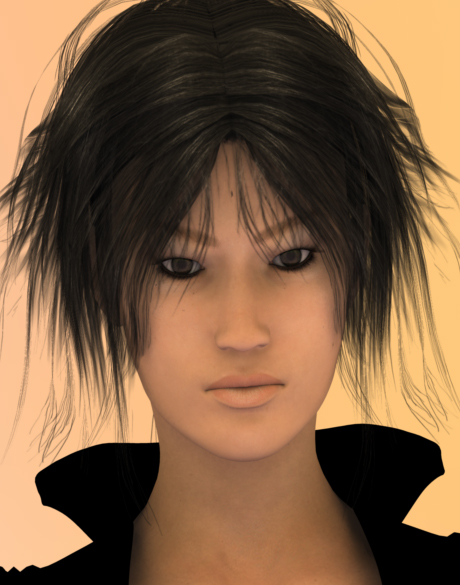
Yep. I think I have a template CAR file I load first with most of my light and render settings already filled in. enigmaticredfrog, Something is different with your lighting. Her eyes are not lit up this time.
www.youtube.com/user/ShawnDriscollCG
I turned caustics on in this last render... it's the only thing I can pinpoint. :P
Christina -- "Love me but don't tell me so" Lilly
Bart
My Art
Ren_mem... I think size matters...as well as shadows and the complexity of your alpha maps. The image I posted is actually a shruken crop of the overall image... it's a full body shot... and I was able to turn interpolation too 100% and only add 15 min to the render time... when I turned it off after 4 hrs i still couldn't see the light at the end of the tunnel. Christina
Christina -- "Love me but don't tell me so" Lilly
Bart
My Art
For me on my PIII, Interpolation settings are usually:
1% - 15 minutes (horrible ashes everywhere)
20% - 45 minutes (still very noticable ashes)
100% - 2.5 hours (hardly any noticable ashes)
Off - 9+ hours (no ashes) I often add some distant lights to a skylight and set Interpolation at 50% to remove obvious ashes without having to wait too long for a render.
Message edited on: 02/22/2006 18:53
www.youtube.com/user/ShawnDriscollCG
I just thought it was interesting results. This was a simple scene no dynamic, but high res textures w/ both GI and 3pt.Pretty sure soft shadows was on. I luckily have not gotten ashes yet.Kinda creepy looking :)Only 640x480 tho. I just wanted to see if it really made that big of a diff.I also don't have layers list. I haven't been able to really take the time to test, but I thing parametric/layers list are just slower. I have had a 1 tree take forever and recently throw me out of carrara.It maybe only certain models. All of a sudden carrara is just gone in a couple secounds and I a looking at my desktop going whaaaa?
No need to think outside the box....
Just make it
invisible.
I often have Carrara appear to drop me back to the desktop with no sign of it running on the taskbar or task manager. Everything else works on my system. But if I wait about a minute, Carrara will come back and all is fine. This is when I have SSS turned on and the object I'm rendering is hi-poly.
www.youtube.com/user/ShawnDriscollCG
Yup... I hate it when my programs do that... pain in the... neck.
Christina -- "Love me but don't tell me so" Lilly
Bart
My Art
Carrara will take up so much CPU time (or doing a huge memory grab) that Task Manager no longer detects it running. Kind of cool, I think.
www.youtube.com/user/ShawnDriscollCG
Well that's odd. If that is happening I would say something is not right.I don't think that would be cool. I have never seen a case where the task manager didn't know the cpu was in use unless it actually wasn't processing at the time. I use a thread process utility and since it has no threads either, no cpu time and no listing in memory. I'd say it was gone :)
No need to think outside the box....
Just make it
invisible.

Privacy Notice
This site uses cookies to deliver the best experience. Our own cookies make user accounts and other features possible. Third-party cookies are used to display relevant ads and to analyze how Renderosity is used. By using our site, you acknowledge that you have read and understood our Terms of Service, including our Cookie Policy and our Privacy Policy.
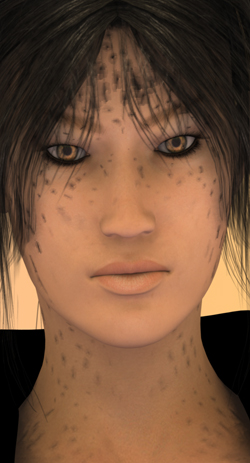
Has anyone else had similar problems? I've checked light through trans in both areas and I'm using only sky lighting to light the scene. It's not as noticible until I render it large enough for a print I'm trying to do... I've checked the alpha maps and there aren't even the smallest imperfections on it that would cause this. If I render the same hair in poser I don't get the leparding effect. I'd say it was the hair, but I've used other hair products with similar results.I like carrara so much, but this is really disheartening. Any suggestions that don't include adding additional light? That would only defeat the purpose. I'm really not sure if this is a bug... but I didn't notice it until the 5.04 update.
Christina
Message edited on: 02/21/2006 09:56
Christina -- "Love me but don't tell me so" Lilly Bart
My Art