
Renderosity Forums / Carrara
Welcome to the Carrara Forum
Forum Coordinators: Kalypso, Anim8dtoon
Carrara F.A.Q (Last Updated: 2026 Jul 11 2:50 am)
Visit the Carrara Gallery here.

Subject: Motion blur where there shouldn't be any


What is your intent? If the blur between the base obj and the instances is the issue you may want to try making real instances in the replicator. It is more memory intensive, but this may not be a bug since w/o them being real instances they are sorta cloned and bound to the original object this allows lot less memory. Also depending on how you are moving them...I am not sure what you are trying to do exactly from your description.
No need to think outside the box....
Just make it
invisible.
I'm trying to NOT have the objects motion blur. The rocks are not moving out from the center of the terrain, but they are blurring as if they were. I just want rocks that stay put -- the blur is an unwanted artifact that just shows up. I have also tried this with trees and other objects using the surface replicator. They all blur towards the center of the grouping, even though they are supposed to be standing still. It doesn't seem like it should do this, so I was wondering if anyone else had encountered this (and maybe had some kind of fix) before I reported it as a bug. Thanks!
SF to LA: From June 1 to June 7 2007 I will be riding my bicycle 545 miles to help support people living with HIV/AIDS. Please visit my homepage: http://www.aidslifecycle.org/6010

You say this is an animation... do you have keys for the positions of the rocks that you may have not meant to do? I haven't tried animating the parameters of the Replicator, so I'm not sure what it would do. (Or if it can.) Check for any unwanted keys in the timeline. (Maybe you moved some rocks after moving the timeline pointer, leaving 2 diferent positions for the rocks, and Carrara did the tweening without you realizing it.) Good luck!
No, no extra key frames. Believe me, I checked. The scene above was made from scratch as a test after it appeared in another file I was working on. I then made ANOTHER file from scratch using Carrara plants on a terrain. All the replicated objects get this wormhole/warp drive trail on them when I turn on vector-based motion blur, even though they don't move. I guess it must be a bug, but if anyone has time to set up a basic scene with a terrain and surface replicated objects, I'd be interested in hearing how it renders with vector-based motion blur clicked.
SF to LA: From June 1 to June 7 2007 I will be riding my bicycle 545 miles to help support people living with HIV/AIDS. Please visit my homepage: http://www.aidslifecycle.org/6010

I haven't animated anything in my test either, but it is doing the same thing. If you did animate something and wanted to use it with the replicator seems like this would be a problem.Did you try it with an actual vector motion blur object?I wonder if you have to do this before you replicate. Seems like w/ no animation it should do nothing instead of the blur. Can't hurt to report it and see what they say.
No need to think outside the box....
Just make it
invisible.
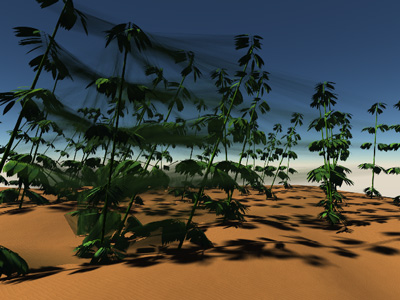
My guess is since this is a post rendering option the way it is intepreting what is a vector for this effect needs to be adjusted.The replicator is new so my guess is this unforseen consequence just got missed. I have also seen something with combining modifiers/particles in the same scene cancel out effects, but don't know if that is a bug or design limitation...will have to check and possibly report it.
No need to think outside the box....
Just make it
invisible.
Yeah, my thinking was that in nature (barring earthquake, landslide or flood) rocks and trees tend to stay put; so having a speed trail coming off of them doesn't make sense. Thank you all for checking this for me -- I was afraid I had done something unspeakable to my software ;-) I will report this as well, but if more than one person reports is, it might get faster attention. Thanks again!
SF to LA: From June 1 to June 7 2007 I will be riding my bicycle 545 miles to help support people living with HIV/AIDS. Please visit my homepage: http://www.aidslifecycle.org/6010
Well, I posted a bug report, and here's the reply: Hello, The vector motion blur is not working with the replicators. We are going to look into the issue and probably fix it. Thank you for reporting it. Just thought you might like to know...
SF to LA: From June 1 to June 7 2007 I will be riding my bicycle 545 miles to help support people living with HIV/AIDS. Please visit my homepage: http://www.aidslifecycle.org/6010

Privacy Notice
This site uses cookies to deliver the best experience. Our own cookies make user accounts and other features possible. Third-party cookies are used to display relevant ads and to analyze how Renderosity is used. By using our site, you acknowledge that you have read and understood our Terms of Service, including our Cookie Policy and our Privacy Policy.
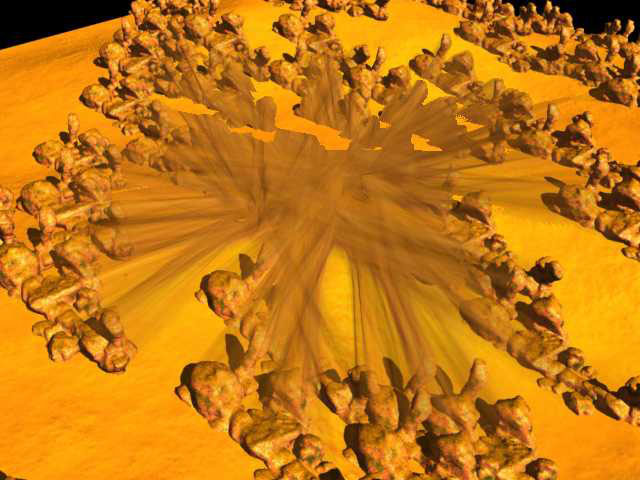
I'm trying to make a terrain with rocks scattered about. I made the terrain, imported some rocks I bought from Content Paradise in wavefront.obj format, and use the surface replicator to distribute them. When I render them in an animation using vector motion blur, it looks like motion blur is applied between the instances and the base object (see picture). Have any of you seen this before? Is it something I'm doing wrong or is it a bug? I'm on a Mac Dual 2Ghz PowerPC GR, OS X 10.3.9, 1.5 GB DDR SDRAM. I've updated Carrara to 5.0.4. I'd appreciate any help. Thanks!SF to LA: From June 1 to June 7 2007 I will be riding my bicycle 545 miles to help support people living with HIV/AIDS. Please visit my homepage: http://www.aidslifecycle.org/6010