
Renderosity Forums / Carrara
Welcome to the Carrara Forum
Forum Coordinators: Kalypso, Anim8dtoon
Carrara F.A.Q (Last Updated: 2026 Jul 11 2:50 am)
Visit the Carrara Gallery here.

Subject: Volumetric clouds not showing in network render

Is it Primivol, or the new Carrara5 native volumetric clouds? The reason I ask is if you used Primivol and didn't have a copy on the render node machine, it would fail. (But, then again, I thought it would fail the network portions or completly, not give you something with a piece missing... hmmmmm)


This file just uses the C5 volumetric clouds - in fact, I don't own any plugins...yet.
I tried ren mem's suggestions of turning multi threading off and changing the tile size but I still got the same results.
When I get a chance I will send it off to Eovia support.
It's not a critical file...just a test file.
Thanks for the responses.
Message edited on: 01/31/2006 09:06
There is a problem with the new volumetric clouds -- depending on scene configuration. This was acknowledged by Eovia's folks after I sent them a scene with V-clouds that was having memory allocation errors. I also noticed that it seemed there was some sort of weird network render time-out(?) when rendering with high quality V-clouds -- took a very long time for the render to start, and when it did, I would be missing the V-clouds on one or more nodes.
Eovia's team seems pretty much on top of things, as they seem to frequent Eovia product forums to see what's going on, so they likely know about this problem? Still, I would definitely sent Eovia an email detailing the problem even if you don't send the file.
The same thing happens with the new patch. I sent the file to support and received this response: Hello, I have been able to reproduce the problem. Actually it is not the network rendering but simply when the file is rendered in the batch queue I have filed a bug for this and we should get it fixed soon. Thanks for taking the time to report this issue. Charles

Privacy Notice
This site uses cookies to deliver the best experience. Our own cookies make user accounts and other features possible. Third-party cookies are used to display relevant ads and to analyze how Renderosity is used. By using our site, you acknowledge that you have read and understood our Terms of Service, including our Cookie Policy and our Privacy Policy.
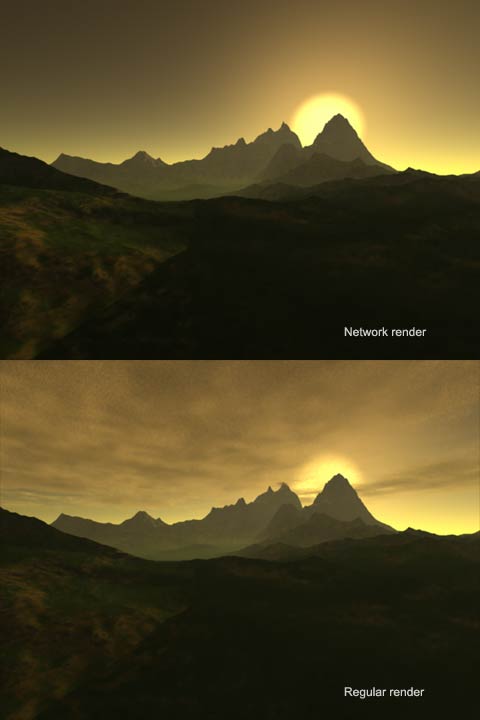
I have a scene (as shown) which renders differently depending on whether I use network rendering or not. For some reason, the volumetric clouds will not render using network rendering. I have another file which renders the clouds either way.Just wondering if anyone else came across this?
I am using 1 render node and everything is updated to 5.0.2.