Filter: Safe | Sun, Jul 12, 3:14 PM CDT

Renderosity Forums / Carrara


Welcome to the Carrara Forum

Forum Coordinators: Kalypso, Anim8dtoon

Carrara F.A.Q (Last Updated: 2026 Jul 11 2:50 am)


Visit the Carrara Gallery here.

Carrara Free Stuff here.

 
Visit the Renderosity MarketPlace - Your source for digital art content!


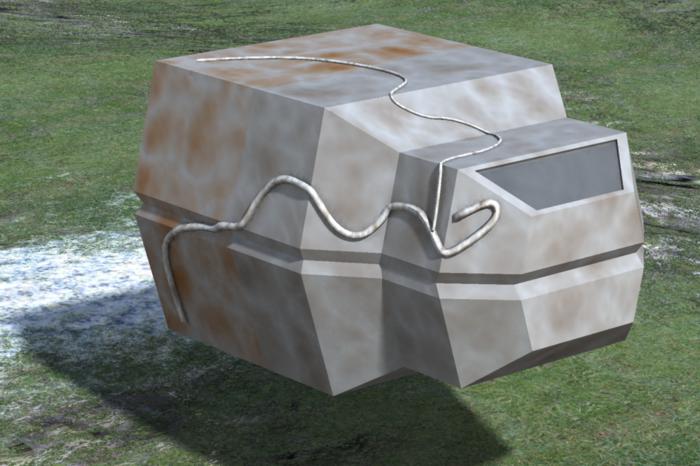
Subject: C5 beta image using New VM and curve tools.


mmoir ( ) posted Fri, 11 November 2005 at 8:22 AM · edited Sun, 12 July 2026 at 2:24 PM

file_303163.jpg

Here is an image done with the C5 beta, I like that you can use the new polyline,curve tools and draw directly on a polymesh. When drawing your curve on the mesh you just have to place a point before,on and just after the edge that the tube is going around . You will get a tube that hugs the polymesh. This is a lame example but I was just playing around,I think the new vm is going to make greebling alot more interesting.


MarkBremmer ( ) posted Fri, 11 November 2005 at 9:28 AM

Yes, this is a wonderful new capability. Just think about creatures with bulging veins.... ;)


Miss Nancy ( ) posted Fri, 11 November 2005 at 4:17 PM

Great! One wonders if it might be used with a pressure-sensitive drawing tablet, in order to vary the line thickness "on the fly".


bluetone ( ) posted Fri, 11 November 2005 at 5:21 PM

Carrara does NOT recognize pressure sensativity as I've used it with my wacom tablet. Maybe in version 6?


ren_mem ( ) posted Sat, 12 November 2005 at 9:36 PM

I really don't get that...it does in terrain editor. Any graphics app really should have decent tablet support. They are just good at what they do.

No need to think outside the box....
    Just make it invisible.


GWeb ( ) posted Sun, 13 November 2005 at 1:53 PM

And eraser function for tablet pen in version 6?


vinividivinci ( ) posted Sun, 13 November 2005 at 4:54 PM

mmoir: Great use of the new tools in the Vertex Modeler. Could you expand a little bit more on the technique you used to obtain the tube hugging the polymesh. What do you mean by "point before, on and just after the edge"? Thanks


mmoir ( ) posted Sun, 13 November 2005 at 7:11 PM

Vinividivinci, When drawing a curve on a surface that goes around a corner place the curve points just before the edge, on the edge and just after the edge. If you dont have several points concentrated at the edge(corner) the curve will either go thru or above the surface. Mike


vinividivinci ( ) posted Tue, 15 November 2005 at 12:23 AM

Thanks, Mike. Was the construction of the tube done by using the curve as a sweep path for a circle? Or was it done by an other method.


mmoir ( ) posted Tue, 15 November 2005 at 6:51 AM

Yes, that is correct. I inserted a circle with 5 vertices then I used the Align function in the vm to place the circle at the beginning of the sweep path. Select a vertex of the circle then select the vertex at the beginning of the sweep path then make this point the control point by ctrl+alt click this point. Then press ctrl+k to align the circle to the beginning of our sweep path. I then performed the sweep or extrude . I hope this helps out.


Privacy Notice

This site uses cookies to deliver the best experience. Our own cookies make user accounts and other features possible. Third-party cookies are used to display relevant ads and to analyze how Renderosity is used. By using our site, you acknowledge that you have read and understood our Terms of Service, including our Cookie Policy and our Privacy Policy.