Filter: Safe | Sat, Jul 11, 9:26 PM CDT

Renderosity Forums / Carrara


Welcome to the Carrara Forum

Forum Coordinators: Kalypso, Anim8dtoon

Carrara F.A.Q (Last Updated: 2026 Jul 11 2:50 am)


Visit the Carrara Gallery here.

Carrara Free Stuff here.

 
Visit the Renderosity MarketPlace - Your source for digital art content!


Subject: Crease Smooth


GWeb ( ) posted Thu, 11 August 2005 at 4:24 PM · edited Sat, 11 July 2026 at 9:26 PM

Hi how do you take crease off the polygon?


ShawnDriscoll ( ) posted Thu, 11 August 2005 at 5:21 PM

Was the polygon made in Carrara or some other app (like Amapi)?

www.youtube.com/user/ShawnDriscollCG


GWeb ( ) posted Thu, 11 August 2005 at 5:49 PM

Carrara BTW this isn't Amapi or other app forum. :)


mmoir ( ) posted Thu, 11 August 2005 at 6:22 PM

In the VM modeler look under Selection/Smooth or you can use the crease(C key) + Alt key to smooth out the Creases. Hope this helps Mike


Kixum ( ) posted Fri, 12 August 2005 at 10:10 AM

I'm assuming Shonner was asking if the original model was made in Carrara or something else and then imported. The import may or may not crease vertices correctly. -Kix

-Kix


GWeb ( ) posted Fri, 12 August 2005 at 1:28 PM

Thanks Kix for clarifying Shonner's post. It is pure done in Carrara using VM and its own primitives. I could not find any function to switch polygon back to grey from blue. Basically I put a sphere in the VM room from primitive toolbar and turned it into smooth in subdivision in selection window. Then I use the cease/smooth and clicked on polygons to get the flat effect. I decided to turn polygons back to smooth using double-click with crease/smooth but it didnt happen. It kept the blue polygons infinitely.


GWeb ( ) posted Sun, 14 August 2005 at 5:08 PM

You guys still can not find the solution?


ShawnDriscoll ( ) posted Sun, 14 August 2005 at 5:26 PM

I've been able to smooth creased edges in Carrara of both Carrara made models and imported models.

www.youtube.com/user/ShawnDriscollCG
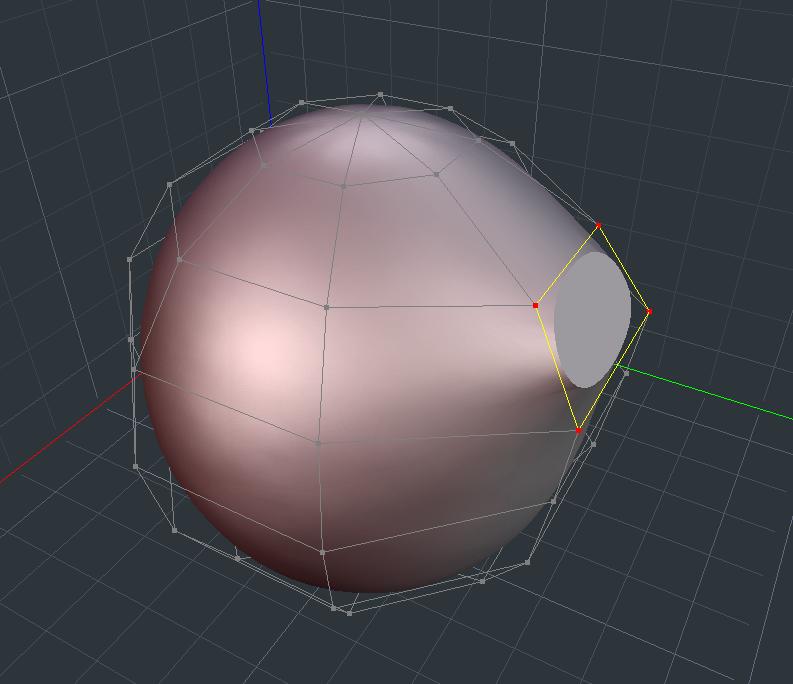

GWeb ( ) posted Sun, 14 August 2005 at 6:13 PM

file_282527.jpg

Were you able to make like this one? and able to turn the yellow/blue polygons back to grey?


GWeb ( ) posted Sun, 14 August 2005 at 6:15 PM

Oh nevermind, I missed mmoir's post that I was supposed to use alt key to do this. I want to get rid of the keyboard.


ShawnDriscoll ( ) posted Sun, 14 August 2005 at 11:15 PM

I click on Smooth in the menu with a mouse. The only time I use the keyboard is to CTRL+Z.

www.youtube.com/user/ShawnDriscollCG


GWeb ( ) posted Mon, 15 August 2005 at 12:07 AM

CTRL+Z is UNDO hot key ALT key to delete CreaseSmooth off the polygon. Eovia should use double click for this deletion stead. I think they should make all functions avialable to mouse and eliminate keyboard. I do not have a room for keyboard and a tablet.


Privacy Notice

This site uses cookies to deliver the best experience. Our own cookies make user accounts and other features possible. Third-party cookies are used to display relevant ads and to analyze how Renderosity is used. By using our site, you acknowledge that you have read and understood our Terms of Service, including our Cookie Policy and our Privacy Policy.