
GWeb opened this issue on Aug 11, 2005 · 12 posts
GWeb posted Thu, 11 August 2005 at 4:24 PM
Hi how do you take crease off the polygon?

ShawnDriscoll posted Thu, 11 August 2005 at 5:21 PM
Was the polygon made in Carrara or some other app (like Amapi)?
GWeb posted Thu, 11 August 2005 at 5:49 PM
Carrara BTW this isn't Amapi or other app forum. :)
mmoir posted Thu, 11 August 2005 at 6:22 PM
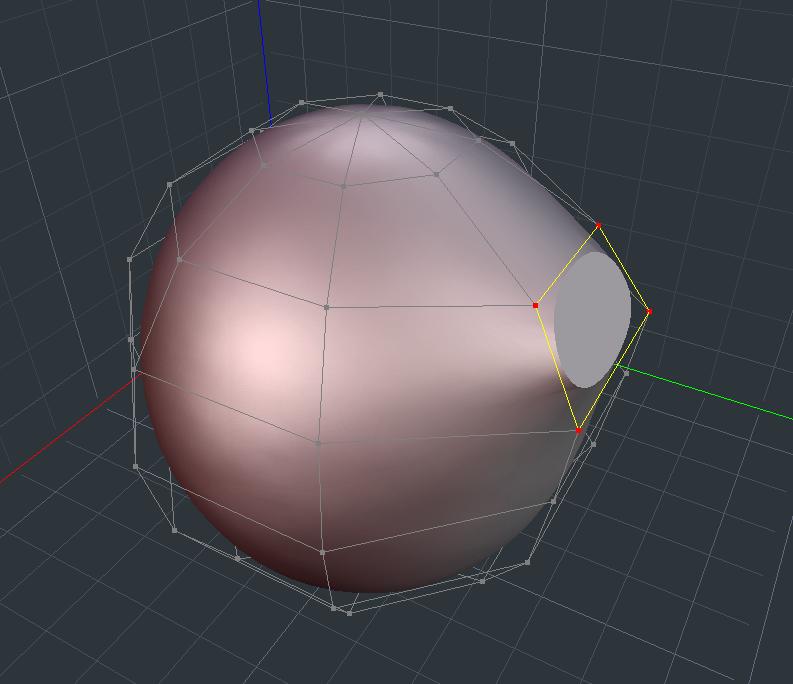
In the VM modeler look under Selection/Smooth or you can use the crease(C key) + Alt key to smooth out the Creases. Hope this helps Mike

Kixum posted Fri, 12 August 2005 at 10:10 AM
I'm assuming Shonner was asking if the original model was made in Carrara or something else and then imported. The import may or may not crease vertices correctly. -Kix
-Kix
GWeb posted Fri, 12 August 2005 at 1:28 PM
Thanks Kix for clarifying Shonner's post. It is pure done in Carrara using VM and its own primitives. I could not find any function to switch polygon back to grey from blue. Basically I put a sphere in the VM room from primitive toolbar and turned it into smooth in subdivision in selection window. Then I use the cease/smooth and clicked on polygons to get the flat effect. I decided to turn polygons back to smooth using double-click with crease/smooth but it didnt happen. It kept the blue polygons infinitely.
GWeb posted Sun, 14 August 2005 at 5:08 PM
You guys still can not find the solution?
ShawnDriscoll posted Sun, 14 August 2005 at 5:26 PM
I've been able to smooth creased edges in Carrara of both Carrara made models and imported models.
GWeb posted Sun, 14 August 2005 at 6:13 PM
GWeb posted Sun, 14 August 2005 at 6:15 PM
Oh nevermind, I missed mmoir's post that I was supposed to use alt key to do this. I want to get rid of the keyboard.
ShawnDriscoll posted Sun, 14 August 2005 at 11:15 PM
I click on Smooth in the menu with a mouse. The only time I use the keyboard is to CTRL+Z.
GWeb posted Mon, 15 August 2005 at 12:07 AM
CTRL+Z is UNDO hot key ALT key to delete CreaseSmooth off the polygon. Eovia should use double click for this deletion stead. I think they should make all functions avialable to mouse and eliminate keyboard. I do not have a room for keyboard and a tablet.