
Renderosity Forums / Poser 11
Welcome to the Poser 11 Forum
Forum Moderators: nerd Forum Coordinators: Anim8dtoon
Poser 11 F.A.Q (Last Updated: 2026 Aug 04 4:53 pm)

Welcome to the Poser Forums! Need help with these versions, advice on upgrading? Etc...you've arrived at the right place!
Looking for Poser Tutorials? Find those HERE

Subject: Poser 9 library not showing


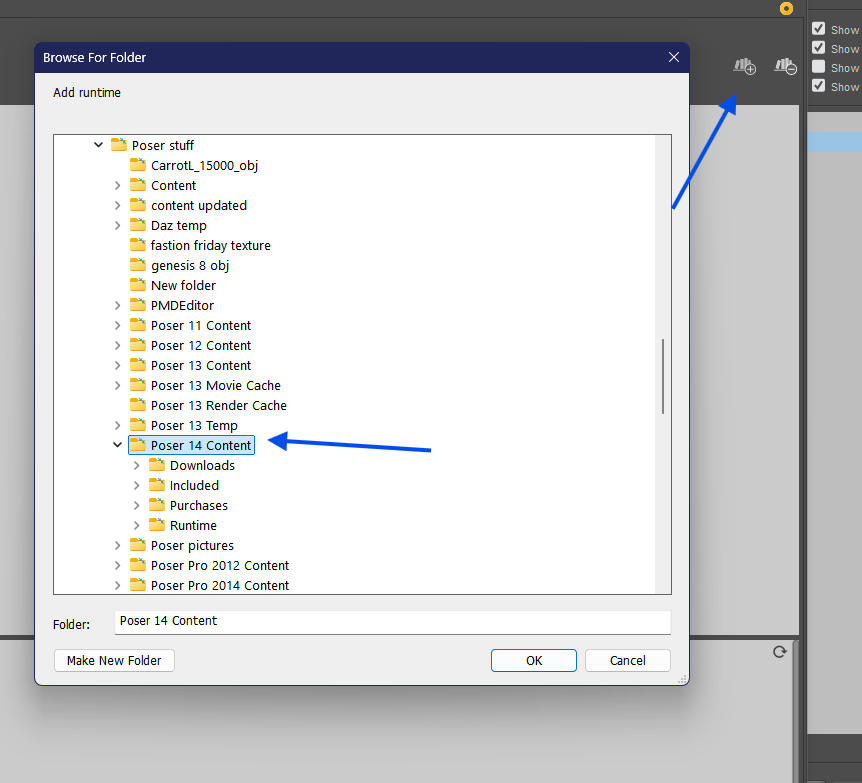
To add your Poser 9 runtime to Poser 11, click on the " Add Library " on the Poser 11 library palette. I'm adding Poser 14 in the sample because I hadn't added it to my library yet.
As far as P9 not working, it may have something to do with Adobe Flash. It might have something to do with that.
Available on Amazon for the Kindle E-Reader Monster of the North and The Shimmering Mage
Today I break my own personal record for the number of days for being alive.
Check out my store here or my free stuff here
I use Poser 14 and Windows 11


If you had the computer repaired they may have removed Adobe and as far as I know without it Poser 9 won't work. If you had Poser Pro 2012 (which is the Pro version of 9) then there is a work around. I am surprised that Poser 9 has worked this long as Adobe is constantly trying to get itself removed from machines in the name of security.
Poser 5, 6, 7, 8, Poser Pro 9 (2012), 10 (2014), 11, 12, 13, 14

Privacy Notice
This site uses cookies to deliver the best experience. Our own cookies make user accounts and other features possible. Third-party cookies are used to display relevant ads and to analyze how Renderosity is used. By using our site, you acknowledge that you have read and understood our Terms of Service, including our Cookie Policy and our Privacy Policy.
I upgraded to Poser 11 from Poser 9 a few years ago and it worked fairly well.
A couple of weeks ago, I had to get my computer fixed and reinstall both posers. Poser 11 comes up without 9's library. When I try opening poser 9, I get the opening screen, then it goes to the workspace which is BLANK. (All white. Nothing) Then it shuts down.
I've reloaded both many times and it still won't work.
Any ideas?