
Renderosity Forums / Poser Python Scripting
Welcome to the Poser Python Scripting Forum
Forum Moderators: Lobo3433, Staff Forum Coordinators: Anim8dtoon
Poser Python Scripting F.A.Q (Last Updated: 2026 Apr 22 10:09 am)
Check out the new Poser Python Wish List thread. If you have an idea for a script, jot it down and maybe someone can write it. If you're looking to write a script, check out this thread for useful suggestions.
Also, check out the official Python site for interpreters, sample code, applications, cool links and debuggers. This is THE central site for Python.
You can now attach text files to your posts to pass around scripts. Just attach the script as a txt file like you would a jpg or gif. Since the forum will use a random name for the file in the link, you should give instructions on what the file name should be and where to install it. Its a good idea to usually put that info right in the script file as well.
Checkout the Renderosity MarketPlace - Your source for digital art content!

Subject: Setting up a Poser Scripting environment


This Poser-friendly article may help. Written a few years ago. A slight wrinkle, since this was written. To turn off annoying ‘code linting’ (i.e. the wiggly red lines under certain parts of the code): Settings > Python: Language Server > None
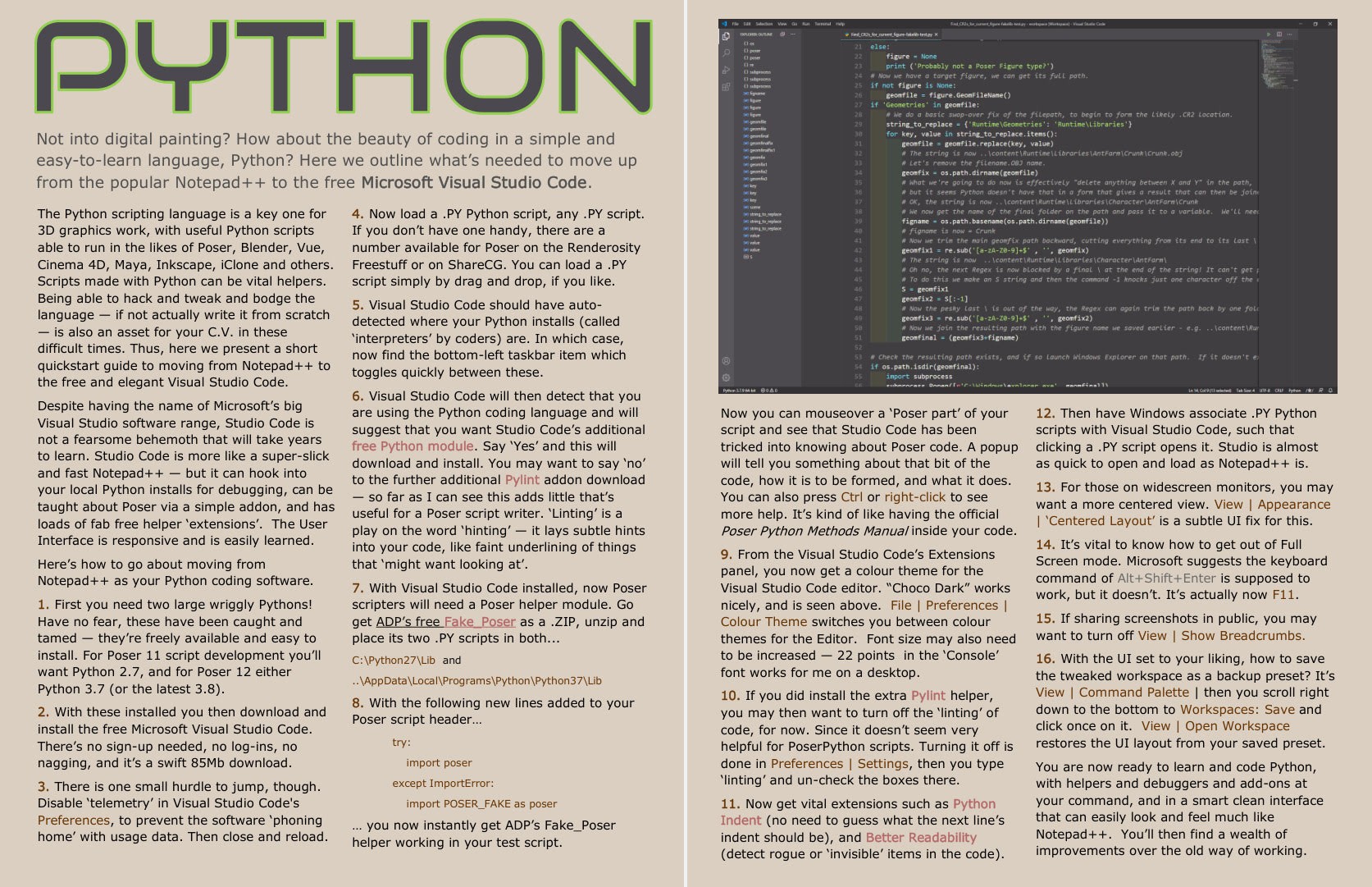
Also, there are .zip archives on the Internet Archive (not to be confused with the Wayback Machine) for the old Smith Micro and Runtime DNA. A wealth of Poser-specific coding advice inaccessible to modern auto-coding LLMs. Unzip and index for local search with AnyText Searcher.
Learn the Secrets of Poser 11 and Line-art Filters.
As for testing and bundling scripts, you probably want to develop only for Python 3, which means Poser 12, 13, 14. Testing and bug-fixing should be fairly straightforward, as Poser can load a script from anywhere on the PC. I'm uncertain what the bundling and distribution requirements would be for offering a script on the Renderosity site, though I expect they have guidelines. I know that Ken's scripts get encrypted, for instance. Maybe look at one of the freebie scripts and see how they did it there first.
Learn the Secrets of Poser 11 and Line-art Filters.
Thank you so much HartyBart I will look this over I just need some starting point been mulling an idea for sometime and want to see if I can put it together again thank you so much
Lobo3433
Blender Maya & 3D Forum Moderator

I also recently started writing some scripts :) Since I have absolutely no programming knowledge, I did it with the help of AI.
Even though a real programmer would probably cry when looking at my code, most of my scripts actually work really well and are a lot of fun.
I like to think that by copying things back and forth and testing, I might pick up a tiny bit here and there, but so far that has not really happened. And some of the things I would love to do are unfortunately not possible for me without the knowledge of a real professional.
I just wanted to say… it is possible :)
Well I set up VS Code to start creating some scripts and with some of the auto complete features I think I am starting to understand some things I haven't done any coding in years and I mean years I actually learned some coding way back in high school with basic, Visual C and believe it or not Pascal I am sure that is aging me alright but I just have this idea that has been bouncing in my head and just have to give it a try to see if I can make it work on some potential level
Lobo3433
Blender Maya & 3D Forum Moderator
I think if I can manage to build scripts with AI without any prior knowledge, and I really mean zero, then you'll definitely succeed with your background! You have the huge advantage of actually understanding what you're writing :D
Want me to give a little spoiler on what I’ve managed to do so far? I’ve made several small scripts that I’m planning to release as freebies once I’ve finished testing them on other PCs and with different Poser versions.
Even if a real programmer would weep at the sight of my code, they do exactly what they’re supposed to do.
The ones I tinkered with yesterday are a total lifesaver, just about 3 clicks to get the job done. They tweak materials without even needing to switch to the Material Room, as long as the material zones are named somewhat logically (so the user doesn't need to look up how they are called)
Anyone curious to see what I’ve 'cobbled together' so far? :D
I am sure as you progress your code will get better and look better eventually to other programmers the fact that you are getting accomplished what you want your scripts to do and achieve is the first hurdle cleaning up the code or appearance is secondary that is the one hurdle I sometimes makes me quit wanting the code to look good versus making sure the actual code works firstI think if I can manage to build scripts with AI without any prior knowledge, and I really mean zero, then you'll definitely succeed with your background! You have the huge advantage of actually understanding what you're writing :D
Want me to give a little spoiler on what I’ve managed to do so far? I’ve made several small scripts that I’m planning to release as freebies once I’ve finished testing them on other PCs and with different Poser versions.
Even if a real programmer would weep at the sight of my code, they do exactly what they’re supposed to do.The ones I tinkered with yesterday are a total lifesaver, just about 3 clicks to get the job done. They tweak materials without even needing to switch to the Material Room, as long as the material zones are named somewhat logically (so the user doesn't need to look up how they are called)
Anyone curious to see what I’ve 'cobbled together' so far? :D
Lobo3433
Blender Maya & 3D Forum Moderator
Oh I am not stopping one thing I am quickly finding which I knew going in is that not all general information AI generated or doing deep diving is accurate and working with especially Python versions between software the latest version of Python does not always seem to be backward compatible not sure where I read that the current Python shipped with Poser was 3.10 when in actually it is 3.7.9 and and when attempting to run some simple stuff hit with a bunch of errors but when I started to use 3.79 things seem to sort of work again if could be maybe typos and or stuff but so still learningMost likely, it is the exact opposite for me. Since I don’t understand any of what’s written there, I don’t even notice if things are messy. I really hope you won’t stop, because now I’m curious :)
Lobo3433
Blender Maya & 3D Forum Moderator

I honestly don’t have much of a technical background myself, but for each script it usually takes me a lot of trial and error until it finally works. AI has been really helpful with that though.
I’ve also noticed that a lot of “standard” Python commands don’t seem to work in Poser the way you’d expect. One thing that helped me a lot was having the AI generate a script that extracts all available Python commands and writes them into a text file.
Whenever I ran into problems, I would just copy that list and ask the AI to check against it. Funny enough, there were quite a few cases where the script only started working after that 😄
I can’t really judge how accurate the AI’s information is due to my lack of knowledge, but it definitely felt like it had a few “aha moments” after comparing things with the command list 😄
If you’re interested, I can send you the list.
here it is :)
https://www.renderosity.com/filelocker/57463/download?key=4191
Poser 13 Python Commands
Thank you for sharing this list I am sure it will come in handy 👍👍here it is :)
https://www.renderosity.com/filelocker/57463/download?key=4191
Poser 13 Python Commands
Lobo3433
Blender Maya & 3D Forum Moderator
This list of the processcommands is also useful for making new scripts that simply automate a manual step-by-step process.
LIST OF POSER COMMANDS FOR SCRIPTS
Example usage in a script:
THE LIST:
File
5002 :New
5000 :Open...
Recent Files
4 :Close
5 :Save
6 :Save As...
7 :Revert
Import
1115 :Background Picture...
1363 :Background Footage...
1131 :Poser Document/Prop...
1567 :LipSync Audio...
1401 :Sound...
1388 :BVH motion...
Export
1791 :Partial Scene...
1792 :Morph Injection...
1192 :Image...
1158 :RIB...
1403 :BVH motion...
1506 :Run Python Script...
1389 :Convert Hier File...
1796 :Install From ZIP Archive...
8 :Page Setup...
9 :Print...
5006 :Exit
16 :Undo
17 :Redo
5031 :Cut
5032 :Copy
5033 :Paste
1898 :Replace
1486 :Copy Picture
1568 :Duplicate Object/Figure
1793 :Previous Selection
1794 :Next Selection
Memorize
1277 :Object
1278 :Figure
1280 :Lights
1279 :Camera
-2 :-
1281 :All
Restore
1036 :Object
1107 :Figure
1106 :Lights
1275 :Camera
1043 :All
5022 :General Preferences...
Edit
Figure
Skinning Method
1708 :Poser Traditional
1729 :Poser Unimesh
Figure Height
1152 :Baby
1153 :Toddler
1154 :Child
1155 :Juvenile
1148 :Adolescent
1149 :Ideal Adult
1150 :Fashion Model
1156 :Heroic Model
1402 :Set Figure Parent...
1475 :Conform To...
1484 :Create Full Body Morph...
1718 :Copy Joint Zones From...
Use Inverse Kinematics
1089 :Use Limits
1370 :Genitalia
1394 :Auto Balance
1492 :Lock Figure
1442 :Lock Hand Parts
1205 :Drop to Floor
Symmetry
1074 :Left to Right
1075 :Right to Left
1373 :Swap Right and Left
1110 :Left Arm to Right Arm
1108 :Right Arm to Left Arm
1371 :Swap Right and Left Arms
1111 :Left Leg to Right Leg
1109 :Right Leg to Left Leg
1372 :Swap Right and Left Legs
1112 :Straighten Torso
1602 :Zero Figure
1135 :Delete Figure
1133 :Hide Figure
1134 :Show All Figures
1400 :Create Walk Path
1904 :Path Palette
Object
1378 :Properties...
1491 :Lock Object
1294 :Change Parent...
1715 :Add Constraint...
1487 :Point At...
1304 :Replace Body Part with Prop
1485 :Load Morph Target...
1742 :Copy Morphs From...
1483 :Spawn Morph Target...
1735 :Spawn Prop from Convex Hull
1761 :Reduce Polygons...
1790 :Convert Prop to Control Handle...
1714 :Create Grouping
Create Light
1479 :Spot
1570 :Infinite
1571 :Point
1572 :Diffuse IBL
1768 :Area
Create Camera
1565 :Revolving
1566 :Dolly
1462 :Create Magnet
1468 :Create Wave
1528 :Create Wind Force
1789 :Create Text Prop...
Create Measurement
1746 :Create Line
1747 :Create Angle
1748 :Create Circle
1749 :Create Polyline
1255 :Delete Object
1905 :Path Palette
1725 :Export Object Mesh To GoZ...
Display
Camera View
1024 :Main Camera
1480 :Aux Camera
1374 :From Left
1029 :From Right
1028 :From Top
1481 :From Bottom
1027 :From Front
1482 :From Back
1398 :Face Camera
1376 :Posing Camera
1397 :Right Hand Camera
1396 :Left Hand Camera
1375 :Dolly Camera
Camera Layout
1517 :Full Port
1510 :Four Ports
1513 :Three Ports - Big Top
1514 :Three Ports - Big Bottom
1511 :Three Ports - Big Left
1512 :Three Ports - Big Right
1515 :Two Ports - Left/Right
1516 :Two Ports - Top/Bottom
1399 :Fly Around
1712 :Frame Selected
1711 :Orbit Selected Mode
1519 :Show Camera Names
1544 :Production Frame
Document Style
1041 :Silhouette
1040 :Outline
1097 :Wireframe
1045 :Hidden Line
1084 :Lit Wireframe
1392 :Flat Shaded
1499 :Flat Shaded Lined
1501 :Cartoon
1393 :Cartoon w/Lines
1083 :Smooth Shaded
1500 :Smooth Shaded Lined
1408 :Texture Shaded
Figure Style
1438 :Use Document Style
1432 :Silhouette
1431 :Outline
1430 :Wireframe
1433 :Hidden Line
1435 :Lit Wireframe
1437 :Flat Shaded
1496 :Flat Shaded Lined
1498 :Cartoon
1436 :Cartoon w/Lines
1434 :Smooth Shaded
1497 :Smooth Shaded Lined
1410 :Texture Shaded
Object Style
1429 :Use Figure Style
1423 :Silhouette
1422 :Outline
1421 :Wireframe
1424 :Hidden Line
1426 :Lit Wireframe
1428 :Flat Shaded
1493 :Flat Shaded Lined
1495 :Cartoon
1427 :Cartoon w/Lines
1425 :Smooth Shaded
1494 :Smooth Shaded Lined
1409 :Texture Shaded
1044 :Depth Cued
Tracking
1092 :Bounding Boxes Only
1031 :Fast Tracking
1420 :Full Tracking
Deformers
1470 :Show All
1471 :Hide All
1472 :Show Current selection only
1406 :Ground Shadows
1460 :Figure Circle
1216 :Bend Body Parts
1270 :Foreground Color...
1269 :Background Color...
1051 :Show Background Picture
1053 :Clear Background Picture
1052 :Paste onto Background
1361 :Show Background Footage
1362 :Clear Background Footage
1533 :Use Background Shader Node
Guides
1047 :Ground Plane
1048 :Head Lengths
1049 :Hip-Shoulder Relationship
1146 :Horizon Line
1050 :Vanishing Lines
1548 :Focus Distance Guide
Preview Drawing
1550 :OpenGL Hardware
1551 :SreeD Software
Cartoon Settings
1552 :One Tone
1553 :Two Tones
1554 :Three Tones
1555 :Three Tones + Hilight
1557 :Smooth Toned
1737 :Comic Book
1738 :Comic Book (Color)
1795 :Geometric Edge Lines
Measurement Mode
1743 :Off
1744 :Display
1745 :Edit
Render
1267 :Render
1562 :Area Render
1466 :Sketch Style Render
1461 :Antialias Document
1508 :MotionBlur Document
1225 :Render Settings...
1563 :Render Dimensions...
1265 :Materials...
1559 :Reload Textures
1560 :Reuse Shadow Maps
1561 :Clear Shadow Maps
Animation
1312 :Make Movie...
Recalculate Dynamics
1536 :All Cloth
1537 :All Hair
1741 :All Bullet Physics
1535 :All
1380 :Retime Animation...
1404 :Resample Key Frames...
Bake Transforms
1752 :Current Object
1753 :Current Figure
1754 :Entire Scene
1395 :Loop Interpolation
1405 :Quaternion Interpolation
1415 :Skip Frames
1413 :Mute Sound
1414 :Clear Sound
1407 :Play Movie File...
Window
1176 :Animation Palette
Graph
1201 :Libraries
1488 :Hierarchy Editor
1387 :Joint Editor
1465 :Sketch Designer...
1390 :Walk Designer
1906 :Path Palette
1907 :Keyframe Category List
1569 :Talk Designer
1750 :Anthropometry
1509 :Python Scripts
1522 :Room Help
1573 :Quick Start...
1574 :Project Guide
1601 :Recent Renders
1733 :Bullet Physics Controls
1416 :Camera Controls
1418 :Preview Styles
1274 :Editing Tools
1417 :Light Controls
1419 :Memory Dots
1178 :Parameter Dials
1459 :Animation Controls
1730 :Log
1902 :Notifications
Custom Parameters Palette
1777 :New
1900 :Remove All
1731 :Raytrace Preview
Room Tools
Material
1583 :Material Palette
Face
1584 :Face Preview
1585 :Photo Lineup
1586 :Texture Preview
1587 :Face Texture Tool
1588 :Face Shaping Tool
Hair
1589 :Hair Growth Groups
1590 :Growth Controls
1591 :Styling Controls
1592 :Dynamics Controls
Cloth
1593 :Cloth Simulation
1594 :Cloth
1595 :Cloth Groups
1596 :Dynamics Controls
Fitting
1734 :Fitting Sessions
1204 :Document Window Size...
Scripts
Help
19997 :Poser Reference Manual...
19998 :Poser Tutorial Manual...
19999 :PoserPython Manual...
5014 :About Poser
19996 :Personalize...
Skinning Method
1708 :Poser Traditional
1729 :Poser Unimesh
1709 :Simple Bones Single Skin - Interoperable
1719 :Regenerate Simple Bones Single Skin Weights
Figure Height
1152 :Baby
1153 :Toddler
1154 :Child
1155 :Juvenile
1148 :Adolescent
1149 :Ideal Adult
1150 :Fashion Model
1156 :Heroic Model
1402 :Set Figure Parent...
1475 :Conform To...
1757 :Combine Figures...
1759 :Find Unseen Polygons...
1756 :Reduce Polygons...
Use Inverse Kinematics
1089 :Use Limits
1370 :Genitalia
1394 :Auto Balance
1492 :Lock Figure
1442 :Lock Hand Parts
1484 :Create Full Body Morph...
1767 :Spawn Full Body Morph...
1600 :Load Full Body Morph...
1739 :Copy Morphs From...
1762 :Copy Measurements From...
1718 :Copy Joint Zones From...
1740 :Merge All Zones To Weight Maps
1205 :Drop to Floor
Pose Symmetry
1074 :Left to Right
1075 :Right to Left
1373 :Swap Right and Left
1110 :Left Arm to Right Arm
1108 :Right Arm to Left Arm
1371 :Swap Right and Left Arms
1111 :Left Leg to Right Leg
1109 :Right Leg to Left Leg
1372 :Swap Right and Left Legs
1112 :Straighten Torso
1769 :Custom...
Rig Symmetry
1770 :Left to Right
1771 :Right to Left
1772 :Left Arm to Right Arm
1773 :Right Arm to Left Arm
1774 :Left Leg to Right Leg
1775 :Right Leg to Left Leg
1776 :Custom...
1602 :Zero Figure
1751 :Apply Motion From Groupings
1135 :Delete Figure
1133 :Hide Figure
1134 :Show All Figures
1400 :Create Walk Path
1904 :Path Palette
1726 :Export Figure Mesh To GoZ...
1267 :Render
1562 :Area Render
1578 :Render In Background
1581 :Render In Queue
1466 :Sketch Style Render
1461 :Antialias Document
1508 :MotionBlur Document
1225 :Render Settings...
1563 :Render Dimensions...
1265 :Materials...
1559 :Reload Textures
1560 :Reuse Shadow Maps
1561 :Clear Shadow Maps
Help
19997 :Poser Reference Manual...
19998 :Poser Tutorial Manual...
19999 :PoserPython Manual...
Learn the Secrets of Poser 11 and Line-art Filters.

Privacy Notice
This site uses cookies to deliver the best experience. Our own cookies make user accounts and other features possible. Third-party cookies are used to display relevant ads and to analyze how Renderosity is used. By using our site, you acknowledge that you have read and understood our Terms of Service, including our Cookie Policy and our Privacy Policy.
I want to start scripting for Poser I have a goal set in mind of what type of script I want to create but need some guideline or folder structure environment that I can save scripts to and be able to test them with in Poser I know that when creating props and such you create a Runtime folder with your vendor Name and such but would that practice work for script development any help or guidance would be appreciated
Thanks in Advance
Lobo3433
Blender Maya & 3D Forum Moderator
Renderosity Store
My Free Stuff
Facebook
Twitter