
Renderosity Forums / Poser - OFFICIAL
Welcome to the Poser - OFFICIAL Forum
Forum Moderators: RedPhantom Forum Coordinators: Anim8dtoon
Poser - OFFICIAL F.A.Q (Last Updated: 2026 Jun 27 7:44 pm)

Subject: Poser Pro 2014 Crashes after Launch


Do you mean Poser Pro 2014? If so I'm using it fine on Windows 11 Education without issue. I didn't set anything special on the install either. I have turned off UAC but that should really only ask you if you want poser to run.
If you suspect it might be Adobe Air then you could try editing the Poser prefs file (MAKE A BACKUP FIRST THOUGH!). This makes the libraries external as far as I remember. I had to do it or I get a blank library palate although Poser still launches.
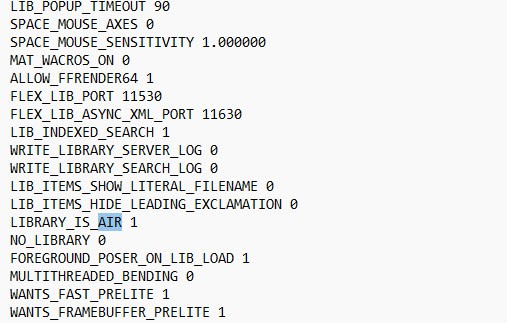
I don't remember altering anything else. I hope this helps.

You should do a clean install. With Poser closed rename the folder that the program is installed in and leave it in place for the moment also rename the storage area under your name where the program preferences are stored. Now reinstall Poser. This will insure that there are ot bits left over from a prior install that might be the problem.
Poser 5, 6, 7, 8, Poser Pro 9 (2012), 10 (2014), 11, 12, 13, 14
I Need 2014 Install Help | Renderosity Link to another person that had problems with Poser 2014.
Poser 5, 6, 7, 8, Poser Pro 9 (2012), 10 (2014), 11, 12, 13, 14
interesting. ive never needed to mess with this to get Poser 2014 working. unless they changed something this year (i doubt).Do you mean Poser Pro 2014? If so I'm using it fine on Windows 11 Education without issue. I didn't set anything special on the install either. I have turned off UAC but that should really only ask you if you want poser to run.
If you suspect it might be Adobe Air then you could try editing the Poser prefs file (MAKE A BACKUP FIRST THOUGH!). This makes the libraries external as far as I remember. I had to do it or I get a blank library palate although Poser still launches.
I don't remember altering anything else. I hope this helps.
Thanks for the responses everyone. i'll try all the above and see if anything works
_____________________________
My most recent Poser animation:
Previs Dummies 2


Privacy Notice
This site uses cookies to deliver the best experience. Our own cookies make user accounts and other features possible. Third-party cookies are used to display relevant ads and to analyze how Renderosity is used. By using our site, you acknowledge that you have read and understood our Terms of Service, including our Cookie Policy and our Privacy Policy.
I'm on Windows 11, always hoping the next update won't kill my old software, but here we are.
Poser 2014 won't launch anymore. I mean i get past the splash screen and the GUI starts to load without any of the details visible,
and then it instantly crashes the moment it would load the GUI content.
Another person tells me it works fine on their computer. Has anyone else run into this issue, and if so, how did you fix it?
I tried re-installing, but it doesn't make a difference.
Funny part is Poser 7, PP7, Poser 12, etc. those all work fine. But Poser 2014 is tha broken.
_____________________________
My most recent Poser animation:
Previs Dummies 2