
GhostyAnimator opened this issue on Mar 07, 2026 · 9 posts
GhostyAnimator posted Sat, 07 March 2026 at 2:56 PM
I'm on Windows 11, always hoping the next update won't kill my old software, but here we are.
Poser 2014 won't launch anymore. I mean i get past the splash screen and the GUI starts to load without any of the details visible,
and then it instantly crashes the moment it would load the GUI content.
Another person tells me it works fine on their computer. Has anyone else run into this issue, and if so, how did you fix it?
I tried re-installing, but it doesn't make a difference.
Funny part is Poser 7, PP7, Poser 12, etc. those all work fine. But Poser 2014 is tha broken.
_____________________________
My most recent Poser animation:
Previs Dummies 2

hborre posted Sat, 07 March 2026 at 3:03 PM
IIRC, Adobe Air may be your problem, but Adobe Air has been discontinued because of security risks.

phil_lawson posted Sun, 08 March 2026 at 12:57 PM
Do you mean Poser Pro 2014? If so I'm using it fine on Windows 11 Education without issue. I didn't set anything special on the install either. I have turned off UAC but that should really only ask you if you want poser to run.
If you suspect it might be Adobe Air then you could try editing the Poser prefs file (MAKE A BACKUP FIRST THOUGH!). This makes the libraries external as far as I remember. I had to do it or I get a blank library palate although Poser still launches.
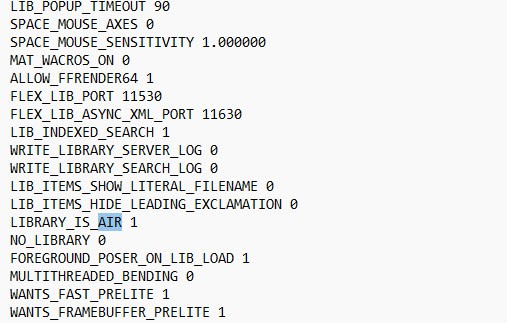
I don't remember altering anything else. I hope this helps.

Richard60 posted Sun, 08 March 2026 at 8:23 PM
You should do a clean install. With Poser closed rename the folder that the program is installed in and leave it in place for the moment also rename the storage area under your name where the program preferences are stored. Now reinstall Poser. This will insure that there are ot bits left over from a prior install that might be the problem.
Poser 5, 6, 7, 8, Poser Pro 9 (2012), 10 (2014), 11, 12, 13, 14
Richard60 posted Tue, 10 March 2026 at 2:17 PM
The problem with reinstall is that unless you are using the very latest patch 10.0.5.2 it won't work as there a last minute patch to fix another problem.
Poser 5, 6, 7, 8, Poser Pro 9 (2012), 10 (2014), 11, 12, 13, 14
Richard60 posted Tue, 10 March 2026 at 3:26 PM
I Need 2014 Install Help | Renderosity Link to another person that had problems with Poser 2014.
Poser 5, 6, 7, 8, Poser Pro 9 (2012), 10 (2014), 11, 12, 13, 14
GhostyAnimator posted Tue, 10 March 2026 at 5:14 PM
interesting. ive never needed to mess with this to get Poser 2014 working. unless they changed something this year (i doubt).Do you mean Poser Pro 2014? If so I'm using it fine on Windows 11 Education without issue. I didn't set anything special on the install either. I have turned off UAC but that should really only ask you if you want poser to run.
If you suspect it might be Adobe Air then you could try editing the Poser prefs file (MAKE A BACKUP FIRST THOUGH!). This makes the libraries external as far as I remember. I had to do it or I get a blank library palate although Poser still launches.
I don't remember altering anything else. I hope this helps.
_____________________________
My most recent Poser animation:
Previs Dummies 2
hborre posted Tue, 10 March 2026 at 5:40 PM
The hack has been around for years since the docked Library became a problem with the changes in Adobe Air. If the Library was set to floating mode, you had no issues. However, on a reinstallation, the Library would default to docked mode.

jangs posted Sat, 09 May 2026 at 7:22 AM